
Pairing: Bose QuietComfort 45 Headphones User Manual
Content
Bose QuietComfort 45 Headphones
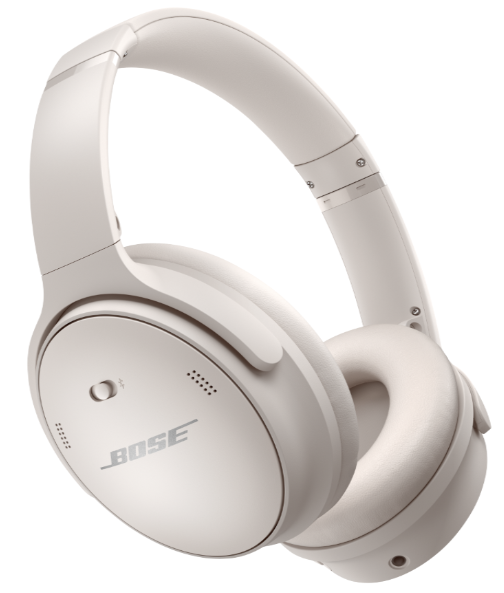
Introduction to Bose QuietComfort 45 Noise-Cancelling Headphones
The Bose QuietComfort 45 headphones represent the pinnacle of wireless noise-cancelling technology, delivering an exceptional audio experience for professionals, travelers, and music enthusiasts alike. These premium over-ear headphones combine decades of Bose acoustic research with modern Bluetooth connectivity to create a listening environment free from external distractions.
Designed as the latest evolution of the iconic QC-series, the Bose QuietComfort 45 headphones feature Bose's best-in-class active noise cancellation technology that continuously measures and reacts to external noise in real-time. The lightweight design, weighing just 8.5 ounces, ensures all-day comfort without fatigue, making these headphones ideal for long flights, remote work sessions, or daily commuting.
The Bose QuietComfort 45 headphones are particularly suited for business travelers who need reliable communication, frequent flyers seeking peace, remote workers requiring focus, and audiophiles demanding high-fidelity sound. The headphones excel in various environments, from noisy airports to quiet home offices, adapting seamlessly to your needs through intelligent Aware Mode functionality.
Priced competitively in the premium headphones segment, the Bose QuietComfort 45 headphones offer exceptional value for their performance class. These headphones are widely available through major retailers, authorized Bose dealers, and online marketplaces worldwide, ensuring accessibility for customers globally.
Technical Specifications of Bose QuietComfort 45 Headphones
Design and Build Quality
- Fit Style: Over-the-ear design with closed earcups
- Weight: 235.4 grams (8.5 ounces) - among the lightest in its class
- Earcup Dimensions: 3.006" width x 3.863" height
- Materials: Impact-resistant nylon with custom cast-metal hinges
- Ear Cushions: Synthetic leather with plush padding for extended wear
- Build: Premium materials designed for durability and longevity
Connectivity and Wireless Technology
- Bluetooth Version: 5.1 for stable wireless connections
- Multi-Point Connection: Pair with two devices simultaneously
- NFC Compatibility: One-touch pairing with compatible devices
- Wired Option: Included a 3.5mm audio cable for wired listening
- Range: Standard Bluetooth 5.1 operational range
Audio Performance and Noise Cancellation
- Active Noise Cancellation: Bose Acoustic Noise Cancelling technology with dual modes
- Microphones: Six internal microphones monitor external sound and adjust ANC in real-time
- Noise Cancellation Modes: Quiet Mode (full ANC) and Aware Mode (ambient sound passthrough)
- Sound Delivery: TriPort proprietary acoustic design for high-fidelity audio
- Frequency Response: Optimized for voice clarity and musical detail
- Passive Noise Reduction: Earcup design and clamping force contribute to isolation
Battery and Charging
- Battery Life: Up to 22 hours on a single charge with ANC enabled
- Quick Charge: 15-minute charge provides up to 3 hours of playback
- Full Charge Time: 2.5 hours via USB-C charging cable
- Charging Port: USB-C for fast, modern charging
- Wired Mode: Unlimited playback time when using an audio cable
Control Features
- Right Earcup: Top button (volume up), middle button (play/pause), bottom button (volume down)
- Left Earcup: Action button for toggling between Quiet and Aware modes
- Phone Calls: Answer and end calls with the middle button
- Voice Assistant: Compatible with smartphone native voice assistants
WHAT’S IN THE BOX
CONTENTS
Confirm that the following parts are included:

DOWNLOAD THE BOSE APP
On your mobile device, download the Bose app.
- Follow the app instructions.
ADD THE HEADPHONES TO AN EXISTING ACCOUNT
To add your Bose QuietComfort 45 headphones, open the Bose app and add your headphones.
HEADPHONE CONTROLS
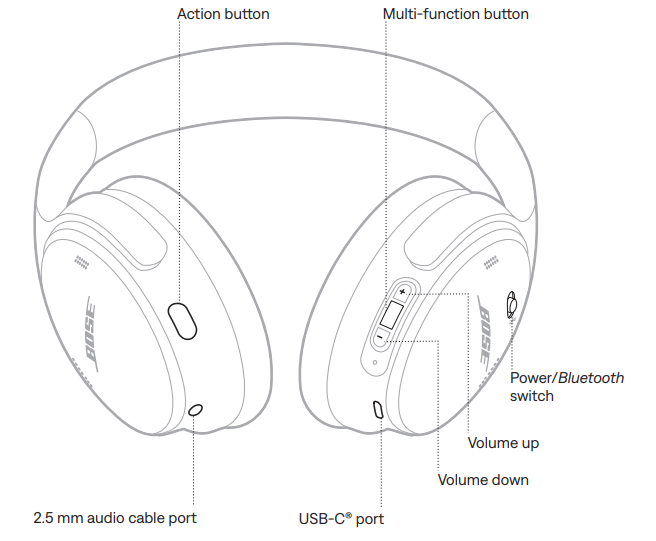
HEADPHONE FUNCTIONS
The headphone controls are located on the back of the right earcup.
Media playback and volume
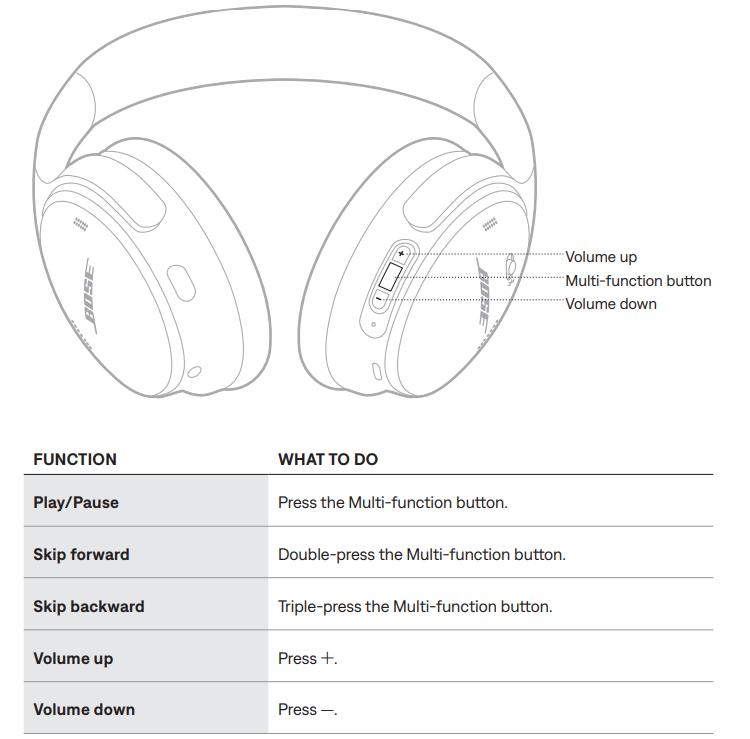
NOTES:
- To quickly increase the volume, press and hold +.
- To quickly decrease the volume, press and hold -.
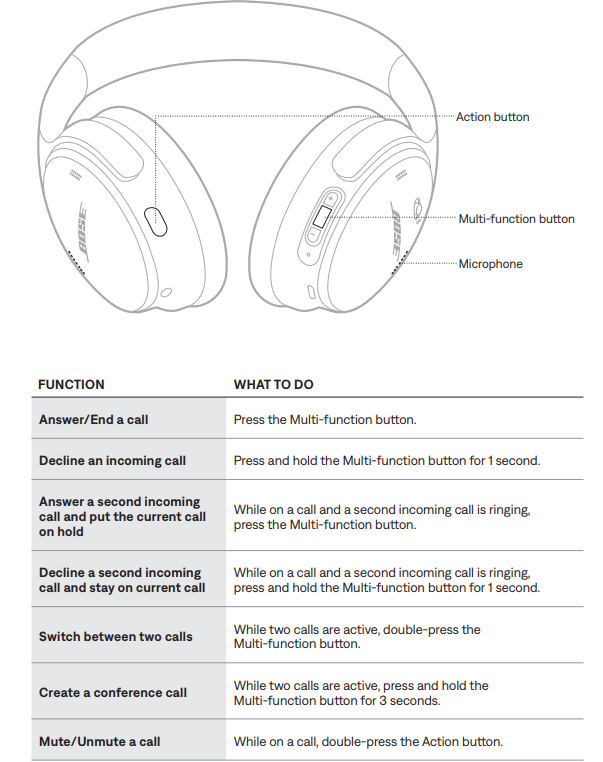
Phone calls
The Multi-function button is located on the back of the right earcup. The microphone is located near the front of the right earcup.
The Action button is located on the back of the left earcup.
Action button
The Action button allows you to quickly and easily switch between noise-cancelling modes.
The Action button is located on the back of the left earcup.
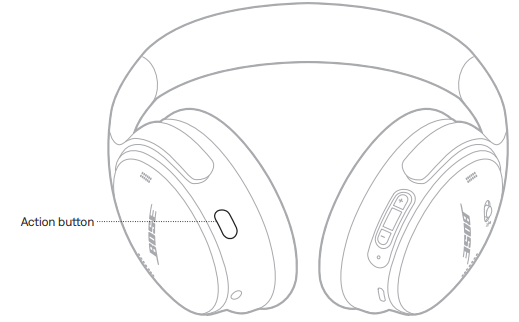
To switch between Quiet Mode and Aware Mode, press the Action button. For information about noise-cancelling modes, see page 24.
WIRED CONNECTIONS
CONNECT THE AUDIO CABLE
Use the 2.5 mm to 3.5 mm cable to connect a non-wireless device or to continue using the headphones if the battery is depleted.
- Connect the cable into the 2.5 mm port on the left earcup.
- Connect the other end of the cable into the 3.5 mm port on your device.
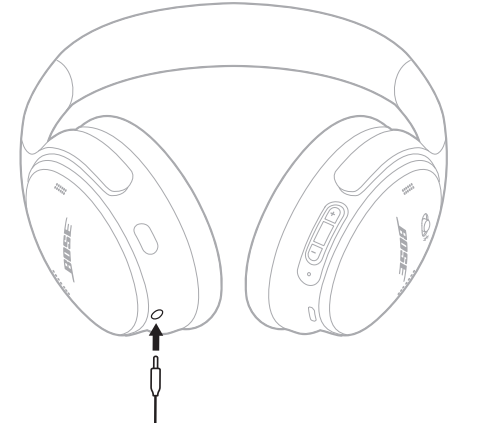
NOTE: You can use the headphones powered on or off when the the audio cable is connected.
Setup Guide for Bose QuietComfort 45 Headphones
- Initial Setup and Activation
Begin by unboxing your Bose QuietComfort 45 headphones and locating the included accessories: USB-C charging cable, 3.5mm audio cable, and zippered storage case. Before initial use, charge the headphones fully using the provided USB-C cable, which takes approximately 2.5 hours. This ensures optimal battery performance for your first listening session. - Bluetooth Pairing Instructions
To pair your Bose QuietComfort 45 headphones with your primary device, power on the headphones by sliding the power switch located on the right earcup. The headphones will automatically enter pairing mode during the first startup, indicated by voice prompts and LED indicators. On your smartphone or tablet, navigate to Bluetooth settings, locate "Bose QuietComfort 45" in available devices, and select to pair. Confirmation will sound through the headphones once pairing succeeds. - For NFC-enabled devices, simply tap the device against the NFC sensor located on the left earcup for instant one-touch pairing. To pair a second device simultaneously, press and hold the action button on the left earcup for three seconds while in Bluetooth settings on your secondary device.
- Configuration and Mode Selection
Press the action button on the left earcup to toggle between Quiet Mode (full active noise cancellation) and Aware Mode (ambient sound passthrough). Quiet Mode completely blocks external distractions for immersive listening, while Aware Mode allows you to hear announcements, conversations, or environmental sounds without removing the headphones. Download the Bose Connect app on your smartphone to access advanced features,, including custom noise cancellation levels, firmware updates, and personalized sound settings. The app provides intuitive controls for fine-tuning your audio experience and managing multiple connected devices. - Safety Precautions and Best Practices
Always verify that surrounding traffic and hazards are audible when using Aware Mode during activities like driving or cycling. Avoid exposing the headphones to water, extreme temperatures, or physical impact that could damage internal components. Store in the included zippered case when not in use to protect from dust and accidental damage. Clean earcup cushions regularly with a soft, damp cloth to maintain hygiene and comfort.
BATTERY
CHARGE THE HEADPHONES
- Connect the small end of the USB cable to the USB-C port on the right earcup.
- Connect the other end to a USB wall charger.
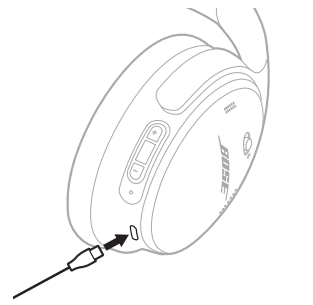
NOTES:
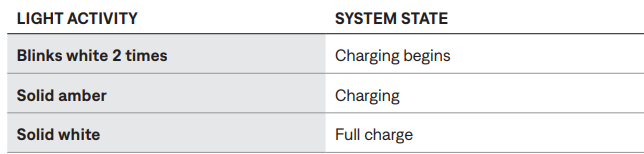
- When the headphones begin charging, the status light blinks white for 10 seconds. When fully charged, the status light glows solid white.
- The headphones don’t play while charging.
Charging time
Allow up to 2.5 hours to fully charge the headphones.
Hear the battery level..
Each time you power on the headphones, a voice prompt announces the battery level. When the headphone battery is low, you hear “Battery low, please charge now.”
NOTE: To visually check the battery, see the status light located on the right earcup. For more information, see “Battery status” on page 32.
HEADPHONE STATUS
The status light is located on the right earcup.
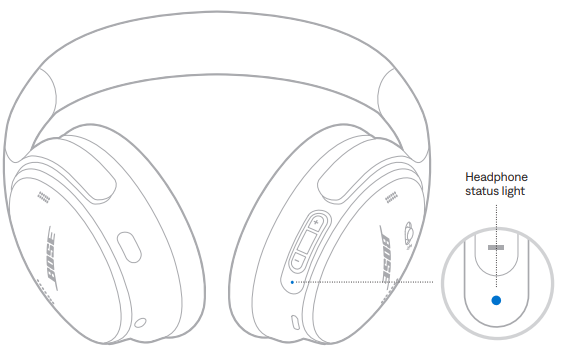
BLUETOOTH STATUS
Shows the Bluetooth connection status.
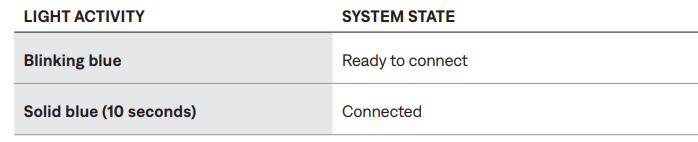
BATTERY STATUS
Shows the battery level.

CHARGING STATUS
Shows the charging status.
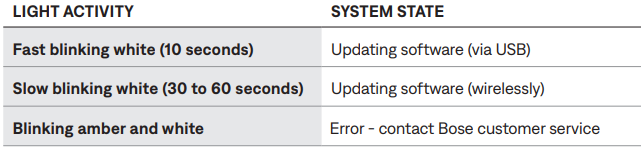
UPDATE AND ERROR STATUS
Shows the update or error status.
CONNECT BOSE PRODUCTS
CONNECT A BOSE SMART SPEAKER OR SOUNDBAR
Using SimpleSync™ technology, you can connect the headphones to a Bose Smart Soundbar or Bose Smart Speaker for a personal listening experience.
Benefits
- Use independent volume controls on each product to lower or mute your Bose Smart Soundbar while keeping the headphones as loud as you like.
- Hear your music clearly from the next room by connecting the headphones to your Bose Smart Speaker.
NOTE: SimpleSync™ technology has a Bluetooth range of up to 30 ft (9 m). Walls and construction materials can affect reception.
Compatible products
You can connect the headphones to any Bose Smart Speaker or Bose Smart Soundbar.
Popular compatible products include:
- Bose Smart Soundbar 700/Bose Soundbar 700
- Bose Soundbar 500
- Bose Smart Speaker 500/Bose Home Speaker 500
- Bose Home Speaker 300
- Bose Portable Smart Speaker/Bose Portable Home Speaker
CARE AND MAINTENANCE
STORE THE HEADPHONES
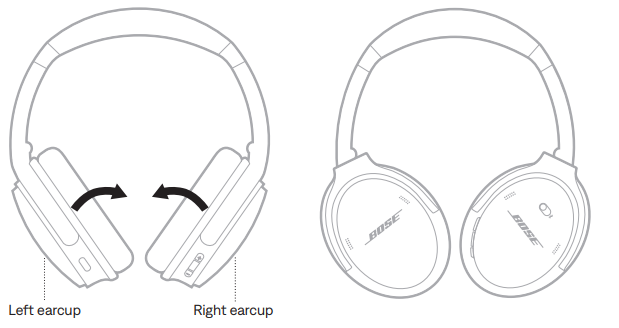
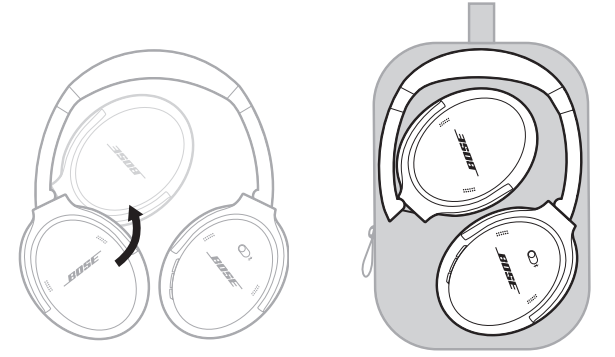
The earcups rotate for easy, convenient storage. Place the headphones flat into the case.
Rotate both earcups inward so they lie flat.
Fold the left earcup up toward the headband.
NOTES:
- Make sure to power off the headphones when not in use.
- Before storing the headphones for more than a few months, make sure the battery is fully charged.
CLEAN THE HEADPHONES
- Wipe the outside surfaces with a soft, dry cloth.
- Don’t allow moisture to get inside the earcups.
REPLACEMENT PARTS AND ACCESSORIES
Replacement parts and accessories can be ordered through Bose customer service.
SERIAL NUMBER LOCATION
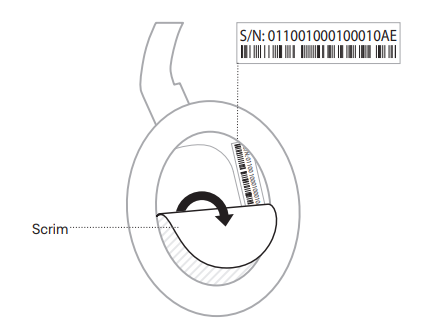
The serial number is located inside the right earcup under the scrim. The scrim is the inner screen that covers and protects the components inside the earcup.
To view the serial number, grab the scrim at the top edge and gently peel it away.
CAUTION: Be careful not to press down on or remove any other components inside the earcup a,s this could damage the headphones.
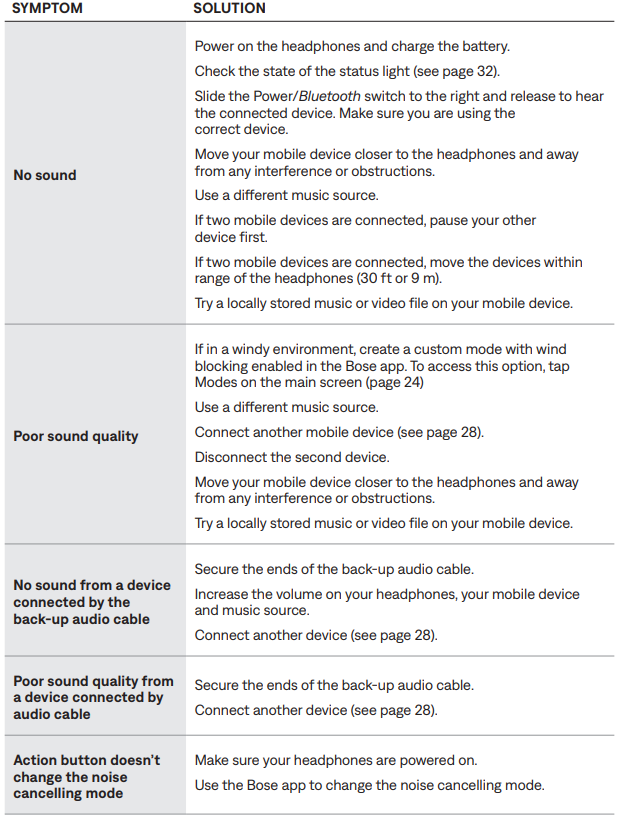
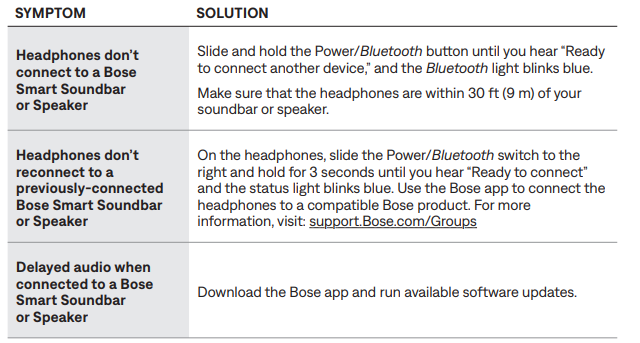
Troubleshooting Common Issues with Bose QuietComfort 45 Headphones
TRY THESE SOLUTIONS FIRST
If you experience problems with your headphones:
- Check the state of the status light (see page 32).
- Charge the battery (see page 31).
- Increase the volume on your headphones, mobile device, and music app.
- Try connecting another mobile device (see page 28).
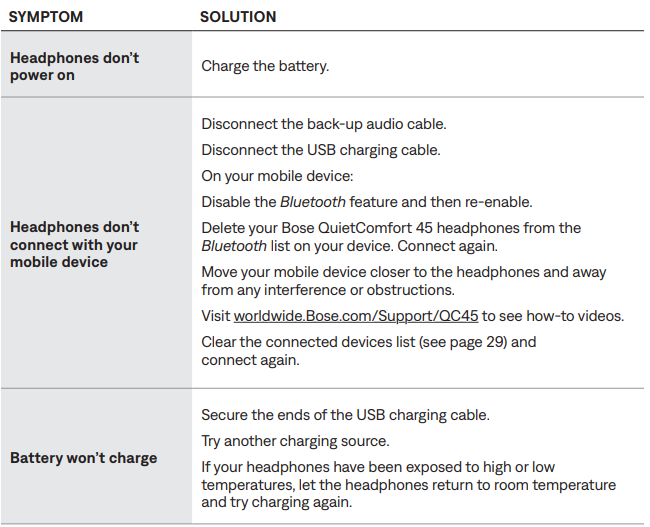
If you could not resolve your issue, see the table below to identify symptoms and solutions to common problems. If you are unable to resolve your issue, contact Bose customer service.
OTHER SOLUTIONS
LIMITED WARRANTY
Your headphones are covered by a limited warranty. Visit our website for details of the limited warranty.
To register your product for instructions. Failure to register will not affect your limited warranty rights.
Pros and Cons of Bose QuietComfort 45 Headphones
Advantages
- Outstanding Noise Cancellation: Bose QuietComfort 45 headphones deliver excellent active noise cancellation that effectively blocks low-frequency drone sounds like airplane engines and high-frequency ambient noise, keeping pace with competitors like Sony and Apple.
- Extended Battery Life: Up to 22 hours of continuous playback on a single charge provides all-day usage without frequent charging interruptions.
- Lightweight and Comfortable: At just 8.5 ounces, the Bose QuietComfort 45 headphones are among the lightest in their class, featuring plush synthetic leather ear cushions ideal for extended wear sessions.
- Bluetooth 5.1 Technology: Stable wireless connectivity with multi-point connection allows simultaneous pairing with two devices for seamless device switching.
- Dual Mode Flexibility: Toggle between Quiet Mode for complete noise isolation and Aware Mode for ambient sound awareness without removing the headphones.
- Premium Build Quality: Impact-resistant nylon construction with custom cast-metal hinges ensures durability for long-term daily use.
- Modern Charging: USB-C charging port with quick-charge capability (15 minutes for 3 hours of use) meets contemporary connectivity standards.
Disadvantages
- Limited Noise Cancellation Customization: Unlike the Bose Headphones 700 with 11 adjustable levels, the Bose QuietComfort 45 offers only Quiet and Aware modes without granular control, though a 2024 firmware update introduced custom modes.
- Moderate Sound Quality: While adequate for general listening, the audio fidelity shows some degradation in the low-treble range at higher volumes compared to specialized audiophile headphones.
- No Touch Controls: The Bose QuietComfort 45 headphones use physical buttons rather than capacitive touch controls, which some users find less intuitive than modern touch interfaces.
- Audio Leakage: At high volumes in close proximity to others, some sound leakage occurs, though it remains generally unobtrusive.
- Average Price Point: While offering excellent features, the Bose QuietComfort 45 headphones are positioned at a premium price, which may exceed budgets for casual users.
Customer Reviews and User Feedback for Bose QuietComfort 45 Headphones
Users consistently praise the Bose QuietComfort 45 headphones for their outstanding noise cancellation performance, particularly highlighting their effectiveness during air travel and in noisy office environments. The lightweight design receives universal acclaim from customers who wear the headphones for extended periods without discomfort or fatigue.
Battery life performance generates positive feedback, with many users reporting actual usage matching or exceeding the rated 22-hour specification. The dual-mode noise cancellation functionality proves valuable for professionals who need flexibility between complete isolation and environmental awareness.
Some customers express minor concerns about the lack of granular noise cancellation adjustment compared to competitors, though the recent firmware update addressing custom modes has improved satisfaction. Audio quality receives solid ratings, with users noting clear voice reproduction and balanced sound suitable for general listening, though not specialized for audiophile applications.
Overall customer satisfaction remains high, with the Bose QuietComfort 45 headphones earning strong recommendations for business travelers, remote workers, and frequent flyers seeking reliable noise-cancelling headphones. Users particularly appreciate the combination of comfort, noise cancellation performance, and battery longevity for demanding usage scenarios.
Leave a Comment