
Pairing: Bose OE2i Audio Headphones User Manual
Content
Bose OE2i Audio Headphones
Introduction
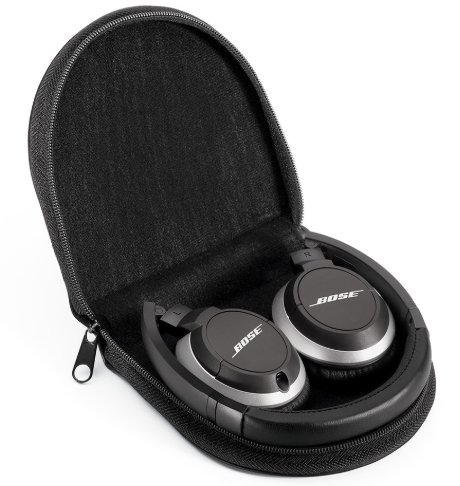
The Bose OE2i Audio Headphones are premium on-ear headphones designed for audiophiles and everyday users seeking high-quality sound with exceptional comfort. These headphones combine Bose’s renowned advanced acoustic design with a lightweight, foldable structure, making them ideal for people on the move, commuters, and professionals who demand clear, rich audio without sacrificing portability. Unique selling points include the integrated inline microphone and remote control, optimized for Apple devices, enabling hands-free calls and seamless music control. Their collapsible design and included compact carrying case enhance convenience for travel and daily use.
Targeted at users who value superior sound clarity and bass depth in a compact form, the Bose OE2i headphones are perfect for music lovers, podcast listeners, and mobile device users alike. The headphones support voice recognition features on iPhone, iPad, and iPod, expanding their utility in modern digital lifestyles.
Available in stylish black and white finishes, the Bose OE2i typically ranges from $120 to $160 USD, depending on retailer, and offers excellent durability backed by a one-year warranty. They can be found through authorized Bose dealers, online marketplaces, and select electronics stores.
Specifications of Bose OE2i Audio Headphones
- Type: On-ear, closed-ear cup design
- Weight: Approximately 140 grams (4.94 oz)
- Dimensions: 7.5″ (H) x 6″ (W) x 2″ (D) folded; ear cushions 2.3″ x 2″
- Cord Length: 69 inches (detachable cable)
- Connectivity: Wired 3.5mm jack with a 2.5mm to 3.5mm detachable cable
- Remote & Microphone: Inline 3-button remote compatible with Apple iOS devices, supporting volume control, call management, and voice recognition
- Sound Technology: Bose TriPort® acoustic design for enhanced bass and clear highs
- Portability: Fold-flat, collapsible earcups with included compact carry pouch (5 x 5.25 x 1.5 inches)
- Colors: Black and White
- Warranty: 1 year on parts and labor
Compared to similar on-ear models like the Bose OE2 (without microphone), the OE2i adds valuable functionality for phone users while maintaining the same superior sound quality and lightweight design. Unlike Bluetooth headphones, these do not offer wireless connectivity but excel in wired audio fidelity and Apple device integration.
Components
Setup Guide for Bose OE2i Audio Headphones
- Unpack the headphones and the carry pouch from the box.
- Unfold the earcups flat and extend the adjustable headband to fit comfortably over your ears.
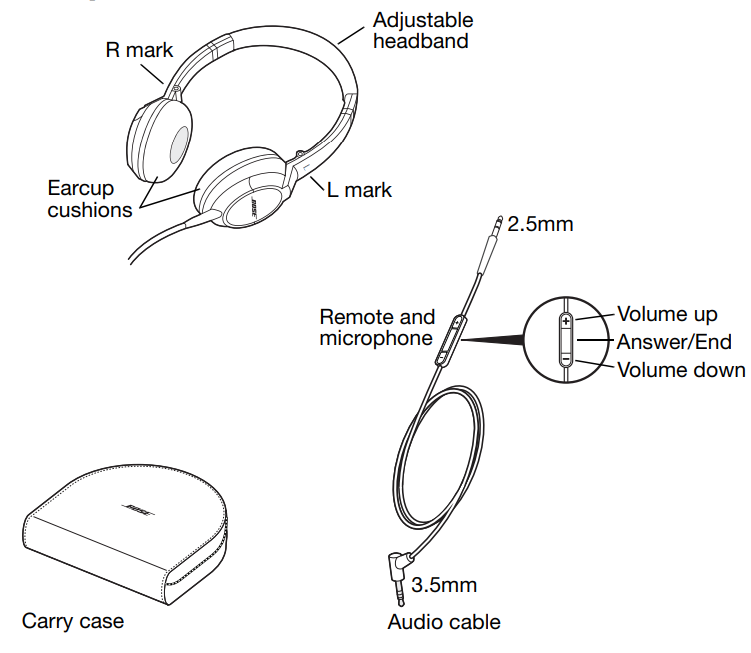
- Plug the detachable audio cable into the left earcup’s 2.5mm jack and connect the 3.5mm end to your audio device.
- For Apple device users, use the inline remote to control volume, track playback, and manage calls. Make sure your device supports these controls (iPod nano 4th gen+, iPhone, iPad compatible).
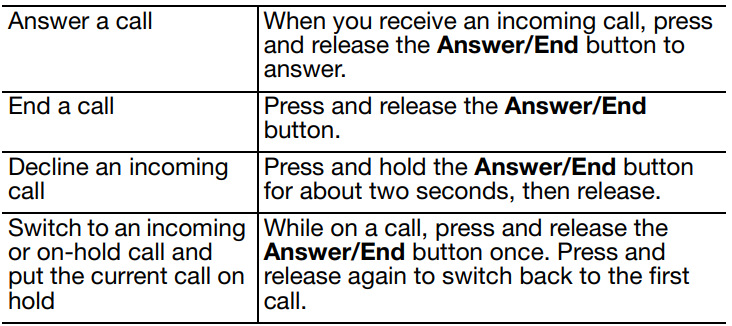
- To answer or end calls, press the center button on the remote. Hold it for two seconds to decline calls.
- If you experience no sound, ensure the cable is fully connected and the device volume is up. Try restarting your device if problems persist.
- Keep headphones away from moisture and extreme temperatures to maintain performance and longevity.
Safety Precautions: Avoid listening at high volume levels for extended periods to prevent hearing damage. Use caution with cables to avoid tripping hazards or damage.
Storing your headphones
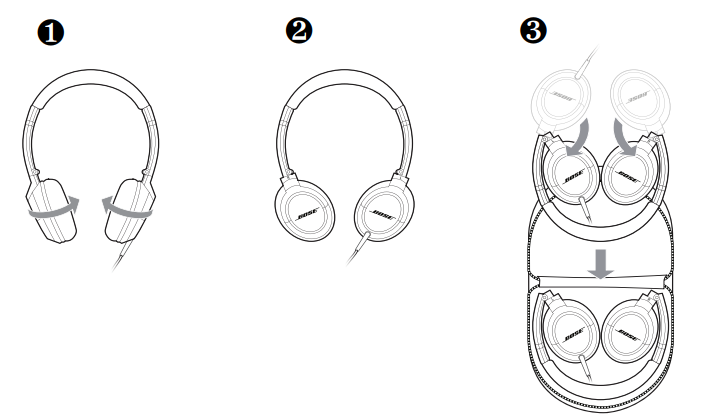
Note: Do not try to exceed the limits of the pivots or over-rotate the earcups.
Using your headphones
- Wearing the headphones
After removing the headphones from the case and unfolding them (see page 5), put on the headphones using the markings that identify the left (L) and right (R) earcups. Adjust the headband so it rests gently on top of your head, and the earcup cushions fit comfortably on your ears. - Cleaning the headphones
The Bose® OE2i audio headphones do not require scheduled cleaning. Should cleaning be necessary, simply wipe the outside surfaces with a soft cloth. Be sure the earcup ports are kept clear, and that no moisture is allowed to get inside the earcup. Connecting to your Apple device
Ensure that the 2.5mm plug is securely inserted into the left earcup. Plug the other end of the cable (3.5mm plug) securely into the audio output jack of the Apple audio device.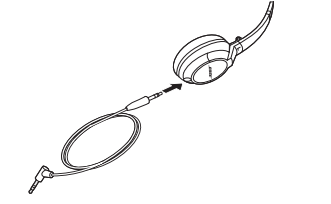
- Using the headphones with your Apple device
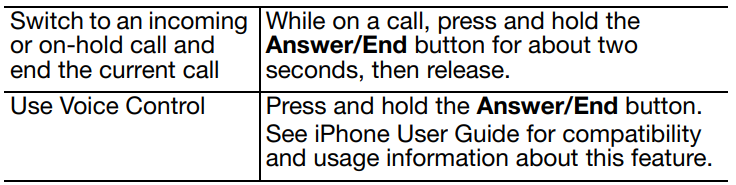
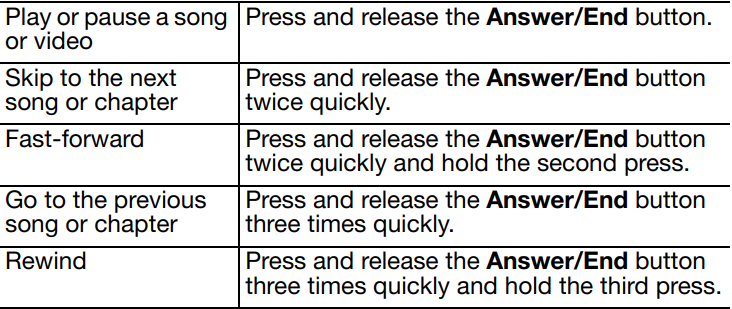
The Bose OE2i headphones come with a small in-line remote with an integrated microphone for convenient control of select Apple products. Easily control volume, track selection, and voice applications, plus switch between your calls and music.
Note: Full controls may not be available for some Apple products.
Basic functions

Call-related functions
Media playback functions
Replacement parts and accessories
Replacement parts and accessories, such as the carry case, earcup cushion, and the audio cable, can be ordered through Bose® Customer Service. See the contact information for your area included in this guide.
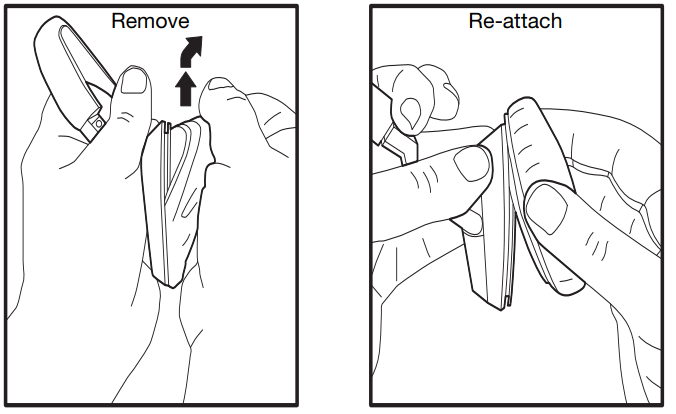
Replacing earcup cushions
Remove the earcup cushion:
- Grasp the earcup cushion securely.
- Pull up and out to remove the earcup cushion.
Re-attach earcup cushion:
- Place the edge of the earcup cushion skirt into the slot behind the earcup flange.
- Work the remainder of the skirt into the slot all the way around the earcup.
Troubleshooting for Bose OE2i Audio Headphones
If you experience any trouble using your headphones, try the following troubleshooting instructions.
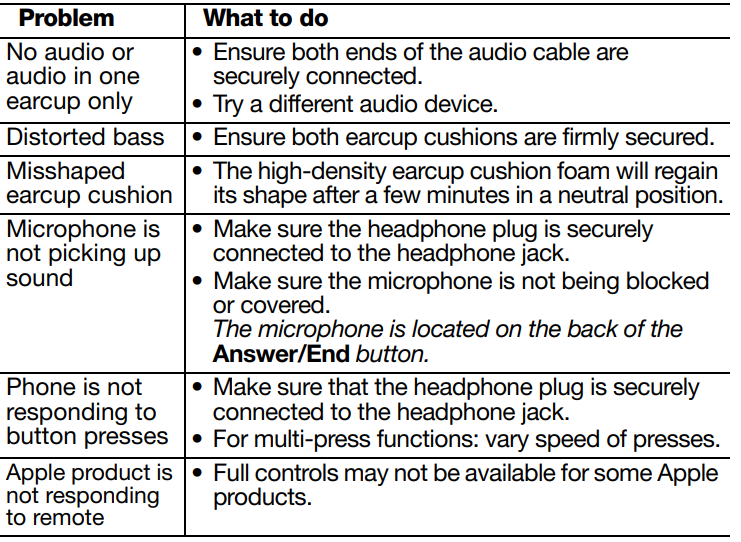
- No Sound: Check cable connections; replace the detachable cable if damaged. Verify device audio settings.
- Remote Not Responding: Confirm compatibility with your Apple device. Restart the device and reconnect the headphone cable.
- Microphone Issues: Ensure the microphone is not muted or blocked. Test with another device to isolate the problem.
- Audio Distortion: Reduce device volume, check cable integrity, and avoid tangled wires.
- Product Warranty: Bose offers a 1-year warranty covering parts and labor. Contact Bose customer support for repairs or replacements.
For additional assistance, users can reach Bose support via their official website or authorized service centers. Regular cleaning of ear cushions and safe storage in the carry pouch help prevent wear.
Limited Warranty
Your Bose® headphones are covered by a limited warranty. Details of the limited warranty are provided on the product registration card that is included in the carton. Please refer to the card for instructions on how to register. Failure to register will not affect your limited warranty rights.
What you must do to obtain Limited Warranty Service:
Return product, with proof of purchase from an authorized Bose dealer, using the following procedures:
- Contact the Bose organization in your country/region (visit Global.Bose.com/register for Bose contact information in your country/region) for specific return and shipping instructions.
- Label and ship the product, freight prepaid, to the address provided by the Bose organization in your country; and
- Place any necessary return authorization number prominently on the outside of the carton. Cartons not bearing a return authorization number, where required, will be refused.
Note: The serial number is located on the warranty card included in the carton.
Pros & Cons of Bose OE2i Audio Headphones
Pros
- Excellent sound clarity with deep, rich bass thanks to Bose TriPort® technology
- Lightweight and comfortable memory foam ear cushions suitable for extended wear
- Fold-flat, collapsible design enhances portability and storage convenience
- Integrated inline remote and microphone compatible with Apple devices for calls and voice control
- Durable build with included carry pouch and detachable cable reduces tangling issues
Cons
- Lacks active noise cancellation, which some competing models offer
- No wireless or Bluetooth connectivity—limited to wired use
- Sound signature leans toward bass-heavy, which may not suit all audiophiles seeking neutraTheheremote control is primarily designed for the Apple ecosystem, limiting functionality with other devices
- Price is higher than some comparable on-ear headphones without brand prestige
Overall, the Bose OE2i delivers solid value for users who prioritize portable, quality sound with Apple device integration, but may fall short for those wanting wireless or noise-canceling features.
Customer Reviews of Bose OE2i Audio Headphones
Users consistently praise the Bose OE2i Audio Headphones for their comfort and exceptional sound quality, especially the bass response and clarity during phone calls. Many highlight the lightweight design and easy portability as major advantages for daily commuting and travel. The inline microphone and remote receive positive feedback for seamless call handling and volume adjustments on Apple devices.
Common complaints include the absence of active noise cancellation and the somewhat recessed highs in the audio profile, which some users find less detailed compared to other premium headphones. A few users note that the headset’s remote does not work well with non-Apple devices. Overall, the headphones maintain a strong average rating of around 4 out of 5 stars, with many recommending them for users who want wired headphones compatible with iPhones and iPods.
Tags
More bose manuals
- Setup & Pairing: Bose SoundComm B40 Headset User Manual
- Pairing: Bose OE2 Audio Headphones User Manual
- Pairing & Setup: Bose Soundbar 550 User Manual
- Setup & Pairing: Bose QuietComfort Ultra Headphones (2nd Gen) User Manual
- Setup: Bose Smart Soundbar 900 User Manual
- Pairing: Bose QuietComfort 45 Headphones User Manual
Leave a Comment