
Setup & Pairing: Bose Soundbar 500 User Manual
Content
Bose Soundbar 500

Introduction
The Bose Soundbar 500 is a premium wireless soundbar designed for audiophiles and home entertainment enthusiasts seeking immersive audio without clutter. With its sleek, minimalist design and advanced acoustic engineering, this soundbar delivers spacious, room-filling sound that enhances movies, music, and gaming experiences. The Bose Soundbar 500 stands out with its proprietary ADAPTiQ audio calibration system, which automatically optimizes sound based on your room’s unique acoustics, ensuring crystal-clear dialogue and balanced audio every time.
Perfect for living rooms, bedrooms, or home offices, the Bose Soundbar 500 is ideal for users who want a compact, wall-mountable solution that doesn’t compromise on performance. It supports Wi-Fi, Bluetooth 5.0, Apple AirPlay 2, and multiroom audio, making it a versatile choice for modern smart homes. The soundbar is compatible with the optional Bose Bass Module 500 and Surround Speakers for a full home theater experience.
Available at major electronics retailers, the Bose Soundbar 500 typically retails between $599 and $799, depending on region and bundle options. Its combination of premium sound, smart features, and elegant design makes it a top contender in the mid-to-high-end soundbar market.
Specifications
- Dimensions: 1.75" H x 31.56" W x 4.125" D (4.44 cm H x 80 cm W x 10.16 cm D)
- Weight: 7 lbs (3.18 kg)
- Drivers: Proprietary low-profile transducers with dedicated center channel
- Power Output: 45W
- Connectivity: HDMI (supports eARC), optical digital input, Wi-Fi, Bluetooth 5.0 (up to 30 ft range)
- Audio Formats: Dolby Digital, DTS, eARC (re-encoded to Dolby Digital)
- Room Calibration: ADAPTiQ automatic audio calibration
- Multiroom Audio: Supports up to 4 zones, compatible with the Bose app and select music services
- Additional Features: QuietPort bass enhancement, Bose SimpleSync for headphones, voice control (future firmware update), wall-mountable
- Warranty: 1-year manufacturer's warranty
Compared to similar models like the Bose Solo 5, the Soundbar 500 offers a wider soundstage, better surround performance, and more advanced connectivity options, making it a superior choice for immersive audio.
WHAT’S IN THE CARTON
CONTENTS
Confirm that the following parts are included:

BOSE APP SETUP
The Bose app lets you set up and control the soundbar from your mobile device, such as a smartphone or tablet.
Using the app, you can stream music, set and change presets, add music services, explore internet radio stations, configure Amazon Alexa or your Google Assistant, and manage soundbar settings.
NOTE: If you have already created a Bose account in the Bose app for another Bose product
DOWNLOAD THE BOSE APP
On your mobile device, download the Bose app.

- Follow the app instructions.
EXISTING BOSE APP USERS
ADD THE SOUNDBAR TO AN EXISTING ACCOUNT
In the Bose app, go to the My Products screen and add your Bose Soundbar 500.
CONNECT TO A DIFFERENT WI-FI NETWORK
Connect to a different network if your network name or password has changed, or if you want to change or add another network.
- On the remote, press and hold the TV button and the Skip backward button J until the light bar glows amber.
- On your mobile device, open your Wi-Fi settings.
- Select the Bose Soundbar 500.
- Open the Bose app, and follow the app instructions.
NOTE: If the app doesn’t prompt you for setup, go to the My Products screen and add your soundbar.
REMOTE FUNCTIONS
Use the remote to control the soundbar, Bluetooth connections, and presets.
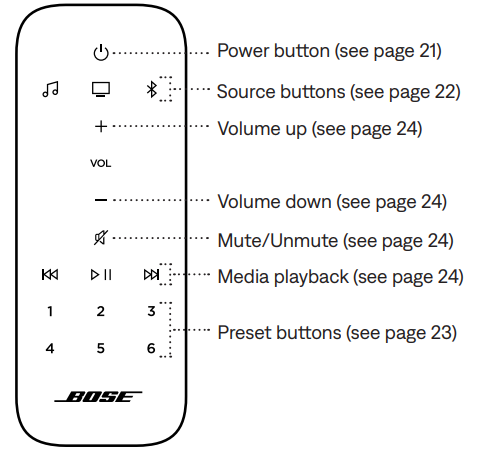
SOUNDBAR CONTROLS
Media playback and volume
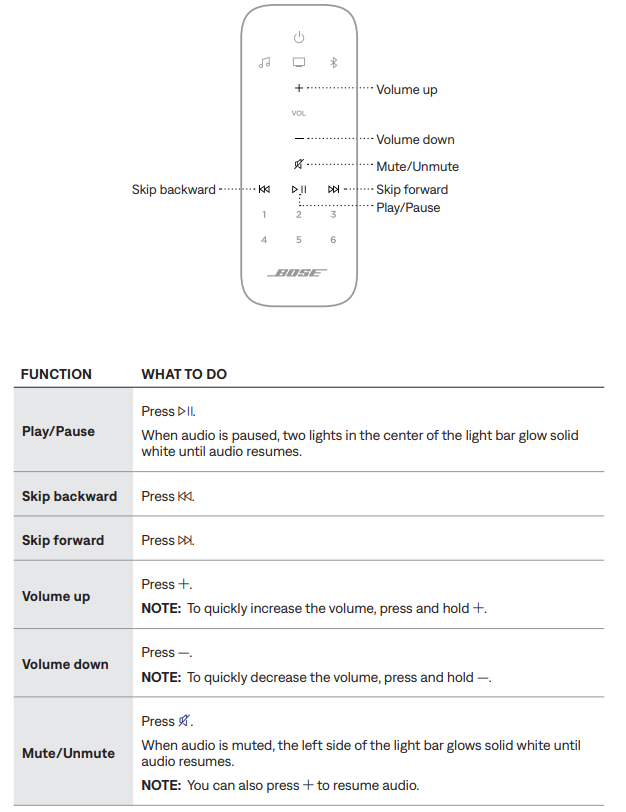
ADJUST THE BASS
To adjust the bass, use the Bose app. You can access this option in the Settings menu.
PROGRAM A THIRD-PARTY REMOTE
You can program a third-party remote, such as your cable/satellite box remote, to control the soundbar. Refer to your third-party remote owner’s guide or website for instructions.
Once programmed, the third-party remote controls the basic soundbar functions, such as power on/off and volume.
NOTE: Not all third-party remotes are compatible with the soundbar. The remote must support IR (infrared) signals to control the soundbar.
Setup Guide for Bose Soundbar 500
- Setting up the Bose Soundbar 500 is straightforward. Begin by placing the soundbar below your TV, ensuring it’s centered and at least 4 inches from the wall for optimal sound dispersion. Connect the soundbar to your TV using the HDMI eARC port for the best audio quality, or use the optical digital input as an alternative.
- Power the soundbar using the included AC adapter. Download the Bose app to your smartphone or tablet for advanced configuration, including ADAPTiQ room calibration, multiroom setup, and firmware updates. Pair Bluetooth devices by pressing the Bluetooth button on the remote or in the app.
- For wireless surround or bass modules, follow the in-app instructions to pair them with the soundbar. Always run ADAPTiQ calibration after moving the soundbar or adding new components. Avoid placing the soundbar near heat sources or in direct sunlight. Keep the remote’s batteries fresh for reliable operation.
CARE AND MAINTENANCE
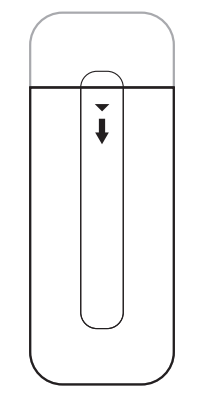
INSTALL THE REMOTE BATTERIES
Slide open the battery compartment cover on the back of the remote.
Insert the two provided AAA (IEC-LR3) 1.5V batteries. Match the + and - symbols on the batteries with the + and - markings inside the compartment.
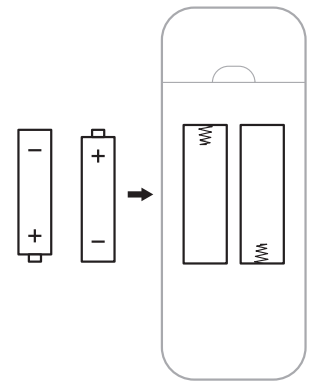
- Slide the battery compartment cover back into place.
CLEAN THE SOUNDBAR
Clean the exterior of the soundbar with a soft dry cloth.
CAUTIONS:
- Do NOT allow liquids to spill onto the system or into any openings.
- Do NOT blow air into the system.
- Do NOT use a vacuum to clean the system.
- Do NOT use any sprays near the system.
- Do NOT use any solvents, chemicals,, cleaning solutions containing alcohol, ammonia, or abrasives.
- Do NOT allow objects to drop into any openings.
REPLACEMENT PARTS AND ACCESSORIES
Replacement parts and accessories can be ordered through Bose customer service.
Visit: worldwide.Bose.com/Support/SB500
OTHER SOLUTIONS
If you could not resolve your issue, see the table below to identify symptoms and solutions to common problems. If you are unable to resolve your issue, contact Bose customer service.
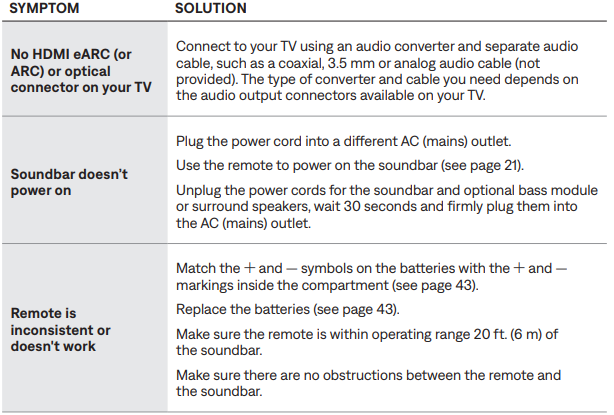
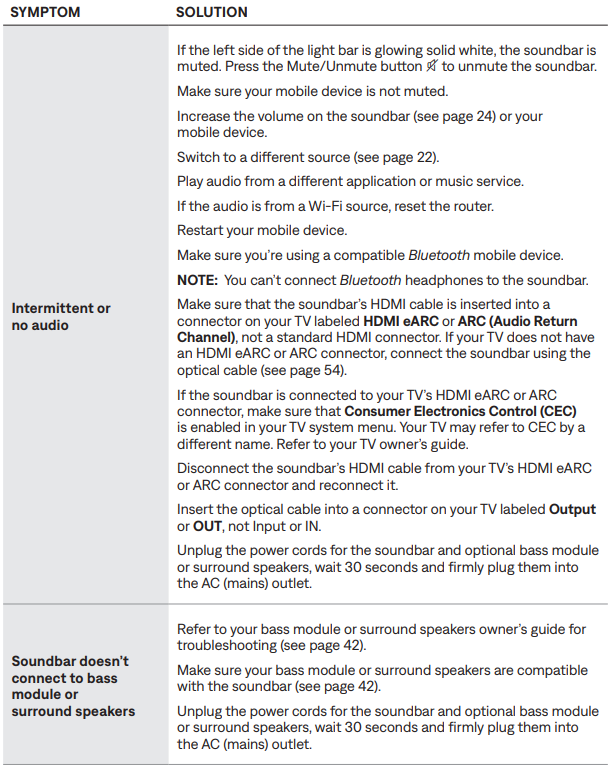
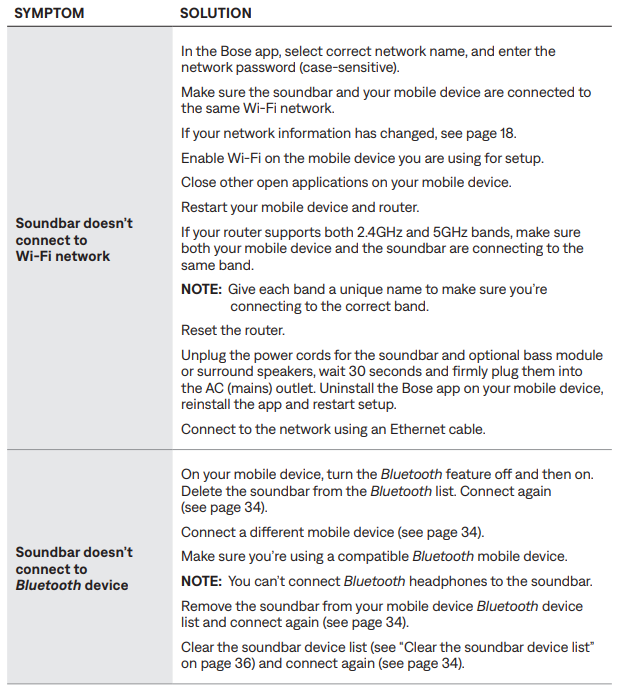
Troubleshooting Common Issues
TRY THESE SOLUTIONS FIRST
If you experience problems with the soundbar:
- Make sure the soundbar is connected to a live AC (mains) outlet.
- Secure all cables.
- Verify the state of the light bar (see page 38).
- Move the soundbar away 1 – 3 ft. (0.3 – 0.9 m) from possible interference (wireless routers, cordless phones, televisions, microwaves, etc.).
- Move the soundbar within the recommended range of your wireless router or mobile device for proper operation.
- Place the soundbar according to the placement guidelines (see page 14).
LIMITED WARRANTY
- The soundbar is covered by a limited warranty. Visit our website at global.Bose.com/warranty for details of the limited warranty.
- To register your product, visit global.Bose.com/register for instructions.
- Failure to register will not affect your limited warranty rights.
Pros and Cons of the Bose Soundbar 500
Pros
- Exceptional sound clarity and spacious audio
- ADAPTiQ room calibration for personalized sound
- Supports Wi-Fi, Bluetooth, AirPlay 2, and multiroom audio
- Compact, wall-mountable design fits under most TVs
- Easy setup and intuitive Bose app control
Cons
- Sub-bass is limited without the optional bass module
- Maximum volume is moderate for large rooms
- Some advanced features require future firmware updates
- Premium price compared to entry-level soundbars
The Bose Soundbar 500 offers excellent value for users seeking high-quality audio and smart features, though it may not suit those needing very loud or deep bass without additional modules.
Customer Reviews and Feedback
The Bose Soundbar 500 consistently receives 4.5-star ratings from users, with praise for its clear dialogue, immersive sound, and easy setup. Customers appreciate the ADAPTiQ calibration and multiroom capabilities, though some note the bass could be stronger without the optional module. Common complaints include the moderate maximum volume and the need for occasional firmware updates.
Many reviewers recommend the Bose Soundbar 500 for its balanced audio and sleek design, especially for those upgrading from basic TV speakers. It’s frequently mentioned as a top choice for home theater enthusiasts and music lovers seeking a premium soundbar experience.
Tags
More bose manuals
Leave a Comment