
Carrier 33CS Programmable Thermostat User Manual
Content
Carrier 33CS Programmable Thermostat Manual
Introduction
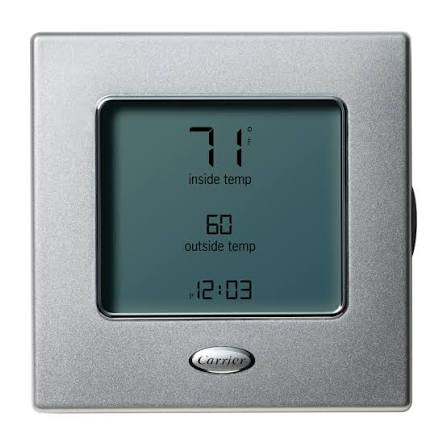
The carrier 33cs programmable thermostat is a commercial-grade, wall-mounted low-voltage control designed to manage heating, cooling, and ventilation with reliable scheduling and precise temperature control. Built for flexibility, it supports multiple programming styles, including 7-day, 5/2-day, and 1-day schedules, making it a practical choice for offices, retail spaces, lodging properties, schools, and other buildings with changing occupancy patterns.
One of the biggest advantages of the carrier 33cs programmable thermostat is its focus on energy savings without sacrificing comfort. Separate heating and cooling set points, auto-changeover capability, and occupied/unoccupied programming help reduce unnecessary runtime while keeping indoor conditions stable. Certain models in the 33CS line also support humidity sensing and 2-stage HVAC compatibility, which makes them suitable for more demanding commercial environments.
This thermostat is a strong fit for facility managers, HVAC contractors, property owners, and maintenance teams looking for an easy-to-use programmable thermostat for commercial applications. It is typically priced in the mid-range for commercial controls, with many listings and distributor prices placing it roughly between $80 and $180, depending on the exact model, features, and seller. Availability is generally good through HVAC supply houses, commercial distributors, and online parts retailers.
If you are comparing the carrier 33cs programmable thermostat with other commercial thermostats, its biggest selling points are dependable scheduling, simple wall-mount installation, and long-term reliability in low-voltage HVAC systems.
Specifications and Key Features of the Carrier 33CS Programmable Thermostat
- Low-voltage wall-mounted thermostat for commercial HVAC systems
- Programmable schedule options: 7-day, 5/2-day, or 1-day operation
- Supports separate heating and cooling set points
- Auto-changeover capability for automatic mode switching
- Occupied and unoccupied scheduling for energy management
- Compatible with many heating, cooling, and ventilation applications
- Some models support humidity sensing and humidity control integration
- Some versions are compatible with 2-stage heat/cool HVAC systems
- User-configured settings are designed to remain stored without frequent reset issues
- Multiple time/temperature periods per day, depending on the model variant
In practical use, the carrier 33cs programmable thermostat is designed for precise comfort control in occupied spaces and automatic setback during unoccupied hours. Compared with basic non-programmable thermostats, it offers more scheduling flexibility and better energy efficiency. Compared with premium smart thermostats, it is less dependent on app-based controls, Wi-Fi, or cloud connectivity, which can be an advantage in commercial buildings where simplicity and reliability matter more than remote automation.
Setup Guide: How to Install and Configure the Carrier 33CS Programmable Thermostat
Before installation, turn off power to the HVAC system at the breaker or service switch. Remove the old thermostat carefully and label each wire before disconnecting it. Mount the carrier 33cs programmable thermostat to a suitable wall location away from direct sunlight, supply vents, doors, and other heat sources that could affect temperature readings.
Connect the wiring according to the system type and terminal labels, then secure the thermostat base and restore power. Once powered on, set the current time and day first, then choose the programming mode that matches the building schedule. Common configuration options include occupied periods, unoccupied periods, heating and cooling set points, and auto-changeover settings. If the model supports it, configure humidity control or stage settings next.
For best results, test heating, cooling, fan, and schedule changes before leaving the unit in service. If the thermostat does not respond, recheck wiring, confirm the system has power, and verify that the mode is set correctly. Safety warning: always disconnect power before opening HVAC equipment or thermostat wiring, and follow local electrical and building codes.
Troubleshooting Common Carrier 33CS Thermostat Problems
If the thermostat display is blank, the most common causes are no power to the HVAC system, loose wiring, or an incorrectly connected common wire on supported models. If the system does not heat or cool, confirm the mode setting, temperature set point, and schedule override status. If room temperature feels inaccurate, the thermostat may be installed too close to a heat source, return vent, or exterior draft.
- Blank display: check power, wiring, and breaker status
- System will not start: verify mode, set point, and equipment wiring
- Short cycling: check thermostat placement and HVAC configuration
- Schedule not holding: re-enter programming and confirm the correct day
- Unresponsive buttons: reset power and inspect the keypad for damage
- No cooling or heating changeover: confirm auto-changeover settings and system compatibility
Some Carrier 33CS model families use on-screen annunciators rather than error-code style fault numbers, so problems are often identified by display indicators, blinking mode labels, or failed system response rather than numeric codes. Preventive maintenance includes cleaning dust from the unit, checking batteries if applicable, and reviewing schedules after power outages or seasonal changes. Warranty and support are typically handled through the installing contractor, Carrier distributors, or Carrier customer support channels. For the most accurate help, contact the installer first, then the nearest Carrier distributor, and then Carrier support if needed.
Pros and Cons of the Carrier 33CS Programmable Thermostat
Pros
- Flexible scheduling for 7-day, 5/2-day, or 1-day operations
- Good fit for commercial HVAC systems with changing occupancy
- Separate heating and cooling set points improve comfort control
- Auto-changeover helps simplify seasonal transitions
- Energy-saving occupied/unoccupied programming supports lower operating costs
- Solid value for money compared with many commercial thermostat alternatives
Cons
- Not a Wi-Fi smart thermostat, so it lacks app-based remote control
- Advanced features vary by exact model number
- Setup may be less intuitive for first-time installers than consumer thermostats
- Some functions require careful programming to avoid schedule errors
Overall, the carrier 33cs programmable thermostat offers strong value for facilities that need dependable local control rather than cloud-connected automation. Compared with entry-level programmable thermostats, it is better suited for commercial use. Compared with premium smart thermostats, it trades remote access for simplicity, durability, and easier building-wide standardization.
Customer Reviews and Real-World Feedback
Typical user feedback for the carrier 33cs programmable thermostat is positive, especially from building managers and HVAC professionals who value scheduling flexibility and reliable operation. Many users give it 4 out of 5 stars for ease of use, comfort control, and energy savings in commercial spaces.
Common praise includes accurate temperature control, straightforward occupied/unoccupied programming, and dependable performance in multi-zone environments. Frequent complaints usually involve programming complexity, limited modern smart features, and the need to match the exact model to the HVAC system.
Sample testimonial: “Installed in a small office building, and it handles weekday scheduling very well. Once programmed, it runs reliably and keeps the space comfortable.”
For buyers who want a durable commercial programmable thermostat with strong core features, the carrier 33cs programmable thermostat is a smart purchase. It is especially recommended for property managers, maintenance teams, and contractors who prioritize reliability over Wi-Fi connectivity.
Faqs
How do I set up the carrier 33CS Programmable Thermostat for the first time?
What should I do if my carrier 33CS Programmable Thermostat is not responding or the display is blank?
Which HVAC systems are compatible with the carrier 33CS Programmable Thermostat?
How does the carrier 33CS Programmable Thermostat help reduce energy costs?
Why is my carrier 33CS Programmable Thermostat not following the programmed schedule?
What do the occupancy and auto-changeover features do on the carrier 33CS Programmable Thermostat?
How do I maintain and clean the carrier 33CS Programmable Thermostat?
What are common installation mistakes with the carrier 33CS Programmable Thermostat?
More carrier manuals
- Carrier MV08B1500A2 Modular Blower User Manual
- Carrier 48GC04-06 Gas Heat & Electric Cooling Rooftop Unit User Manual
- Carrier Humiditrac Humidifier Control KUAWC0101CAC User Manual
- Carrier AquaSnap Air-Cooled Chillers 30RB060-390 User Manual
- Carrier 38MHRC Outdoor Unit Single Zone Ductless System User Manual
- Carrier PURON Air Conditioner with Refrigerant 38EZA User Manual
Leave a Comment