
Dell Wireless Mouse and Keyboard KM717 User Manual
Content
Dell Wireless Mouse and Keyboard KM717: Premium Wireless Desktop Set for Productivity
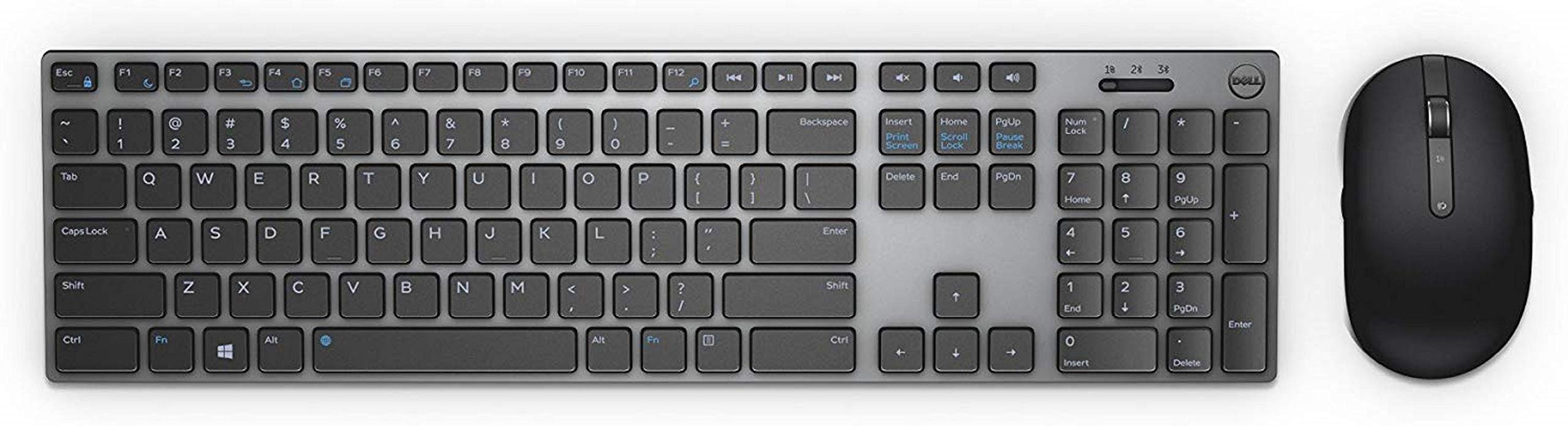
The Dell Wireless Mouse and Keyboard KM717 is a sleek premium desktop combo built for professionals who want a clean wireless setup, reliable connectivity, and multi-device flexibility. This Dell wireless keyboard and mouse set is designed for office users, remote workers, and anyone who regularly switches between a laptop, desktop, and tablet. With support for Bluetooth and 2.4GHz wireless via a nano receiver, the KM717 offers convenient pairing across multiple devices, making it especially useful in modern hybrid workspaces.
One of the biggest strengths of the Dell Wireless Mouse and Keyboard KM717 is its low-profile, full-size keyboard paired with a compact mouse that feels comfortable for everyday productivity. The mouse uses a 1600 DPI sensor, which delivers smooth pointer control for tasks like document editing, browsing, and spreadsheet work. The keyboard includes a numeric keypad, multimedia shortcuts, and a slim professional design that fits well in both home and office environments. The combo is also appreciated for its premium styling, with a dark gray finish that looks more refined than many budget wireless keyboard kits.
In terms of value, the KM717 typically falls in the mid-range used or new-old-stock market, often appearing around $60 to $90 depending on condition, region, and seller availability. Because it is an older model, availability can vary, but it remains popular among buyers looking for a reliable Dell wireless keyboard and mouse set with a polished look and flexible connectivity. For users who prioritize productivity, multi-device switching, and a compact premium feel, the Dell Wireless Mouse and Keyboard KM717 remains a solid choice.
Pros and Cons of the Dell Wireless Mouse and Keyboard KM717
Pros
- Multi-device connectivity: Supports Bluetooth and 2.4GHz wireless, which is ideal for switching between a PC, laptop, and tablet without constantly reconnecting.
- Premium office-friendly design: The slim keyboard and understated finish make the Dell Wireless Mouse and Keyboard KM717 a strong fit for professional workspaces.
- Full-size layout: The included number pad and media controls improve productivity for data entry, office tasks, and everyday use.
- Comfortable everyday mouse: The 1600 DPI mouse is responsive enough for routine productivity work and general navigation.
- Good value for business users: Compared with many premium wireless sets, the KM717 offers a refined experience without moving into high-end pricing.
Cons
- Not ideal for gaming: The keyboard and mouse are tuned for productivity, not fast-paced gaming or advanced customization.
- Older product availability: Since it is no longer a current flagship model, finding the Dell Wireless Mouse and Keyboard KM717 can be inconsistent.
- Basic mouse features: The mouse is practical, but users expecting advanced buttons or adjustable DPI may find it limited.
- Value depends on price: It is a strong buy at a reasonable discount, but less compelling if priced close to newer Dell wireless keyboard and mouse alternatives.
Compared with newer options like Dell multi-device combos in the KM700 series, the KM717 feels more premium than budget sets but less feature-rich than recent models with advanced productivity software and better battery optimization.
Customer Reviews for Dell Wireless Mouse and Keyboard KM717
User feedback for the Dell Wireless Mouse and Keyboard KM717 is generally positive, with many buyers giving it around 4 out of 5 stars for design, comfort, and wireless convenience. Customers often praise the clean aesthetic, reliable connection, and the ability to pair with multiple devices. A common positive comment is that the keyboard feels “professional and compact” while still offering a full-size layout for daily work.
Common complaints usually focus on the mouse being fairly basic and the set not offering the advanced features found in newer premium keyboard and mouse bundles. Some users also mention that battery life and device-switching behavior can vary depending on usage and wireless environment. A typical testimonial style review would be: “Great for office work and easy to connect, but I wish the mouse had more customization.”
Overall, this is a good purchase for users who want a dependable Dell wireless keyboard and mouse combo for productivity, especially if found at a fair price. Buyers looking for gaming-grade performance or premium programmable controls should consider newer alternatives instead.
Frequently Asked Questions About the Dell Wireless Mouse and Keyboard KM717
Is the Dell Wireless Mouse and Keyboard KM717 good for work?
Yes, it is well suited for office work, remote work, document editing, and everyday productivity tasks.
Does the KM717 support multiple devices?
Yes, it is designed for flexible pairing and can be used across multiple devices with Bluetooth and wireless connectivity options.
Is it worth buying in 2026?
It is worth considering if you want a premium-feeling Dell wireless keyboard and mouse set and can find it at a competitive price.
What type of user should buy it?
It is best for professionals, students, home office users, and anyone who values a compact, stylish wireless desktop combo.
Faqs
How do I set up dell Wireless Mouse and Keyboard KM717 for the first time?
Why is my dell Wireless Mouse and Keyboard KM717 not connecting after sleep or idle time?
Can dell Wireless Mouse and Keyboard KM717 work with Bluetooth and a USB dongle at the same time?
What devices are compatible with dell Wireless Mouse and Keyboard KM717?
How do I fix lag, delay, or input dropouts on dell Wireless Mouse and Keyboard KM717?
What should I do if the dell Wireless Mouse and Keyboard KM717 mouse cursor is moving erratically?
How long do the batteries last in dell Wireless Mouse and Keyboard KM717?
How should I clean and maintain dell Wireless Mouse and Keyboard KM717 safely?
More dell manuals
Leave a Comment