
Setup: Dyson Gen5detect Cordless HEPA Vacuum Cleaner User Manual
Content
Dyson Gen5detect Cordless HEPA Vacuum Cleaner
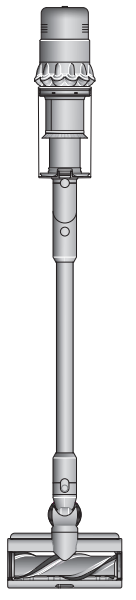
Introduction
The Dyson Gen5detect Cordless HEPA Vacuum Cleaner represents a cutting-edge advancement in home cleaning technology, combining powerful suction with intelligent detection features. Designed for modern households seeking a versatile, efficient cleaning solution, this cordless vacuum integrates Dyson’s unique Laser Slim Fluffy™ cleaner head that highlights microscopic dust on hard floors with a green laser, ensuring no dirt is missed.
Key benefits include its lightweight, cordless design for effortless maneuverability, a high-efficiency HEPA filtration system that traps 99.99% of allergens and bacteria as small as 0.3 microns, and an advanced LCD screen providing real-time performance feedback such as particle count, cleaning modes, and battery life. The vacuum suits busy families, allergy sufferers, and pet owners aiming for a healthier, dust-free home environment.
The Dyson Gen5detect Cordless HEPA Vacuum Cleaner is widely available through major electronics and home appliance retailers, as well as online marketplaces. The estimated price range typically falls between $650 and $750, reflecting its premium build and innovative features. Its combination of superior cleaning power, smart technology, and user-friendly design makes it a compelling choice for those seeking thorough and convenient home cleaning.
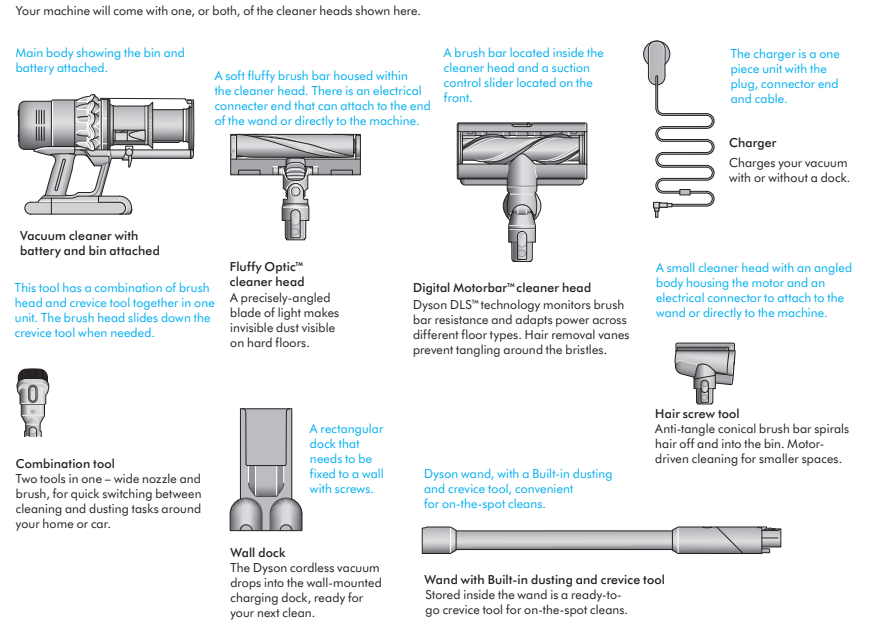
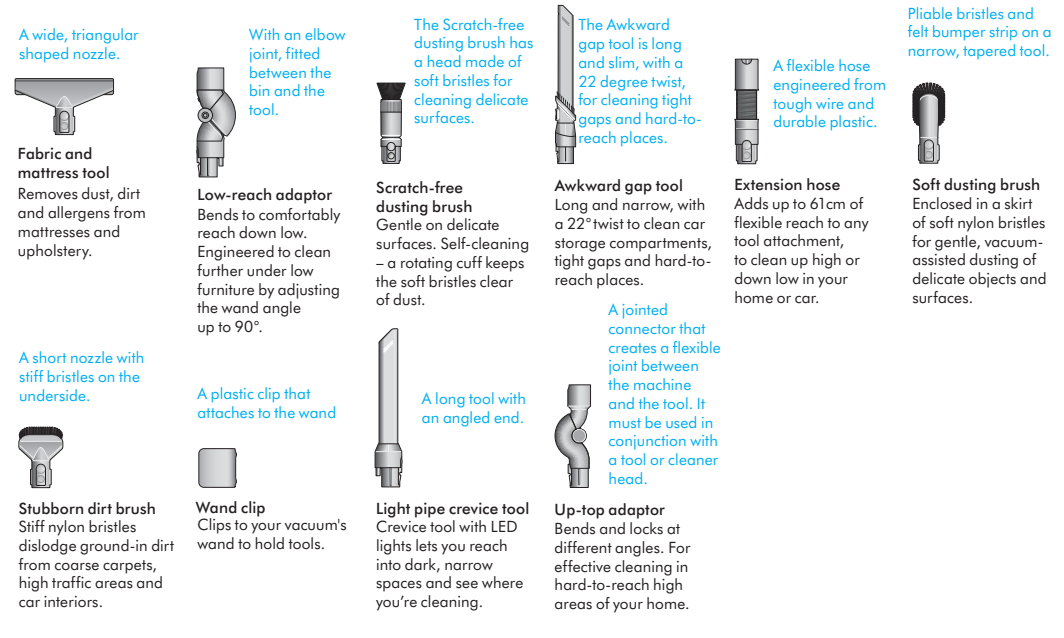
In the box
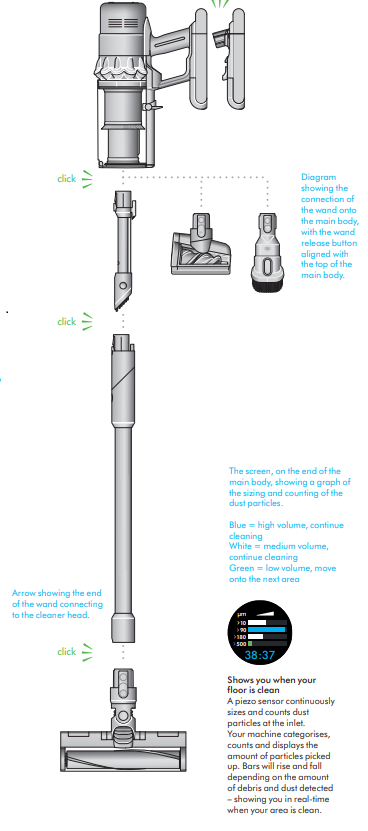
Your machine will come with one, or both, of the cleaner heads shown here.
Getting started
Power modes
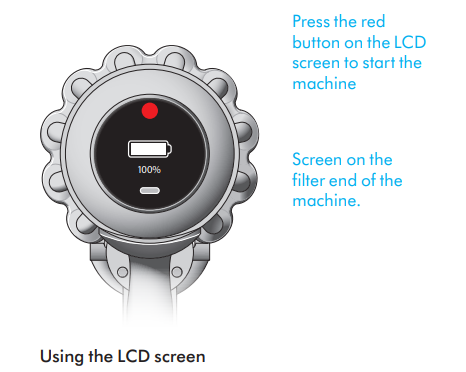
Your machine has three power modes for different tasks. Change power modes quickly using the silver Selection button.
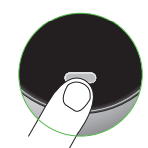
Press the selection button on the screen to move between power modes.
Eco mode
- Maximum run time for longer cleans all around your home.
- The screen shows the machine set to Eco mode with a full battery in green to show that this will give the longest battery life of the three modes.

Auto and Med mode

- Medium mode for the optimum balance of power and run time. Attach your cleaner head or Hair screw tool to activate Auto mode. Suction power automatically adapts to dust levels.
- Two screens showing the machine set to Auto mode and Med mode, with a blue battery showing that this will give a medium length of battery life.
Boost mode

- Designed for intensive spot cleaning of ground–in dirt.
- The screen shows the machine set to Boost mode with a red battery to show that this will give the shortest battery life of the three modes.
- Location of the Selection button on the screen on the filter end of the machine.
Specifications of the Dyson Gen5detect Cordless HEPA Vacuum Cleaner
- Motor: Dyson Hyperdymium™ motor spinning up to 125,000 rpm
- Battery Life: Up to 60 minutes of fade-free suction with an interchangeable battery system
- Filtration: Fully sealed 5-stage HEPA filtration capturing 99.99% of particles down to 0.3 microns
- Weight: Approximately 2.2 kg (lightweight and ergonomic)
- Cleaning Head: Laser Slim Fluffy™ cleaner head with green laser dust detection for hard floors
- LCD Screen: Displays real-time particle detection, battery life, cleaning mode, and maintenance alerts
- Noise Level: Optimized for quieter operation compared to previous models
- Accessories: Includes combination tool, crevice tool, mini motorized tool, and docking station
- Charging Time: Approximately 4.5 hours for a full charge
- Comparison: Compared to the Dyson V15 Detect, the Gen5detect offers improved battery life and enhanced laser detection technology, making it ideal for households focused on precision cleaning.
Dyson Gen5detect Cordless HEPA Vacuum Cleaner Troubleshooting Guide
- Loss of Suction: Check and clean the HEPA filter, clear any blockages in the wand or cleaner head, and empty the dust bin. Filters should be washed and dried for 24 hours before reuse.
- Laser Dust Detection Failure: Inspect the cleaner head for dust on the laser lens and clean gently. If the laser flickers or does not activate, the sensor or wiring might need professional repair.
- Error Codes & Alerts: Common alerts include “Battery empty,” “Airway obstructed,” “Filter needs cleaning,” and “Filter not sealed.” Follow LCD screen prompts to resolve these issues promptly.
- Preventive Measures: Regularly empty the bin in a ventilated area, clean the filter monthly, and store the vacuum in temperatures between 5°C and 35°C to avoid “High storage temperature” alerts.
- Warranty & Support: Dyson offers a standard 2-year warranty covering parts and labor. For help, contact Dyson customer support at 1-866-314-8881 or use the Live Chat on the Dyson website.
Pros & Cons of the Dyson Gen5detect Cordless HEPA Vacuum Cleaner
- Pros:
- Exceptional cleaning performance on hard floors and carpets thanks to laser dust detection.
- Highly efficient HEPA filtration is ideal for allergy sufferers.
- Lightweight and cordless design offers excellent maneuverability and ease of use.
- Clear LCD provides transparency on suction power, dirt detection, and battery life.
- Quiet operation compared to earlier Dyson models enhances user comfort.
- Cons:
- Premium price point may be prohibitive for budget-conscious buyers.
- Laser feature primarily benefits hard floor cleaning, less impactful on carpets.
- Requires regular filter washing and drying, which may be time-consuming.
- Battery life, while improved, may be insufficient for very large homes on a single charge.
- Value for Money: Offers a high-end cleaning experience with unique technology, but may be best suited to users prioritizing thorough hard floor cleaning and allergen control over budget constraints.
Customer Reviews and Feedback on the Dyson Gen5detect Cordless HEPA Vacuum Cleaner
Users praise the Dyson Gen5detect Cordless HEPA Vacuum Cleaner for its powerful suction and innovative laser dust detection, highlighting its effectiveness in revealing and removing fine dust particles. Many appreciate the lightweight design and intuitive LCD screen that enhances usability. Star ratings commonly range between 4 and 4.5 stars out of 5.
Frequent compliments focus on allergy relief benefits and the satisfaction of visibly cleaner floors. However, some reviews note issues such as occasional blockages causing suction drops and the need for regular maintenance of the HEPA filter. A few customers mention the premium price as a consideration,n but acknowledge the product's advanced features justify the cost.
Overall, purchase recommendations favor the vacuum for users with hard flooring and allergy concerns, while advising prospective buyers to follow maintenance guidelines carefully to avoid common issues.
Faqs
How do I set up the Dyson Gen5detect Cordless HEPA Vacuum Cleaner for first-time use?
What should I do if my Dyson Gen5detect Cordless HEPA Vacuum Cleaner is losing suction or pulsating?
How does the dust detect sensor on the Dyson Gen5detect improve cleaning performance?
Can I use the Dyson Gen5detect Cordless HEPA Vacuum Cleaner on all floor types?
How often should I clean the filter on the Dyson Gen5detect Cordless HEPA Vacuum Cleaner to maintain optimal performance?
What maintenance steps are recommended for the brush bar on the Dyson Gen5detect Cordless HEPA Vacuum Cleaner?
Is the battery on the Dyson Gen5detect Cordless HEPA Vacuum Cleaner swappable for extended cleaning sessions?
How do I hygienically empty the bin on the Dyson Gen5detect Cordless HEPA Vacuum Cleaner without touching dirt?
More dyson manuals
- Pair & Usage: Dyson 360 VisNav Robot Vacuum Cleaner User Manual
- Setup: Dyson Outsize Vacuum Cleaner User Manual
- Setup: Dyson WashG1 Wet Floor Cleaner User Manual
- How to Use: Dyson V7 Advanced Vacuum Cleaner User Manual
- Setup & Usage: Dyson Pure Cool Me Personal Purifier Fan User Manual
- Setup & Usage: Dyson V8 Vacuum Cleaner User Manual
Leave a Comment