
Setup & Usage: Dyson V8 Vacuum Cleaner User Manual
Content
Dyson V8 Vacuum Cleaner
Introduction
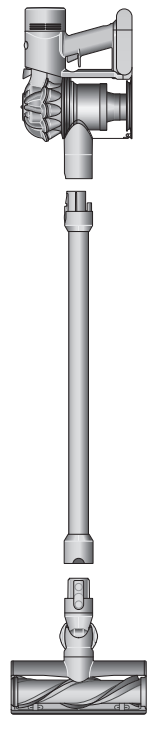
The Dyson V8 Vacuum Cleaner is a versatile, cordless stick vacuum designed to deliver powerful, fade-free suction for deep cleaning across your entire home. Engineered for pet owners, busy families, and anyone seeking a lightweight, high-performance cleaning solution, the Dyson V8 stands out with its advanced digital motor, whole-machine HEPA filtration, and hassle-free maintenance features.
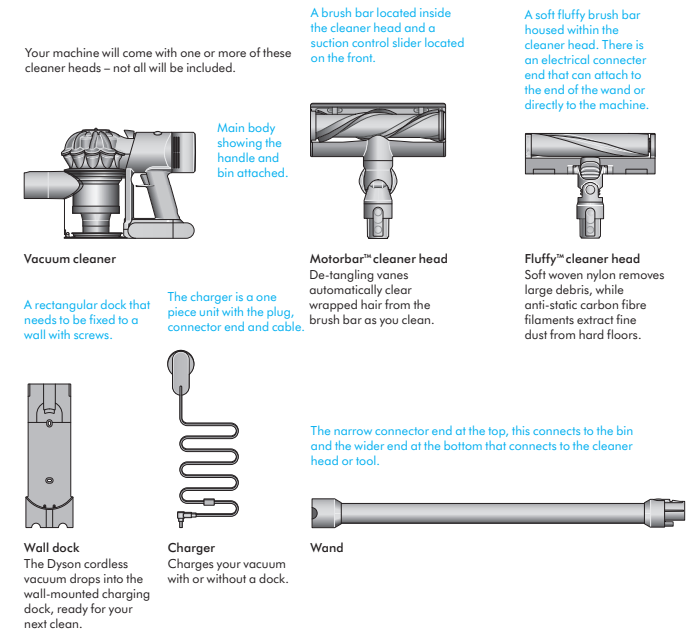
Key benefits include up to 40 minutes of fade-free run time, a hygienic no-touch bin emptying system, and seamless conversion from a full-size stick vacuum to a handheld device for cleaning cars, stairs, and upholstery. The Dyson V8 Vacuum Cleaner is particularly effective at removing pet hair, dust, and allergens, thanks to its Motorbar™ cleaner head with de-tangling vanes and anti-static carbon fiber filaments for hard floors.s
This model is ideal for users who want a premium cordless vacuum that’s easy to maneuver, store, and maintain. It’s suitable for daily use in apartments, houses with pets, and even for car detailing. The Dyson V8 is available in multiple configurations (Absolute, Animal, Motorhead), with prices typically ranging from $300 to $500 depending on the retailer and included accessories. It’s widely available through Dyson’s official website, major electronics retailers, and online marketplaces.
In the box
Getting started
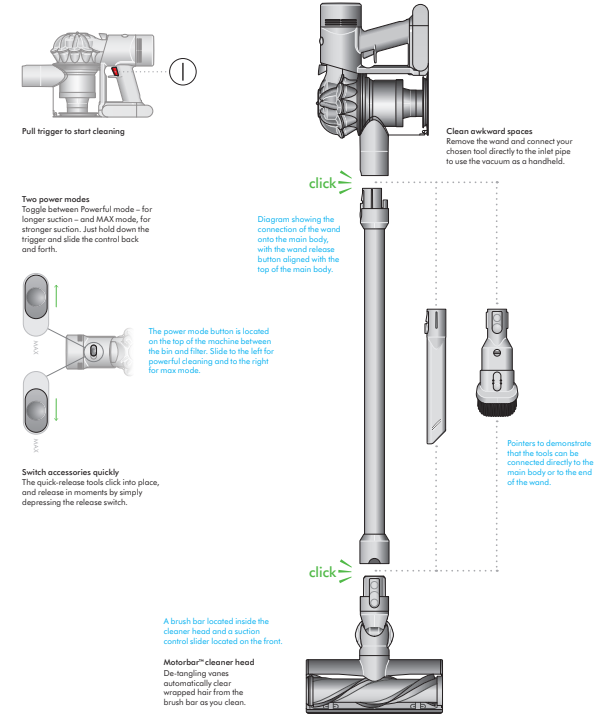
- Pull the trigger to start cleaning.
- Two power modes
Toggle between Powerful mode – for longer suction – and MAX mode, for stronger suction. Just hold down the trigger and slide the control back and forth. - The power mode button is located on the top of the machine between the bin and filter. Slide to the left for powerful cleaning and to the right for max mode.
- Switch accessories quickly
The quick-release tools click into place, and release in moments by simply depressing the release switch. - Diagram showing the connection of the wand to the main body, with the wand release button aligned with the top of the main body.
- Clean awkward spaces
Remove the wand and connect your chosen tool directly to the inlet pipe to use the vacuum as a handheld. - Pointers to demonstrate that the tools can be connected directly to the main body or to the end of the wand.
- A brush bar is located inside the cleaner head, and a suction control slider is located on the front.
- Motorbar™ cleaner head
De-tangling vanes automatically clear wrapped hair from the brush bar as you clean.
Dyson V8 Vacuum Cleaner: Detailed Specifications
- Type: Cordless stick vacuum (converts to handheld)
- Suction Power: 115 Air Watts (fade-free, no loss of suction)
- Motor: Dyson digital motor V8 (up to 110,000 RPM)
- Battery: Advanced six-cell lithium-ion; up to 40 minutes run time (5-hour charge time)[
- Weight: Approx. 5.6 lbs (lightweight and ergonomic)
- Dust Bin Capacity: 0.14 gallons (0.53 liters)
- Filtration: Whole-machine HEPA filtration; captures 99.99% of particles as small as 0.3 microns (pet dander, allergens)
- Cyclone Technology: 15 cyclones for powerful separation and no loss of suction
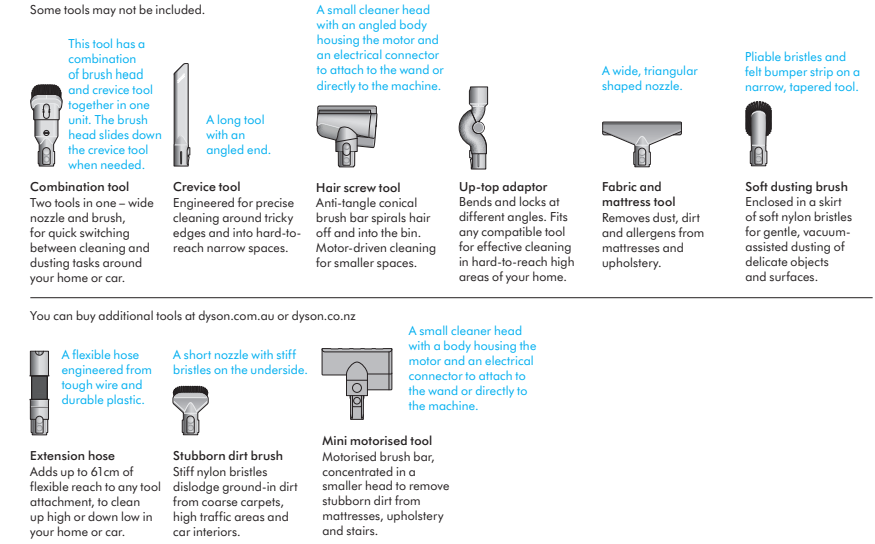
- Attachments: Motorbar™ cleaner head (with de-tangling vanes), crevice tool, combination tool, dusting brush, wall-mounted docking station
- Dimensions: 49.45" (height) x 8.7" (length) x 9.84" (width)
- Warranty: 2-year limited warranty (varies by region)
The Dyson V8 Vacuum Cleaner outperforms many mid-range cordless vacuums with its superior suction, advanced filtration, and robust build. While pricier than entry-level models, it offers features typically found in Dyson’s top-tier products, such as the V15 and Gen 5, but at a more accessible price point
Dyson V8 Vacuum Cleaner: Troubleshooting Common Issues
Even the best cordless vacuums can encounter issues. Here’s how to troubleshoot common problems with your Dyson V8 Vacuum Cleaner:
Common Problems and Solutions
- Loss of Suction: Check for blockages in the hose, wand, or cleaner head. Empty the dust bin and clean the filters regularly. Ensure the bin is properly seated after emptying
- Battery Not Charging: Confirm the charger is properly connected. If the battery still doesn’t charge, try a different power outlet. Allow up to 5 hours for a full charge
- Brush Bar Not Spinning: Remove the cleaner head and clear any tangled hair or debris. Ensure the head is securely attached to the wand.
- Error Codes: If the vacuum displays an error code (e.g., flashing blue light), consult the user manual or Dyson’s online support for specific troubleshooting steps.
- Strange Noises: Inspect for foreign objects in the brush bar or motor. Turn off and unplug the vacuum before inspecting.
Preventive Measures
- Regularly clean filters and empty the bin after each use.
- Avoid vacuuming large debris that could clog the system.
- Store the vacuum on its wall-mounted dock to keep it charged and ready.
Warranty and Support
The Dyson V8 comes with a 2-year limited warranty. For additional support, visit Dyson’s official website or contact their customer service. Lifetime help is available for all registered owners
Dyson V8 Vacuum Cleaner: Pros & Cons
Pros
- Powerful, Fade-Free Suction: 115 Air Watts and advanced cyclone technology ensure consistent performance on all surfaces
- Long Battery Life: Up to 40 minutes of cordless cleaning per charge, ideal for larger homes
- HEPA Filtration: Captures 99.99% of microscopic particles, making it excellent for allergy sufferers and pet owners
- Versatile Attachments: Converts easily to a handheld vacuum for cleaning cars, stairs, and upholstery
- Hygienic Bin Emptying: No-touch ejection mechanism keeps hands clean
- Lightweight and Ergonomic: Easy to maneuver, even for extended cleaning sessions
Cons
- Premium Price: More expensive than many cordless vacuums, though it offers better value than higher-end Dyson models
- Charge Time: Requires up to 5 hours for a full charge, which may be inconvenient for back-to-back cleaning sessions
- Bin Capacity: Smaller than some competitors, requiring more frequent emptying during heavy use
- No Smart Features: Lacks advanced connectivity or app controls found in newer models.
Compared to alternatives, the Dyson V8 Vacuum Cleaner offers a compelling balance of power, filtration, and convenience, though budget-conscious buyers may find cheaper options with fewer features.
Dyson V8 Vacuum Cleaner: Customer Reviews and Recommendations
User feedback for the Dyson V8 Vacuum Cleaner is overwhelmingly positive, with many highlighting its suction power, ease of use, and effectiveness on both carpets and hard floors. Pet owners especially appreciate the de-tangling brush bar and HEPA filtration, which help manage pet hair and allergens.
Common praises include the lightweight design, versatile attachments, and the hygienic bin-emptying mechanism. However, some users note the relatively high price and the need to empty the bin frequently during heavy cleaning sessions. A few have mentioned that the battery life, while good, may not be sufficient for very large homes without recharging.
Star ratings typically range from 4 to 5 out of 5, with most customers recommending the Dyson V8 for its reliability and cleaning performance. For those seeking a premium cordless vacuum with strong filtration and pet-friendly features, the Dyson V8 remains a top choice in 2025
If you value deep cleaning, allergen control, and versatile use cases, the Dyson V8 Vacuum Cleaner is a worthwhile investment. For larger homes or those wanting the latest smart features, consider newer Dyson models, but for most households, the V8 delivers excellent value and performance.
Faqs
How do I set up my Dyson V8 Vacuum Cleaner for first-time use?
What should I do if my Dyson V8 Vacuum Cleaner loses suction or has weak suction?
Why does my Dyson V8 Vacuum Cleaner pulse or shut off during use?
How often should I clean and maintain the filter on my Dyson V8 Vacuum Cleaner?
Can I use my Dyson V8 Vacuum Cleaner on all floor types, including carpets and hardwood?
What should I do if my Dyson V8 Vacuum Cleaner is not charging and shows a red or flashing light?
How do I replace the battery in my Dyson V8 Vacuum Cleaner to restore performance?
How can I optimize the runtime and suction of my Dyson V8 Vacuum Cleaner during cleaning?
More dyson manuals
- How to Use: Dyson V7 Advanced Vacuum Cleaner User Manual
- Setup: Dyson V11 Vaccum Cleaner User Manual
- Setup: Dyson Outsize Vacuum Cleaner User Manual
- How to Use: Dyson V12 Detect Slim Vacuum Cleaner Instruction Manual
- Setup: Dyson Gen5detect Cordless HEPA Vacuum Cleaner User Manual
- Setup & Usage: Dyson V15 Detect Vacuum Cleaner User Manual
Leave a Comment