
How to Use: Dyson V12 Detect Slim Vacuum Cleaner Instruction Manual
Content
Dyson V12 Detect Slim Vacuum Cleaner
Introduction
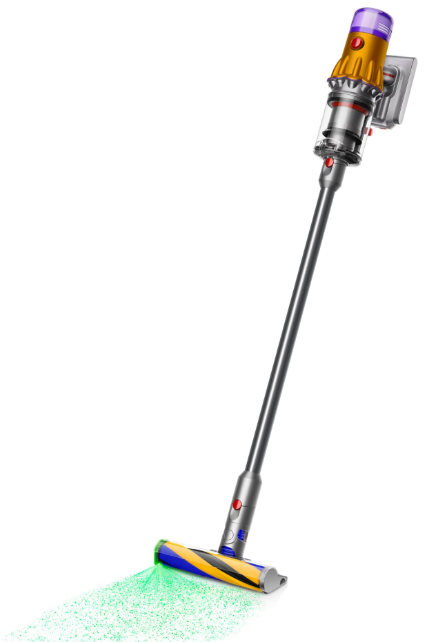
The Dyson V12 Detect Slim Vacuum Cleaner represents a breakthrough in intelligent cordless cleaning technology. Engineered to be Dyson's lightest intelligent cordless vacuum, it combines powerful suction, advanced particle detection, and a sleek lightweight design to deliver exceptional cleaning performance across your entire home. The vacuum features a unique laser detection system that reveals invisible dust on hard floors, ensuring no dirt goes unnoticed, while its intelligent motor automatically adjusts suction power based on the debris detected, optimizing cleaning efficiency and battery life.
Ideal for homeowners seeking a versatile, high-performance vacuum that excels on both hard floors and carpets, the Dyson V12 Detect Slim is especially suited for allergy sufferers due to its whole-machine HEPA filtration, which traps microscopic particles. Its cordless, handheld convertible design allows easy cleaning of floors, upholstery, mattresses, and tight spaces. With an estimated price range typically between $600 to $700 and wide availability through major retailers, this vacuum appeals to tech-savvy consumers who value convenience, power, and innovative features.
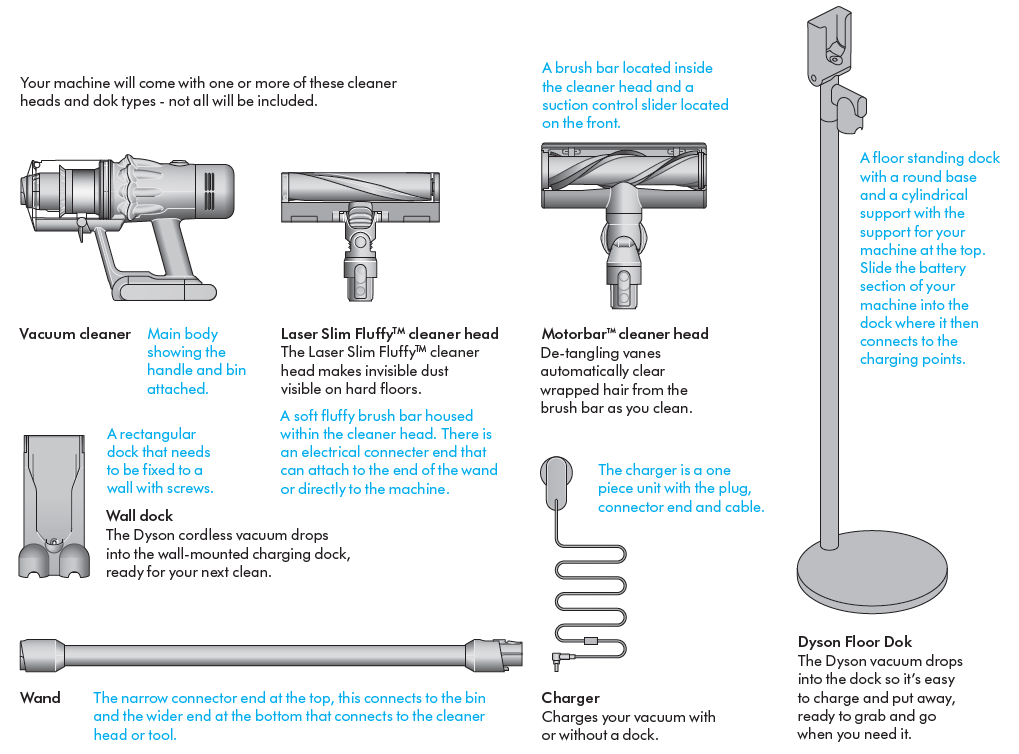
In the box
Specifications of the Dyson V12 Detect Slim Vacuum Cleaner
- Motor: Dyson Hyperdymium™ digital motor spinning up to 125,000 rpm
- Suction Power: 150 Air Watts of fade-free suction
- Runtime: Up to 60 minutes on a single charge (varies by mode and attachments)
- Weight: Approximately 5.2 lbs (2.36 kg), making it Dyson’s lightest intelligent cordless vacuum
- Dust Bin Capacity: 0.1 gallons (0.38 liters)
- Cleaner Heads Included: Motorbar™ cleaner head for carpets and hard floors, Laser Fluffy head that uses laser illumination to detect fine dust on hard floors
- Filtration: Whole-machine HEPA filtration capturing particles down to 0.3 microns
- Display: LCD screen shows real-time battery life, power modes, particle count, and maintenance alerts
- Auto Mode: Piezo particle sensor adjusts suction automatically based on detected debris
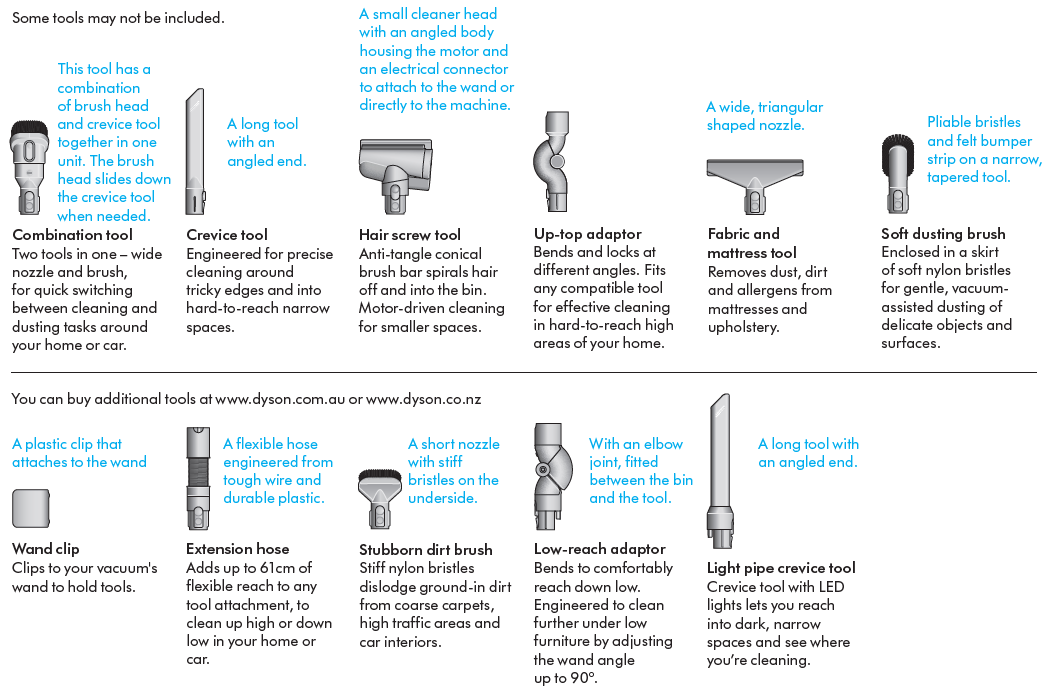
- Accessories: Hair screw tool, crevice tool, combination tool, wand clip, docking station, and charger
- Warranty: 2-year manufacturer warranty with lifetime Dyson support
Compared to similar Dyson models like the V15 Detect, the V12 Detect Slim is lighter and more maneuverable but has a smaller dustbin and slightly less suction power. Its unique laser dust detection and particle counter set it apart from competitors, offering intelligent cleaning with optimized battery usage.
Caring for your floors
- Check that the underside of the cleaner head or tool is clean and free from any objects that may cause damage.
- Before vacuuming your flooring, rugs, and carpets, check the manufacturer’s recommended cleaning instructions.
- The brush bar on your machine can damage certain carpet types and floors. Some carpets will fuzz if a rotating brush bar is used when vacuuming. If this happens, we recommend vacuuming without the motorised floor tool and consulting with your flooring manufacturer.
Charging your machine
- It’s important to fully charge your new machine before using it for the first time, and after every clean. This is because the battery and monitoring system’s algorithm ‘learns’ over time, and fully charging your machine helps it to more accurately calculate and display remaining run time.
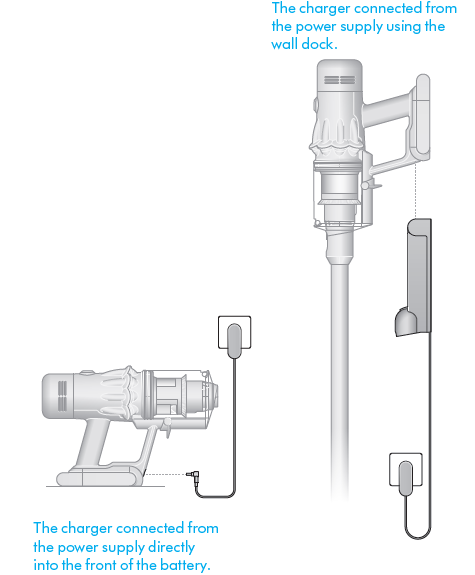
- Connect to the charger either directly or in the dock.
- The blue LEDs on either side of the battery will flash during charging. When the battery is fully charged, both LEDs will light for 5 seconds.
- Your battery is fully charged when the display shows 100%.
- Your machine won’t operate or charge if the ambient temperature is below 5°C (41°F). This is designed to protect both the motor and battery.
Changing your click-in battery
- If you have additional click-in batteries, we recommend that you alternate the batteries to maintain even performance.
- Additional click-in batteries available to purchase separately
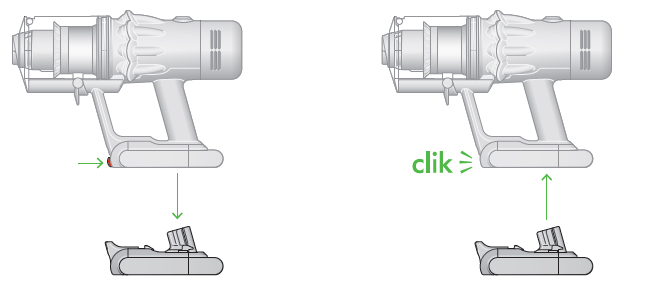
- Removing your battery
- Push the Battery release button on the handle and slide the battery off your machine.
- Charge the battery.
- Refitting your battery
- Align your battery with the handle and slide it in. Push firmly until it clicks into place.
Arrows showing the location of the Battery release button and the battery coming off the handle when the button is pressed. The battery is then shown being replaced on the base of the handle, clicking into place.
Cleaning your tools
- Don’t put any part of your machine in a dishwasher or use detergents, polishes or air fresheners.
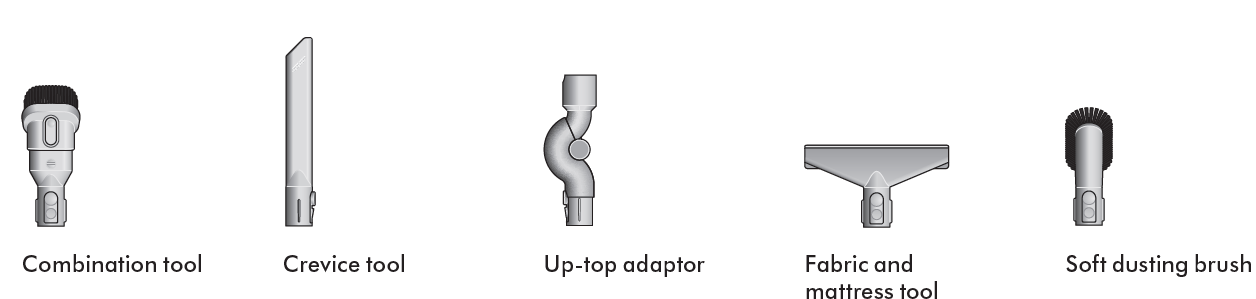
- Wipe with a damp, lint-free cloth, without touching the connector end. Make sure your tools are completely dry before using.
- Some tools may not be included in the box.
Looking after your machine
To always get the best performance from your machine, it’s important to clean it regularly and check for blockages.
Look after your machine
- If your machine is dusty, wipe with a damp lint-free cloth.
- Check for blockages in the cleaner head, tools and main body of your machine.
- Wash your filter regularly and leave to dry completely.
- Don’t use detergents or polishes to clean your machine.
Look after your battery
- To get the best performance and life from your battery, use Eco or Auto/Med mode.
- Your machine won’t operate or charge if the ambient temperature is below 5°C (41°F). This is designed to protect both the motor and battery.
Your serial numbers
- You can find your serial numbers on your machine, battery and charger.
- Use your serial number to register.
- For more information and support videos for your machine go online: www.dyson.com.au/support or www.dyson.co.nz/support
Troubleshooting the Dyson V12 Detect Slim Vacuum Cleaner
- Problem: Vacuum loses suction - Check and clean the filter monthly as indicated by the LCD maintenance alert. Ensure the dust bin is not full and is properly attached.
- Error Codes: LCD screen provides alerts for filter cleaning and blockages. Follow on-screen instructions to resolve.
- Problem: Brush bar not spinning - Clear any hair or debris wrapped around the Motorbar™ cleaner head or Hair screw tool.
- Battery issues: The battery detaches easily for replacement. If runtime decreases significantly, consider replacing the battery through Dyson support.
- Preventive Measures: Regularly empty dust bin, clean the filter monthly, and avoid vacuuming up large debris that could clog the system.
For persistent issues, Dyson offers 24/7 customer support and authorized service centers. Contact Dyson support via their official website or included warranty documentation for assistance and repairs.
Pros & Cons of the Dyson V12 Detect Slim Vacuum Cleaner
- Pros:
- Ultra-lightweight design (5.2 lbs) enhances portability and ease of use throughout the home.
- Laser dust detection reveals invisible fine dust on hard floors for thorough cleaning.
- Auto mode intelligently adjusts suction based on debris size, optimizing battery life and cleaning efficiency.
- Whole-machine HEPA filtration traps allergens and microscopic particles, ideal for allergy sufferers.
- LCD display provides transparent real-time information on battery life, power mode, and particle count.
- Cons:
- Smaller dust bin capacity (0.38L) requires more frequent emptying compared to some competitors.
- Attachments are not compatible with other Dyson models, limiting accessory interchangeability.
- While powerful, it is less effective on dense carpeting compared to higher-end models like Dyson V15.
- Price point is premium, which may be high for budget-conscious consumers.
Overall, the Dyson V12 Detect Slim offers excellent value for money in the mid-range cordless vacuum segment, combining advanced technology with convenient usability. It competes well with alternatives like the Dyson V11 and V10 but stands out with its laser dust detection and particle sensor features.
Customer Reviews of the Dyson V12 Detect Slim Vacuum Cleaner
Users consistently praise the Dyson V12 Detect Slim for its lightweight design, ease of maneuvering, and the innovative laser dust detection that makes invisible dust visible during cleaning. Many highlight the vacuum’s ability to maintain suction power and the helpful LCD display showing battery and particle information. Common positive remarks include its effective pet hair removal and allergy-friendly HEPA filtration.
Frequently mentioned complaints include the small dustbin size requiring frequent emptying and the incompatibility of accessories with older Dyson models, which can limit flexibility for some users. Some reviewers note that while it performs excellently on hard floors and light carpets, it may struggle slightly on thick carpets compared to higher-end Dyson models.
Overall, customers rate the Dyson V12 Detect Slim around 4.5 out of 5 stars, recommending it for those seeking a smart, lightweight cordless vacuum with advanced dust detection technology and strong all-around cleaning performance.
Faqs
How do I set up the dyson V12 Detect Slim Vacuum Cleaner for first-time use?
What should I do if my dyson V12 Detect Slim Vacuum Cleaner is losing suction?
How can I clear blockages in the dyson V12 Detect Slim Vacuum Cleaner safely?
What are the key features of the dyson V12 Detect Slim Vacuum Cleaner that enhance cleaning performance?
Can I use different cleaning attachments with my dyson V12 Detect Slim Vacuum Cleaner?
How often should I clean and maintain the filter of the dyson V12 Detect Slim Vacuum Cleaner?
What battery care tips help maximize the runtime of the dyson V12 Detect Slim Vacuum Cleaner?
What should I do if the dyson V12 Detect Slim Vacuum Cleaner shows a blockage or filter alert?
More dyson manuals
- Setup: Dyson V11 Vaccum Cleaner User Manual
- Setup & Usage: Dyson V15 Detect Vacuum Cleaner User Manual
- Setup & Usage: Dyson V8 Vacuum Cleaner User Manual
- How to Operate & Assemble: Dyson DC 40 Upright Vacuum Cleaner Manual
- How to Use: Dyson V7 Advanced Vacuum Cleaner User Manual
- Setup: Dyson Outsize Vacuum Cleaner User Manual
Leave a Comment