
Setup & Usage: Dyson V15 Detect Vacuum Cleaner User Manual
Content
Dyson V15 Detect Vacuum Cleaner
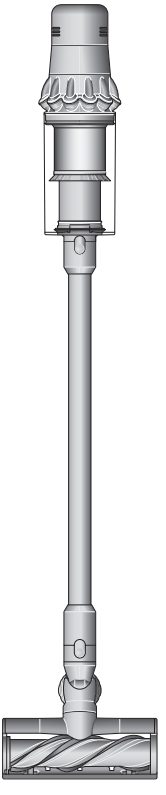
Introduction
The Dyson V15 Detect Vacuum Cleaner is a premium cordless stick vacuum designed for consumers seeking advanced cleaning technology combined with ease of use. Engineered to deliver powerful suction and innovative features, it targets homeowners who demand deep cleaning performance across various floor types and environments, including homes with pets and allergy sufferers.
This model stands out by incorporating a unique laser technology—called the Fluffy Optic™ cleaner head—that reveals microscopic dust invisible to the naked eye, ensuring no dirt is missed on hard floors. The vacuum intelligently adapts suction power based on detected dust levels and floor surfaces, maximizing cleaning efficiency and battery life. With a fully sealed HEPA filtration system, it captures 99.99% of particles as small as 0.3 microns, promoting cleaner indoor air quality.
Ideal for deep cleaning carpets, hard floors, and tight spaces, the Dyson V15 Detect suits busy households, pet owners, and allergy-conscious users. It offers up to 60 minutes of runtime per charge, with a removable lithium-ion battery for extended cleaning sessions. Available globally, the vacuum is typically priced around SAR 2,999, reflecting its flagship status within Dyson’s cordless lineup. Its combination of smart sensors, powerful suction (up to 240 Air Watts), and ergonomic design makes it a compelling choice for those wanting both thoroughness and convenience in their cleaning routine.
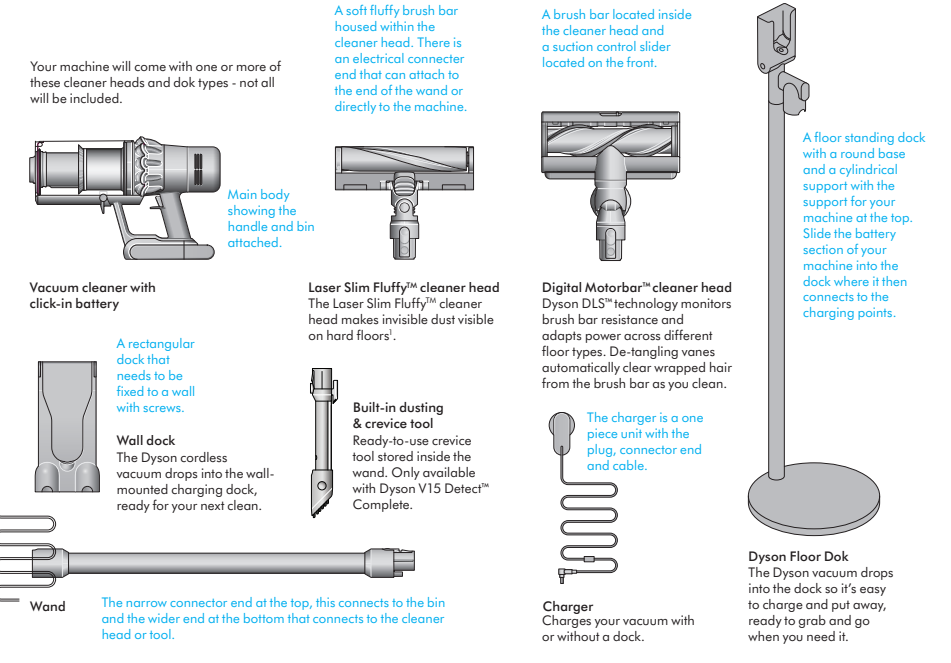
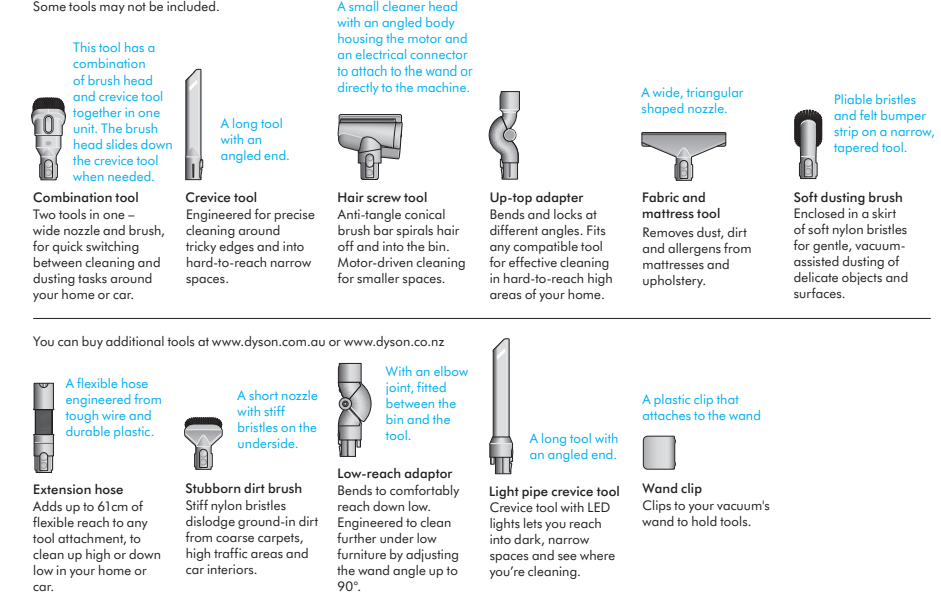
In the box
Specifications of Dyson V15 Detect Vacuum Cleaner
- Motor: Dyson Hyperdymium™ digital motor spinning up to 125,000 rpm
- Suction Power: Up to 240 Air Watts (AW) of fade-free suction
- Runtime: Up to 60 minutes on a single charge with a removable lithium-ion battery
- Filtration: Fully sealed whole-machine HEPA filtration capturing 99.99% of particles as small as 0.3 microns
- Dust Bin Capacity: Approximately 0.76 liters (0.8 quarts)
- Weight: Around 6.8 lbs (3.1 kg) for ease of maneuverability
- Key Features:
- Fluffy Optic™ cleaner head with laser technology reveals invisible dust on hard floors
- Piezo sensor counts dust particles 15,000 times per second and adjusts suction accordingly
- Multiple power modes: Eco, Auto, and Boost for optimized cleaning and battery management
- Anti-tangle technology for hair removal in motorized brush heads
- Onboard LCD screen displays real-time dust information, run time, and maintenance alerts
- Transformable into handheld mode with click-in tools for versatile cleaning
- Accessories Included: Laser Slim Fluffy head, Hair screw tool, Digital Motorbar™ cleaner head, Combination tool, Crevice tool, Wall-mounted dock, Charger
Comparison: Compared to previous Dyson models (e.g., V11), the V15 Detect offers enhanced suction, advanced dust detection, and improved filtration, placing it among the most intelligent cordless vacuums available today.
Getting started
Dyson V15 Detect™ Complete
Power modes

- Your machine has three power modes for different tasks. Change power modes quickly using a single button.
- The screen shows the machine set to Eco mode with a full battery in green to show that this will give the longest battery life of the three modes.
Eco mode

- Maximum run time for longer cleans all around your home.
- Two screens showing the machine set to Auto mode and Med mode, with a blue battery showing that this will give a medium length of battery life.
Auto and Med mode

- The optimum balance of power and run time. Attach your cleaner head or Hair screw tool to activate Auto mode. Suction power automatically adapts to dust levels.
- The screenshow the machine set to Boost mode with a red battery to show that this will give the shortest battery life of the three modes.
Boost mode

Designed for intensive spot cleaning of ground–in dirt.
Turn your laser on and off
- Turn your laser on or off with the slider switch on your cleaner head.
- Class 1 laser product – safe for pets and humans. Avoid looking directly into the beam.
The screen, the end of the main body, shows a graph of the sizing and counting of the dust particles.

- Measures microscopic dust particles. A piezo sensor continuously sizes and counts dust particles at the inlet. Attach your cleaner head or Hai screw tool and use in Auto mode to automatically increase suction power when needed.
- Location of the Selection button on the screen on the filter end of the machine.
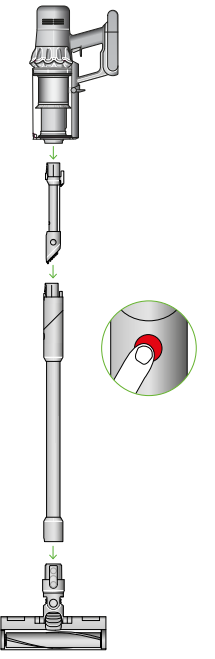
- Diagram showing the connection of the wand otothe main body, with the wand release button aligned with the top of the main body. Built-in dusting and crevice tool. Stored inside your wand for on-the-spot cleans
Dyson V15™ Detect Absolute
Power modes

Your machine has three power modes for different tasks. Change power modes quickly using a single button.
- The screenshowsg the machine set to Eco mode with a full battery in green to show that this will give the longest battery life of the three modes.
Eco mode

Maximum run time for longer cleans all around your home.
- Two screens showing the machine set to Auto mode and Med mode, with a blue battery showing that this will give a medium length of battery life.
Auto and Med mode

The optimum balance of power and run time. Attach your cleaner head or Hair screw tool to activate Auto mode. Suction power automatically adapts to dust levels.
- The screenshowsg the machine set to Boost mode with a red battery to show that this will give the shortest battery life of the three modes.
Boost mode

- Designed for intensive spot cleaning of ground–in dirt.
- Turn your laser on and off
- Turn your laser on or off with the slider switch on your cleaner head.
- Class 1 laser product – safe for pets and humans. Avoid looking directly into the beam.
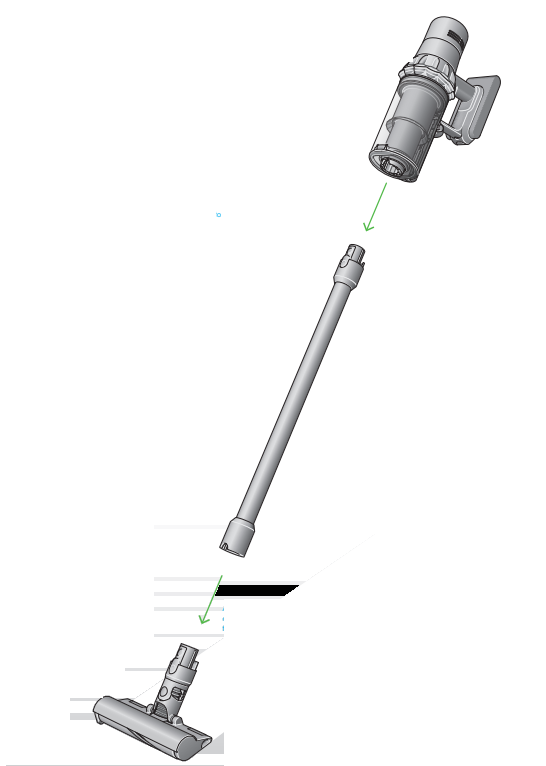
- AAn arrowshowing the end of the wand connecting to the cleaner head.
- Diagram showing the connection of the wand to the main body, with the wand release button aligned with the top of the main body.
The screen, at the end of the main body, shows a graph of the sizing and counting of the dust particles.
Measures microscopic dust particles. A piezo sensor continuously sizes and counts dust particles at the inlet. Attach your cleaner head or Hair screw tool and use in Auto mode to automatically increase suction power when needed.
Troubleshooting Dyson V15 Detect Vacuum Cleaner
- Vacuum won’t turn on: Ensure battery is fully charged and properly connected. Press the trigger firmly and check for battery lock indicators.
- Reduced suction: Check for blockages in the wand, brush head, or bin inlet. Empty the dust bin if full. Clean or replace filters as needed.
- Brush bar not spinning: Remove debris or tangled hair fromthe brush bar. Reset the vacuum by turning it off and on again.
- Error codes: Refer to the LCD screen for maintenance alerts, such as filter cleaning reminders or bin full warnings. Follow on-screen instructions.
- Battery drains quickly: Use Eco mode for longer runtime. Replacethe battery if performance degrades significantly after prolonged use.
- Preventive measures: Regularly clean filters, avoid vacuuming liquids, and keep brush heads free of hair buildup.
The Dyson V15 Detect is covered by a 2-year warranty, including parts and labor. For support, customers can contact Dyson customer service via their official website or authorized service centers.
Pros & Cons of Dyson V15 Detect Vacuum Cleaner
- Pros:
- Exceptional suction power (240 AW) delivers deep cleaning on carpets and hard floors
- Laser Slim Fluffy head reveals hidden dust for thorough cleaning
- Advanced sensors optimize suction and provide scientific proof of cleaning progress
- Fully sealed HEPA filtration benefits allergy and asthma sufferers
- Up to 60 minutes of runtime with a removable battery for extended use
- Wide range of versatile tools suitable for multiple surfaces and tight spaces
- Cons:
- A higher price point may be prohibitive for budget-conscious buyers
- Laser feature mostly benefits hard floor cleaning; less useful on carpets
- The vacuum can feel slightly heavy during extended overhead or handheld use
- Trigger-style power button may require continuous pressing unless locked on
Compared to competitors, the Dyson V15 Detect offers superior technology and performance but at a premium cost. It is best suited for those who value cutting-edge features and allergy filtration.
Customer Reviews of Dyson V15 Detect Vacuum Cleaner
Users consistently praise the Dyson V15 Detect Vacuum Cleaner for its powerful suction and the innovative laser dust detection that helps uncover hidden dirt on hard floors. Many highlight the excellent filtration system and ease of switching between floor types as key benefits. The LCD providing real-time dust analysis is frequently mentioned as a helpful feature.
Common complaints include the vacuum’s weight during extended handheld use and the need to hold the trigger continuously unless locked on in some models. Some users find the laser head more of a novelty than a necessity, especially for carpeted areas.
Overall, the vacuum holds a typical rating of 4.5 out of 5 stars across major retailers, with customers recommending it for homes with pets, allergy sufferers, and those wanting a thorough clean. The investment is justified by long-term performance and convenience.
Faqs
How do I set up my dyson V15 Detect Vacuum Cleaner for first-time use?
What should I do if my dyson V15 Detect Vacuum Cleaner stops working or shows flashing lights?
How can I clean and maintain the filter of my dyson V15 Detect Vacuum Cleaner?
What are the unique features of the dyson V15 Detect Vacuum Cleaner that optimize cleaning performance?
Can I use the dyson V15 Detect Vacuum Cleaner on all floor types and with various attachments?
How do I troubleshoot if my dyson V15 Detect Vacuum Cleaner runs briefly then stops with no indicator lights?
What is the best way to optimize battery life and run time on my dyson V15 Detect Vacuum Cleaner?
How often should I empty the dust bin of my dyson V15 Detect Vacuum Cleaner to maintain optimal suction?
More dyson manuals
- How to Use: Dyson V12 Detect Slim Vacuum Cleaner Instruction Manual
- How to Operate & Assemble: Dyson DC 40 Upright Vacuum Cleaner Manual
- Setup: Dyson V11 Vaccum Cleaner User Manual
- Setup & Usage: Dyson V8 Vacuum Cleaner User Manual
- How to Use: Dyson V7 Advanced Vacuum Cleaner User Manual
- Setup: Dyson Outsize Vacuum Cleaner User Manual
Leave a Comment