
Setup: Dyson V11 Vaccum Cleaner User Manual
Content
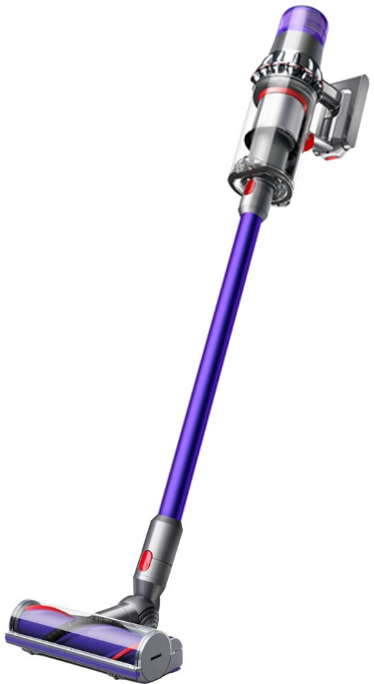
Dyson V11 Vacuum Cleaner
Introduction
The Dyson V11 Vacuum Cleaner represents a cutting-edge cordless cleaning solution designed for efficient, deep cleaning across various floor types. Equipped with Dyson’s powerful Hyperdymium™ digital motor spinning at up to 125,000rpm, the V11 delivers 185 air watts of fade-free suction, making it one of the strongest cordless vacuums on the market. Its intelligent design automatically adapts suction power to different surfaces, ensuring optimal performance whether cleaning carpets, hard floors, or upholstery.
This vacuum is ideal for households with pets or allergy sufferers, thanks to its advanced whole-machine filtration system that captures 99.99% of microscopic particles and allergens down to 0.3 microns. The integrated LCD screen enhances the user experience by displaying real-time information such as remaining battery life, cleaning mode, and maintenance alerts.
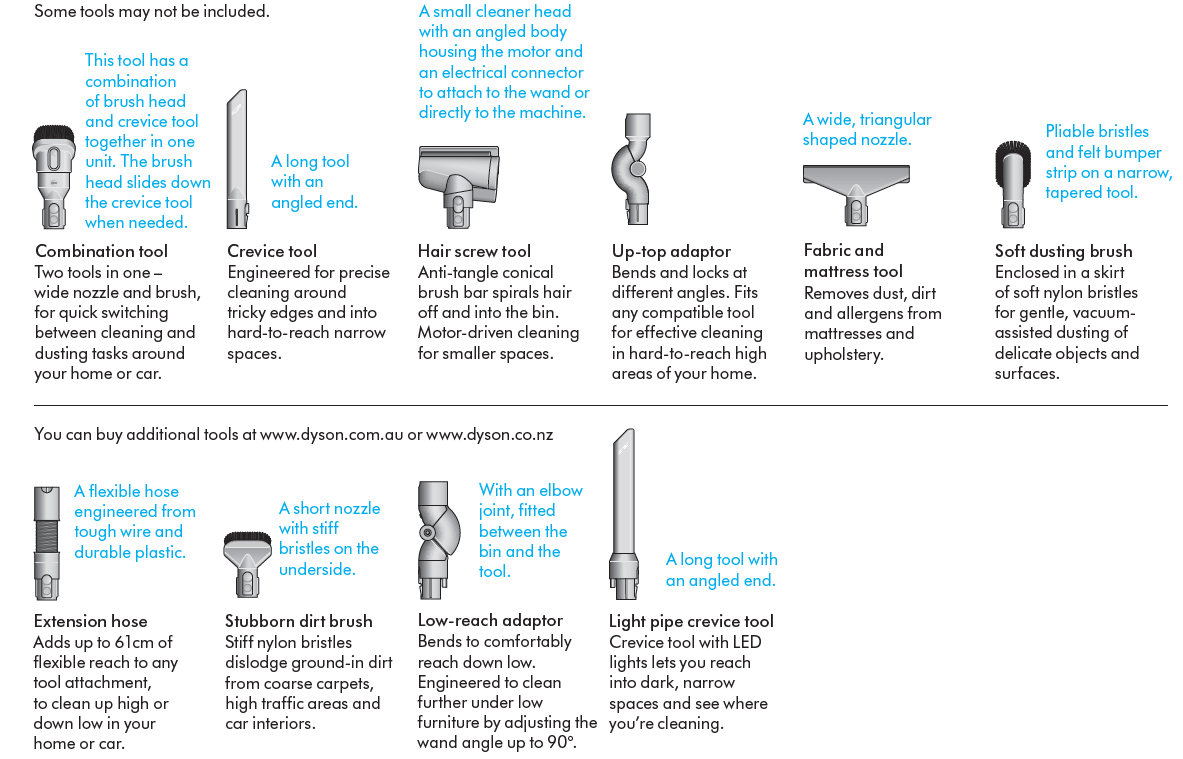
With up to 60 minutes of runtime on a single charge and a lightweight, versatile design that easily converts into a handheld unit, the Dyson V11 suits busy homes requiring quick yet thorough cleaning. The vacuum includes multiple specialized tools for tackling pet hair, narrow crevices, and delicate surfaces.
Available globally through Dyson’s official website and major retailers, the Dyson V11 is priced in the mid to high range for cordless vacuums, typically around $600 to $700, reflecting its premium technology and durability.
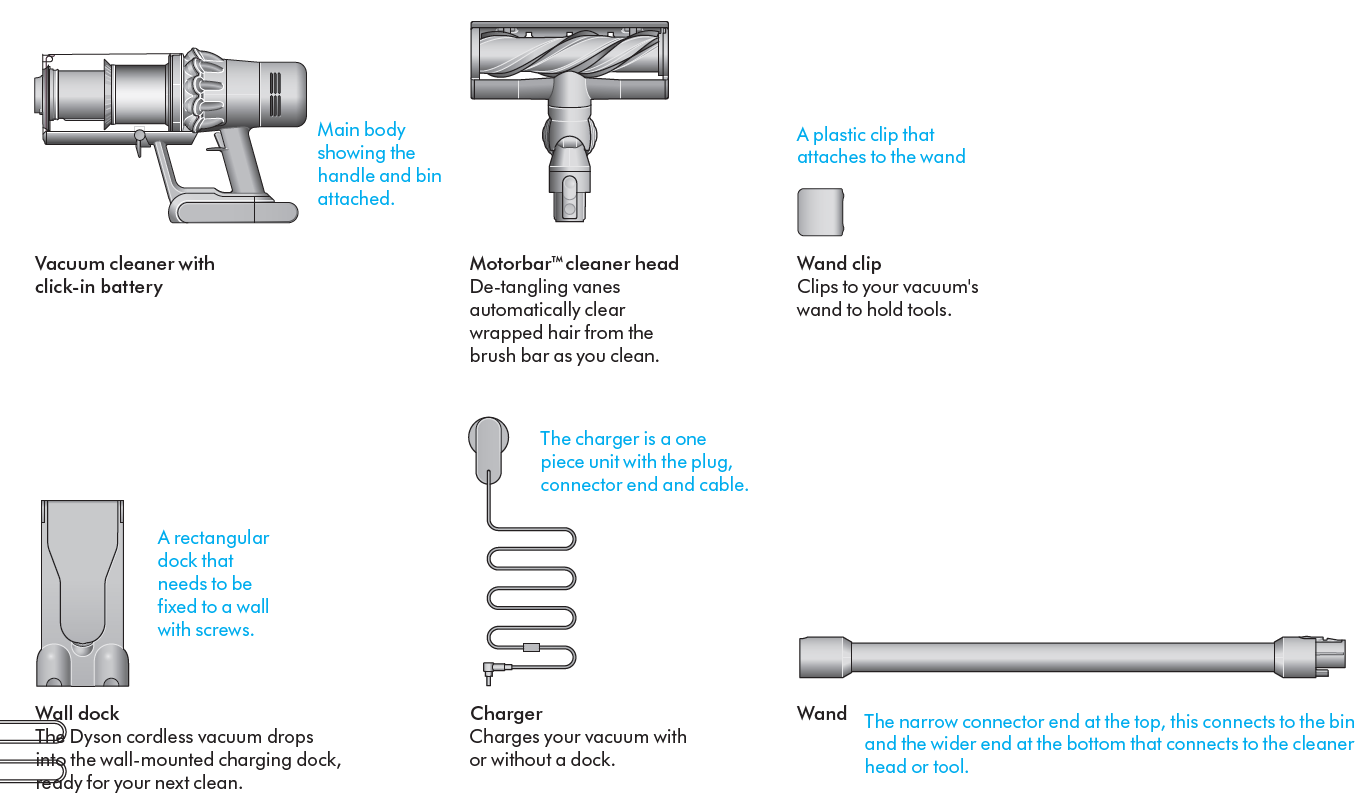
In the box
Specifications of the Dyson V11 Vacuum Cleaner
- Motor: Dyson Hyperdymium™ digital motor, up to 125,000 rpm
- Suction Power: 185 Air Watts (Powerful and Boost modes)
- Run Time: Up to 60 minutes (Eco mode, without motorized floorhead)
- Charge Time: Approximately 4.5 hours
- Filtration: Advanced whole-machine 5-stage HEPA filtration, captures 99.99% of particles as small as 0.3 microns
- Bin Volume: 0.2 gallons (0.757 liters)
- Weight: Around 6.5 to 6.6 pounds
- Dimensions: Length ~49.4 in, Width ~9.8 in, Height ~10.3–10.5 in
- Cleaner Head: Motorbar™ cleaner head with 43 de-tangling vanes and 7,815 stiff nylon bristles
Compared to similar models like the Dyson V8, the V11 offers 60% more suction power and an extended runtime, making it suitable for larger homes and tougher cleaning tasks. The V11’s automatic hair de-tangling feature sets it apart from many competitors, eliminating common brushbar hair wrap issues.
Caring for your floors
- Check that the underside of the cleaner head or tool is clean and free from any objects that may cause damage.
- Before vacuuming your flooring, rugs, and carpets, check the manufacturer’s recommended cleaning instructions.
- The brush bar on your machine can damage certain carpet types and floors. Some carpets will fuzz if a rotating brush bar is used when vacuuming. If this happens, we recommend vacuuming without the motorised floor tool and consulting with your flooring manufacturer.
Charging your machine
- It’s important to fully charge your new machine before using it for the first time, and after every clean. This is because the battery and monitoring system’s algorithm ‘learns’ over time, and fully charging your machine helps it to more accurately calculate and display remaining run time.
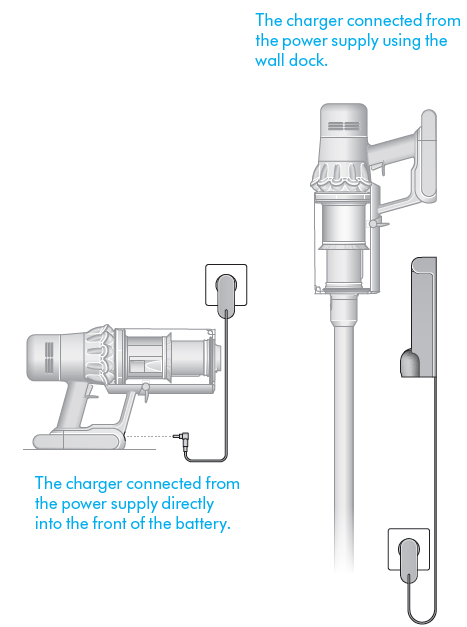
- Connect to the charger either directly or in the dock.
- The blue LEDs on either side of the battery will flash during charging.
- When the battery is fully charged, both LEDs will light for 5 seconds.
- Your battery is fully charged when the display shows 100%.
- Your machine won’t operate or charge if the ambient temperature is below 5°C (41°F). This is designed to protect both the motor and battery.
Changing your click-in battery
- If you have additional click-in batteries, we recommend that you alternate the batteries to maintain even performance.
- Additional click-in batteries available to purchase separately
- Removing your battery
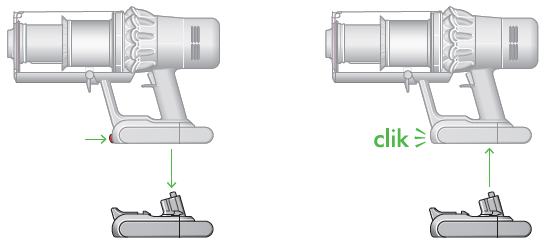
- Push the Battery release button on the handle and slide the battery off your machine.
- Charge the battery
- Refitting your battery
- Align your battery with the handle and slide it in. Push firmly until it clicks into place.
Arrows showing the location of the Battery release button and the battery coming off the handle when the button is pressed. The battery is then shown being replaced on the base of the handle, clicking into place.
Cleaning your tools
- Don’t put any part of your machine in a dishwasher or use detergents, polishes or air fresheners.
- Wipe with a damp, lint-free cloth, without touching the connector end. Make sure your tools are completely dry before using.
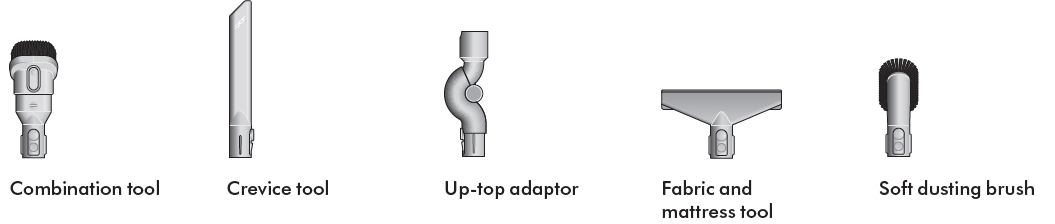
- Some tools may not be included in the box.
Troubleshooting the Dyson V11 Vacuum Cleaner
- Common Issue: Reduced suction — Check for blockages in the cleaner head, wand, or bin outlet. Empty the bin if full.
- Error Codes: LCD screen alerts may indicate blockages or filter cleaning requirements. Follow on-screen instructions to resolve.
- Brush Bar Not Rotating: Ensure the motorized brush bar is engaged and free of tangled hair or debris; the Motorbar™ self-clearing feature helps but manual cleaning may be required occasionally.
- Battery Not Charging: Confirm charger and docking station connections; allow the vacuum to charge fully for 4.5 hours. Replace battery if problems persist beyond warranty.
- Preventive Measures: Regularly clean filters (wash every 1 month), empty the bin after each use, and avoid vacuuming large debris that might clog the system.
The Dyson V11 comes with a 2-year warranty and lifetime support from Dyson. For further assistance, customers can contact Dyson customer service via their official website or hotline.
Pros & Cons of the Dyson V11 Vacuum Cleaner
Pros
- Powerful suction: 185 air watts deliver strong, consistent cleaning on all floor types.
- Advanced filtration: Captures 99.99% of fine dust and allergens, ideal for allergy sufferers.
- Automatic hair de-tangling: Motorbar™ cleaner head clears wrapped hair, reducing maintenance.
- Versatile design: Converts easily into a handheld vacuum with multiple tool attachments.
- Intuitive LCD screen: Real-time updates on battery, mode, and maintenance improve usability.
Cons
- Price point: Higher cost compared to some other cordless vacuums may be a barrier for budget shoppers.
- Runtime limitations: Boost mode runs only about 15 minutes before overheating, requiring charging breaks.
- Small bin size: 0.2-gallon capacity requires frequent emptying in larger homes.
- Weight: Slightly heavier than some competing models, which may affect long cleaning sessions for some users.
Overall, the Dyson V11 offers excellent value for money for users seeking premium performance and smart features, outperforming many alternatives in suction power and filtration.
Customer Reviews of the Dyson V11 Vacuum Cleaner
Users frequently praise the Dyson V11 for its powerful suction and ease of use, highlighting the automatic hair de-tangling Motorbar™ as a game-changer for pet owners. Many reviews mention the vacuum’s versatility, with the handheld mode and diverse attachments receiving high marks.
Common complaints include the relatively short Boost mode runtime and the small bin size, which some users find requires frequent emptying during larger cleaning tasks. The price is noted as premium but justified by many due to the vacuum's advanced features and reliability.
Overall star ratings typically range from 4 to 4.5 out of 5 stars, and most users recommend the Dyson V11 for families, pet owners, and allergy sufferers looking for a high-performance cordless vacuum cleaner with superior filtration and smart technology.
Faqs
How do I set up my Dyson V11 Vaccum Cleaner for the first time?
What should I do if my Dyson V11 Vaccum Cleaner has weak suction power?
How can I fix a stuck or unresponsive trigger on my Dyson V11 Vaccum Cleaner?
Is the Dyson V11 Vaccum Cleaner compatible with all Dyson charging docks and accessories?
How do I optimize the battery life and performance of my Dyson V11 Vaccum Cleaner?
What are the key cleaning modes and features of the Dyson V11 Vaccum Cleaner?
How often should I clean and maintain my Dyson V11 Vaccum Cleaner filters and brush bar?
What should I do if my Dyson V11 Vaccum Cleaner stops working and the LED light flashes multiple times?
More dyson manuals
- Setup & Usage: Dyson V8 Vacuum Cleaner User Manual
- How to Use: Dyson V12 Detect Slim Vacuum Cleaner Instruction Manual
- How to Use: Dyson V7 Advanced Vacuum Cleaner User Manual
- Setup & Usage: Dyson V15 Detect Vacuum Cleaner User Manual
- Setup: Dyson Outsize Vacuum Cleaner User Manual
- How to Operate & Assemble: Dyson DC 40 Upright Vacuum Cleaner Manual
Leave a Comment