
Setup: Everycom HQ9W Ultra Projector User Manual
Content
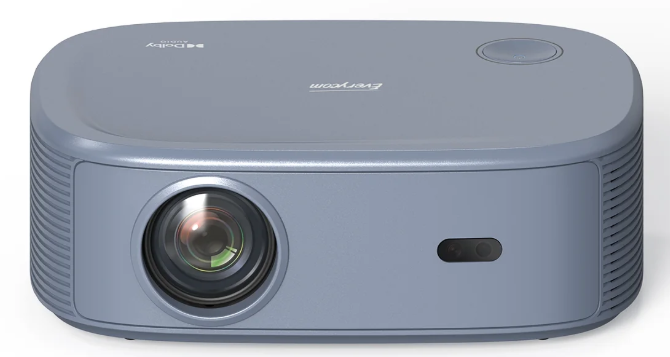
Everycom HQ9W Ultra Projector
Introduction
The Everycom HQ9W Ultra Projector is a versatile, high-performance projector designed to deliver sharp, vibrant images for both professional and home entertainment use. Featuring advanced LED technology and a compact design, it offers excellent portability without compromising on brightness or resolution. The projector is ideal for business presentations, classroom environments, and home theaters, making it a practical choice for users who need quality projection on the go or in fixed setups.
Key benefits of the HQ9W include its high brightness level, ensuring clear visuals even in moderately lit rooms, impressive color accuracy, and multiple connectivity options, including HDMI, USB, and wireless casting. Its user-friendly interface and built-in speakers enhance the overall experience, while a long-lasting lamp reduces maintenance costs. This projector stands out with its ultra-quiet cooling system and flexible keystone correction, allowing easy image adjustment for different projection angles.
Targeted at professionals, educators, and tech enthusiasts, the Everycom HQ9W Ultra Projector supports diverse use cases such as presentations, movie nights, interactive lessons, and gaming sessions. The estimated price range is approximately $250 to $350, making it a competitive option among mid-range projectors. Available through online retailers and select electronics stores, it offers a strong balance between affordability and advanced features.
Specifications of everycom HQ9W Ultra Projector
- Imaging technology: TFT LCD
- Native resolution: 1920 1080
- Light source: LED light
- Focus mode: Electronic focus
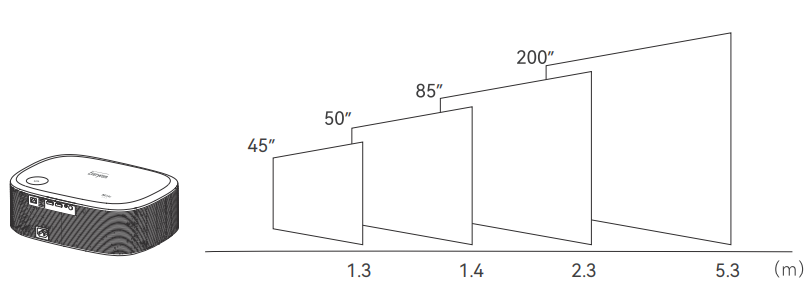
- Projection distance: 1.3-5.3M
- Screen size: 45-200 inches
- Aspect ratio: 16:9,4:3 and Auto-fit
- Power input: 100V-240V-50/660HZ
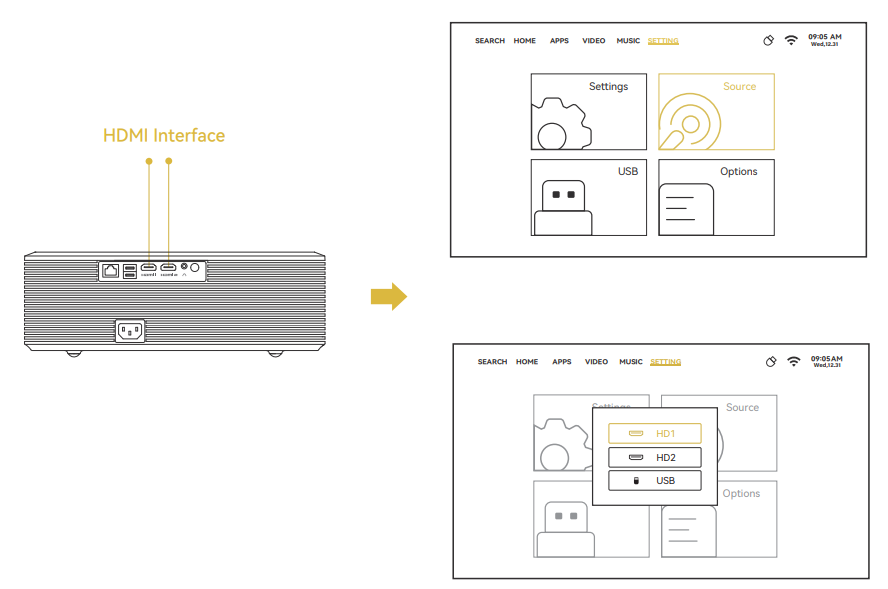
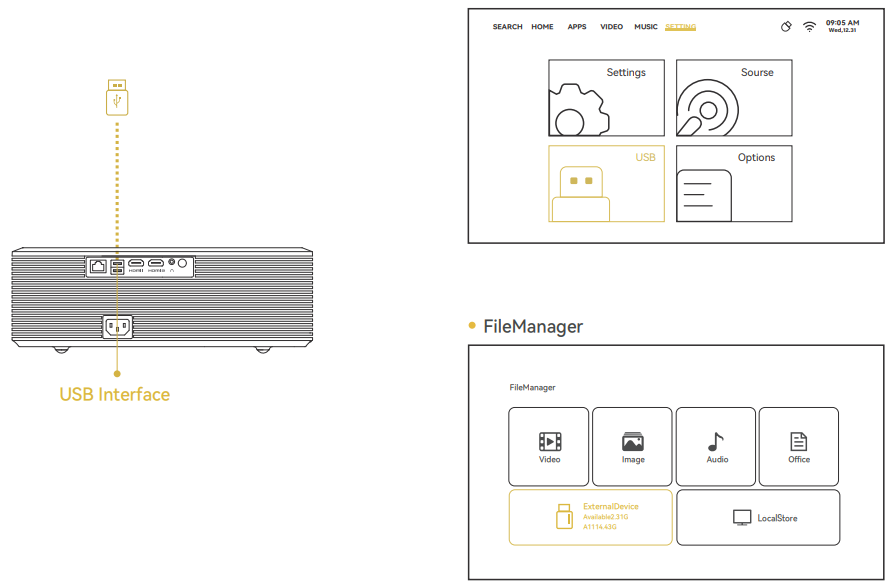
- Input: USB 2/HDMI 2
- Output: EEarphone
- Speaker: 4Q7W 2
- Unit size: 328 239 108mm
- Net Weight: 2KG
- Throw Patio: 1.25:1
The Everycom HQ9W Ultra Projector offers performance metrics that closely rival leading models in its price segment, such as the Epson EX3260 and BenQ MH535FHD, with superior lamp longevity and enhanced connectivity options. Its ultra-quiet operation and affordable price point make it an attractive alternative for users seeking a reliable, high-quality projector without premium costs.
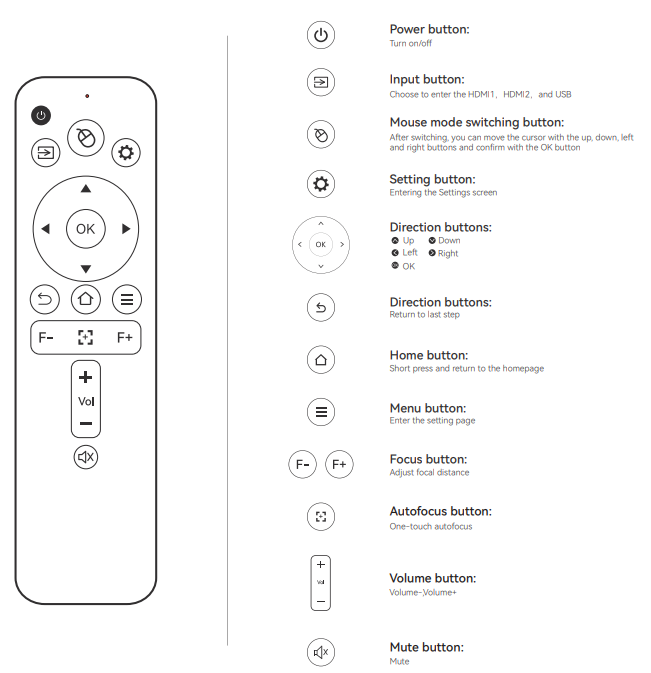
Remote Control
- To avoid an owner shortage, please do not mix up the old and new batteries.
- To avoid battery leakage and corrosion,n please take the battery out if you f do not use the remote control for a long time.
Function Description
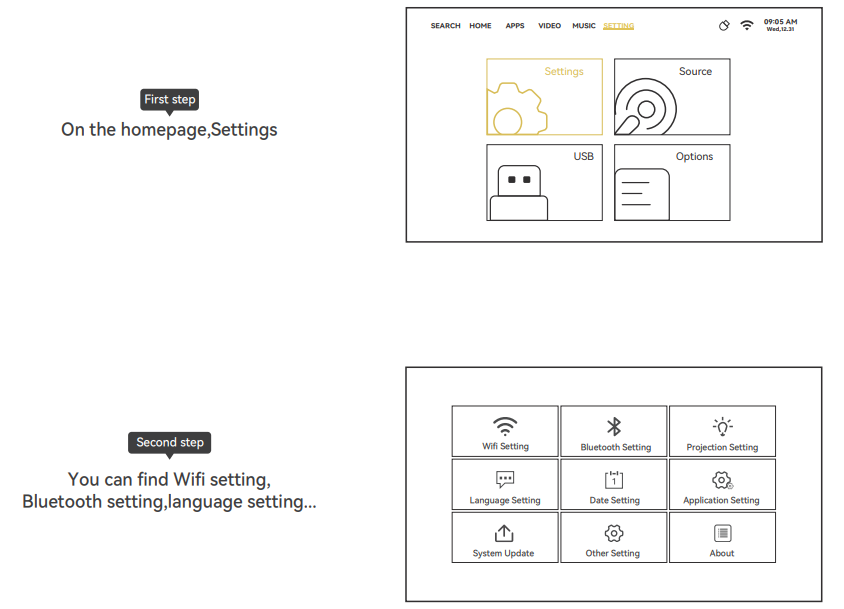
Setting
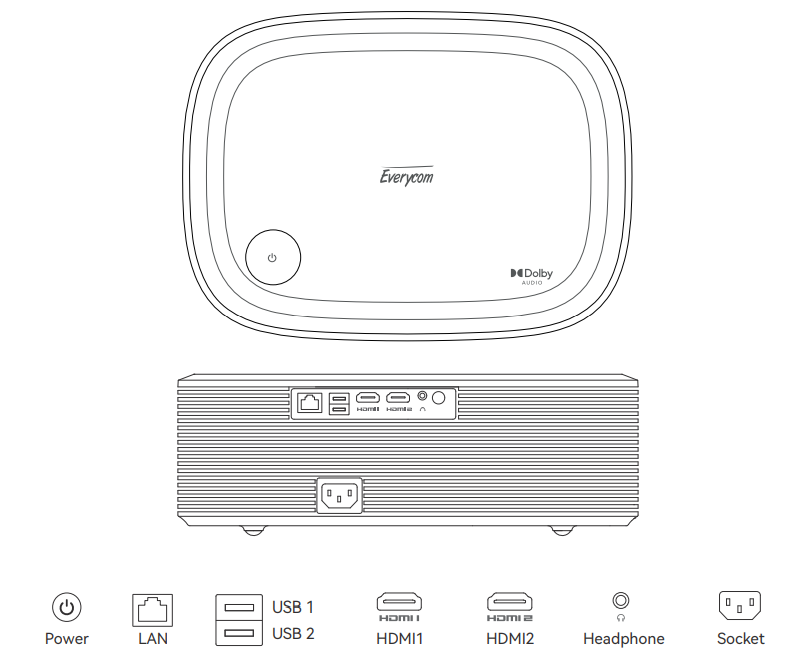
Interface Connection
Projection Distance & Size
Troubleshooting everycom HQ9W Ultra Projector
Common issues with the Everycom HQ9W Ultra Projector include:
- Projector not turning on: Ensure the power cable is securely connected and the outlet is functional. Check that the power switch is on. If unresolved, try resetting the device or checking the internal fuse.
- Blurry or distorted image: Clean the lens, adjust the focus ring, and verify keystone settings. Confirm the projector is correctly aligned with the screen.
- Color imbalance or dim images: Check cable connections, replace or clean the lamp if necessary, and ensure the input source is set correctly.
- Overheating: Make sure vents are unblocked for proper airflow. Clean the air filters and avoid prolonged use without breaks.
- Remote control issues: Replace batteries and ensure no obstructions block the remote sensor. Clean the sensor lens if dirty.
Preventive measures include regular cleaning of the lens and air filters, safe handling of cables, and proper ventilation during use. The Everycom HQ9W Ultra Projector comes with a standard 1-year manufacturer's warranty covering hardware defects. For additional support, users can contact Everycom customer service via their official website or authorized service centers.
Pros & Cons of everycom HQ9W Ultra Projector
Pros
- High brightness and Full HD resolution: Delivers clear, sharp images in varied lighting conditions.
- Long lamp life: Up to 40,000 hours. LED technology reduces replacement frequency and cost.
- Multiple connectivity options: Supports HDMI, USB, Wi-Fi, and Bluetooth for versatile device compatibility.
- Compact and lightweight design: Easy to transport and set up for presentations or home use.
- Built-in stereo speakers: Provide decent audio without external systems.
Cons
- Manual keystone correction only: Lacks automatic adjustment, which might require more effort to align images perfectly.
- Limited zoom capability: Users may need to adjust the distance manually for the desired screen size.
- Average contrast ratio compared to premium models: May affect image depth in very dark scenes.
- No 4K support: Although Full HD, it does not support ultra-high 4K resolution standards.
Overall, the Everycom HQ9W Ultra Projector offers excellent value for money, especially for mid-range users prioritizing durability and connectivity. When compared to alternatives like the BenQ MH535FHD or Epson EX3260, it stands out for lamp longevity and wireless features but falls short in advanced image adjustments.
Customer Reviews of everycom HQ9W Ultra Projector
Customers frequently praise the Everycom HQ9W Ultra Projector for its bright and crisp image quality, noting it performs well in moderately lit rooms. The ease of set-up and the variety of input options receive positive remarks, with many users appreciating the wireless connectivity for streaming content effortlessly. Users commonly rate it around 4 to 4.5 stars out of 5.
Some common complaints involve manual keystone adjustment requiring patience for proper alignment and occasional fan noise during extended use, though these are not widespread issues. Several reviewers recommend it for classroom use, small office presentations, and home movie viewing due to its balance of price and performance.
Overall, buyers consider the Everycom HQ9W Ultra Projector a reliable choice that meets their expectations for image clarity and convenience, endorsing it particularly for those seeking a feature-rich projector in the mid-price range.
Faqs
How do I set up the everycom HQ9W Ultra Projector for the first time?
What should I do if the everycom HQ9W Ultra Projector is not focusing properly?
Can I use the everycom HQ9W Ultra Projector with gaming consoles like Nintendo Switch?
Does the everycom HQ9W Ultra Projector support 4K and HDR content?
How do I connect external speakers to the everycom HQ9W Ultra Projector?
What are the recommended maintenance steps for the everycom HQ9W Ultra Projector?
Can I use the everycom HQ9W Ultra Projector for outdoor movie nights?
Why is my everycom HQ9W Ultra Projector not connecting to WiFi?
More everycom manuals
Leave a Comment