
Setup & Pairing: Everycom X10 Projector User Manual
Content
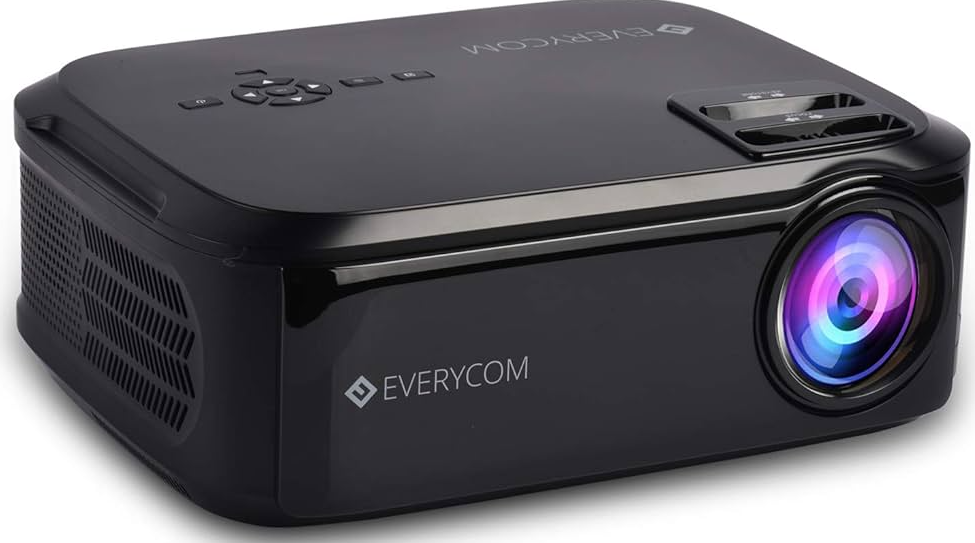
Everycom X10 Projector
Introduction
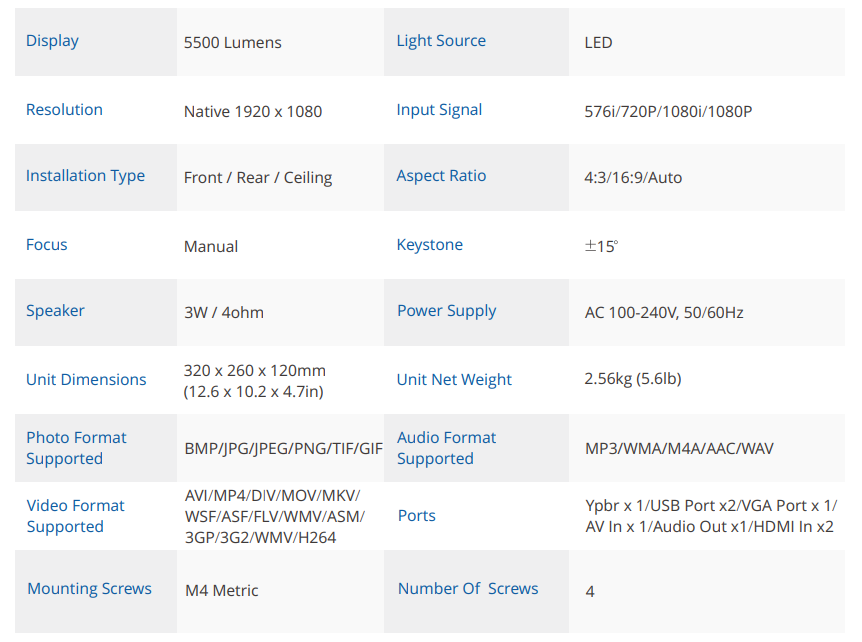
The Everycom X10 Projector is a versatile, high-performance Full HD projector designed for both home entertainment and professional business use. With a native 1920 x 1080 resolution and a powerful 5500 Lumens LED lamp, the X10 delivers bright, sharp, and vibrant images—ideal for movie nights, gaming sessions, presentations, and outdoor screenings. Its compact, portable design (32 x 26 x 12 cm, 2.6 kg) makes it easy to set up anywhere, while dual HDMI and USB ports, VGA, and AV connectivity ensure compatibility with a wide range of devices, including laptops, PCs, gaming consoles, Amazon Fire TV Stick, and Chromecast.
Unique selling points of the Everycom X10 Projector include built-in stereo speakers with noise suppression, keystone correction for flexible placement, and the ability to project images from 50 to 200 inches, providing a true cinema experience at home or in the office. The projector is especially suited for users seeking affordable, reliable projection with excellent color accuracy and brightness, and is backed by a 1-year Indian warranty and BIS certification for peace of mind.
The Everycom X10 Projector is priced competitively in the ₹14,000–₹17,500 range, making it accessible for budget-conscious buyers and small businesses looking for value without compromising on quality. Availability is typically through major Indian e-commerce platforms and select electronics retailers, though stock may vary. Whether you’re upgrading your home theater, hosting a backyard movie night, or delivering professional presentations, the Everycom X10 Projector offers an immersive viewing experience at an attractive price point.
Specifications
Key Features
The Everycom X10 Projector stands out for its high brightness and Full HD resolution, outperforming many entry-level 720p projectors in both clarity and color richness. Its dual HDMI ports are MHL certified, supporting mobile device connectivity, and the projector is compatible with streaming devices like Amazon Fire TV Stick and Chromecast, transforming it into a smart projector. The inclusion of keystone correction and a long lamp life (50,000 hours) ensures hassle-free setup and durability.
PACKING CONTENT
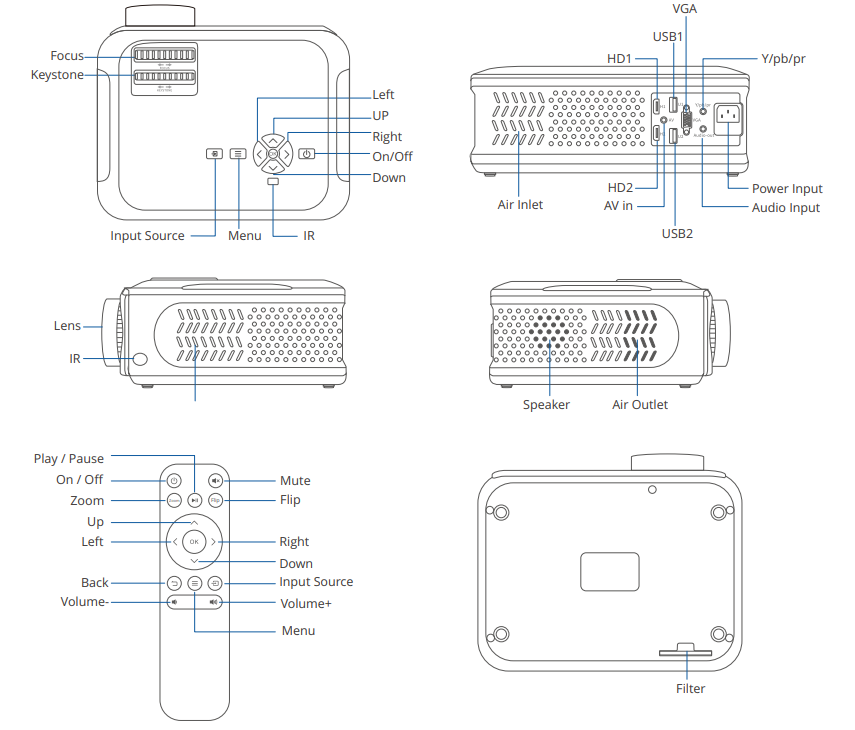
FUNCTION OVERVIEW
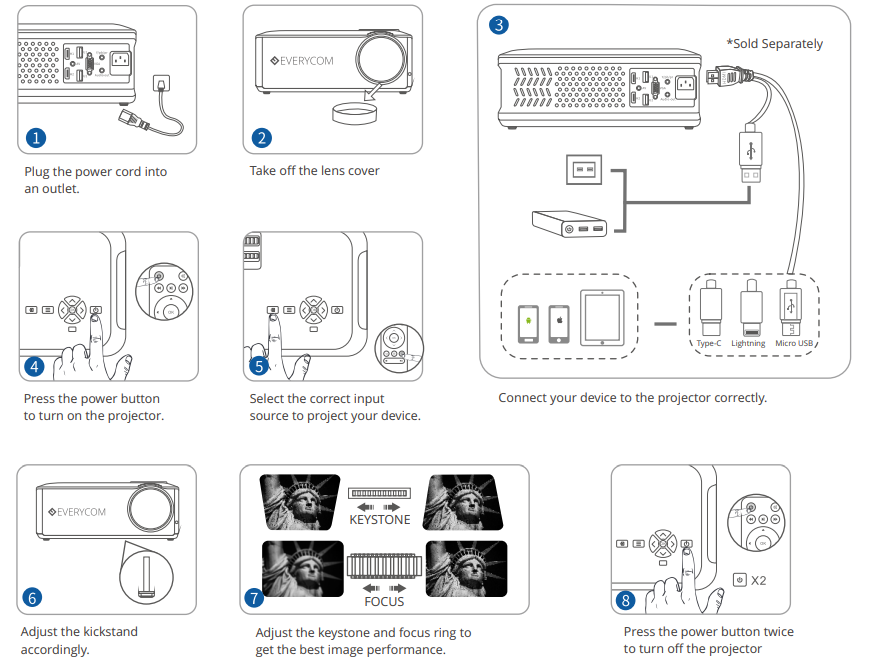
QUICK START
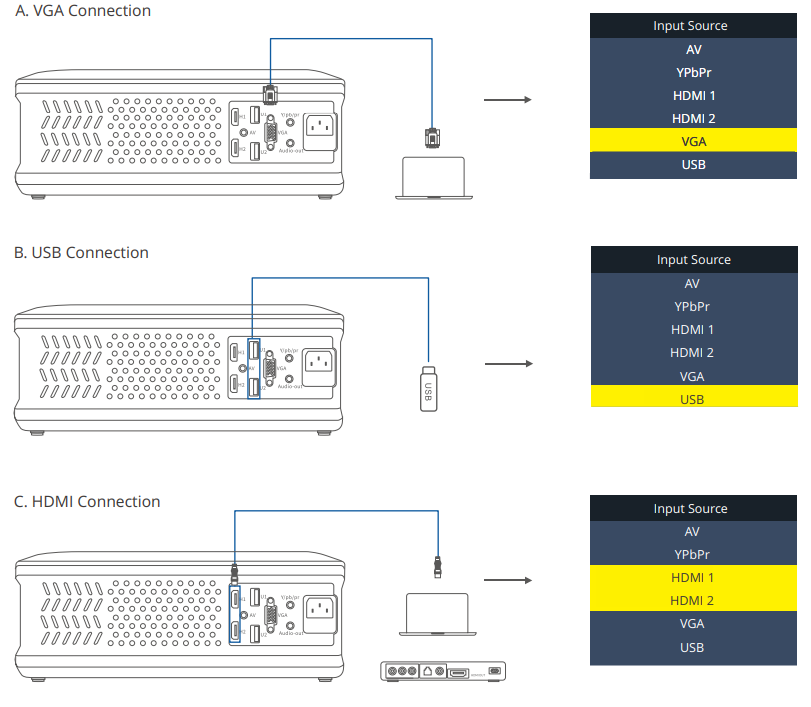
INPUT SOURCE
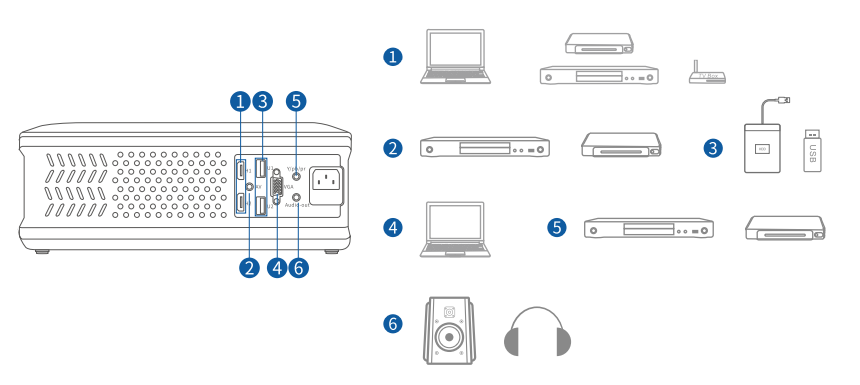
PROJECTOR CONNECTION
PROJECTION DISTANCE & SIZE
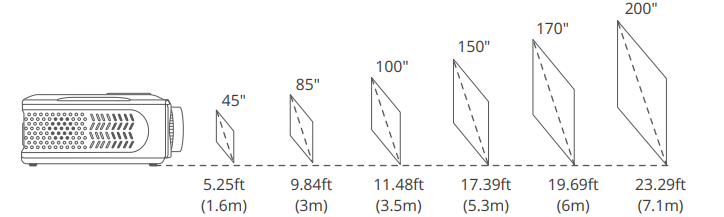
The recommended projection screen is around 85 inches with a projection distance of around 9.84ft. Ambient darkness will improve the clarity of the projected images.
PROJECTION METHODS
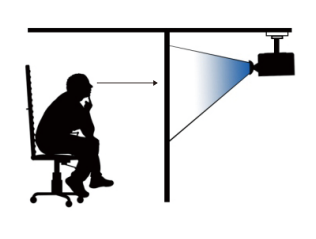
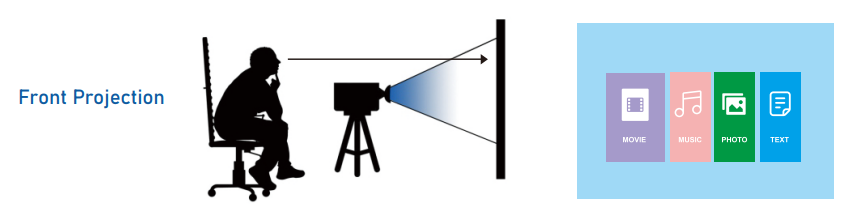
4 Projection methods: Depending on how you place the projector, you may need to change the projection mode so your images will be projected correctly.
Factory defaults: The Projector is mounted on the same side of the same side of the screen as the viewer
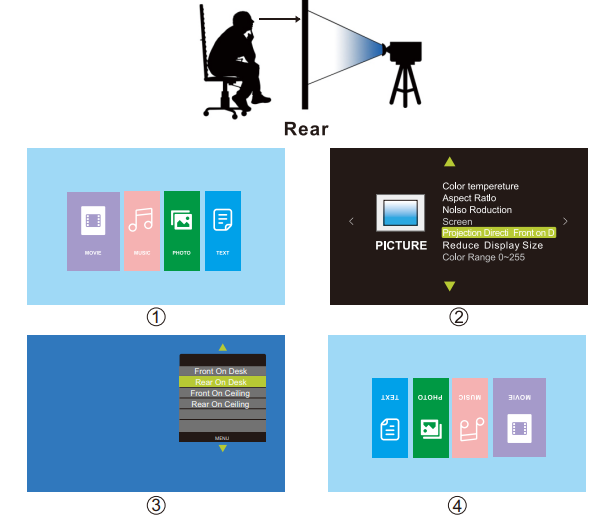
Rear: The installation position of the projector and the audience are located on the two sides of the screen.
You can change the projection mode to rear with the remote control by clicking MENU > SETTING > PROJECTION MODE (Rear on Desk) as the following pictures show.
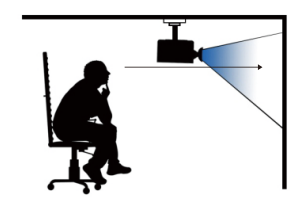
1.3 Front/Ceiling
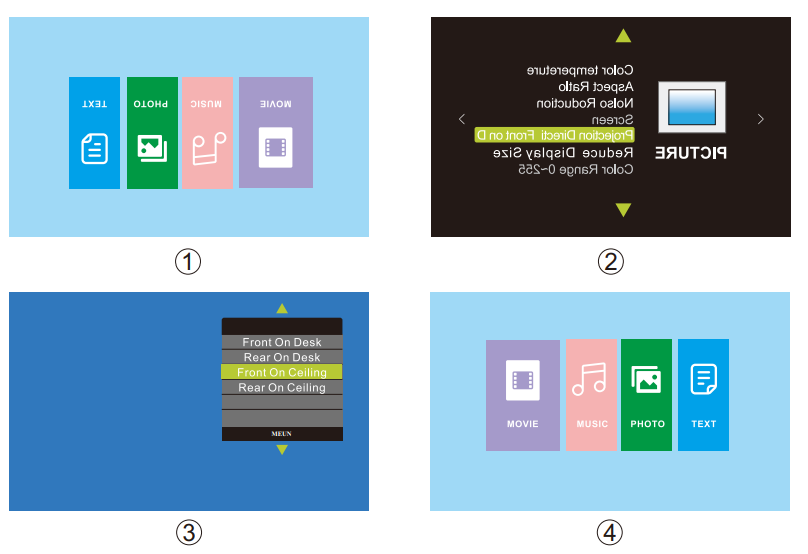
1.4 Front/Ceiling
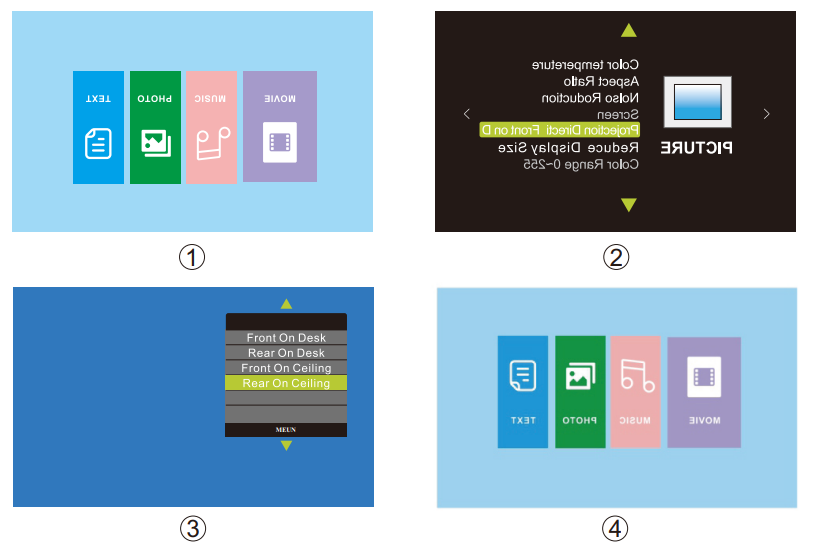
Comparison
Compared to similar budget projectors, the Everycom X10 Projector offers superior brightness and resolution, making it suitable for environments with ambient light. While it lacks built-in Wi-Fi or Bluetooth, its versatility in connectivity and robust performance make it a compelling choice for users prioritizing image quality and ease of use over smart features.
TROUBLESHOOTING GUIDE
- Blurry Image
- Adjust focus ring/keystone
- Projector and screen/wall must be in effective distance.
- Remote Unresponsive
- Make sure the remote points at the IR receiver directly.
- Do not cover the IR receiver
- Try a new pair of AAA batteries
- Mobile Connection
iOS: Genuine lightning to HDMI cable.
Android: Micro USB to HDMI adapter / Type C to HDMI cable.
Wireless Display Adapter: Anycast , Chromecast , Amazon Fire TV Stick. - Upside Down Images
Go to MENU > PICTURE > PROJECTION MODE to flip the projection image. - Home Theater Connection
The Projector can be connected to a Home Theater using the Audio-out Port available on the projector.
Error Codes
No specific error codes are mentioned in the available sources. For persistent issues, consult the user manual or contact support.
Preventive Measures
- Keep the projector in a cool, dry place.
- Avoid direct sunlight and high humidity.
- Regularly clean the lens and air filter.
- Use a surge protector to safeguard against voltage fluctuations.
Warranty and Support
The Everycom X10 Projector comes with a 1-year nationwide Indian warranty. For technical support or warranty claims, contact Everycom at 1800 121 4480 or visit their official website. Always keep your purchase receipt for warranty validation.
Pros & Cons
Pros
- Bright, Full HD Image: 5500 Lumens and 1920 x 1080 resolution deliver vivid, sharp visuals even in moderately lit rooms.
- Versatile Connectivity: Dual HDMI, USB, VGA, and AV ports support a wide range of devices.
- Built-in Speakers: Dual stereo speakers provide decent sound without external audio systems.
- Long Lamp Life: Up to 50,000 hours reduces long-term maintenance costs.
- Compact and Portable: Easy to move and set up for home or business use.
- Value for Money: Competitive price for the features offered, especially in the Indian market.
Cons
- No Smart Features: Lacks built-in Wi-Fi, Bluetooth, or streaming apps; requires external devices for smart functionality.
- Manual Keystone: Correction is manual, not automatic.
- Average Built-in Audio: Sound quality is adequate but not exceptional; external speakers are recommended for better audio.
- No 4K Support: Limited to Full HD; not suitable for users seeking ultra-high-definition projection.
Compared to alternatives, the Everycom X10 Projector offers excellent brightness and connectivity at a lower price than many branded projectors, though it may lack some advanced features found in premium models.
Customer Reviews
User feedback for the Everycom X10 Projector is generally positive, with many praising its bright image, easy setup, and value for money. Common compliments include the projector’s ability to deliver clear visuals even in ambient light, reliable connectivity, and sturdy build quality. Some users highlight its suitability for both movie nights and professional presentations, noting that it performs well with streaming devices and gaming consoles.
Frequent criticisms are minor, such as average built-in speaker quality and the lack of smart features. Most users recommend the projector for budget-conscious buyers seeking a reliable home theater or business projector. Star ratings from major platforms average around 4 out of 5, reflecting broad satisfaction with the product’s core performance and affordability.
For those in the market for a dependable, bright Full HD projector under ₹20,000, the Everycom X10 Projector is a strong contender—offering impressive visuals, solid connectivity, and good after-sales support, especially in India.
More everycom manuals
Leave a Comment