
Setup & Pairing: Everycom X8 Projector User Manual
Content
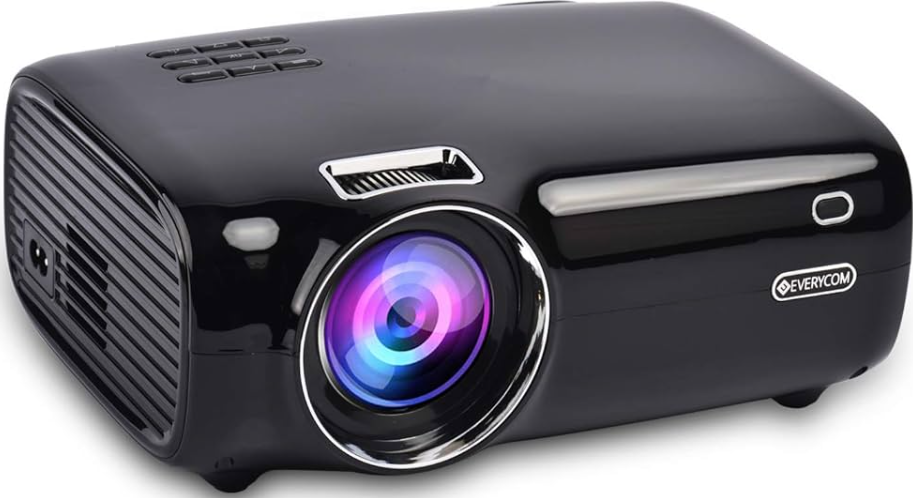
Everycom X8 Projector
Introduction
The Everycom X8 Projector is a versatile Full HD smart projector designed to deliver immersive home theater experiences and outdoor entertainment. With its native 1280x720 resolution supporting Full HD 1080p playback, this compact and portable device combines high brightness, sharp visuals, and smart connectivity features to suit a wide range of uses. Whether you want to enjoy movies, stream content, or present multimedia presentations, the everycom X8 adapts seamlessly with Wi-Fi, Bluetooth, and multiple input options.
Key benefits include a built-in 20000mAh rechargeable battery for portable use, electronic focus adjustment for crisp image clarity, and a 3200-lumen LED lamp that performs well in varied lighting conditions. Sporting an Android 9 operating system, the projector supports popular apps and wireless display technologies such as AirPlay and Miracast, enhancing user convenience and entertainment flexibility.
Ideal for families, educators, gamers, and outdoor enthusiasts, the everycom X8 can project screen sizes from 36 to 200 inches, making it suitable for bedrooms, living rooms, classrooms, or backyard movie nights. The product typically ranges around ₹7,000 to ₹12,000 (approximate pricing) and is available through online platforms and select retailers.
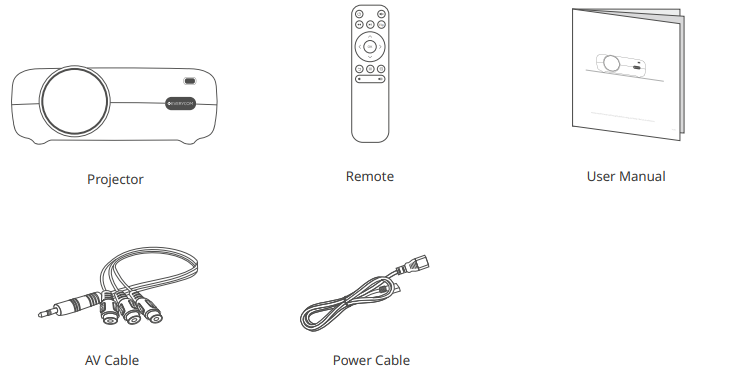
PACKING CONTENT
Specifications
- Display Technology: LCD with LED lamp
- Native Resolution: 1280 x 720 pixels (HD), supports Full HD 1080p playback
- Brightness: 3200 lumens for vivid visuals in ambient light conditions
- Contrast Ratio: 2000:1 for enhanced image depth
- Projection Size: 36 to 200 inches diagonal
- Projection Distance: 1 to 5 meters
- Operating System: Android 9 with smart app capabilities
- Connectivity: Wi-Fi, Bluetooth, HDMI, USB, SD card, 3.5mm audio jack
- Sound: Dual 3W speakers with independent multimedia sound chambers
- Battery: Built-in 20000mAh rechargeable battery supporting mobile device charging
- Additional Features: Electronic focus adjustment, 3D support, AirPlay/Miracast screen sharing
- Weight: Approximately 1.0 kg for portability
- Warranty: 2-year limited manufacturer warranty
Compared to similar models like the eEverycomX7 and X9, the X8 offers improved brightness (3200 lumens vs. 1800 lumens on X7) and enhanced smart features, making it a mid-range option balancing performance and price.
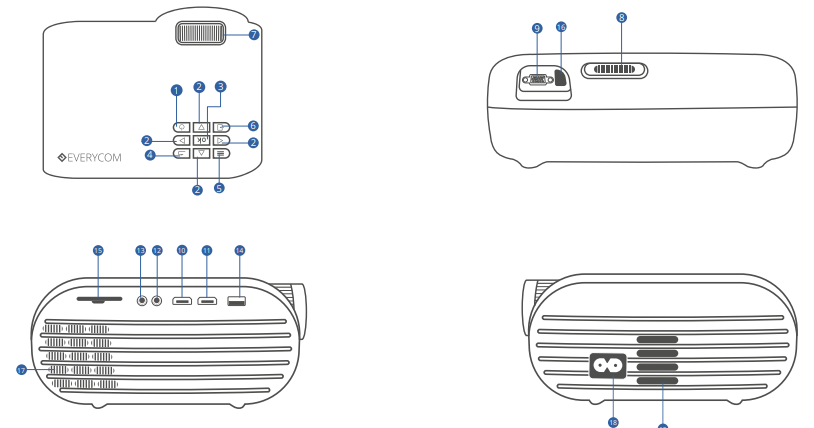
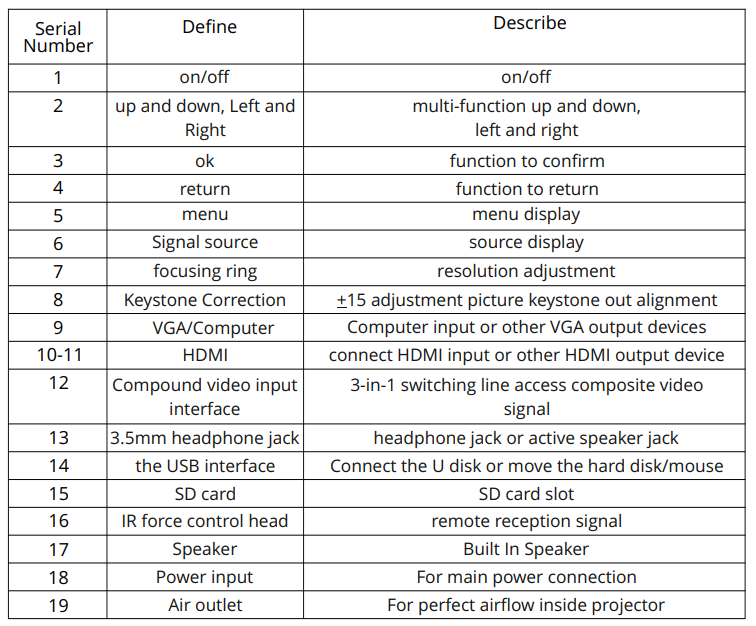
FUNCTION OVERVIEW
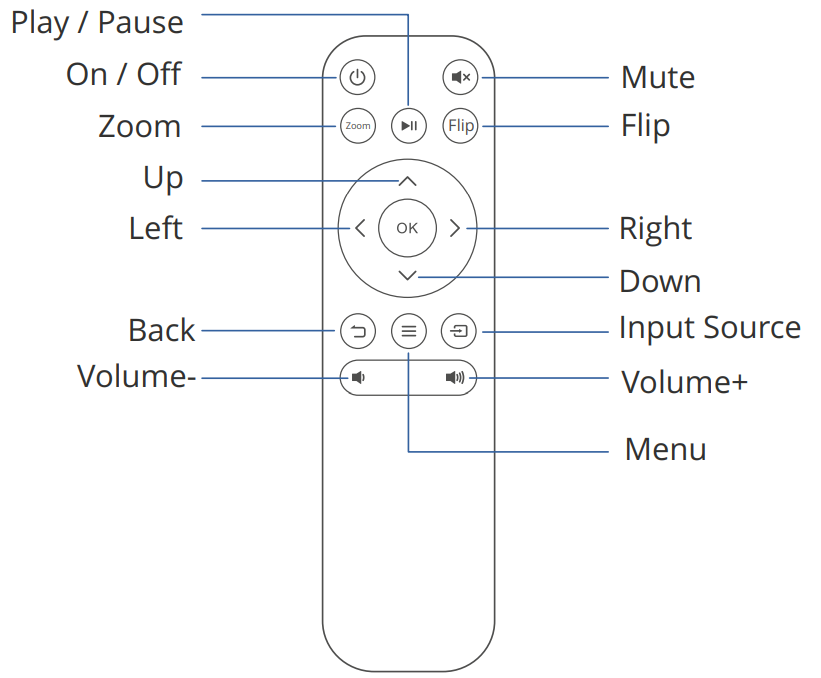
REMOTE OVERVIEW
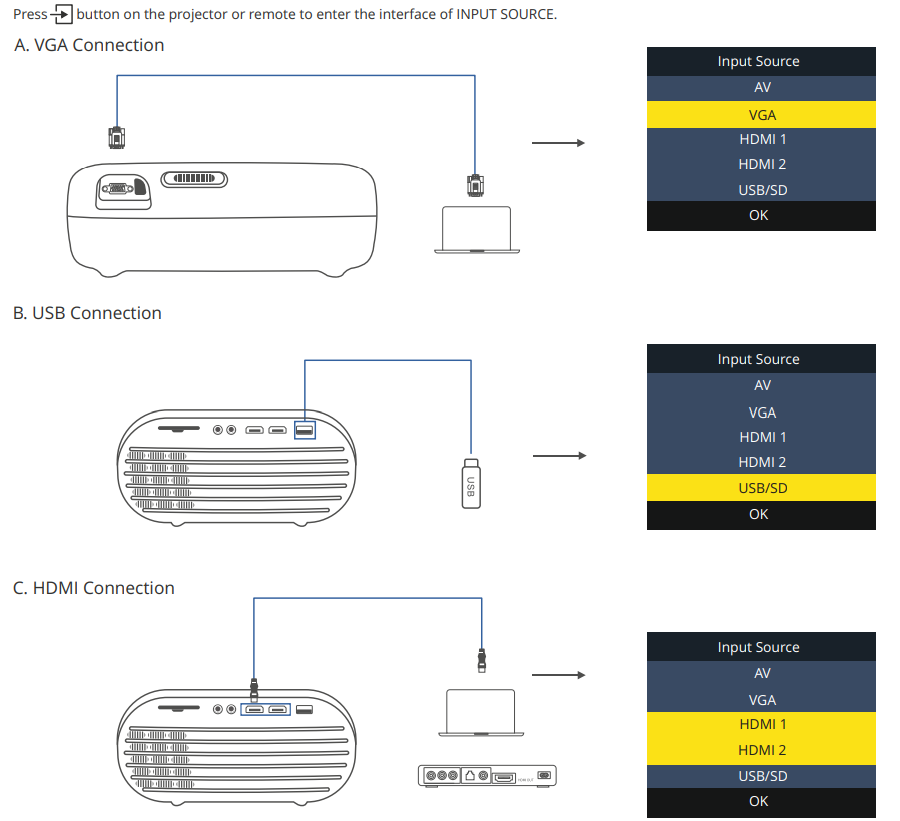
INPUT SOURCE
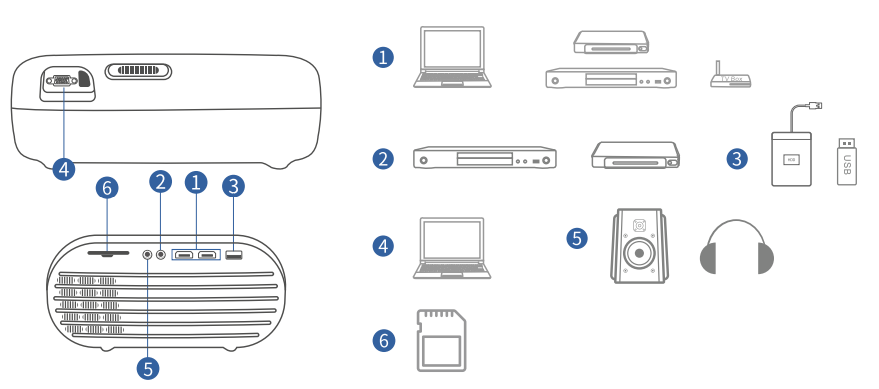
PROJECTOR CONNECTION
PROJECTION DISTANCE & SIZE
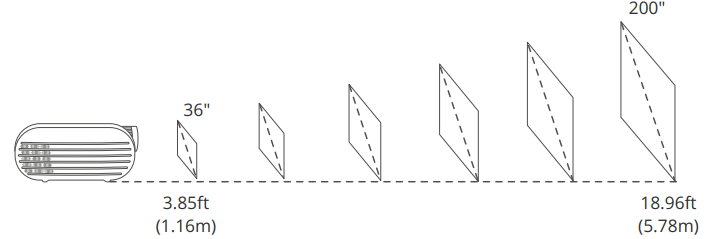
The recommended projection screen is around 85 inches with a projection distance of around 9.84ft. Ambient darkness will improve the clarity of the projected images.
TROUBLESHOOTING GUIDE
- Blurry Image
- Adjust focus ring/keystone
- Projector and screen/wall must be in effective distance.
- Remote Unresponsive
- Make sure the remote points at the IR receiver directly.
- Do not cover the IR receiver
- Try a new pair of AAA batteries
- Mobile Connection
- iOS: Genuine lightning to HDMI cable.
- Android: Micro USB to HDMI adapter / Type C to HDMI cable.
- Wireless Display Adapter: Anycast , Chromecast , Amazon Fire TV Stick.
- Upside Down Images
- Go to MENU > PICTURE > PROJECTION MODE to flip the projection image.
- Home Theater Connection
- The Projector can be connected to a Home Theater using the Audio-out Port available on the projector.
Preventive measures include regular firmware updates via Wi-Fi, safe handling during transport, and using recommended screen sizes and projection distances for optimal image quality. The Everycom X8 Projector comes with a 2-year warranty covering manufacturing defects.
For further assistance, users can contact the official support via the manufacturer's website or authorized distributors.
Pros and Cons of the Everycom X8 Projector
Pros
- High Brightness: 3200 lumens ensure clear and bright projections even in moderately lit rooms.
- Smart Android OS: Built-in Android 9 provides access to apps and streaming services without additional devices.
- Portability: Lightweight design and a large built-in battery support outdoor and on-the-go use.
- Versatile Connectivity: Supports HDMI, USB, Wi-Fi, Bluetooth, and AirPlay/Miracast for flexible media input.
- Good Value: Competitive price with robust feature set compared to other projectors in the ₹7,000–₹12,000 range.
Cons
- Resolution Limitation: Native 720p may not satisfy users seeking true 1080p native projection quality.
- Contrast Ratio: Moderate 2000:1 contrast ratio can affect image depth in very dark scenes.
- Manual Keystone Correction: Lacks automatic keystone correction, requiring manual adjustment.
- Sound Quality: Built-in speakers are adequate for casual use but may require external audio for immersive sound.
Overall, the everycom X8 strikes a balance between portability, smart features, and affordability, making it a solid choice for casual home entertainment and presentations when compared to alternatives like the everycom X7 or budget DLP projectors.
Customer Reviews and Feedback on the Everycom X8 Projector
Users consistently praise the Everycom X8 Projector for its bright image quality, ease of use with Android apps, and portability due to its built-in battery. Many highlight the convenience of wireless connectivity options and the ability to project large screen sizes up to 200 inches.
Common complaints include the native resolution being 720p rather than true 1080p, occasional Wi-Fi connectivity glitches, and moderate sound output from the built-in speakers. Several users recommend pairing the projector with external audio systems for an enhanced experience.
Star ratings generally average around 4 out of 5 stars, with purchase recommendations focusing on casual users, families, and educators looking for an affordable smart projector. Reviews emphasize the value-for-money aspect and the solid feature set offered at this price point.
Faqs
How do I set up the Everycom X8 Projector for the first time?
What should I do if the Everycom X8 Projector is not displaying a clear image?
Can I connect my smartphone or tablet to the Everycom X8 Projector?
Does the Everycom X8 Projector support 3D content and what formats are compatible?
How do I troubleshoot sound issues with the Everycom X8 Projector?
What is the recommended screen size and projection distance for the Everycom X8 Projector?
How often should I clean and maintain the Everycom X8 Projector?
Can the Everycom X8 Projector be used outdoors and does it have a battery?
More everycom manuals
Leave a Comment