
Pairing: Everycom X9 Projector User Manual
Content
Everycom X9 Projector
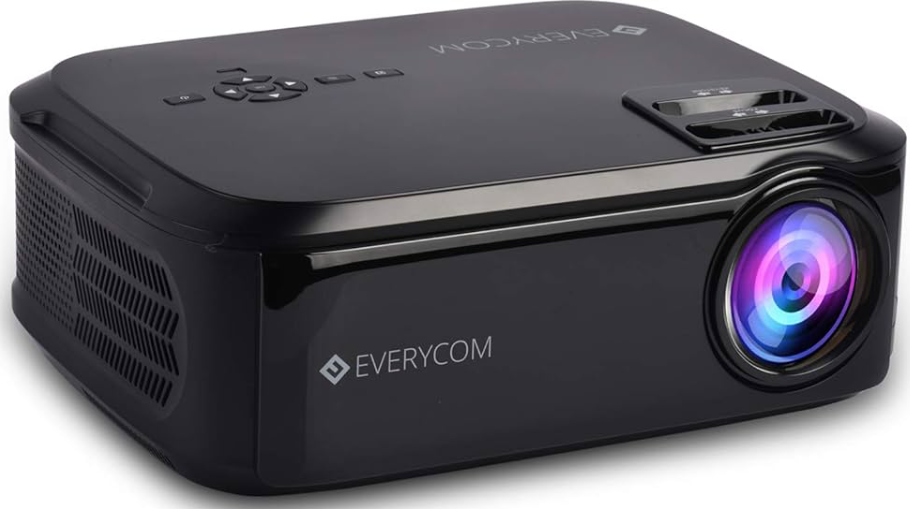
Introduction
The Everycom X9 Projector is a powerful and versatile LED projector designed for both home entertainment and professional use. Featuring a native 720p HD resolution and a bright 6000-lumen output, it delivers clear, vibrant images even in moderately lit rooms. Its high 5000:1 contrast ratio enhances color depth and sharpness, making movies, presentations, and gaming visually striking.
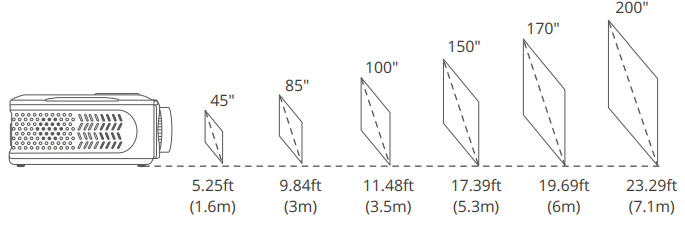
Weighing just 2.6 kg and compactly sized, the everycom X9 is highly portable and easy to set up anywhere,, ideal for home theaters, office meetings, classrooms, or casual outdoor viewing. It supports a massive projection screen size from 45 to 200 inches, with keystone correction to ensure perfect alignment and distortion-free viewing.
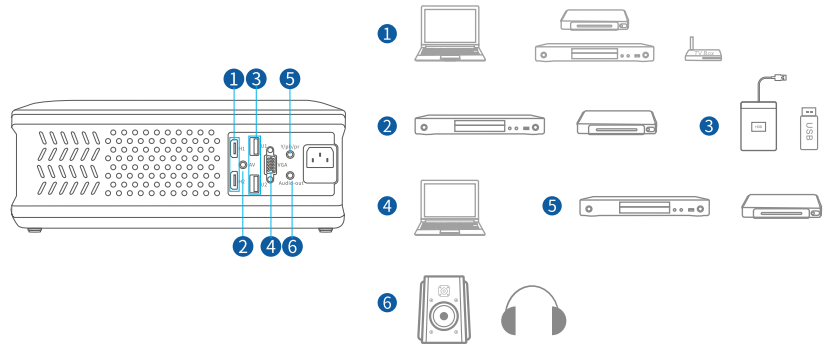
Equipped with multiple input options including dual HDMI, USB, VGA, and AV ports, it is compatible with laptops, smartphones, Amazon Fire TV Stick, DVD players, and gaming consoles, allowing seamless multimedia integration. The built-in dual stereo speakers with noise suppression provide immersive audio without needing external sound systems.
Priced approximately in the mid-range segment around ₹15,000–₹18,000 (depending on retailer and region), the Everycom X9 Projector offers excellent value for those seeking bright, high-definition projection in a portable form factor. Available through online marketplaces and select retailers, it is a practical choice for users looking to upgrade their visual experience without breaking the bank.
SPECIFICATION
- Display Technology: LCD with LED light source
- Native Resolution: 1280 x 720 pixels (HD 720p)
- Brightness: 6000 lumens, suitable for dim and moderately lit environments
- Contrast Ratio: 5000:1 for clear, vivid image quality
- Projection Size: 45” to 200” screen size with manual keystone correction
- Aspect Ratio: Supports 16:9, 4:3, and auto adjustments
- Input Ports: 2x HDMI, 2x USB, 1x VGA, 1x AV input, 1x audio out
- Audio: Dual 5W built-in stereo speakers with noise suppression
- Compatibility: Laptop, Fire TV Stick, Chromecast, DVD players, smartphones
- Weight & Dimensions: 2.6 kg; 32 x 26 x 12 cm
- Power: 60 Watts, AC 100-240V, 50/60Hz
- Special Features: Portable design, remote control included, supports large screen projection and multiple media formats (AVI, MP4, MKV, etc.)
Compared to similar models like the Everycom X7 and X8, the X9 offers significantly higher brightness and contrast, making it better suited for a wider range of lighting conditions and larger screen sizes.
Troubleshooting Common Issues with Everycom X9 Projector
- Image not displaying: Check HDMI/USB cables for secure connections; ensure source device is powered on and outputting video; try switching input ports.
- Blurred or distorted image: Adjust the manual focus ring and use keystone correction to align the image properly.
- No sound or low volume: Verify audio output settings on source device; ensure projector speakers are not muted; connect external speakers via audio out if needed.
- Projector overheating or shutting off: Ensure proper ventilation; avoid blocking air vents; clean dust filters regularly.
- Error codes: Refer to the user manual for specific LED indicator patterns; common fixes include resetting the projector or checking power stability.
Preventive measures include using the projector in a dust-free environment, avoiding sudden power interruptions, and handling input devices carefully. The Everycom X9 comes with a 1-year manufacturer warranty and customer support through Everycom’s helpline at 1800-121-4480 and email support for technical assistance.
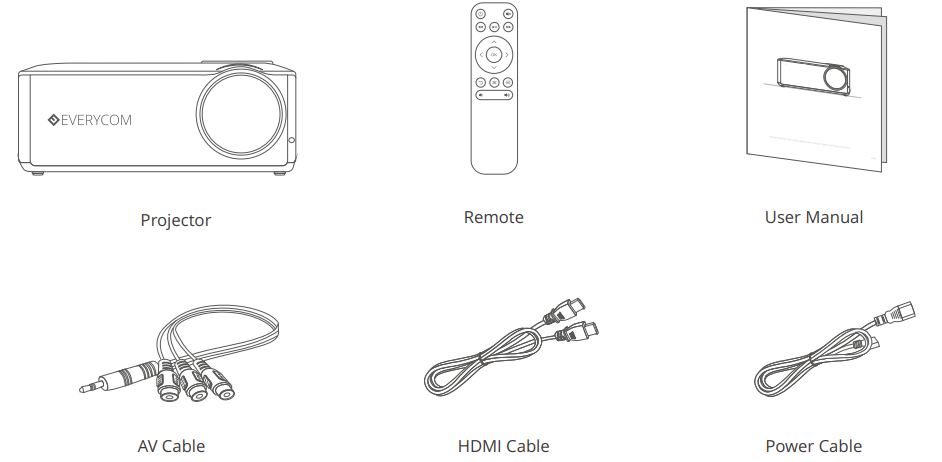
PACKING LIST
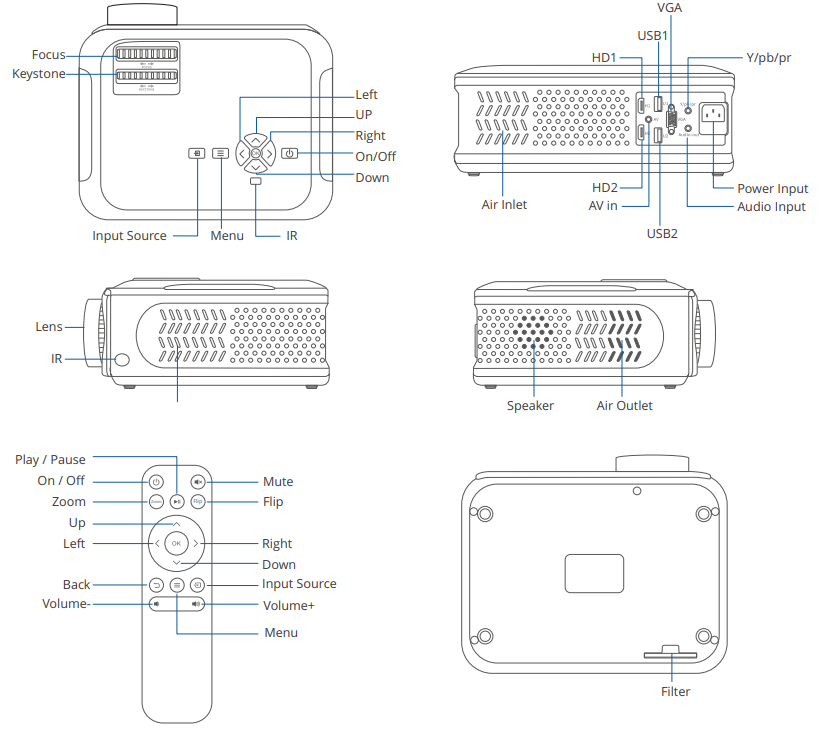
FUNCTION OVERVIEW
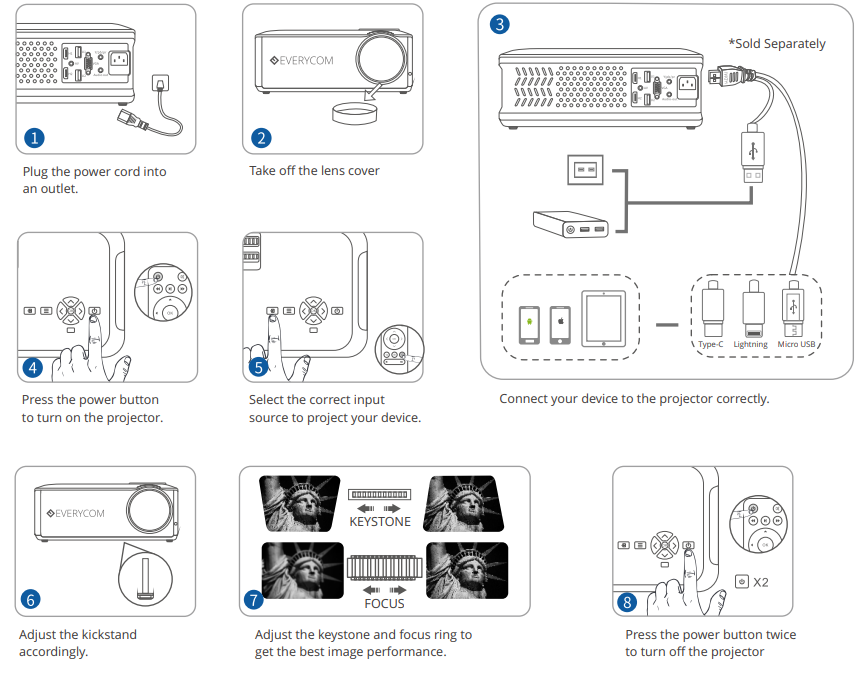
QUICK START
INPUT SOURCE
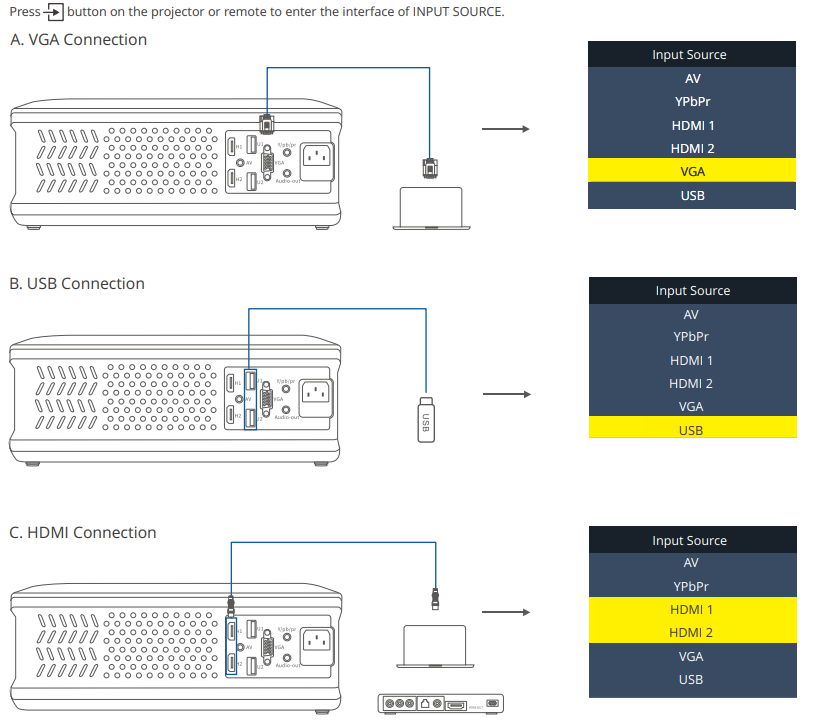
PROJECTOR CONNECTION
PROJECTION DISTANCE & SIZE
Pros and Cons of the Everycom X9 Projector
- Pros:
- High brightness of 6000 lumens – bright enough for less-than-dark rooms
- Native 720p resolution with good color contrast (5000:1)
- Supports large projection size up to 200 inches
- Multiple input options,, including dual HDMI and USB ports
- Compact and portable design, weighing just 2.6 kg
- Dual built-in stereo speakers with noise suppression
- Good value for money in its price range
- Cons:
- Native resolution is 720p, not Full HD or 4K, which may not satisfy users seeking ultra-high definition
- No built-in WiFi or Bluetooth connectivity
- Manual focus and keystone adjustment require user effort
- Sound quality is adequate but not comparable to dedicated external speakers
- Brightness may diminish on very large screen sizes or in brightly lit rooms
Compared to alternatives like the Everycom X7 and X8, the X9 offers superior brightness and contrast but lacks advanced smart features found in some premium projectors. It remains an excellent budget-friendly choice for users prioritizing brightness and screen size over 4K resolution.
Customer Reviews and Feedback on Everycom X9 Projector
Users generally praise the Everycom X9 Projector for its bright display and ease of setup. Many highlight its crisp image quality for the price and versatility with multiple devices like laptops and Fire TV sticks. The projector’s portability and value for money receive frequent commendations.
Common complaints include the absence of native Full HD or 4K resolution, occasional need for manual focus adjustments, and limited sound performance from built-in speakers. Some users note that projection quality diminishes in well-lit environments or on very large screens.
Overall, the Everycom X9 holds an average rating of around 4 out of 5 stars, with recommendations for casual home cinema users, educators, and small businesses seeking a reliable, bright projector within a reasonable budget. Many reviewers advise using an external sound system for an enhanced audio experience.
Faqs
How do I set up the everycom X9 Projector for the first time?
What should I do if the everycom X9 Projector image appears blurry or distorted?
Can the everycom X9 Projector connect with Amazon Fire TV Stick or other streaming devices?
What are the key display features of the everycom X9 Projector for home theater use?
How can I optimize the everycom X9 Projector’s sound quality during playback?
What maintenance practices are recommended to prolong the lifespan of the everycom X9 Projector?
What should I check if the everycom X9 Projector does not power on?
Is the everycom X9 Projector compatible with both Windows and Mac laptops?
More everycom manuals
Leave a Comment