
Garmin Forrunner 935 GPS Running Watch User Manual
Content
Garmin Forerunner 935 GPS Running Watch: Complete Product Manual and Buyer Guide
Introduction
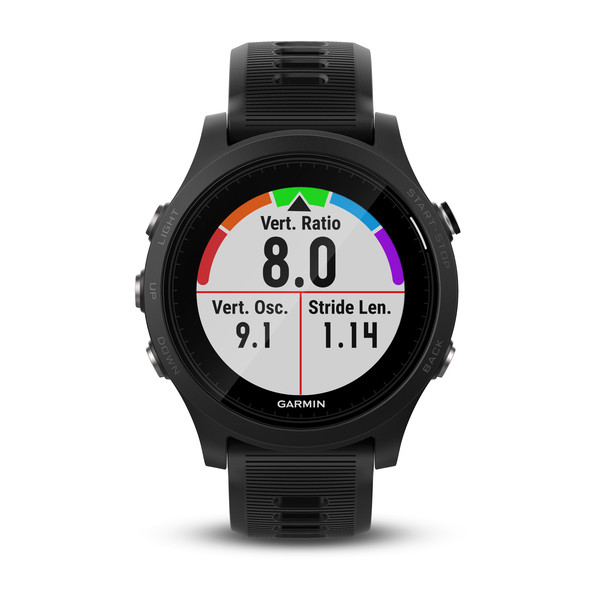
The Garmin Forerunner 935 GPS Running Watch is a premium multisport smartwatch designed for runners, triathletes, cyclists, and endurance athletes who need accurate training data in a lightweight package. Built for performance-focused users, it combines advanced GPS tracking, wrist-based heart rate monitoring, and detailed training analytics to support everything from daily runs to long-distance races and triathlon training. Its slim 49 g design and comfortable silicone strap make it easy to wear all day, while the transflective MIP display stays readable in bright sunlight and outdoor conditions.
One of the biggest strengths of the Garmin Forerunner 935 GPS Running Watch is its balance of battery life, durability, and advanced performance features. It offers up to 24 hours in GPS mode, up to 2 weeks in watch mode, and up to 60 hours in UltraTrac mode, making it suitable for marathon training, ultra-distance events, and multi-day adventures. The watch also supports ANT+, Bluetooth, and Wi‑Fi connectivity, allowing pairing with chest straps, cycling power meters, cadence sensors, and other training accessories.
This model is ideal for serious athletes who want more than basic fitness tracking. It is commonly used for structured training, race preparation, open-water swimming, cycling, and multisport competition. The estimated price range varies widely because the device is older and may be sold new-old-stock or refurbished, typically around the mid-range to premium used-market level rather than current flagship pricing. Availability is more limited than newer Garmin running watches, but it remains a strong value option for users seeking advanced features without paying top-tier modern smartwatch prices.
Specifications: Garmin Forerunner 935 GPS Running Watch Features and Performance
- Display: 1.2-inch sunlight-visible transflective MIP screen with 240 x 240 resolution.
- Dimensions: 47 x 47 x 13.9 mm.
- Weight: 49 g for a lightweight, race-ready feel.
- Battery life: Up to 24 hours in GPS mode, up to 2 weeks in watch mode, and up to 60 hours in UltraTrac mode.
- Water rating: 5 ATM, suitable for swimming and wet-weather training.
- Connectivity: Bluetooth, ANT+, and Wi‑Fi for sensor pairing and syncing.
- Navigation: GPS support with multisport tracking and route-following capabilities.
- Sensors: Wrist-based heart rate, barometric altimeter, compass, and thermometer support.
- Memory: 64 MB internal memory.
- Band compatibility: QuickFit 22 mm bands for fast customization.
- Comparison note: Compared with the Garmin Forerunner 735XT, the 935 adds broader training metrics, longer battery life, and stronger multisport support; compared with newer Forerunner models, it may lack some modern smartwatch features but still delivers excellent training performance.
For athletes asking “What makes the Forerunner 935 different?”, the answer is its strong triathlon-focused feature set, lightweight build, and reliable endurance battery performance.
Pros and Cons of the Garmin Forerunner 935 GPS Running Watch
Pros
- Excellent battery life for long training sessions and endurance events.
- Lightweight design makes it comfortable for all-day wear and race use.
- Advanced running dynamics and multisport metrics help serious athletes train smarter.
- Strong sensor compatibility with chest straps, power meters, and cycling accessories.
- Readable screen in direct sunlight, which is useful for outdoor runners and triathletes.
- Good value for money if purchased at a discounted or refurbished price.
Cons
- Older model with fewer smartwatch features than newer Garmin watches.
- Wrist heart rate is useful, but dedicated chest straps can still be more accurate for interval training.
- Display is functional rather than high-resolution or touch-based.
- Availability may be limited, depending on region and seller inventory.
- Not the best choice if you want advanced lifestyle apps, music storage, or modern AMOLED visuals.
For performance-focused users, the Garmin Forerunner 935 GPS Running Watch remains a solid purchase because it prioritizes training tools over luxury smartwatch extras. Compared with newer alternatives, it offers less polish but still delivers strong reliability for running, cycling, swimming, and triathlon training.
Customer Reviews and User Feedback
Average user sentiment is generally very positive, often landing around 4.5/5 stars for endurance sports performance. Many runners praise the lightweight feel, long battery life, and dependable GPS tracking, especially during marathon preparation and outdoor workouts. Athletes also appreciate the detailed training data and compatibility with external sensors.
Common complaints include the older interface, lack of modern smartwatch extras, and occasional preference for using a chest strap instead of wrist-based heart rate for highly accurate interval sessions. Some users note that the screen is practical but not especially flashy by today’s standards.
Typical testimonial: “A fantastic training watch for runners and triathletes—light, accurate, and easy to trust on long sessions.” Another common view is that it is still worth buying if the price is right, especially for users who care more about performance metrics than lifestyle features. If you want a reliable GPS running watch for structured training, this model is still a smart option.
Who Should Buy the Garmin Forerunner 935 GPS Running Watch?
The Garmin Forerunner 935 GPS Running Watch is best for runners, triathletes, cyclists, and fitness enthusiasts who want advanced training data in a lightweight, durable design. It is especially appealing to users who need long battery life, multisport support, and reliable GPS tracking without paying for a newer flagship smartwatch.
If your priority is serious workout tracking, race preparation, and sensor compatibility, this watch offers excellent value. If you want the latest smartwatch interface, AMOLED display, or premium lifestyle features, a newer Garmin model may be a better fit.
Faqs
How do I set up the garmin Forrunner 935 GPS Running Watch for the first time?
Why is my garmin Forrunner 935 GPS Running Watch taking a long time to find GPS?
How do I improve battery life on the garmin Forrunner 935 GPS Running Watch during long runs?
What should I do if the garmin Forrunner 935 GPS Running Watch will not sync with Garmin Connect?
Which training features on the garmin Forrunner 935 GPS Running Watch help with marathon and interval workouts?
Is the garmin Forrunner 935 GPS Running Watch compatible with heart rate straps and foot pods?
How do I clean and maintain the garmin Forrunner 935 GPS Running Watch after sweaty workouts?
Why does the garmin Forrunner 935 GPS Running Watch show inaccurate pace or distance, and how can I fix it?
More garmin manuals
Leave a Comment