
Garmin Approach S60 Gps Golf Watch User Manual
Content
Garmin Approach S60 GPS Golf Watch: Complete Product Manual and Buyer’s Guide
Introduction
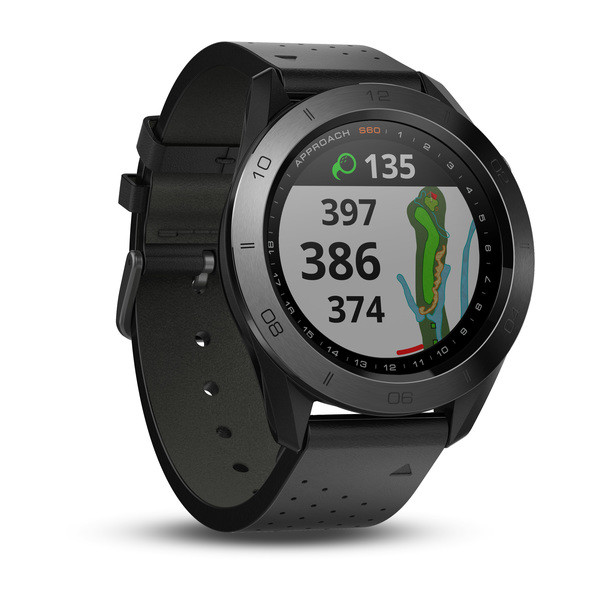
The Garmin Approach S60 GPS golf watch is a premium wrist-worn golf GPS designed for players who want fast course data, reliable shot-tracking, and a stylish smartwatch they can wear beyond the 18th hole. Built with a bright 1.2-inch sunlight-readable color touchscreen, it delivers precise yardages to greens, hazards, and doglegs with full-color course maps that are easy to read in bright outdoor conditions. The Garmin Approach S60 GPS golf watch is especially appealing to golfers who value convenience, speed, and a cleaner setup than a handheld rangefinder or bulky GPS device.
This model is aimed at casual golfers, weekend players, and serious competitors who want useful distance information without interrupting pace of play. It also suits golfers who like fitness and smartwatch features, since it tracks steps, calories, sleep, and other daily activity metrics outside golf mode. Key selling points include preloaded worldwide course coverage, automatic shot detection, round analysis, swing training tools, and compatibility with Garmin’s golf ecosystem. For players seeking one device for golf and everyday wear, the Garmin Approach S60 GPS golf watch offers a strong balance of performance and style.
At launch, the price range was about $399.99 for the standard version and $499.99 for the premium model, with current market pricing often varying by seller, condition, and availability. Because it is an older model, new stock may be limited in some regions, but it is still commonly found through third-party retailers and resale marketplaces.
Specifications for Garmin Approach S60 GPS Golf Watch
- Display: 1.2-inch sunlight-readable color touchscreen
- Resolution: 240 x 240 pixels
- Case size: 46.5 x 46.5 x 14.5 mm
- Weight: about 52 g with band
- Battery life: up to 10 hours in golf mode; up to 10 days in watch mode
- Course data: preloaded with more than 40,000 golf courses worldwide
- Core golf features: yardages to greens, hazards, and doglegs; course maps; shot tracking
- Performance tools: AutoShot tracking, SwingTempo, TempoTraining, and compatibility with swing sensors
- Connectivity: Bluetooth and Garmin app support
- Water resistance: suitable for everyday golf use and light weather exposure
- Band system: QuickFit bands for fast changes
- Storage: around 1 GB on some listings
- Comparable models: the Garmin Approach S62 offers newer hardware and broader golf intelligence, while the Approach S42 is a lower-cost alternative with fewer premium smartwatch features
In practical use, the Garmin Approach S60 GPS golf watch performs best for golfers who want clear front, middle, and back distances plus hole-overview visuals on the wrist. It is not as advanced as newer premium models, but it still remains a capable golf smartwatch with strong course coverage and dependable battery life.
Pros and Cons of the Garmin Approach S60 GPS Golf Watch
Pros
- Excellent sunlight-readable touchscreen makes it easy to check yardages during play.
- Preloaded course maps and worldwide course coverage reduce setup time.
- AutoShot tracking helps golfers review shot patterns after the round.
- Useful smartwatch features add value for everyday wear, not just golf.
- QuickFit bands and a polished design make it more versatile than many golf-only devices.
- Strong value if found at a discounted price compared with newer premium alternatives.
Cons
- The interface and hardware feel older compared with newer Garmin golf watches.
- Battery life is solid, but newer competitors may offer more efficient power management.
- Premium pricing at launch makes it less attractive if buying at full original retail.
- Some users may prefer a rangefinder for simpler point-and-shoot accuracy on certain shots.
- Advanced golfers may want more detailed analytics available on newer models like the Approach S62.
Overall, the Garmin Approach S60 GPS golf watch is a smart buy if appearance, ease of use, and full-featured golf tracking matter more than having the latest model. Compared with cheaper alternatives, it offers stronger smartwatch functionality; compared with newer premium watches, it is less advanced but often more affordable.
Customer Reviews and User Feedback
Typical customer feedback for the Garmin Approach S60 GPS golf watch is strongly positive, with many users giving it around 4 to 4.5 out of 5 stars. Golfers frequently praise the bright display, fast access to yardages, and the convenience of wearing a single watch for both golf and everyday use. A common positive comment is that the watch feels premium and makes course navigation easier without slowing down play.
Common complaints usually focus on the higher price, especially for buyers comparing it with newer models or basic GPS watches. Some users also mention that the interface can feel dated and that they would like longer battery performance in heavy use. Despite that, most reviews recommend it for golfers who want a reliable GPS golf watch with practical tracking features and a refined design. For buyers choosing between the Garmin Approach S60 GPS golf watch and lower-cost competitors, it is often considered a worthwhile upgrade for serious golfers.
Faqs
How do I set up the garmin Approach S60 Gps Golf Watch for the first time?
Why is my garmin Approach S60 Gps Golf Watch not finding courses or showing the wrong golf course?
How accurate is the garmin Approach S60 Gps Golf Watch for distance to the green and hazards?
Can I connect the garmin Approach S60 Gps Golf Watch to my smartphone and Garmin Golf app?
What should I do if the garmin Approach S60 Gps Golf Watch battery drains too quickly?
How do I update maps and software on the garmin Approach S60 Gps Golf Watch?
Is the garmin Approach S60 Gps Golf Watch compatible with Android and iPhone devices?
How should I clean and maintain the garmin Approach S60 Gps Golf Watch after regular golf use?
More garmin manuals
- Garmin Forrunner165 Series Watch User Manual
- Garmin Venu 4 Series Premium GPS Smartwatch User Manual
- Garmin EDGE 840 GPS Cycling Computer User Manual
- Garmin Fenix 7 Series GPS Smartwatch User Manual
- Garmin Forrunner 935 GPS Running Watch User Manual
- Garmin 10X2/12X2 Marine Chartplotter GPSMAP User Manual
Leave a Comment