
Garmin Venu 4 Series Premium GPS Smartwatch User Manual
Content
Garmin Venu 4 Series Premium GPS Smartwatch: Complete Product Manual
Introduction
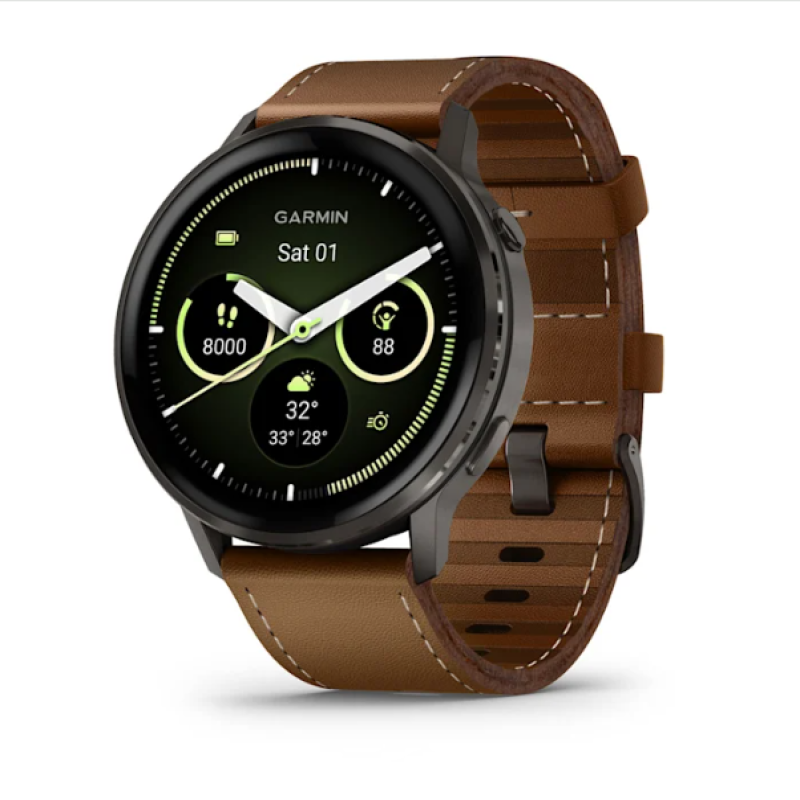
The Garmin Venu 4 Series Premium GPS Smartwatch is a stylish, feature-rich wearable designed for users who want advanced health tracking, accurate GPS performance, and strong everyday battery life in one polished package. With its bright AMOLED display, premium stainless-steel accents, and two size options, it blends fitness-focused engineering with a more lifestyle-friendly look than many rugged multisport watches.
This smartwatch is built for runners, gym users, wellness enthusiasts, cyclists, and busy professionals who want reliable notifications, contactless payments, sleep insights, and training tools without carrying a phone everywhere. The Venu 4 stands out for its dual-frequency GPS, broad health monitoring, and long-lasting battery, making it a strong choice for both workouts and daily wear. It also supports smart features such as music storage, Bluetooth connectivity, Wi-Fi syncing, and NFC payments, which make it useful beyond fitness tracking.
The estimated price range is around $549.99 in the U.S., £469.99 in the U.K., and AU$949 in Australia, with some premium strap variants priced higher. Availability includes Garmin’s store and major retail channels in many regions, and the watch is offered in 41mm and 45mm versions to suit different wrist sizes and style preferences.
Specifications
- Model: Garmin Venu 4 Series Premium GPS Smartwatch
- Sizes: 41mm and 45mm
- Display: 1.2-inch AMOLED at 390 x 390 pixels or 1.4-inch AMOLED at 454 x 454 pixels
- Battery life: Up to 10 days on the 41mm model and up to 12 days on the 45mm model in smartwatch mode
- GPS: Multi-band GPS with support for major satellite systems and all-systems GNSS modes
- Water resistance: 5ATM, suitable for swimming and everyday water exposure
- Sensors: Heart rate, ECG, SpO2, skin temperature, accelerometer, gyroscope, altimeter, compass
- Connectivity: Bluetooth, Wi-Fi, NFC, and ANT+
- Storage: 8GB for music and offline content
- Materials: Stainless steel bezel with fiber-reinforced polymer case and Gorilla Glass 3
- Weight: Approximately 46g for the 41mm model and 56g for the 45mm model with band
- Comparison: Compared with the Apple Watch and Samsung Galaxy Watch, the Venu 4 emphasizes longer battery life, deeper fitness tracking, and stronger training tools; compared with Garmin’s more rugged lines, it offers a cleaner, more lifestyle-focused design.
Detailed Description
The Garmin Venu 4 Series Premium GPS Smartwatch is designed to balance advanced health tools with a sleek everyday form factor. Its AMOLED touchscreen delivers bright, high-contrast visuals that are easy to read indoors and outdoors, while the stainless-steel bezel gives the watch a more premium look than many fitness wearables. The 41mm version suits smaller wrists, while the 45mm model offers a larger display and longer battery life.
In daily use, the watch tracks heart rate, sleep, stress, blood oxygen, and activity data, then syncs that information to Garmin’s ecosystem for trend analysis and training guidance. During workouts, the multi-band GPS improves location accuracy for running, cycling, hiking, and open-water sessions. The smartwatch also supports smartphone notifications, offline music playback, Garmin Pay, and voice-enabled features depending on connected device compatibility.
Real-world users will appreciate its versatility: it works as a fitness tracker during the day, a running watch during training, and a stylish smartwatch at work or social events. The overall build quality feels durable without being overly bulky, making it a strong premium GPS watch for users who want performance and comfort in one device.
Setup Guide
Setting up the Garmin Venu 4 Series Premium GPS Smartwatch is straightforward and can usually be completed in a few minutes. Start by charging the watch fully using the included cable, then power it on and select your preferred language. Next, download the Garmin Connect app on your smartphone and follow the pairing instructions on screen.
After pairing, configure essentials such as units of measurement, wrist orientation, sleep schedule, notification settings, and activity preferences. For best results, enable Bluetooth, Wi-Fi, and location permissions so the watch can sync data quickly and improve GPS performance. If you plan to use Garmin Pay, add your supported payment card through the app. You can also load music, adjust display brightness, and customize watch faces at this stage.
If pairing fails, restart both the phone and watch, confirm Bluetooth is enabled, and remove any old watch profiles from the app. Avoid exposing the device to extreme heat, and do not press buttons underwater unless the watch is designed for that action. For swimming or outdoor exercise, make sure the strap is secure before starting activity tracking.
Troubleshooting
Common issues with the Garmin Venu 4 Series Premium GPS Smartwatch usually relate to pairing, GPS lock, syncing, or battery drain. If the watch will not connect to your phone, unpair it in Bluetooth settings, restart both devices, and pair again through Garmin Connect. If GPS takes too long to lock, move to an open outdoor area and allow a full satellite acquisition before beginning your activity.
If battery life seems lower than expected, reduce screen brightness, limit always-on display use, and disable unnecessary sensors or notifications. For poor heart-rate readings, tighten the strap slightly and wear the watch above the wrist bone. If an update stalls, connect to Wi-Fi and ensure the battery is charged before retrying.
There are no widely reported error-code patterns specific to this model, so most fixes rely on standard smartwatch troubleshooting steps such as restarting, updating firmware, and clearing device pairings. Garmin typically provides warranty coverage through its authorized retail and support channels, and users can contact Garmin support through the official help center, the Garmin Connect app, or the retailer where the watch was purchased.
Pros and Cons
Pros
- Excellent battery life for an AMOLED smartwatch, especially on the 45mm model
- Bright, sharp display that is easy to read in everyday use and workouts
- Strong fitness and health tracking with GPS, ECG, SpO2, and sleep tools
- Premium materials and a more polished look than many sport-first watches
- Useful smart features such as music storage, NFC payments, and Wi-Fi syncing
- Great option for users who want a Garmin smartwatch that also feels stylish
Cons
- Higher price than many mainstream smartwatches
- Fewer third-party apps than some competitors
- Not as rugged as Garmin’s adventure-focused models
- Some users may prefer more advanced mapping tools found on premium multisport watches
- Leather strap versions cost more, reducing overall value for budget-conscious buyers
Overall, the watch offers strong value for users who prioritize fitness accuracy, battery life, and build quality over app-store depth. Compared with alternatives like Apple Watch or Samsung Galaxy Watch, it is better suited to endurance users and health tracking fans who want longer runtime and deeper training metrics.
Customer Reviews
Customer feedback for the Garmin Venu 4 Series Premium GPS Smartwatch is generally positive, with many users praising the display quality, battery performance, and improved health tools. A common rating pattern is around 4.5 out of 5 stars from buyers who like the premium design and reliable GPS tracking.
Typical praise includes comments such as “the screen is gorgeous,” “battery life finally matches my needs,” and “it feels like a true everyday smartwatch with serious fitness features.” Common complaints focus on the price and the lack of a deeper app ecosystem compared with Apple and Samsung models. Some users also mention that the watch is more lifestyle-oriented than rugged adventure watches.
For most buyers, this is a strong purchase recommendation if the goal is a premium GPS smartwatch with excellent wellness tracking and dependable daily performance. It is especially appealing to runners, walkers, and professionals who want one device for training and everyday wear.
Faqs
How do I set up garmin Venu 4 Series Premium GPS Smartwatch for the first time?
Why is my garmin Venu 4 Series Premium GPS Smartwatch not connecting to the Garmin Connect app?
What features should I use first on garmin Venu 4 Series Premium GPS Smartwatch to get the best daily value?
How do I improve GPS accuracy on garmin Venu 4 Series Premium GPS Smartwatch during outdoor workouts?
Is garmin Venu 4 Series Premium GPS Smartwatch compatible with Android and iPhone?
What should I do if the battery on garmin Venu 4 Series Premium GPS Smartwatch drains too fast?
How do I clean and maintain garmin Venu 4 Series Premium GPS Smartwatch without damaging it?
Can I customize workouts and watch faces on garmin Venu 4 Series Premium GPS Smartwatch for specific goals?
More garmin manuals
Leave a Comment