
Garmin Forrunner165 Series Watch User Manual
Content
Garmin Forerunner 165 Series Watch: Complete Product Manual and Buyer’s Guide
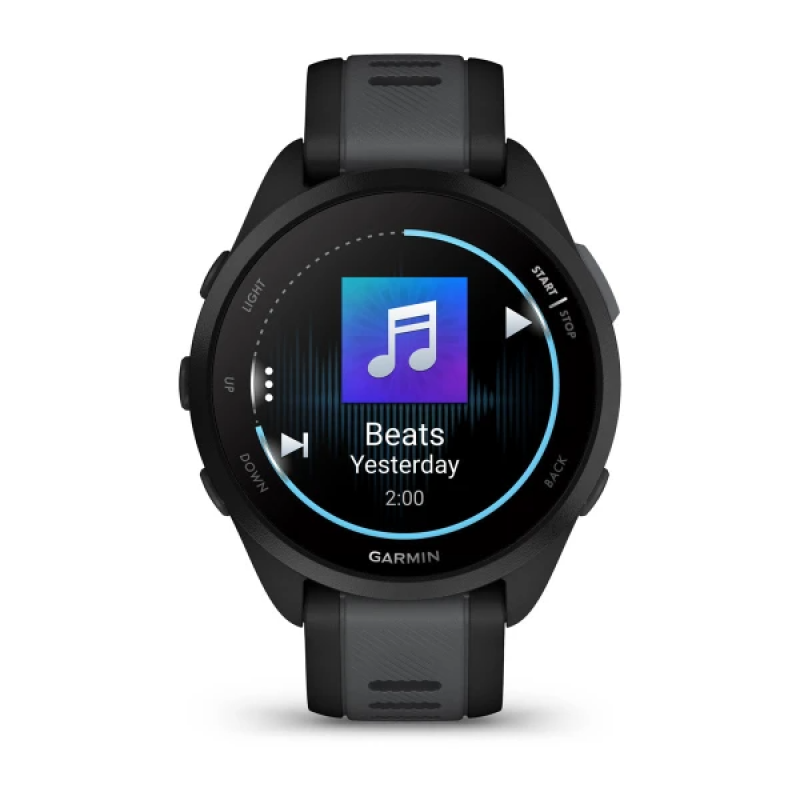
The garmin Forrunner165 Series Watch is a lightweight GPS running smartwatch built for beginner to intermediate runners who want advanced training features without the complexity or price of a premium multisport model. With a bright AMOLED touchscreen, button controls, accurate satellite tracking, and a strong focus on health and training insights, it delivers a balanced mix of everyday smartwatch convenience and serious running performance. The series is especially appealing to users who want reliable pace, distance, heart-rate, sleep, and recovery tracking in a simple, easy-to-use package.
Available in standard and music-enabled versions, this watch is designed for runners, fitness enthusiasts, and anyone looking for a compact wearable with excellent battery life and strong GPS functionality. The typical price range is about $249.99 for the standard model and $299.99 for the music edition, with regional pricing varying by market and retailer. Its availability is broad through Garmin, major electronics stores, and online marketplaces, making it one of the most accessible entry-level Garmin running watches.
What makes the garmin Forrunner165 Series Watch stand out is its vibrant 1.2-inch AMOLED display, 39g lightweight build, up to 11 days of smartwatch battery life, and support for advanced training tools such as morning reports, training effect, body battery, recovery guidance, and running-specific metrics. For users seeking a feature-rich running watch that is comfortable enough for all-day wear, the Forerunner 165 series offers excellent value and dependable performance.
Specifications of the Garmin Forerunner 165 Series Watch
- Display: 1.2-inch AMOLED touchscreen, 390 x 390 resolution
- Case size: 43 x 43 x 11.6 mm
- Weight: 39 g
- Materials: Fiber-reinforced polymer case with chemically strengthened glass
- Band: 20 mm quick-release silicone strap
- Water resistance: 5 ATM, suitable for swimming and daily wear
- Battery life: Up to 11 days in smartwatch mode, up to 19 hours in GPS-only mode, and up to 17 hours in all-systems GNSS mode
- Connectivity: Bluetooth and ANT+; Wi-Fi on the Music edition
- Storage: 4 GB on the Music model for offline playlists
- Sensors: Optical heart rate, pulse oximeter, accelerometer, compass, altimeter, and ambient light sensor
- Navigation: GPS, GLONASS, Galileo, and all-systems GNSS support
- Key features: Morning Report, sleep tracking, nap tracking, training suggestions, Garmin Pay, running power, race widgets, and health snapshots
Compared with the Garmin Forerunner 55, the garmin Forrunner165 Series Watch adds a much better AMOLED screen and richer health tools. Compared with higher-end models like the Forerunner 265, it is simpler and more affordable, but still offers excellent value for runners who do not need advanced dual-frequency GPS or deeper performance analytics.
Detailed Description: What the Garmin Forerunner 165 Series Watch Offers
The garmin Forrunner165 Series Watch is built around ease of use and performance clarity. The touchscreen interface makes menu navigation quick, while physical buttons provide reliable control during workouts, wet conditions, or when gloves are worn. This hybrid interaction style is particularly helpful for runners who want a watch that is intuitive both on the move and at rest.
In real-world use, the watch tracks outdoor runs, treadmill sessions, walking, cycling, and general fitness activity with strong consistency. The built-in GPS records route, pace, and distance data, while health tracking tools monitor heart rate, stress, sleep quality, and oxygen saturation. The Music edition adds offline storage for playlists, making it a strong companion for training sessions without a phone.
The build quality feels solid for a lightweight sports watch. Its polymer casing keeps weight low without feeling fragile, and the strengthened glass helps resist scratches from everyday use. Users typically appreciate the bright AMOLED screen, comfortable fit, and Garmin’s polished training ecosystem. For daily wear, the watch feels discreet and light; for workouts, it remains responsive and dependable.
Setup Guide for Garmin Forerunner 165 Series Watch
Setting up the garmin Forrunner165 Series Watch is straightforward. First, charge the watch fully using the included Garmin charging cable. Then power it on and follow the on-screen prompts to select language, region, and user profile details such as age, height, weight, and activity level.
- Download the Garmin Connect app on your smartphone.
- Enable Bluetooth on your phone and pair the watch through the app.
- Allow notifications, activity access, and location permissions for full functionality.
- Customize data fields, watch faces, and workout profiles inside the app.
- For the Music edition, connect to Wi-Fi and sync supported playlists or audio services.
If pairing fails, restart both devices, verify Bluetooth is enabled, and confirm the app has updated permissions. For accurate tracking, wait for GPS signal lock before starting outdoor activities. Avoid using the watch in extreme heat, and ensure the strap is secure but not overly tight to reduce inaccurate heart-rate readings and skin irritation.
Troubleshooting the Garmin Forerunner 165 Series Watch
Most common issues with the garmin Forrunner165 Series Watch are simple to resolve. If GPS takes too long to connect, move to an open outdoor area and give the watch a few extra seconds before starting. If heart-rate readings seem unstable, clean the sensor on the underside of the watch and wear it one finger-width above the wrist bone.
- Problem: Watch will not sync. Solution: Restart the watch, reopen Garmin Connect, and confirm Bluetooth is active.
- Problem: Battery drains quickly. Solution: Reduce brightness, disable unused notifications, and limit always-on display use if available in settings.
- Problem: Music will not play on the Music model. Solution: Reconnect Wi-Fi, verify storage space, and resync playlists.
- Problem: Inaccurate pace or distance. Solution: Update software and wait for a full GPS lock before starting a workout.
If a software issue persists, perform a restart or factory reset after backing up data. Garmin devices are generally backed by warranty coverage, and support is available through the official help center, product manuals, and customer service channels offered in your region. For physical damage, battery replacement, or charging concerns, contact authorized Garmin support directly.
Pros and Cons of the Garmin Forerunner 165 Series Watch
Pros
- Bright AMOLED display makes workouts and menus easy to read indoors and outdoors.
- Lightweight 39g design improves comfort for all-day wear and long runs.
- Strong battery life for a watch in this price range, especially in smartwatch mode.
- Excellent value for runners who want Garmin training tools without paying for a flagship model.
- Music edition adds offline playback, which is useful for phone-free training.
- Reliable health and training insights, including sleep, recovery, and daily workout suggestions.
Cons
- No premium dual-band GPS, so it is less advanced than higher-end running watches.
- 4 GB storage is limited compared with some competing music watches.
- Plastic construction is practical but less premium than metal-bodied alternatives.
- Best features are concentrated around running, so multisport athletes may want a more advanced model.
For value for money, the garmin Forrunner165 Series Watch performs very well. It is a stronger choice than many basic fitness watches, while remaining more affordable than advanced Garmin alternatives such as the Forerunner 265 or 965.
Customer Reviews: What Buyers Say About the Garmin Forerunner 165 Series Watch
Average user sentiment is generally positive, with many buyers rating it around 4.5 out of 5 stars. Runners often praise the vivid display, lightweight feel, accurate daily tracking, and the simplicity of Garmin’s training ecosystem. One common comment is that it feels like the “sweet spot” between basic and premium running watches.
Common complaints usually involve the lack of advanced mapping, limited storage on the Music model compared with some rivals, and occasional setup confusion for first-time Garmin users. Even so, most owners recommend it for beginners, casual runners, and anyone upgrading from a basic fitness tracker.
Typical testimonial: “The watch is comfortable enough to forget during long runs, but powerful enough to guide my training every day.” For shoppers looking for a practical GPS running watch with dependable performance and strong everyday usability, the garmin Forrunner165 Series Watch remains a highly recommended pick.
Faqs
How do I set up garmin Forrunner165 Series Watch for the first time?
Why is my garmin Forrunner165 Series Watch not syncing with Garmin Connect?
What features of garmin Forrunner165 Series Watch help improve running performance?
How do I fix inaccurate heart rate or GPS readings on garmin Forrunner165 Series Watch?
Is garmin Forrunner165 Series Watch compatible with iPhone and Android phones?
How can I extend the battery life of garmin Forrunner165 Series Watch during daily use?
What should I do if garmin Forrunner165 Series Watch is freezing or not responding?
How should I clean and maintain garmin Forrunner165 Series Watch to keep it in good condition?
More garmin manuals
Leave a Comment