
Garmin EDGE 840 GPS Cycling Computer User Manual
Content
Garmin Edge 840 GPS Cycling Computer: Complete Product Manual and Review
Introduction
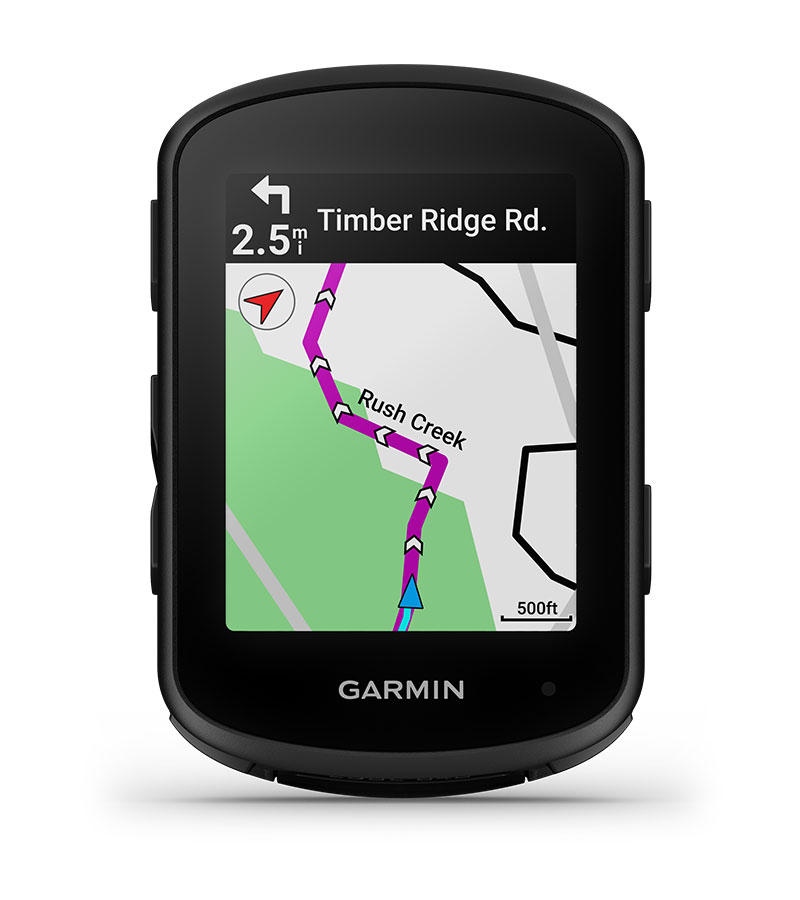
The Garmin Edge 840 GPS Cycling Computer is a compact, feature-rich bike computer designed for road cyclists, gravel riders, mountain bikers, and endurance athletes who want reliable navigation, training guidance, and performance tracking in one device. It combines touchscreen control with physical buttons, making it easy to use in wet weather, with gloves, or on rough terrain. The Edge 840 is especially appealing to riders who want advanced route planning, climb insights, adaptive coaching, and multi-band GNSS accuracy in a single unit.
One of its biggest strengths is versatility. The device supports detailed turn-by-turn navigation, structured workouts, stamina tracking, smart notifications, and compatibility with external sensors and power meters. It is built for long rides and serious training sessions, while still being simple enough for everyday commuting and weekend fitness rides. Riders who value a responsive interface and dependable mapping will find the Garmin Edge 840 GPS Cycling Computer a strong upgrade over entry-level bike computers.
The estimated price range is typically around $300 to $450 USD depending on retailer, bundle, and seasonal discounts. It is widely available through major cycling stores, online marketplaces, and Garmin’s retail partners. For cyclists looking for a premium GPS cycling computer with advanced training and navigation tools, the Edge 840 remains one of the most compelling options in its class.
Specifications
- Display: 2.6-inch color touchscreen with 246 x 322 pixel resolution
- Controls: Touchscreen plus physical buttons for all-weather usability
- Dimensions: 57.8 x 85.1 x 19.6 mm
- Weight: Approximately 80 to 89 grams depending on configuration
- Battery life: Up to 26 hours in standard GPS mode; longer battery-saving modes available
- Water resistance: IPX7 rated for rain and wet riding conditions
- Connectivity: Bluetooth, ANT+, Wi-Fi, and USB-C charging
- Memory: 32 GB internal storage for maps and ride data
- GNSS support: Multi-band satellite positioning for improved accuracy
- Compatibility: Works with heart rate monitors, cadence sensors, speed sensors, power meters, and smart trainers
- Navigation: Turn-by-turn routing, course creation, rerouting, and climb information
- Training tools: Adaptive coaching, workouts, stamina insights, and performance analytics
Compared with similar models, the Edge 840 offers more advanced features than many midrange bike computers and is more compact than larger flagship units. It is often compared with the Edge 540, which shares many performance features but lacks the same touchscreen-first experience.
Detailed Description
The Garmin Edge 840 GPS Cycling Computer is built to deliver a balanced mix of navigation, training, and everyday ride tracking. It works by using satellite positioning, onboard maps, and sensor data to record rides, guide routes, and analyze performance in real time. Riders can load courses, follow turn-by-turn directions, monitor climbs with ClimbPro-style ascent guidance, and review detailed ride metrics after each session.
In real-world use, the device is well suited to road cyclists navigating unfamiliar routes, mountain bikers handling technical trails, and gravel riders exploring long-distance back roads. Its compact shape keeps handlebar clutter minimal, while the hybrid touchscreen-and-button layout improves usability when weather, gloves, or rough terrain make touch input less practical. The housing feels sturdy and premium, with a durable design intended for frequent outdoor use.
User experience is one of its strongest points. Menus are responsive, pairing is straightforward, and the display is easy to read in bright daylight. The interface is designed to reduce friction during rides, allowing riders to switch between data screens, maps, and workout prompts quickly. As a premium cycling computer, it delivers a polished experience for both serious athletes and dedicated recreational riders.
Setup Guide: How to Set Up the Garmin Edge 840 GPS Cycling Computer
- Charge the device fully using the USB-C cable before first use.
- Power it on and follow the on-screen setup prompts to select language, region, and preferred units.
- Install the mount securely on the handlebar or stem, then attach the unit firmly.
- Pair the device with the Garmin Connect app on your smartphone for syncing, updates, and ride management.
- Add sensors such as heart rate, cadence, speed, or power meter devices through the sensor menu.
- Configure data pages, activity profiles, alerts, and navigation settings according to your riding style.
- Download maps and update firmware when prompted to ensure the latest features and route data.
Troubleshooting tips include checking Bluetooth if the device will not pair, restarting the computer if a sensor is not detected, and confirming that the mount is locked before every ride. Avoid exposing the unit to extreme heat, and do not charge it in unsafe wet conditions. For safety, always test navigation and buttons before starting a ride so you are not distracted on the road.
Troubleshooting
- Problem: Device will not power on. Solution: Charge for at least 30 minutes and try a different cable or adapter.
- Problem: GPS takes too long to lock. Solution: Wait in an open area and make sure satellite settings are enabled.
- Problem: Sensor not connecting. Solution: Remove the sensor from saved devices, then pair it again while close to the unit.
- Problem: Touchscreen is unresponsive. Solution: Clean the screen, remove heavy moisture, and use the side buttons temporarily.
- Problem: Ride sync fails. Solution: Check Wi-Fi or phone connection and reopen the Garmin Connect app.
- Problem: Battery drains too quickly. Solution: Reduce screen brightness, disable unused sensors, and shorten backlight timeouts.
Common error behavior is often related to pairing, outdated firmware, or weak satellite visibility rather than hardware failure. Preventive care includes regular software updates, secure mounting, and routine charging. Warranty coverage and support are available through Garmin’s official support channels, retail partners, and registered product service options. For help, users should contact Garmin support through the company’s official customer service portal or the retailer where the device was purchased.
Pros and Cons
Pros
- Excellent navigation tools with detailed maps and rerouting
- Touchscreen plus buttons improve control in varied riding conditions
- Strong battery life for long training rides and endurance events
- Wide sensor compatibility for structured training and performance tracking
- Compact, lightweight design that does not clutter the cockpit
- Great value for riders who want premium features without the largest flagship price
Cons
- More expensive than entry-level GPS cycling computers
- Advanced menus can feel overwhelming for casual users
- Touchscreen performance may be less ideal in heavy rain than button-only devices
- Some riders may prefer the longer battery life of solar variants
- Feature depth may be more than occasional riders actually need
Compared with alternatives like the Edge 540, the Edge 840 offers a more flexible interface and stronger everyday usability, while still remaining lighter and more compact than some larger premium units. For riders who want a serious training and navigation tool, the value for money is strong.
Customer Reviews
Typical customer feedback for the Garmin Edge 840 GPS Cycling Computer is highly positive, with many riders giving it around 4.5 out of 5 stars. Cyclists commonly praise the fast setup, accurate navigation, crisp display, and the convenience of having both touch and button controls.
Common complaints usually focus on the learning curve, occasional touchscreen sensitivity issues in bad weather, and the higher price compared with simpler bike computers. One rider might say, “The mapping and workout features are outstanding, and it makes long rides much easier to manage.” Another may note, “It is packed with features, but it takes some time to learn everything.”
Most buyers recommend it for riders who train regularly, follow routes, or want deep performance data. If the goal is a dependable premium bike computer with advanced features, this model is an easy recommendation.
Frequently Asked Questions
- Is the Garmin Edge 840 GPS Cycling Computer good for beginners? Yes, but beginners may need time to learn the menus and training features.
- Does it work with power meters and heart rate straps? Yes, it supports common ANT+ and Bluetooth cycling sensors.
- Is it waterproof? It has an IPX7 water-resistance rating, which is suitable for rain and wet rides.
- How long does the battery last? Up to 26 hours in standard use, with longer life in power-saving modes.
- Is it worth buying? Yes, for cyclists who want premium navigation, training metrics, and reliable daily performance.
Faqs
How do I set up the garmin EDGE 840 GPS Cycling Computer for the first time without missing important settings?
Why is my garmin EDGE 840 GPS Cycling Computer taking a long time to get a GPS signal?
How do I fix syncing problems on the garmin EDGE 840 GPS Cycling Computer with Garmin Connect?
What sensors and accessories are compatible with the garmin EDGE 840 GPS Cycling Computer?
How can I improve battery life on the garmin EDGE 840 GPS Cycling Computer during long rides?
How do I use training features on the garmin EDGE 840 GPS Cycling Computer to follow a workout correctly?
What should I do if the touchscreen or buttons on the garmin EDGE 840 GPS Cycling Computer stop responding?
How should I maintain and care for the garmin EDGE 840 GPS Cycling Computer to keep it reliable?
More garmin manuals
Leave a Comment