
Setup: Govee Smart Air Purifier 2 H7124 User Manual
Content
Govee Smart Air Purifier 2 H7124
Introuction
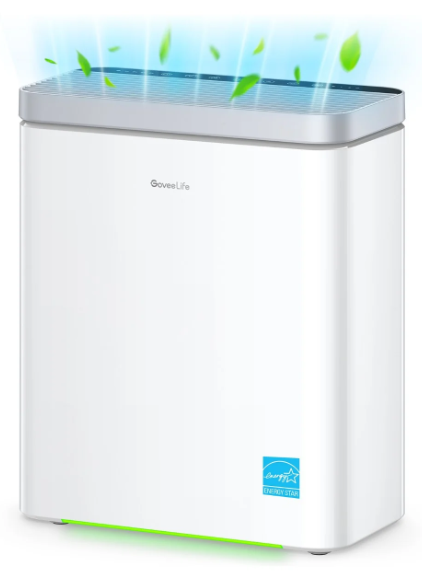
The govee Smart Air Purifier 2 H7124 is a state-of-the-art home air purification device designed to improve indoor air quality with smart technology and advanced filtration. Equipped with an H13-level HEPA filter, it delivers up to 99.97% filtration efficiency, effectively capturing fine dust, pollen, pet dander, smoke particles, and other airborne pollutants. It's built-in PM2.5 sensor continuously monitors air quality, allowing the purifier to adjust its fan speed automatically for optimal performance and energy efficiency.
This smart air purifier is ideal for health-conscious individuals, allergy sufferers, pet owners, and families seeking to maintain a cleaner, healthier living environment. It supports app control via the Govee Home App, enabling remote operation, real-time air quality monitoring, and integration with voice assistants like Amazon Alexa and Google Assistant. This makes it perfect for modern smart homes where convenience and air quality management matter.
Available through major online retailers and the official Govee website, the Govee Smart Air Purifier 2 H7124 typically ranges between $120 and $160, positioning it as an affordable yet highly efficient option in the mid-range air purifier market. Whether used in bedrooms, offices, or living rooms, it provides quiet operation and customizable settings to suit different spaces and user preferences.
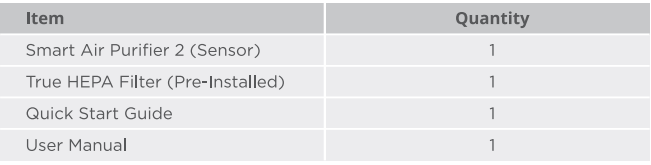
Included in the Box
Specifications of the govee Smart Air Purifier 2 H7124
- Model: H7124 (Includes PM2.5 sensor for real-time air quality feedback)
- Filtration System: H13 Level True HEPA filter with 99.97% filtration efficiency
- Filter Types: HEPA filter combined with a modified activated carbon filter for smoke and odor absorption
- Coverage Area: Suitable for rooms up to approximately 300 sq. ft.
- Fan Speeds: Three adjustable speeds (Low, Medium, High) plus Auto and Sleep modes
- Air Quality Sensor: Built-in PM2.5 sensor with real-time readings displayed on the device
- Connectivity: Wi-Fi enabled for Govee Home App integration, compatible with Amazon Alexa and Google Assistant
- Noise Level: Ultra-quiet operation, especially in Sleep mode for nighttime use
- Power Consumption: Maximum under 40 watts, even at Turbo mode
- Additional Features: Timer settings (1, 2, 4, 8 hours), filter life alerts, touch control panel
- Power Supply: 120V-60Hz
- Purifier Rated Power: 40W
- Air Purifier Dimensions: 12.4xl4.7x6.3in/31.5x37.4xl6cm
- Air Purifier Weight: 7.03Ib/3.19kg
- Operating Conditions
- Temperature: 14° to 104° F/-10° to 40° C
- Humidity: <85%RH
Compared to similar mid-range air purifiers, the govee Smart Air Purifier 2 H7124 stands out with smart home integration and a highly efficient H13 HEPA filter, which is a step above standard HEPA 12 units common in its price class.
Part Names
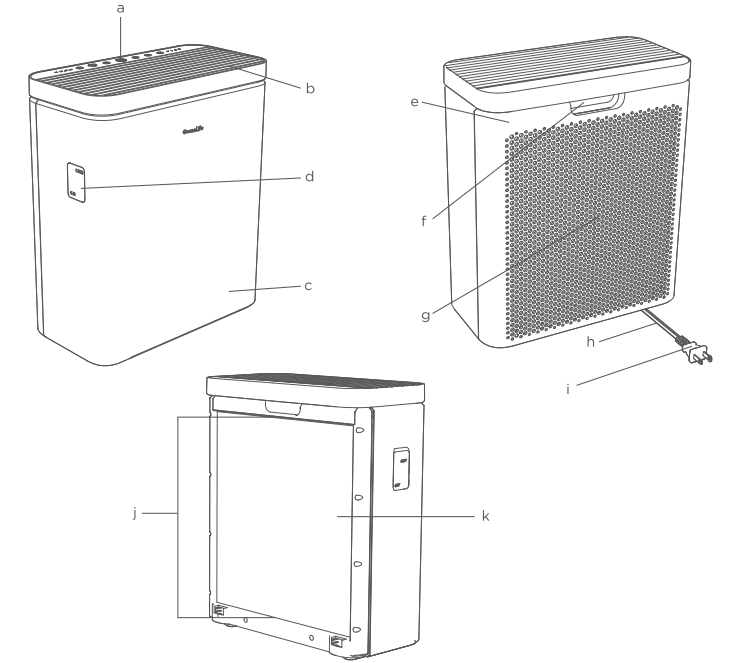
- Touch Control Panel
- Air Outlet
- Main Housing
- Particle Sensor
- Filter Cover
- Open Slot & Built-in Handle
- Air Inlet
- Power Cord
- Power Plug
- Filter Tab
- 3-Stage True HEPA
Safety Instructions
General Safety
- Only use the air purifier as described in this manual.
- Do not use the air purifier without removing the plastic wrap from the filter. If not removed, the air purifier will not filter air, and may overheat, causing a fire hazard.
- Do not use the air purifier outdoors.
- Keep the air purifier away from water or wet, damp areas. Never submerge it in water or liquid.
- Do not use the air purifier in excessively humid areas.
- Keep the air purifier away from heat sources such as stovetops, ovens, or radiators.
- Do not use the air purifier in places where combustible gases, vapors, metallic dust, aerosol (spray) products, or fumes from industrial oil are present.
- Keep the air purifier 5ft Cl.. Sm) away from where oxygen is being administered.
- Supervise children when they are near the air purifier.
- Do not place anything into the openings of the air purifier.
- Do not place heavy objects on the air purifier.
- Keep the inside of the air purifier dry. To prevent moisture buildup, avoid placing it in rooms with major temperature changes or underneath air conditioners.
- Always unplug the air purifier before servicing (such as changing the filter).
- Do not use the air purifier if it is damaged or not functioning well, or if the power cord or plug is damaged. Do not risk repairing the air purifier by yourself. Contact customer support for assistance.
- Not for commercial use. Household use only.
- Place the air purifier near the electrical outlet it is plugged into.
- Never place the power cord near any heat sources.
- Do not run cord under carpeting. Do not cover the cord with throw rugs, runners, or similar coverings. Do not route the cord under furniture or appliances. Arrange the cord away from the traffic area and where it will not be tripped over.
- This appliance has a polarized plug (one blade is wider than the other). To reduce the risk of electric shock, this plug is intended to fit in a polarized outlet only one way. If the plug does not fit fully in the outlet, reverse the plug. If it still does not fit, contact a qualified electrician. Do not attempt to defeat this safety feature.
- This air purifier uses standard US 120V, 60Hz outlets. If using it outside the US, check the compatibility.
- WARNING: To Reduce The Risk Of Fire Or Electric Shock, Do Not Use This Air Purifier With Any Solid-State Speed Control Device.
- WARNING: To Reduce The Risk Of Fire, Electric Shock, Or Injury To Persons, Do Not Use Replacement Parts That Have Not Been Recommended By The Manufacturer(e.g., Parts Made At Home Using A 3D Printer).
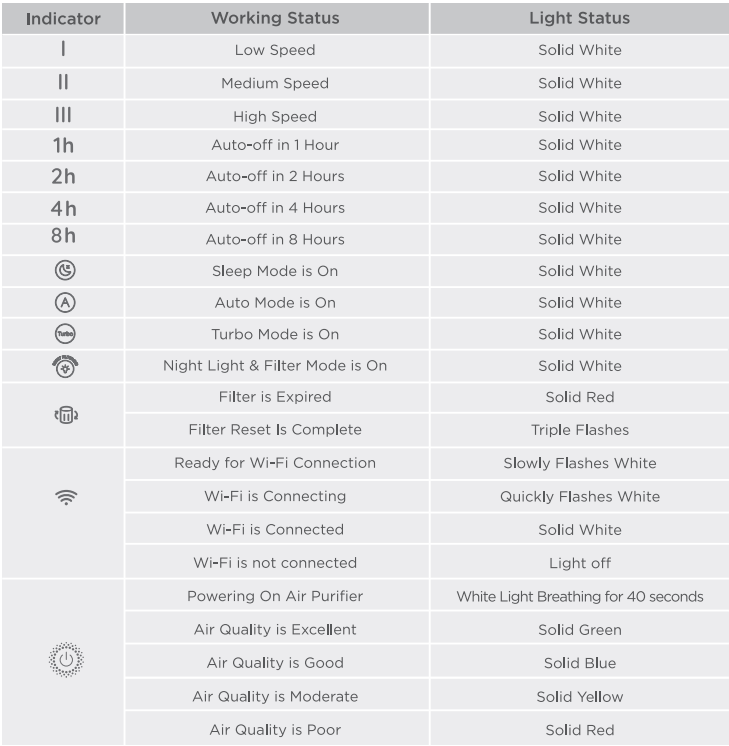
LED Indicators
Using the Filters
Stage Filtration System
Washable Pre-Filter
- Captures large particles such as dust, lint, fibers, hair, and pet fur.
- Maximizes the filter's life by protecting it from large debris.
H13 True HEPA Filter
- Captures at least 99.97% of airborne particles 0.3 microns (µm) in size.
- Filters small particles such as fine dust, smoke particles, pollen, and pet dander.
Modified High-Efficiency Activated Carbon Filter
- Physically absorbs smoke, odors, and fumes.
- Decomposes pet odors through chemical reaction.
- Filters compounds such as formaldehyde, benzene, ammonia, hydrogen sulfide, and volatile organic compounds (VOCs).
Standard Environment Precautions
Humidity
- Moisture may damage the filters. This air purifier should be used in an area with a humidity level below 85% RH. If you use the air purifier in excessively humid areas, the surface of the filter will become moldy.
Essential Oils
- Do not add essential oils to the air purifier or filter. The filter will become damaged by the oil and will eventually release an unpleasant smell.
- Do not use diffusers near the air purifier.
Care & Maintenance
Caution: Do not clean with abrasive chemicals or flammable cleaning agents.
Cleaning the Smart Air Purifier
- Unplug the purifier from power before cleaning.
- Wipe the outside of the air purifier with a soft, dry cloth. If necessary, wipe the housing with a damp cloth and leave it to dry.
- Vacuum the inside of the air purifier.
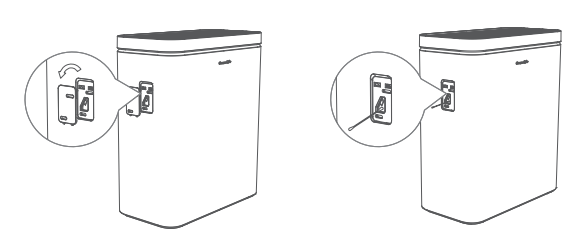
Cleaning the Particle Sensor Lens
- Unplug the purifier from the power.
- Open the particle sensor cover.
- Use a cotton swab dipped in water to clean the particle sensor lens. Instructed by customer support.
- Wipe the inside of the sensor dry with a dry cotton swab.
Note: Do not remove the foam piece attached to the particle sensor cover unless instructed by customer support.
Cleaning the Pre-Filter
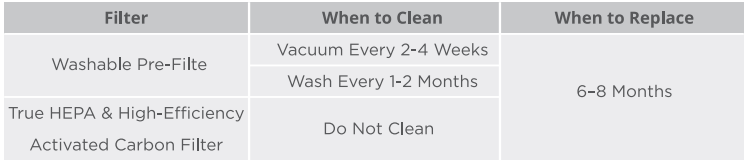
The outer pre-filter should be cleaned to increase its efficiency and service life.
- Carefully peel the pre-filter away from the True HEPA and Modified Activated Carbon Filters.
- Clean the pre-filter with a soft brush or vacuum hose to remove hair, dust, and large particles.
- Gently rinse the pre-filter with water and dry it completely before putting it back in place.
- Place the filter back into the main housing.
Note: Do not clean the True HEPA and Activated Carbon Filters.
Troubleshooting
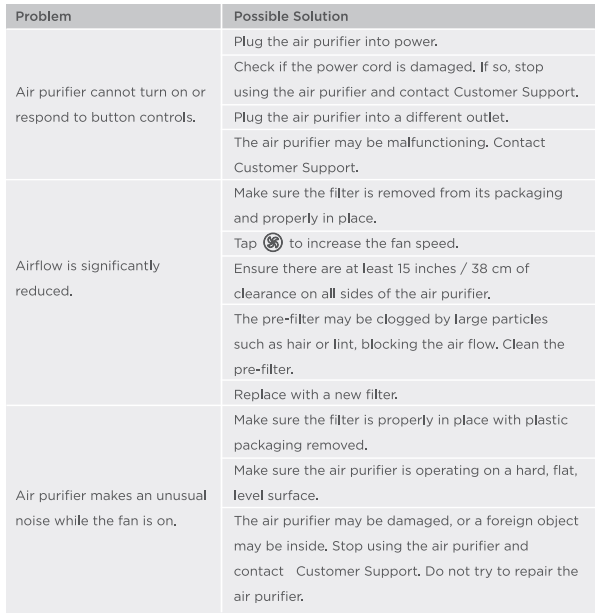
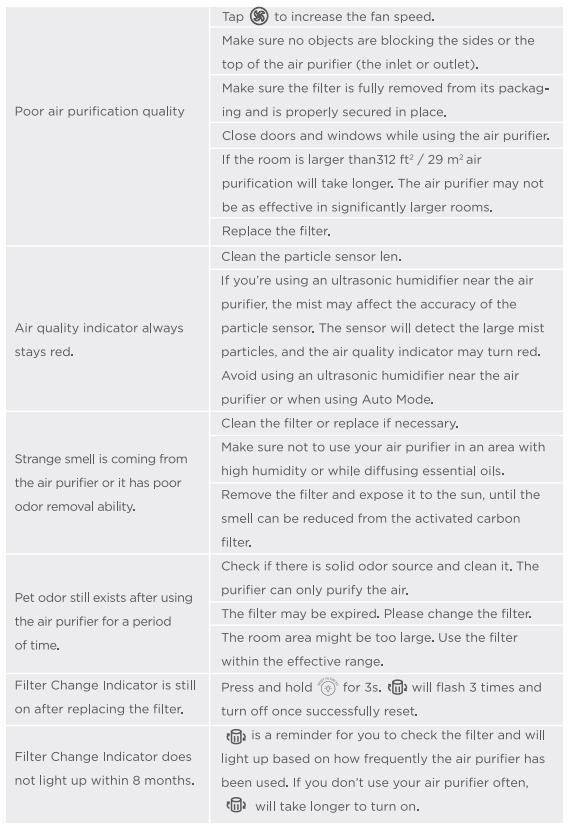
The troubleshooting section below is for solving frequently asked questions for the purifier unit. If your problem persists, please contact customer support.
For Smart Air Purifier 2 (Sensor)

Pros & Cons of the govee Smart Air Purifier 2 H7124
Pros
- High filtration efficiency: Captures 99.97% of particles as small as 0.3 microns, effectively improving indoor air quality.
- Smart connectivity: Full app control with real-time air quality monitoring and voice assistant compatibility provides user convenience.
- Quiet operation: Runs silently in Sleep mode, ideal for bedrooms and nighttime use without disturbance.
- Energy efficient: Low power consumption ,n even at maximum fan speed, eed reduces electricity costs.
- Multiple fan speed and timer options: Customizable performance for various room sizes and usage scenarios.
Cons
- Coverage area limitation: Best suited for small to medium rooms; may not be effective in large open spaces.
- Filter replacement cost: Replacement filters can add to long-term costs, requiring periodic maintenance.
- App dependency: Some advanced features require the Govee Home App, which might be less intuitive for non-tech-savvy users.
Overall, the govee Smart Air Purifier 2 H7124 offers excellent value for money by combining high filtration performance with smart features, making it a strong competitor against alternatives like Levoit Core 300 and Coway Airmega in its category.[5]
Customer Reviews and Feedback for govee Smart Air Purifier 2 H7124
Users consistently praise the Govee Smart Air Purifier 2 H7124 for its quiet operation, effective air purification, and ease of use,, both via physical controls and the Govee Home App. Many highlight the accuracy of the PM2.5 sensor and appreciate the timely filter replacement reminders. Common complaints include the limited room coverage in larger spaces and occasional connectivity issues with Wi-Fi setups in some homes.
Star ratings average around 4.5 out of 5, with testimonials noting improved allergy symptoms and fresher indoor air. Most customers recommend this purifier for bedrooms and small living spaces, emphasizing its smart features as a key selling point. Some suggest considering room size before purchasing to ensure optimal results.
Faqs
How do I set up the govee Smart Air Purifier 2 H7124 for the first time?
What should I do if my govee Smart Air Purifier 2 H7124 is not connecting to the Govee Home app?
Why is the filter change indicator light on my govee Smart Air Purifier 2 H7124 and how do I reset it?
Can the govee Smart Air Purifier 2 H7124 operate in Auto Mode and what does it do?
What steps can I take if airflow is reduced in my govee Smart Air Purifier 2 H7124?
How do I perform a factory reset on the govee Smart Air Purifier 2 H7124?
What maintenance is required for the govee Smart Air Purifier 2 H7124 to ensure long-term performance?
Is the govee Smart Air Purifier 2 H7124 compatible with all Wi-Fi networks and devices?
More govee manuals
- Setup: Govee Smart Mini Air Purifier H7126 User Manual
- Setup: Govee Smart Air Purifier H7121 User Manual
- How to Use: Govee Smart Countertop Ice Maker H717D User Manual
- Govee RGBIC Neon Rope Light H61A21D1 Guide
- Govee RGBIC LED Strip Lights H6171 | Pairing Instructions
- Govee Doorbell H7202 User Manual | Specs & Operations
Leave a Comment