
Setup: Govee Smart Mini Air Purifier H7126 User Manual
Content
ovee Smart Mini Air Purifier H7126
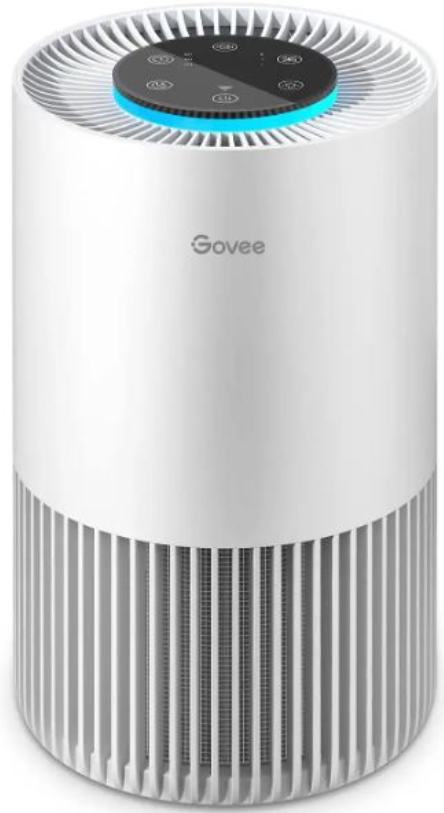
Introduction
The Govee Smart Mini Air Purifier H7126 is a compact, high-performance air purifier designed for small spaces like bedrooms, offices, and dorm rooms. With its sleek, modern design and advanced H13 HEPA filtration, this device delivers cleaner, fresher air by capturing dust, pollen, pet dander, smoke, and other airborne particles as small as 0.3 microns. The Govee Smart Mini Air Purifier H7126 stands out with its smart features, including app control via the Govee Home App, voice compatibility, and customizable modes for personalized air quality management.
Perfect for allergy sufferers, pet owners, and anyone seeking improved indoor air quality, this purifier operates quietly in Sleep Mode and offers both low and high-speed settings for flexible use. Its compact size makes it ideal for desks, nightstands, or small living areas. The built-in aroma box also allows for optional aromatherapy, enhancing comfort and relaxation. The Govee Smart Mini Air Purifier H7126 is available for around $50–$70 and can be purchased from major retailers and online marketplaces, making it an affordable solution for healthier indoor environments.
Specifications: Govee Smart Mini Air Purifier H7126
- Model: H7126
- Filter Type: H13 HEPA (3-in-1: Pre-filter, HEPA, Activated Carbon)
- Clean Air Delivery Rate (CADR): 50 CFM (85 m³/h) at highest speed
- Recommended Room Size: Up to 120 sq ft (small rooms, offices, bedrooms)
- Power Input: 100–240V, 50/60Hz, 0.5A; Output: 12V, 1A
- Dimensions: 6.22" D x 6.22" W x 10.75" H
- Weight: 2.49 lbs
- Noise Level: As low as 24dB (Sleep Mode)
- Control Options: Touch panel, Govee Home App, voice control (Alexa/Google Assistant)
- Features: Sleep Mode, Low/High Speed, Custom/Auto Mode (with optional Smart Air Quality Monitor), Memory Function, Aroma Box
- App Connectivity: Bluetooth & Wi-Fi enabled
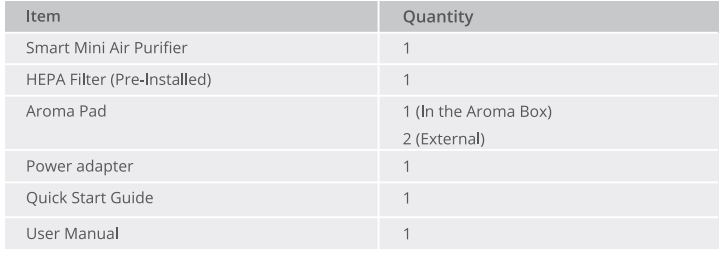
- Accessories: Pre-installed HEPA filter, aroma pad, power adapter, quick start guide
Compared to similar mini air purifiers, the Govee Smart Mini Air Purifier H7126 offers superior app integration, quieter operation, and a true H13 HEPA filter, making it a top choice for tech-savvy users seeking smart air purification.
Included in the Box
Part Names
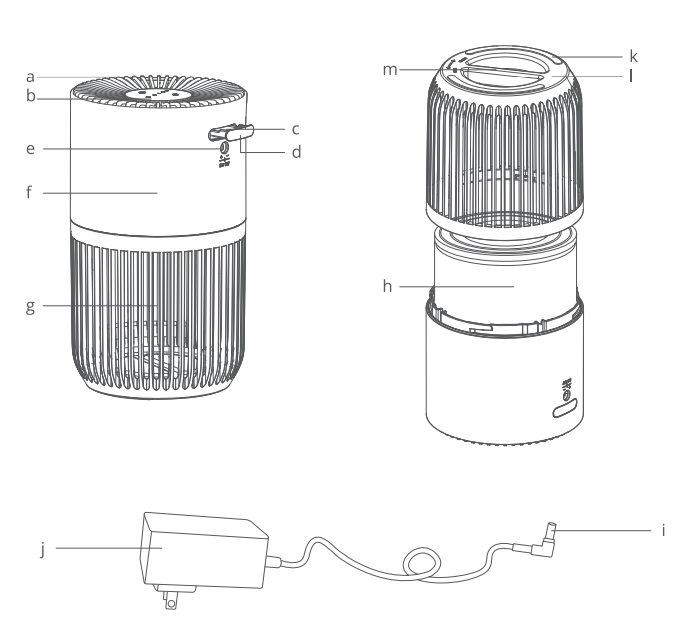
- Air Outlet
- Touch Control Panel
- Aroma Pad
- Aroma Box
- DC Input Port
- Housing
- Air Inlet
- 3-in-1 HEPA Filter
- Adapter Output Cable
- Power Adapter
- Non-slip Pad
- Bottom Cover
- Bottom Cover Handle
Getting Started
Using the Smart Mini Air Purifier
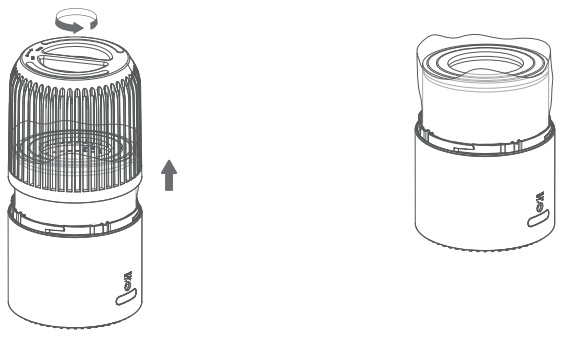
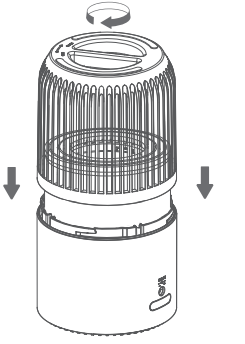
- Hold the handle of the bottom cover and rotate counterclockwise to take the filter out.
- Remove the filter from its plastic packaging and place it back into the air purifier.
- Reattach the cover and rotate clockwise to lock. You'll hear a sound to indicate the cover is tightened.
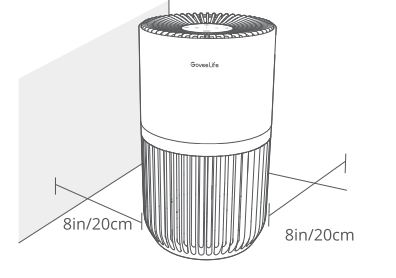
- Place the air purifier on a flat, stable surface with the panel facing up. Allow at least 8in/20cm of clearance on all sides of the air purifier. Keep away from anything that would block airflow, such as curtains and cabinets.
- Insert the adapter output cable into the DC input port, then plug the power adapter into a 120V socket. Now your purifier is ready to use!
Using the Aroma Box
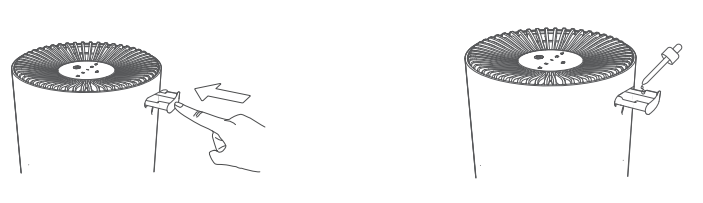
- Press to pop out the aroma box from the back of the base.
- Add 8 to 1 O drops of essential oil on the aroma pad. Be careful not to spill essential oil out of the aroma box to avoid contaminating the inside of the product.
- Push the aroma box back into the air purifier.
- Turn on the air purifier. The air purifier will automatically diffuse the aroma when in use.
Note: To get better aromatherapy, always clean the aroma pad before adding new essential oils. Do not mix essential oils.
Care & Maintenance
Caution: Do not clean with abrasive chemicals or flammable cleaning agents.
Cleaning the Air Purifier
- Unplug the purifier from power before cleaning.
- Wipe the outside of the air purifier with a soft, dry cloth. If necessary, wipe the housing with a damp cloth and leave it to dry.
- Vacuum the inside of the air purifier.
Cleaning the Pre-Filter
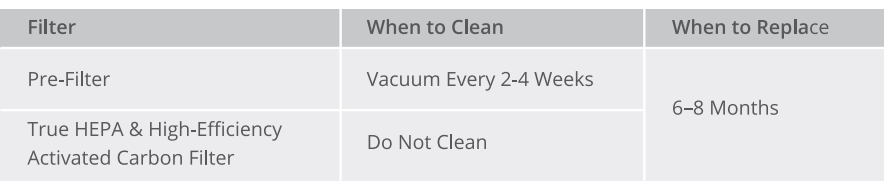
Do not clean the filter with water or other liquids. The outer pre-filter should be cleaned every 2-4 weeks to increase its efficiency and extend its lifespan. The pre-filter should be cleaned by a soft brush or vacuum hose to remove hair, dust, and large particles.
Troubleshooting
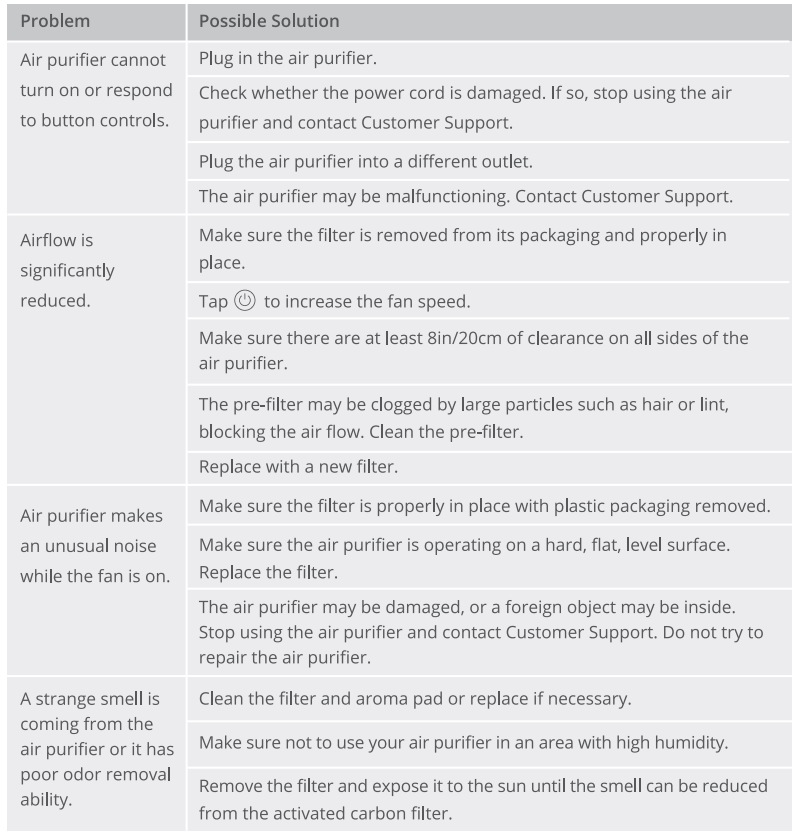
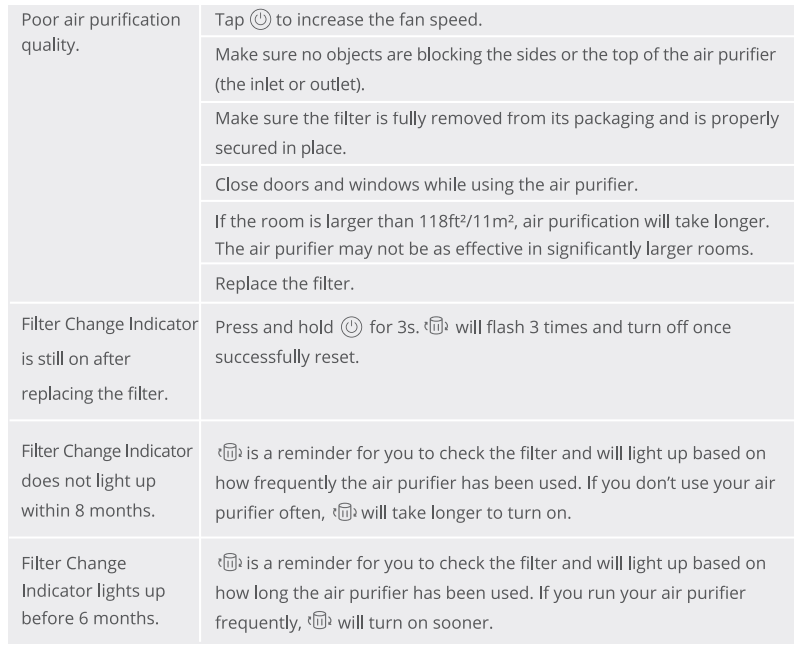
The troubleshooting section below is for solving frequently asked questions for the purifier unit. If your problem persists, please contact Customer Support.
For Air Purifier
Pros & Cons of the Govee Smart Mini Air Purifier H7126
Pros
- Compact and stylish design fits easily on desks or nightstands
- True H13 HEPA filter captures 99.97% of airborne particles
- Smart app control and voice compatibility for convenience
- Quiet Sleep Mode is ideal for bedrooms
- Optional aromatherapy feature for added comfort
- Affordable price point compared to larger models
Cons
- Best suited for small rooms (not whole-house coverage)
- Auto Mode requires a separate Smart Air Quality Monitor
- Filter replacement may be needed every 6–12 months,, depending on use
- Limited physical controlssingle-touchch button)
The Govee Smart Mini Air Purifier H7126 offers excellent value for money, especially for those who want smart features in a compact, budget-friendly air purifier.
Customer Reviews: Govee Smart Mini Air Purifier H7126
Users consistently rate the Govee Smart Mini Air Purifier H7126 highly, with an average of 4.4 out of 5 stars. Many praise its quiet operation, easy setup, and effective filtration for small spaces. Customers appreciate the app connectivity and the ability to monitor air quality remotely. Common compliments include the sleek design, simple controls, and the added aromatherapy feature. Some users note that while the purifier is not powerful enough for large rooms, it works perfectly for bedrooms and offices. A few mention that the filter reminder in the app is helpful, but replacement filters can be slightly expensive over time. Overall, buyers recommend the Govee Smart Mini Air Purifier H7126 for anyone seeking a smart, compact, and affordable air purifier for personal use.
Faqs
How do I set up the govee Smart Mini Air Purifier H7126 for the first time?
What should I do if my govee Smart Mini Air Purifier H7126 does not turn on or respond to controls?
Can I connect the govee Smart Mini Air Purifier H7126 to Wi-Fi and control it via the Govee Home app?
How do I clean and maintain the filter in the govee Smart Mini Air Purifier H7126 for optimal performance?
What are the key air filtration features of the govee Smart Mini Air Purifier H7126?
Why is my govee Smart Mini Air Purifier H7126 airflow reduced, and how can I fix this problem?
Is the govee Smart Mini Air Purifier H7126 safe to use in humid or wet environments?
How do I reset the filter replacement indicator on the govee Smart Mini Air Purifier H7126?
More govee manuals
- Setup: Govee Smart Air Purifier 2 H7124 User Manual
- Setup: Govee Smart Air Purifier H7121 User Manual
- How to Use: Govee Smart Countertop Ice Maker H717D User Manual
- Govee RGBIC Neon Rope Light H61A21D1 Guide
- Govee RGBIC LED Strip Lights H6171 | Pairing Instructions
- Govee Doorbell H7202 User Manual | Specs & Operations
Leave a Comment