
Honeywell RTH8580WF Wi-Fi Touchscreen Thermostat User Manual
Content
Honeywell RTH8580WF Wi-Fi Touchscreen Thermostat: Complete Product Manual
Introduction
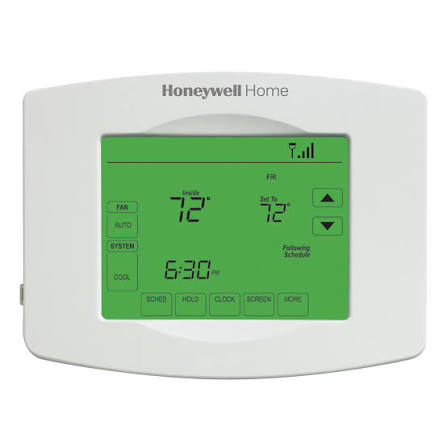
The Honeywell RTH8580WF Wi-Fi Touchscreen Thermostat is a smart, 7-day programmable thermostat designed for homeowners who want precise temperature control, remote access, and an easy-to-use touchscreen interface. It combines traditional thermostat reliability with modern Wi-Fi connectivity, making it a practical upgrade for busy households, rental properties, and energy-conscious users who want better control over heating and cooling costs. The honeywell RTH8580WF Wi-Fi Touchscreen Thermostat stands out for its intuitive menu system, backlit display, vacation mode, filter reminders, and automatic heating/cooling changeover, all of which help simplify everyday climate management.
This model is well suited for users who want app-based control from an Apple or Android smart device, as well as those who prefer a wall-mounted thermostat that still offers advanced scheduling features. It works with many common 24V heating and cooling systems, including forced air, hydronic, heat pump, oil, gas, and electric systems. However, it is not compatible with millivolt systems or standard 120/240V electric baseboard heat. Typical pricing for the honeywell RTH8580WF Wi-Fi Touchscreen Thermostat generally falls in the midrange smart thermostat category, often around $100 to $250 depending on seller, condition, and availability. Because this is an older but still popular model, availability can vary across retail marketplaces, refurbished listings, and third-party resellers.
Specifications for Honeywell RTH8580WF Wi-Fi Touchscreen Thermostat
- Model: RTH8580WF1007/W1
- Display: Backlit touchscreen with digital temperature readout
- Connectivity: Built-in Wi-Fi for remote app-based control
- Power: 24V compatible system support with battery backup
- Compatibility: Common 24 volt heating and cooling systems, including forced air, hydronic, heat pump, oil, gas, and electric
- Incompatible systems: Millivolt systems and 120/240V baseboard electric heat
- Dimensions: Approximately 6.4 inches wide, 5 inches high, and 1.25 inches deep
- Control type: Touchscreen interface with app control
- Programming: 7-day programmable scheduling
- Key features: Vacation mode, filter monitor, automatic changeover, daylight savings time ready
- Smart device support: Apple and Android devices
- Installation style: Wall mount
Compared with newer smart thermostats such as the Honeywell Home T5 series, the honeywell RTH8580WF Wi-Fi Touchscreen Thermostat focuses more on straightforward scheduling and dependable manual control than on features like geofencing or advanced learning automation. That makes it a strong option for users who want a simple, familiar interface without sacrificing Wi-Fi convenience.
Troubleshooting Honeywell RTH8580WF Wi-Fi Touchscreen Thermostat Problems
Common issues with the honeywell RTH8580WF Wi-Fi Touchscreen Thermostat usually involve power, connectivity, or system wiring. If the screen is blank, check whether the thermostat is receiving 24V power and confirm battery condition. If Wi-Fi pairing fails, make sure the router is using a supported 2.4 GHz network and that the password is entered correctly. If heating or cooling does not start, verify the system mode, schedule settings, and wiring connections at the wall plate.
- Blank screen: Replace batteries and confirm system power is on
- No Wi-Fi connection: Reconnect to a 2.4 GHz network and restart the router
- Incorrect temperature control: Calibrate settings and review schedule overrides
- Heating or cooling not responding: Check system mode, breaker status, and wiring
- Filter reminder not clearing: Reset the alert from the maintenance menu after changing the filter
To prevent recurring problems, keep firmware and app access current where available, clean dust from the thermostat surface, and verify that the system wiring matches the installation guide. Warranty coverage and support may vary depending on where the unit was purchased, so buyers should keep the receipt and product model number handy. For help, contact Honeywell Home customer support through the official support channels listed with the product packaging or retail documentation, or reach out to the seller if the unit was purchased through a marketplace or refurbished listing.
Pros and Cons of the Honeywell RTH8580WF Wi-Fi Touchscreen Thermostat
Pros
- Easy-to-use touchscreen interface with clear menus
- Reliable 7-day programming for customized weekly schedules
- Wi-Fi access for remote temperature control from a mobile device
- Works with many common HVAC systems, including heat pumps and hydronic systems
- Vacation mode and filter reminders add practical everyday convenience
- Good value for users who want a proven smart thermostat without premium pricing
Cons
- Not compatible with millivolt or 120/240V electric baseboard systems
- Lacks some advanced features found in newer models, such as geofencing and adaptive learning
- Setup can be confusing for users unfamiliar with thermostat wiring
- Older design may feel less modern than newer touchscreen thermostats
- Availability can be inconsistent because the model is not as widely stocked as current releases
For value for money, the honeywell RTH8580WF Wi-Fi Touchscreen Thermostat is a solid choice if your priority is reliable scheduling and remote access rather than cutting-edge smart-home automation. Compared with newer alternatives, it is often easier to learn but less feature-rich.
Customer Reviews of Honeywell RTH8580WF Wi-Fi Touchscreen Thermostat
Customer feedback for the honeywell RTH8580WF Wi-Fi Touchscreen Thermostat is generally positive, with many users rating it around 4 out of 5 stars for ease of use and dependable performance. Buyers often praise the simple touchscreen, accurate temperature control, and the convenience of adjusting settings from a phone. A common positive comment is that it makes scheduling straightforward for households that want predictable comfort without constant manual changes.
Common complaints usually mention Wi-Fi setup difficulties, compatibility concerns, and the lack of advanced smart-home features available in newer thermostats. A typical user testimonial might say, “Great thermostat for basic smart control and programming, but setup took longer than expected.” Another frequent comment is, “Works well once installed, especially for managing temperature while away from home.” Overall, this model is a strong recommendation for homeowners who want a dependable programmable thermostat with Wi-Fi functionality and a familiar interface.
Faqs
How do I set up the honeywell RTH8580WF Wi-Fi Touchscreen Thermostat for the first time?
Why won’t my honeywell RTH8580WF Wi-Fi Touchscreen Thermostat connect to Wi-Fi?
What HVAC systems are compatible with the honeywell RTH8580WF Wi-Fi Touchscreen Thermostat?
How do I troubleshoot inaccurate temperature readings on the honeywell RTH8580WF Wi-Fi Touchscreen Thermostat?
What features make the honeywell RTH8580WF Wi-Fi Touchscreen Thermostat useful for energy savings?
How do I reset the honeywell RTH8580WF Wi-Fi Touchscreen Thermostat after setup problems?
How can I make the honeywell RTH8580WF Wi-Fi Touchscreen Thermostat respond faster to temperature changes?
What maintenance does the honeywell RTH8580WF Wi-Fi Touchscreen Thermostat need over time?
More honeywell manuals
- Honeywell HE105 Bypass Humidifier User Manual
- Honeywell TH7000 Series Touch-Screen Thermostat User Manual
- Honeywell HE300 Humidifier User Manual
- Honeywell HumidiPRO H6062 Digital Humidity Control User Manual
- Honeywell HM700A1000 Electrode Steam Humidifier User Manual
- Honeywell RTH6500WF Wi-Fi Programmable Thermostat User Manual
Leave a Comment