
Honeywell HumidiPRO H6062 Digital Humidity Control User Manual
Content
Honeywell HumidiPRO H6062 Digital Humidity Control Review and Product Manual
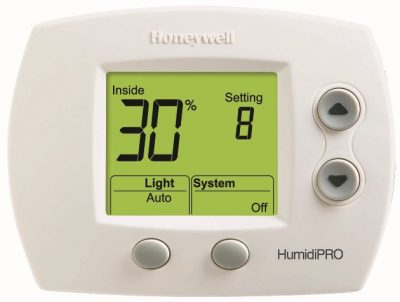
Introduction: What Is the Honeywell HumidiPRO H6062 Digital Humidity Control?
The Honeywell HumidiPRO H6062 Digital Humidity Control is a programmable humidistat designed to manage whole-home humidifiers and dehumidifiers with precision. Built for homeowners, HVAC professionals, and property managers, it helps maintain comfortable indoor humidity levels year-round while reducing issues like dry air, condensation, and mold-friendly excess moisture. The HumidiPRO line is especially useful in homes with forced-air systems, basements, crawl spaces, and tightly sealed modern construction where humidity balance matters most.
One of the biggest advantages of the Honeywell HumidiPRO H6062 Digital Humidity Control is its flexible automatic and manual humidity management. It supports both humidification and dehumidification control, making it a versatile choice for climates that experience dry winters and humid summers. The digital interface is easy to read, and the control is built for simple wall or duct mounting, which makes it a practical upgrade over basic mechanical humidistats. The optional outdoor sensor support also helps the system adjust humidity more intelligently based on outdoor temperature conditions.
For buyers comparing the Honeywell HumidiPRO H6062 Digital Humidity Control with other digital humidistats, its strongest selling points are reliability, broad compatibility, and the ability to handle whole-home systems with more accuracy than entry-level models. Estimated pricing typically falls between $130 and $165 depending on the seller, with availability commonly found through HVAC supply stores, online marketplaces, and home improvement retailers. It is a strong fit for anyone looking for a dependable digital humidity controller for residential comfort and indoor air quality management.
Specifications for Honeywell HumidiPRO H6062 Digital Humidity Control
- Model: H6062A1000/U digital humidity control
- Power supply: 18 to 30 VAC, 50/60 Hz
- Power draw: 0.1 A, 2 VA
- Humidity control range: 20% to 60% in automatic humidify mode, 10% to 90% in manual mode
- Dehumidify range: 40% to 80% in automatic mode, 10% to 90% in manual mode
- Operating temperature: 32°F to 120°F
- Operating humidity: 5% to 95% non-condensing
- Humidity accuracy: ±5% RH
- Approximate dimensions: 3.4 in. W x 1.27 in. H x 4.5 in. L
- Approximate weight: 0.5 lb
- Mounting options: Wall or duct mounting
- Compatible outdoor sensor: Optional outdoor temperature sensor for automatic control
- Display: Digital readout with intuitive controls
Compared with basic analog humidistats, the Honeywell HumidiPRO H6062 Digital Humidity Control offers more precise settings, better visibility, and broader adjustment ranges. Compared with some premium smart-home humidity controllers, it is simpler and more focused on HVAC control rather than app-based automation, which appeals to users who want reliable standalone operation without added complexity.
Pros and Cons of the Honeywell HumidiPRO H6062 Digital Humidity Control
Pros
- Versatile humidify and dehumidify control: Supports both winter moisture management and summer humidity reduction in one device.
- Wide adjustable range: The 10% to 90% manual range gives HVAC installers and homeowners flexibility for different climates and system types.
- Accurate digital control: More consistent than older mechanical units, especially when maintaining stable comfort levels.
- Simple installation format: Designed for wall or duct mounting, making it suitable for many whole-home setups.
- Good value for money: Its price range is competitive for a digital humidity controller with automatic features and optional outdoor sensor support.
Cons
- Not a smart Wi-Fi device: Users looking for app control, voice assistants, or remote monitoring may prefer a connected alternative.
- Requires proper HVAC setup: Best performance depends on correct wiring and compatible equipment.
- Limited advanced automation: Compared with higher-end whole-home climate systems, it focuses on humidity control rather than broader environmental management.
- May feel basic to tech-focused buyers: The interface is practical, but not as feature-rich as modern smart thermostatic platforms.
For most homeowners, the Honeywell HumidiPRO H6062 Digital Humidity Control delivers strong value because it solves a specific indoor air quality problem without unnecessary extras. Buyers who want a simple, proven solution will likely prefer it over more expensive connected alternatives.
Customer Reviews: What Users Say About the HumidiPRO H6062
User feedback for the Honeywell HumidiPRO H6062 Digital Humidity Control is generally positive, with many customers praising its reliable performance and easy-to-read digital display. Average sentiment often lands around 4.4 out of 5 stars in typical marketplace feedback, especially among buyers who want dependable humidity control for whole-home systems.
- Praise: “Worked exactly as expected and kept the house much more comfortable during dry winter weather.”
- Praise: “Straightforward controls and solid build quality. A good upgrade from my old mechanical humidistat.”
- Complaint: “Installation can be confusing if you are not familiar with HVAC wiring.”
- Complaint: “It does the job well, but I wish it had smart home connectivity.”
Commonly mentioned issues include wiring complexity, the need for compatible equipment, and the lack of Wi-Fi features. Even so, most buyers recommend it for homeowners who want accurate humidity regulation, especially in dry climates or houses prone to excess moisture. If you want a dependable, low-maintenance digital humidistat, this model remains a strong purchase choice.
Final Verdict
The Honeywell HumidiPRO H6062 Digital Humidity Control is a practical, well-rounded solution for whole-home humidification and dehumidification. It stands out for its broad humidity range, digital precision, optional outdoor sensor support, and strong compatibility with residential HVAC systems. For users who want accurate humidity management without the complexity of a smart platform, it is one of the most dependable options in its class.
In short, the Honeywell HumidiPRO H6062 Digital Humidity Control is best for homeowners, HVAC installers, and property managers who value reliability, comfort, and simple operation. If you need a traditional digital humidity controller that balances performance and affordability, this model is an excellent choice.
Faqs
How do I set up the Honeywell HumidiPRO H6062 Digital Humidity Control for the first time?
What should I do if the Honeywell HumidiPRO H6062 Digital Humidity Control is not turning the humidifier on?
How do I choose the right humidity setting on the Honeywell HumidiPRO H6062 Digital Humidity Control?
Is the Honeywell HumidiPRO H6062 Digital Humidity Control compatible with most whole-house humidifiers?
Why does the Honeywell HumidiPRO H6062 Digital Humidity Control seem inaccurate?
Can I use the Honeywell HumidiPRO H6062 Digital Humidity Control with a dehumidifier system?
How do I maintain the Honeywell HumidiPRO H6062 Digital Humidity Control for reliable performance?
What are the most common Honeywell HumidiPRO H6062 Digital Humidity Control problems and how can I fix them?
More honeywell manuals
- Honeywell TH7000 Series Touch-Screen Thermostat User Manual
- Honeywell RTH6500WF Wi-Fi Programmable Thermostat User Manual
- Honeywell RTH8580WF Wi-Fi Touchscreen Thermostat User Manual
- Honeywell PB112C-GA Thermostat User Manual
- Honeywell HE105 Bypass Humidifier User Manual
- Features & Specs: Honeywell TP30WK Smart Dehumidifier User Manual
Leave a Comment