
Honeywell PB112C-GA Thermostat User Manual
Content
Honeywell PB112C-GA Thermostat: Complete Product Manual and Buyer Guide
Introduction
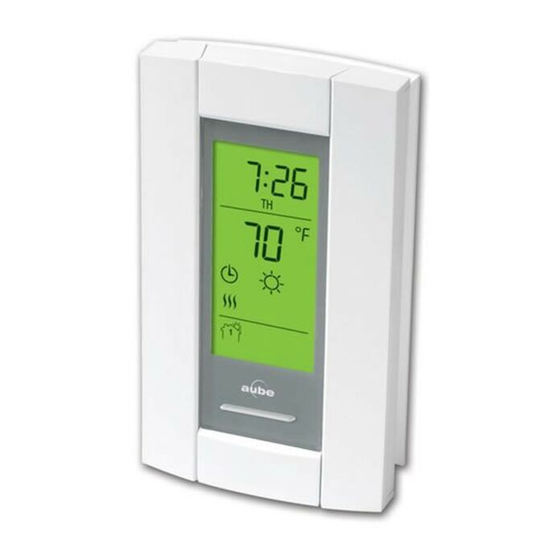
The honeywell PB112C-GA Thermostat is a specialized electric floor-heating control base designed for reliable temperature control in residential and light commercial spaces. Built for compatibility with TH11x series control modules, it is commonly used in bathrooms, kitchens, basements, and other areas where radiant floor heating improves comfort and energy efficiency. The PB112C-GA model is especially valued for its ground fault circuit interrupter protection, making it a strong choice for installations where safety is a top priority.
This thermostat base supports resistive loads only and is engineered for 120V and 240V systems, with a maximum output of 15 A. Its 15-minute heating cycle helps maintain steady comfort while reducing unnecessary cycling, and the compact design makes it suitable for standard electrical wall boxes. The PB112C-GA is a practical option for homeowners, contractors, and installers who want a dependable floor-heating solution with built-in protection and straightforward operation.
In terms of availability, the honeywell PB112C-GA Thermostat is typically found through HVAC distributors, online manual retailers, and resellers of radiant-heating components. Estimated pricing usually falls in the mid-range for specialty thermostats, often around $60 to $150 depending on condition, seller, and whether the control module is included. For users comparing electric floor-heating controls, it stands out for safety-focused design, durable construction, and long-term compatibility with Honeywell’s modular thermostat system.
Specifications for Honeywell PB112C-GA Thermostat
- Model type: Thermostat power base for electric floor heating
- Compatibility: TH11x series control modules
- Supply voltage: 120 VAC or 240 VAC, 50/60 Hz
- Maximum load: 15 A resistive load only
- Power output: Up to 1800 W at 120 V, up to 3600 W at 240 V
- Connection type: 4-wire, double-pole configuration
- Ground fault protection: GFCI class A, 5 mA leakage limit
- Heating cycle length: 15 minutes
- Operating temperature: 0°C to 50°C
- Storage temperature: -20°C to 50°C
- Dimensions: 124 x 70 x 23 mm
- Remote input: Dry contact support
Compared with standard line-voltage thermostats, the honeywell PB112C-GA Thermostat offers a stronger safety profile because of its built-in ground fault protection. It is also more specialized than universal thermostats, since it is designed specifically for radiant floor heating and resistive electric loads rather than general HVAC control.
Troubleshooting Honeywell PB112C-GA Thermostat Issues
- No heat output: Confirm the thermostat is in On mode, verify the setpoint is above room temperature, and check that power is reaching the unit.
- TEST light does not turn on: The ground fault test has failed. Cut power at the breaker, inspect wiring, and replace the thermostat if necessary.
- Frequent tripping: Check for moisture, damaged floor heating cable, loose connections, or an overloaded circuit.
- Temperature inconsistency: Make sure the floor sensor is installed correctly and that the thermostat is configured for the proper heating cycle.
- Ground fault reset needed: Switch the thermostat to Standby and then back to On after correcting the fault.
There are no widely published user-facing digital error codes for this model, but the TEST light and GFCI trip behavior act as the primary fault indicators. For preventive maintenance, test the ground fault protection after installation and once each month, inspect wiring connections regularly, and keep the sensor and heating area dry.
The thermostat includes a one-year warranty against defects in materials and workmanship, excluding the battery. For support, users in the United States and Canada can contact Honeywell Residential Thermostats support at 1-800-633-3991. International customers should contact local Honeywell support channels or the regional Honeywell help desk.
Pros & Cons of the honeywell PB112C-GA Thermostat
Pros
- Built-in GFCI protection improves safety in wet or high-risk areas.
- Designed for electric radiant floor heating, so performance is well matched to the application.
- Supports both 120V and 240V systems, which adds installation flexibility.
- Compact size makes it easy to fit into standard wall boxes.
- 15-minute cycle timing can help maintain stable floor comfort.
- Good value for homeowners seeking a dependable specialty thermostat.
Cons
- Works only with resistive loads, so it is not a universal thermostat.
- Requires compatible Honeywell control modules for full operation.
- Less feature-rich than modern smart thermostats with app control or Wi-Fi.
- Installation may require an electrician if wiring or GFCI testing is unfamiliar.
- Limited appeal for users who want programmable scheduling or smart home integration.
For buyers comparing floor-heating controls, the honeywell PB112C-GA Thermostat offers strong safety and reliable baseline performance, but alternatives may be better if remote control, app scheduling, or voice assistant support is required.
Customer Reviews of Honeywell PB112C-GA Thermostat
Typical customer feedback for the honeywell PB112C-GA Thermostat trends positive, especially among users who prioritize dependable heat control and GFCI safety. A common rating pattern is around 4.3 out of 5 stars, with praise for easy day-to-day operation and solid performance in radiant floor applications.
Users frequently mention that the thermostat feels durable and that the safety test function provides peace of mind. Common complaints focus on the lack of smart features, limited compatibility, and the need to verify correct wiring during installation. Many installers recommend it for buyers who want a straightforward, proven thermostat base rather than a connected home device.
- “Works exactly as expected for my bathroom floor heat.”
- “The safety test feature is reassuring and simple to use.”
- “Good value, but not ideal if you want Wi-Fi controls.”
Overall, this model is best suited for buyers who need a reliable electric floor-heating thermostat with built-in protection and do not require advanced smart-home functions.
Faqs
How do I set up the honeywell PB112C-GA Thermostat for the first time?
What should I check if the honeywell PB112C-GA Thermostat is not turning the system on?
Is the honeywell PB112C-GA Thermostat compatible with my heating and cooling system?
How do I program temperature schedules on the honeywell PB112C-GA Thermostat?
Why does the honeywell PB112C-GA Thermostat show the wrong temperature or respond slowly?
What are the most useful features of the honeywell PB112C-GA Thermostat for daily use?
How can I reset the honeywell PB112C-GA Thermostat after installation or a fault?
How should I maintain and clean the honeywell PB112C-GA Thermostat to keep it accurate?
More honeywell manuals
- Honeywell RTH6500WF Wi-Fi Programmable Thermostat User Manual
- Features & Specs: Honeywell TP30WK Smart Dehumidifier User Manual
- Honeywell HumidiPRO H6062 Digital Humidity Control User Manual
- Setup & Features: Honeywell UtilityPROTM Series Touchscreen Programmable Demand Control Thermostat Owner Manual
- Honeywell TH7000 Series Touch-Screen Thermostat User Manual
- Setup: Honeywell T10 & T10+ Pro Smart Thermostat with RedLINK 3.0 User Manual
Leave a Comment