
Honeywell RTH6500WF Wi-Fi Programmable Thermostat User Manual
Content
Honeywell RTH6500WF Wi-Fi Programmable Thermostat: Complete Product Manual
Introduction
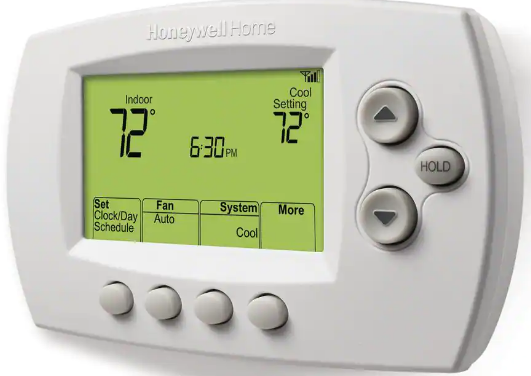
The Honeywell RTH6500WF Wi-Fi Programmable Thermostat is a smart, 7-day programmable thermostat designed for homeowners who want dependable temperature control with remote access and energy-saving scheduling. This model combines traditional programmable thermostat reliability with Wi-Fi connectivity, allowing users to manage heating and cooling from a mobile device or adjust settings at the wall unit. It is a strong fit for busy households, rental properties, and homeowners looking to reduce energy waste without sacrificing comfort.
One of its biggest advantages is broad compatibility with common 24-volt HVAC systems, including forced air, hydronic, heat pump, gas, oil, and electric systems. It supports flexible scheduling for different days of the week, making it ideal for families with changing routines, seasonal homes, or users who want separate weekday and weekend climate settings. The interface is designed to be straightforward, with clear temperature display options and practical controls for everyday use.
In terms of price, the Honeywell RTH6500WF Wi-Fi Programmable Thermostat typically falls in the budget-to-midrange category, often found around $45 to $70 depending on seller, condition, and availability. New and refurbished units may both be available through online marketplaces and HVAC retailers. For users comparing smart thermostats, it offers a solid balance of value, app-based convenience, and proven Honeywell brand support.
Specifications: Honeywell RTH6500WF Wi-Fi Programmable Thermostat Features and Technical Details
- Type: 7-day Wi-Fi programmable thermostat
- Compatibility: Common 24V systems including forced air, hydronic, heat pump, gas, oil, and electric
- Not supported: Millivolt systems and 120/240V baseboard electric systems
- Power requirements: 24V HVAC wiring; some installations require a C-wire for stable operation
- Electrical ratings: Heating terminals rated for 20–30 VAC with running current up to 1.0 A
- Control capability: Heating and cooling scheduling with programmable daily settings
- Connectivity: Wi-Fi for remote monitoring and control
- Display: Digital temperature readout with Fahrenheit/Celsius options
- System setup: Designed for single-stage heating/cooling in many installations, with setup options for compatibility tuning
- Typical use case: Residential HVAC energy management and comfort scheduling
Compared with newer smart thermostats, the RTH6500WF focuses on essential connected control rather than advanced learning features, voice assistant integration, or sophisticated occupancy automation. That makes it a practical alternative for users who want Wi-Fi scheduling without paying premium prices.
Troubleshooting Honeywell RTH6500WF Wi-Fi Programmable Thermostat Problems
If the display is blank, check the circuit breaker, confirm the HVAC power switch is on, make sure the furnace door is fully closed, and verify that the C-wire is connected if your system uses one. If the thermostat loses Wi-Fi, confirm your home network is working on another device and restart the router if needed.
Common setup error code E01 usually indicates the router lost power during Wi-Fi setup. The fix is to restore router power and restart the connection process. For intermittent connection problems, move the router closer, reduce interference, and confirm the thermostat is within reliable wireless range.
Preventive maintenance helps avoid most issues: replace batteries when prompted, keep the thermostat clean, avoid tampering with wiring after installation, and verify schedule settings after power outages. The product is covered by a 1-year limited warranty against defects in materials and workmanship. For support, Honeywell residential thermostat assistance is available at 1-800-633-3991, with general support hours listed as 6 AM Monday through 6 PM Friday EST.
Pros and Cons of the Honeywell RTH6500WF Wi-Fi Programmable Thermostat
Pros
- Affordable smart thermostat option with Wi-Fi scheduling
- Works with many common HVAC systems, including heat pumps and forced air
- Simple interface that is easy for beginners to learn
- 7-day programming supports customized weekday and weekend routines
- Good value for money compared with premium smart thermostats
Cons
- Does not support millivolt or 120/240V baseboard systems
- Lacks advanced features found in newer competitors, such as learning automation
- Wi-Fi setup can be frustrating if the router connection is unstable
- May require a C-wire for dependable operation in some homes
For homeowners comparing alternatives, the RTH6500WF is a practical choice if basic smart control matters more than premium features. It offers stronger value than many entry-level models while remaining easier to use than more advanced platforms.
Customer Reviews: Honeywell RTH6500WF Wi-Fi Programmable Thermostat Feedback
Typical customer feedback gives the Honeywell RTH6500WF around 4 out of 5 stars for reliability, affordability, and ease of use. Many users praise the straightforward scheduling, stable temperature control, and the convenience of adjusting settings remotely. A common positive comment is that it “does the job without overcomplicating setup.”
Frequent complaints mention Wi-Fi setup difficulties, occasional connectivity drops, and the need to confirm wiring compatibility before installation. One reviewer-style testimonial often reflects the overall sentiment: “Great value for the price, but make sure your system has the right wiring before you buy.”
For shoppers who want a dependable thermostat at a reasonable cost, this model is a strong recommendation. It is especially appealing for users who want a basic smart thermostat without paying for features they may never use.
Faqs
How do I set up the honeywell RTH6500WF Wi-Fi Programmable Thermostat for the first time?
Why won't my honeywell RTH6500WF Wi-Fi Programmable Thermostat connect to Wi-Fi?
Is the honeywell RTH6500WF Wi-Fi Programmable Thermostat compatible with my HVAC system?
How do I fix temperature swings on the honeywell RTH6500WF Wi-Fi Programmable Thermostat?
What features does the honeywell RTH6500WF Wi-Fi Programmable Thermostat offer for daily energy savings?
How do I reset the honeywell RTH6500WF Wi-Fi Programmable Thermostat after a setup problem?
Can I control the honeywell RTH6500WF Wi-Fi Programmable Thermostat remotely from my phone?
How should I maintain the honeywell RTH6500WF Wi-Fi Programmable Thermostat for reliable performance?
More honeywell manuals
- Honeywell HumidiPRO H6062 Digital Humidity Control User Manual
- Honeywell PB112C-GA Thermostat User Manual
- Honeywell TH7000 Series Touch-Screen Thermostat User Manual
- Features & Specs: Honeywell TP30WK Smart Dehumidifier User Manual
- Honeywell RTH8580WF Wi-Fi Touchscreen Thermostat User Manual
- Setup & Features: Honeywell UtilityPROTM Series Touchscreen Programmable Demand Control Thermostat Owner Manual
Leave a Comment