
Honeywell TH7000 Series Touch-Screen Thermostat User Manual
Content
Honeywell TH7000 Series Touch-Screen Thermostat: Complete Product Manual
Introduction
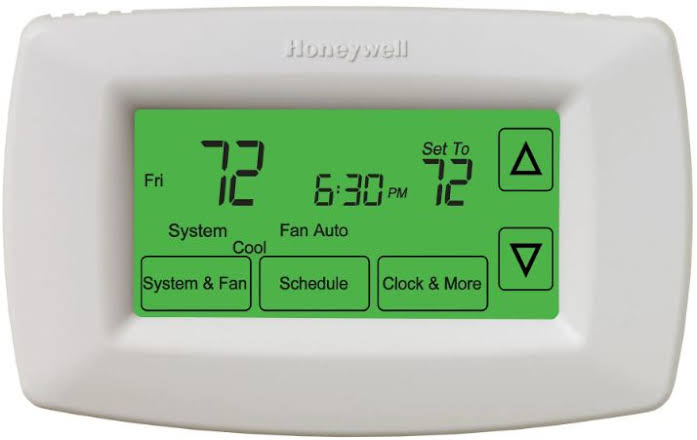
The Honeywell TH7000 Series Touch-Screen Thermostat is a programmable home comfort controller designed to simplify temperature management while improving energy efficiency. Built around a large backlit touchscreen, it offers an intuitive interface that makes scheduling, adjusting settings, and checking reminders easy for everyday users. Key features include 7-day programmable schedules, one-touch temperature overrides, precise comfort control within 1°F of the selected temperature, and change/check reminders for filters, batteries, and other maintenance needs.
This thermostat is a strong fit for homeowners who want a reliable upgrade from older manual or dial thermostats, as well as families looking for convenient climate control across busy routines. It is also useful in light commercial spaces, rental properties, and households that benefit from automated heating and cooling schedules. Some models in the TH7000 family also support optional indoor or outdoor remote sensors, which can improve room-by-room temperature accuracy.
As of current market availability, the Honeywell TH7000 Series Touch-Screen Thermostat is generally found through HVAC suppliers, online retailers, and thermostat replacement marketplaces, with an estimated price range of about $80 to $180 depending on model, condition, and included accessories. For buyers comparing smart and programmable options, it remains attractive for its simple touchscreen operation, dependable scheduling, and strong value for money.
Troubleshooting Honeywell TH7000 Series Touch-Screen Thermostat Problems
Common issues with the Honeywell TH7000 Series Touch-Screen Thermostat usually relate to power, programming, or HVAC communication. If the display is blank, check the circuit breaker, verify the HVAC system power switch is on, and replace the batteries if applicable. If heating or cooling does not respond, confirm the furnace door is fully closed, the thermostat is set to the correct mode, and the temperature setting is high or low enough to trigger the system.
Typical alert and error conditions may include low-battery warnings, which are resolved by replacing the AA batteries, and sensor-related alerts if a connected indoor or outdoor sensor is installed. If a memory or system fault appears and the thermostat stops operating normally, resetting the unit may help, but persistent errors usually require service or replacement. Preventive care includes replacing batteries on schedule, cleaning the touchscreen gently, checking filter reminders, and confirming wiring is secure during installation.
The TH7000 Series typically includes a limited warranty from the manufacturer, and support is available through Honeywell or Resideo customer care. For help, users can contact residential thermostat support at 1-800-633-3991 or 1-800-468-1502. Live support and manuals are also available through Honeywell’s residential support pages.
Pros and Cons of the Honeywell TH7000 Series Touch-Screen Thermostat
Pros
- Easy-to-read touchscreen with backlight for use day or night.
- 7-day programming supports customized schedules for weekdays and weekends.
- One-touch overrides make temporary changes fast and simple.
- Precise temperature control improves comfort and reduces unnecessary cycling.
- Useful reminders help maintain filters, batteries, and overall system health.
- Good value for users who want a programmable thermostat without the complexity of a full smart-home model.
Cons
- Lacks advanced Wi-Fi and app-based control found in newer smart thermostats.
- Older interface design may feel basic compared with modern connected alternatives.
- Some models may require careful wiring or compatibility checks before installation.
- Not ideal for users who want voice control, geofencing, or remote access from a phone.
Compared with modern smart thermostats, the Honeywell TH7000 Series Touch-Screen Thermostat offers better simplicity and a lower learning curve, but fewer connected features. For buyers who want a dependable programmable thermostat at a reasonable cost, it remains a solid choice.
Customer Reviews and User Feedback
Customer feedback for the Honeywell TH7000 Series Touch-Screen Thermostat is generally positive, especially from users who value straightforward scheduling and easy operation. Many reviewers praise the bright touchscreen, clear display, and reliable temperature control, while common complaints focus on the absence of smart-home features and occasional installation confusion. Overall ratings often fall around 4 out of 5 stars for convenience and usability.
- “Simple to use and much easier than my old thermostat. The schedule setup saved me time.”
- “Great display and dependable performance, but I wish it had Wi-Fi control.”
- “A very good buy for the price if you want a basic programmable thermostat.”
For homeowners seeking a dependable thermostat replacement, this model is frequently recommended. It is especially appealing for users who prefer manual control with programmable efficiency rather than a more expensive connected device.
Faqs
How do I set up the honeywell TH7000 Series Touch-Screen Thermostat for the first time?
Why is my honeywell TH7000 Series Touch-Screen Thermostat not turning on after installation?
What HVAC systems are compatible with the honeywell TH7000 Series Touch-Screen Thermostat?
How do I change the schedule on the honeywell TH7000 Series Touch-Screen Thermostat for better energy savings?
Why does the honeywell TH7000 Series Touch-Screen Thermostat show the wrong temperature or room reading?
How do I lock the honeywell TH7000 Series Touch-Screen Thermostat to prevent unwanted changes?
What should I do if my honeywell TH7000 Series Touch-Screen Thermostat keeps short cycling the heating or cooling system?
How do I maintain and clean the honeywell TH7000 Series Touch-Screen Thermostat safely?
More honeywell manuals
- Honeywell RTH8580WF Wi-Fi Touchscreen Thermostat User Manual
- Honeywell HumidiPRO H6062 Digital Humidity Control User Manual
- Honeywell HE105 Bypass Humidifier User Manual
- Honeywell RTH6500WF Wi-Fi Programmable Thermostat User Manual
- Honeywell HE300 Humidifier User Manual
- Honeywell PB112C-GA Thermostat User Manual
Leave a Comment