
Setup: Hp dx5150 Series Desktop User Manual
Content
hp dx5150 Series Desktop Manual and Product Overview
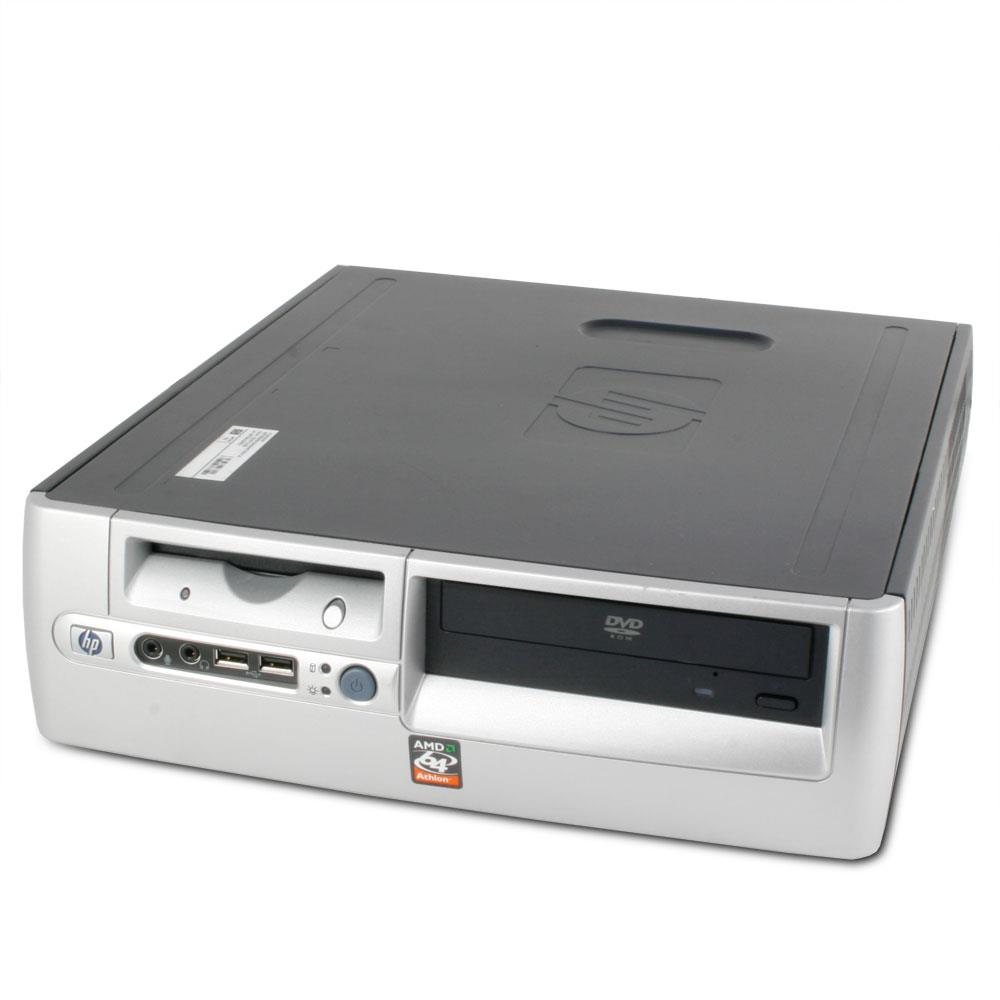
The hp dx5150 Series Desktop is a business-class PC designed for dependable everyday office computing, legacy application support, and cost-conscious deployment in small to mid-sized work environments. Built around AMD Athlon 64 and AMD Sempron processor options, this desktop line was positioned as a practical solution for companies that needed stable performance for document handling, web access, point-of-sale tasks, and standard productivity workloads. Its appeal comes from a straightforward design, flexible expansion options, and multiple form factors that made it suitable for reception desks, back offices, and compact workstations.
One of the strongest advantages of the hp dx5150 Series Desktop is its configurability. Available in small form factor and microtower variants, it supports business-friendly features such as SATA storage, DDR memory, integrated graphics, USB 2.0 ports, and expansion slots for added peripherals. This made the platform especially useful for organizations standardizing fleets of desktops or replacing aging PCs without moving into a high-cost modern enterprise system. Typical configurations included 512MB to 1GB of memory, hard drives from 40GB to 160GB, and optical drives such as CD-RW or DVD-ROM units, depending on the build.
At release, the estimated price range generally fell into the budget-to-midrange business desktop category, with refurbished and used units now commonly found at low resale prices depending on condition and configuration. Availability today is mainly through refurbished computer resellers, secondary marketplaces, and surplus business hardware channels. For users who need a reliable legacy desktop for older software, light office tasks, or retro IT labs, the hp dx5150 Series Desktop remains a practical and searchable option.
HP dx5150 Series Desktop Specifications and Key Features
The hp dx5150 Series Desktop was built as a business-focused system with balanced specifications for its time. It offered enough flexibility for office productivity while keeping maintenance and deployment simple.
- Processor options: AMD Athlon 64 and AMD Sempron families.
- Memory support: PC3200 DDR-SDRAM, non-ECC, with four DIMM slots and dual-channel memory support.
- Maximum memory: Up to 4GB installed, with lower usable memory on 32-bit operating systems.
- Storage: SATA hard drive support, commonly configured with 40GB, 80GB, or 160GB drives.
- Graphics: Integrated ATI Radeon Xpress-class graphics with expansion capability on select configurations.
- Expansion: PCI and PCI Express support for add-in cards and peripherals.
- Connectivity: USB 2.0, RJ-45 Ethernet, serial, parallel, PS/2, VGA, DVI-D, audio in/out, and microphone connections depending on model.
- Power: 200W power supply in documented business desktop configurations.
- Form factors: Small form factor and microtower versions for different workspace needs.
- Benchmarks and performance: Entry-level business performance suitable for productivity workloads, with real-world systems commonly paired with 512MB to 1GB RAM and AMD Athlon 64 3200+ or 3500+ processors.
Compared with similar business desktops from its era, the hp dx5150 Series Desktop offered competitive expandability and practical I/O, though it was not intended for demanding multimedia or modern multitasking workloads. Its strongest comparison point is reliability and serviceability rather than raw speed.
Troubleshooting HP dx5150 Series Desktop Common Problems
Most issues on the hp dx5150 Series Desktop are related to aging hardware, storage wear, memory faults, or power delivery. If the system will not start, check the power cable, wall outlet, and power supply first. A failed boot with no display often points to loose RAM, bad video output, or a depleted CMOS battery. Reseating memory modules and clearing BIOS settings can resolve many startup problems.
- No power: Verify the outlet, power cord, and rear power switch; replace the power supply if fans never spin.
- No display: Reconnect the monitor, test VGA or DVI output, and check RAM seating.
- Frequent beeps: Use the beep pattern as a hardware clue, usually memory or graphics related.
- Slow performance: Upgrade RAM, replace an aging hard drive, and remove unnecessary startup software.
- Drive not detected: Check SATA data and power cables, then confirm BIOS storage settings.
Common BIOS or POST problems do not usually display modern-style error codes, so sound patterns and diagnostic LEDs are more useful than numeric codes. Preventive care includes regular dust cleaning, replacing the CMOS battery when date and time reset repeatedly, and keeping the system in a cool, ventilated area. Warranty coverage for original units is typically expired, but refurbished sellers may include limited hardware support or short-term return protection. For help, contact the seller or HP business support channels, and keep the exact model number, serial number, and configuration details ready.
Pros and Cons of the HP dx5150 Business Desktop
Pros
- Affordable on the used market, making it a budget-friendly desktop for basic needs.
- Business-oriented design with practical ports and legacy connectivity such as serial and parallel options.
- Upgradeable architecture with four memory slots and expansion support.
- Reliable for office tasks, printing stations, light accounting work, and older software environments.
- Compact options available for small desks and shared work areas.
Cons
- Outdated hardware by modern standards, especially for multitasking and web-heavy workloads.
- Limited performance for current operating systems, browsers, and security requirements.
- Older storage and memory technology can slow boot times and file access.
- Replacement parts may be harder to source than newer business desktops.
- Not suitable for gaming, content creation, or demanding modern applications.
In value-for-money terms, the hp dx5150 Series Desktop makes sense only when low cost, legacy software compatibility, or basic office use is the priority. Compared with newer alternatives, it loses on speed and efficiency but still offers useful hardware expandability for retro-fit business setups.
Customer Reviews and Real-World Feedback on the hp dx5150 Series Desktop
Owners commonly describe the hp dx5150 Series Desktop as a dependable workhorse for everyday office use. Typical ratings from refurbished buyers often fall around 4 out of 5 stars for value and reliability, especially when the machine has been cleaned, tested, and fitted with a larger hard drive or more memory.
Frequent praise includes quiet operation, straightforward setup, and strong compatibility with older peripherals. Common complaints focus on slow boot times, limited RAM by modern standards, and hardware age-related issues such as worn fans or failing drives. A typical testimonial reads: “It was perfect for our front desk software and printing tasks, and it ran reliably after a memory upgrade.” Another common remark is: “Good value, but only if you understand it is an older business PC.”
For buyers seeking a low-cost refurbished desktop for basic productivity or legacy applications, this model remains a reasonable choice. For users expecting modern performance, a newer business tower or compact desktop will be a better fit.
Faqs
How do I set up hp dx5150 Series Desktop for the first time without missing any hardware checks?
What should I do if hp dx5150 Series Desktop powers on but there is no display?
Which memory and storage upgrades are compatible with hp dx5150 Series Desktop?
How can I improve performance on hp dx5150 Series Desktop without replacing the whole system?
Why does hp dx5150 Series Desktop keep restarting or freezing during use?
Can hp dx5150 Series Desktop run modern software, and what are the limitations?
How do I clean and maintain hp dx5150 Series Desktop to prevent dust and overheating problems?
What accessories and peripherals work best with hp dx5150 Series Desktop for office use?
More hp manuals
Leave a Comment