
Hp MFP-M232 series Laser Jet User Manual
Content
HP LaserJet MFP M232 Series: Complete Product Manual and Buyer Guide
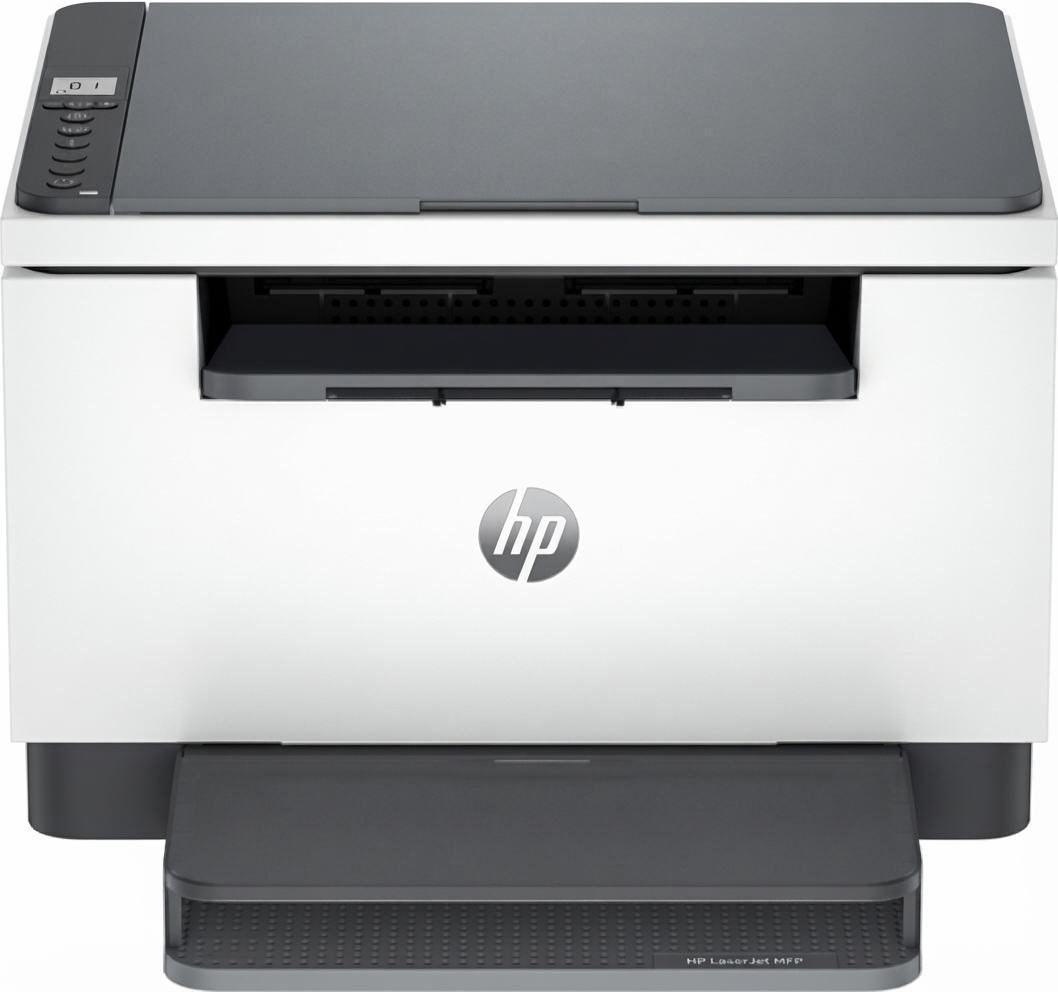
The hp MFP-M232 series Laser Jet is a compact monochrome multifunction printer designed for home offices, students, and small teams that need fast black-and-white printing, scanning, and copying in a space-saving format. It combines laser reliability with practical wireless and wired connectivity, making it a strong choice for everyday document handling, invoices, reports, and schoolwork. With support for automatic duplex printing on many configurations, fast first-page output, and mobile printing features, the hp MFP-M232 series Laser Jet is built for users who want simple operation and dependable performance without the footprint of a larger office machine.
One of the biggest advantages of the hp MFP-M232 series Laser Jet is its balance of speed, compact design, and low-maintenance laser output. Typical black print speeds reach up to 29 ppm on A4, with a first page out in about 7 seconds, which helps reduce waiting during busy workdays. Depending on the model, users may also get dual-band Wi-Fi, Ethernet, USB, and mobile printing compatibility through common platforms. This series is especially useful for remote workers, small businesses, and anyone who prints mostly text-based documents. Estimated pricing generally falls in the budget-to-midrange category, often around $150 to $300 depending on the exact model, region, and bundled features. Availability is broad through major online retailers, office supply stores, and HP-authorized sellers.
Technical Specifications for hp MFP-M232 series Laser Jet
- Print technology: monochrome laser multifunction printer
- Functions: print, copy, scan
- Print speed: up to 29 ppm A4, up to 30 ppm letter on select models
- First page out: about 6.9 to 7 seconds
- Print quality: up to 600 x 600 dpi, with HP FastRes 1200 quality mode
- Automatic duplex printing: up to 18 ipm on A4 for supported versions
- Input tray capacity: 150 sheets
- Output tray capacity: 100 sheets
- ADF capacity: 40 sheets on supported versions
- Connectivity: USB 2.0, Fast Ethernet, dual-band Wi-Fi on Wi-Fi models
- Mobile printing: Apple AirPrint, Mopria, HP app, Wi-Fi Direct on supported variants
- Duty cycle: up to 20,000 pages per month on select HP listings
- Processor speed: 500 MHz on referenced product data
- Memory: 64 MB on referenced product data
- Dimensions: approximately 368 x 298.6 x 241.9 mm closed
- Weight: about 7.6 kg to 9.5 kg depending on configuration
Compared with similar compact mono MFPs, the hp MFP-M232 series Laser Jet is attractive for its faster output, lower running complexity, and better fit for text-heavy workloads than many inkjet all-in-ones. It is best suited to users who print regularly and want consistent laser text quality rather than color printing.
Troubleshooting hp MFP-M232 series Laser Jet Common Problems and Fixes
If the printer will not connect, restart the router and printer, then reconnect using the HP Smart app, Wi-Fi Direct, or the Embedded Web Server if your model supports network access. For paper jams, open the rear access door and input tray carefully, remove torn paper slowly, and make sure paper is loaded within supported size and weight limits. For faded or streaky printouts, check toner level, shake the cartridge gently, and confirm that the paper type setting matches the media being used.
- Paper jam: remove media from the main tray, rear door, and output path, then reload clean, dry paper.
- Wireless not found: reset wireless settings, move the printer closer to the router, and confirm dual-band network support.
- Cartridge error: reseat the toner cartridge, remove protective seals, and replace with a compatible HP cartridge if needed.
- Print queue stuck: cancel all jobs, restart the spooler on the computer, and power cycle the printer.
- Error codes: check the display or status lights; common alerts usually relate to paper handling, cartridge installation, or connectivity. Follow the on-screen prompt or restart the device.
Preventive care includes using clean paper, updating firmware, avoiding overfilled trays, and keeping the printer in a dust-free area. Warranty coverage and support vary by region, but HP typically offers online support, user guides, firmware updates, and live help through its support channels. For help, use HP customer support, the HP Smart app help section, or your local authorized HP service center.
Pros and Cons of hp MFP-M232 series Laser Jet
Pros
- Compact footprint that fits easily on a desk or shelf
- Fast black-and-white output for invoices, reports, and school documents
- Sharp text quality typical of a laser printer
- Useful multifunction features: print, scan, and copy
- Wireless and wired connectivity options on many models
- Automatic duplex printing on supported versions saves paper
- Strong value for money for frequent document printing
Cons
- Monochrome only, so it is not suitable for color graphics or photos
- ADF and wireless features depend on the exact model
- Not ideal for high-volume office environments with heavy monthly demand
- Entry-level display and controls are functional but basic
- Replacement toner costs can be higher than ink tank systems over time
For buyers comparing alternatives, the hp MFP-M232 series Laser Jet is better than basic inkjets for sharp text and lower maintenance, but it is less versatile than color MFPs if charts, photos, or marketing materials matter. Overall, it offers solid value for small offices that prioritize speed and reliability over color printing.
Customer Reviews for hp MFP-M232 series Laser Jet
Customer feedback for the hp MFP-M232 series Laser Jet is generally positive, with many users giving it about 4 to 4.5 out of 5 stars for print quality, setup, and compact size. Buyers often praise the quick startup time, crisp text output, and reliable scanning for everyday office work. A frequent comment is that the printer feels well suited to home office use because it is easy to place and does not require much desk space.
Common complaints usually involve wireless setup, toner replacement cost, or feature differences between sub-models. Some users also note that the interface is basic and that the printer is not designed for color printing. A typical testimonial theme is: “It prints fast, connects well after setup, and handles my work documents without trouble.” For most buyers needing a dependable mono laser MFP, the hp MFP-M232 series Laser Jet is a strong recommendation, especially if black-and-white printing is the main priority.
Faqs
How do I set up the hp MFP-M232 series Laser Jet for the first time?
Why is my hp MFP-M232 series Laser Jet not connecting to Wi-Fi?
What should I do if the hp MFP-M232 series Laser Jet prints blank pages?
Is the hp MFP-M232 series Laser Jet compatible with Windows, Mac, Android, and iPhone?
How do I scan documents from the hp MFP-M232 series Laser Jet to my computer or phone?
What are the best ways to improve print speed on the hp MFP-M232 series Laser Jet?
How often should I maintain the hp MFP-M232 series Laser Jet to prevent paper jams and poor print quality?
What should I check if the hp MFP-M232 series Laser Jet says offline or stops responding?
Tags
More hp manuals
Leave a Comment