
Hp ProDesk 600 G1 Series Desktop User Manual
Content
HP ProDesk 600 G1 Series Desktop Overview
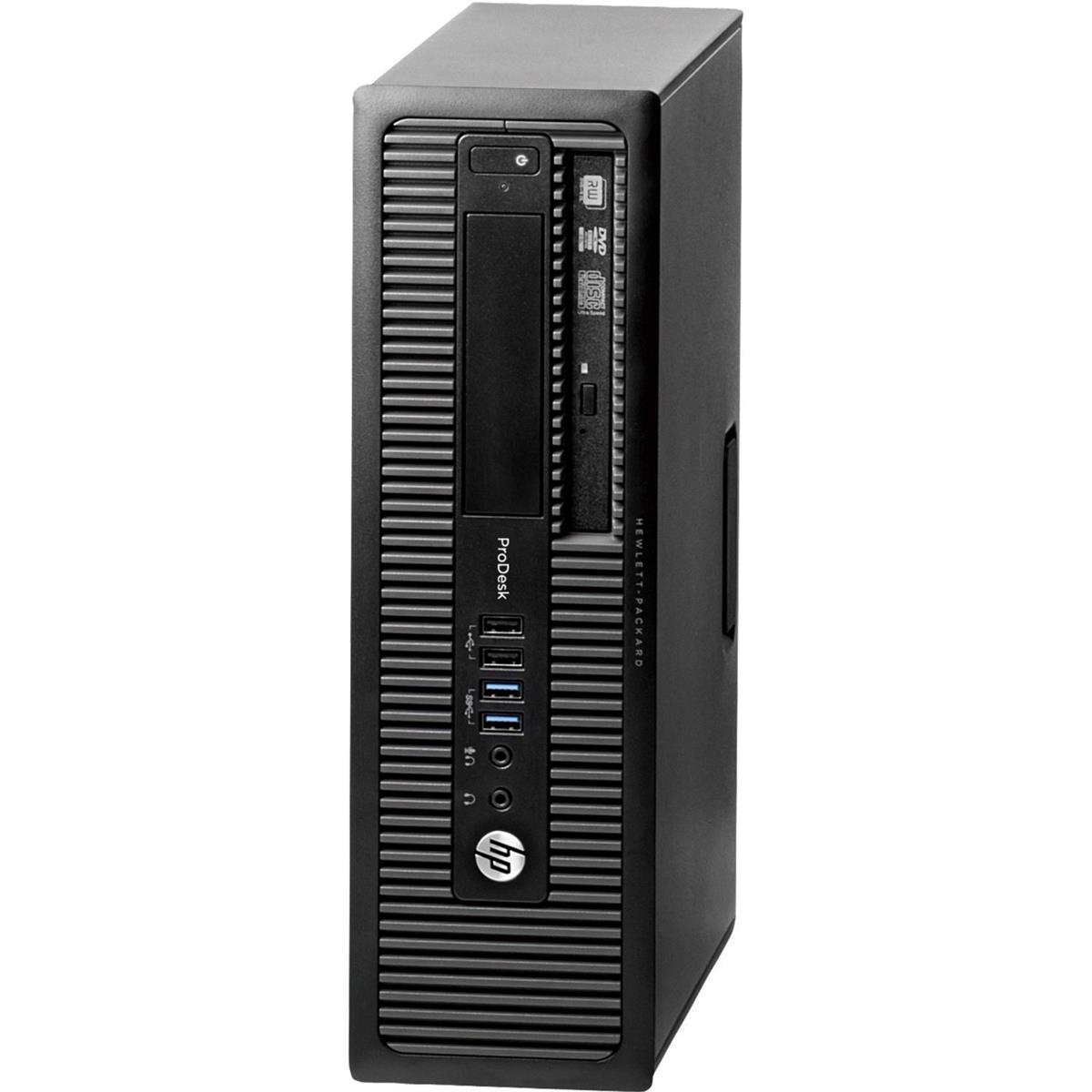
The HP ProDesk 600 G1 Series Desktop is a business-class PC built for everyday productivity, office workflows, and dependable long-term use. Designed for small businesses, home offices, and enterprise environments, this desktop balances performance, expandability, and durability in a practical package. The hp ProDesk 600 G1 Series Desktop is especially appealing for users who need a stable system for document handling, web browsing, accounting, point-of-sale tasks, and light multitasking without paying for a modern premium workstation.
One of its biggest strengths is flexibility. It was sold in multiple configurations, including tower, small form factor, and mini options, with Intel Core i3, i5, i7, and Pentium processors, DDR3 memory, and SATA storage. Many models include multiple USB ports, DisplayPort outputs, VGA, Ethernet, and optional serial connectivity, making it a solid fit for office hardware and legacy peripherals. The business-oriented design also means easier maintenance and a layout built for serviceability.
In today’s refurbished market, pricing usually falls in the budget range, often around $80 to $250 depending on processor, RAM, storage, and condition. New units are generally no longer widely available, but refurbished and renewed systems remain common through resellers and liquidators. For buyers seeking a low-cost desktop for productivity, the hp ProDesk 600 G1 Series Desktop continues to offer strong value.
Technical Specifications and Key Features
- Processor options: Intel Core i3, Core i5, Core i7, Pentium, depending on configuration.
- Memory: DDR3 SDRAM, commonly 4 GB, with upgrades often supported up to 16 GB or 32 GB depending on form factor.
- Storage: 500 GB SATA hard drive is common; some refurbished units include SSD upgrades for faster boot times.
- Graphics: Integrated Intel HD Graphics 4600 or similar integrated graphics solution.
- Connectivity: Gigabit Ethernet, multiple USB 2.0 and USB 3.0 ports, DisplayPort, VGA, and optional serial port.
- Expansion: PCI Express slots and internal drive bays vary by tower and small form factor model.
- Operating system: Originally shipped with Windows 7 Professional; many refurbished systems now ship with Windows 10 Pro.
- Power: Business-class power supply and energy-efficient design in many configurations.
Performance is strong for office workloads, with capable multitasking on Core i5 and Core i7 versions and modest everyday responsiveness on Pentium or Core i3 variants. Compared with newer business desktops, the hp ProDesk 600 G1 Series Desktop is less powerful and less efficient, but it still performs well for general productivity. Compared with entry-level all-in-one PCs, it usually offers better upgradeability and easier repair access.
Detailed Product Description
The HP ProDesk 600 G1 Series Desktop is a traditional business PC built around reliability, upgradeability, and easy deployment. It uses standard desktop components such as SATA storage, DDR3 memory, and Intel chipsets, which makes it straightforward to service and customize. The system is designed to work quietly and consistently in office environments, where stability matters more than flashy design.
In real-world use, it handles spreadsheets, email, cloud applications, schoolwork, and customer service applications with ease. When paired with an SSD and 8 GB or more of RAM, the system feels noticeably faster and can support a smoother everyday experience. Tower models are especially useful for users who want internal expansion, while small form factor versions save desk space and suit front-office or retail setups.
Build quality is one of its defining traits. The chassis uses durable business-grade materials, with a practical layout that supports tool-friendly maintenance. Users typically appreciate the solid construction, quiet operation, and simple port selection. The hp ProDesk 600 G1 Series Desktop is not a gaming PC or content creation powerhouse, but it excels as an affordable productivity machine.
Setup Guide for HP ProDesk 600 G1 Series Desktop
Setting up the HP ProDesk 600 G1 Series Desktop is simple and suitable for beginners. Start by placing the desktop on a stable, ventilated surface. Connect the power cord, monitor cable, keyboard, mouse, and Ethernet cable if you want a wired network connection. Use DisplayPort for the best digital monitor output, or VGA if your display requires legacy connectivity.
- Step 1: Inspect the chassis for shipping damage and confirm all cables are available.
- Step 2: Connect the monitor to the preferred video port and secure the cable.
- Step 3: Attach keyboard, mouse, and network cable.
- Step 4: Plug in the power cable and turn on the system.
- Step 5: Follow the operating system prompts to complete setup and user creation.
- Step 6: Install drivers, system updates, and security software.
For configuration, BIOS settings can be adjusted for boot order, virtualization, and security features. If the system does not display video, check that the monitor input matches the selected port and confirm the cable is firmly seated. Avoid blocking ventilation openings and never open the power supply enclosure. If upgrading memory or storage, disconnect power first and use anti-static precautions.
Troubleshooting Common Problems
Like many older desktops, the HP ProDesk 600 G1 Series Desktop can develop issues related to storage, memory, or outdated software. Common symptoms include slow boot times, no display, boot loops, or USB devices not responding. In many cases, these problems are caused by a failing hard drive, insufficient RAM, dust buildup, or a BIOS configuration issue.
- No power: Check the wall outlet, power cable, and rear power switch if present.
- No display: Reconnect the monitor, verify the correct input source, and test another cable or monitor.
- Slow performance: Replace the hard drive with an SSD and increase RAM.
- Frequent freezing: Run memory diagnostics and scan for malware or disk errors.
- USB failure: Try rear ports, update chipset drivers, and inspect connected devices.
Error codes can appear during startup if the system detects memory or storage faults. When this happens, reseat the RAM, disconnect unnecessary peripherals, and enter BIOS to confirm boot settings. Preventive maintenance includes regular dust cleaning, software updates, and periodic drive health checks. Warranty coverage depends on the seller because most units are now refurbished or pre-owned. For help, customers should contact the retailer, refurbisher, or HP business support for documentation and service options.
Pros and Cons of the HP ProDesk 600 G1 Series Desktop
Pros
- Excellent value for budget-conscious buyers looking for a reliable office desktop.
- Business-grade build quality with easy access for maintenance and upgrades.
- Multiple form factors available, including tower and small form factor models.
- Good port selection for office accessories and legacy equipment.
- Upgradeable design makes it easy to install SSDs, more RAM, and replacement parts.
Cons
- Older platform with DDR3 memory and 4th-generation Intel processors.
- Integrated graphics are not suitable for modern gaming or heavy creative work.
- Many systems ship with aging hard drives that should be replaced for best performance.
- Limited modern connectivity compared with newer business desktops.
- Refurbished units vary in condition, accessories, and warranty coverage.
Overall, the hp ProDesk 600 G1 Series Desktop offers strong value for basic computing and business tasks. It compares well against other refurbished office PCs, especially when upgraded with an SSD and extra memory. Buyers who need modern performance for design, editing, or gaming should consider newer alternatives.
Customer Reviews and Real User Feedback
Typical customer feedback for the HP ProDesk 600 G1 Series Desktop is positive among office and home users. Many buyers rate it around 4 out of 5 stars for value, reliability, and easy setup. Users frequently praise its sturdy construction, quiet operation, and the ability to upgrade storage and memory at low cost.
Common complaints usually focus on the original hard drive speed, outdated Windows 7-era hardware, and variation between refurbished listings. Some users also note that performance is heavily dependent on whether the unit includes an SSD and enough RAM. A frequent recommendation is to buy a configuration with at least 8 GB of memory and a solid-state drive for the best experience.
Testimonial-style feedback often sounds like this: “Great office PC for the money,” “Perfect for web and document work,” and “Much faster after adding an SSD.” For buyers who want a dependable, affordable desktop for everyday productivity, the hp ProDesk 600 G1 Series Desktop remains a practical purchase.
Faqs
How do I set up the hp ProDesk 600 G1 Series Desktop for the first time?
What should I do if my hp ProDesk 600 G1 Series Desktop is not turning on?
Which upgrades are most useful for improving hp ProDesk 600 G1 Series Desktop performance?
Is the hp ProDesk 600 G1 Series Desktop compatible with Windows 10 and newer software?
Why is my hp ProDesk 600 G1 Series Desktop running slow, and how can I speed it up?
What ports and connectivity options does the hp ProDesk 600 G1 Series Desktop offer?
How do I maintain the hp ProDesk 600 G1 Series Desktop for reliable long-term use?
Can I use two monitors with the hp ProDesk 600 G1 Series Desktop?
More hp manuals
Leave a Comment