
Hp Smart Tank Plus 650 series Color Printer User Manual
Content
Introduction to the HP Smart Tank Plus 650 Series Color Printer
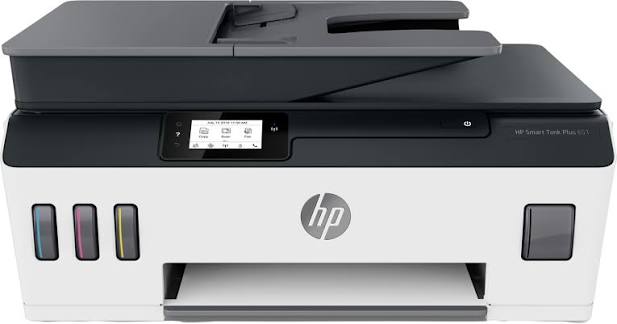
The hp Smart Tank Plus 650 series Color Printer is a refillable ink tank all-in-one printer designed for home users, students, and small offices that need reliable printing, scanning, and copying with low running costs. Built for high-volume everyday tasks, it combines wireless convenience, mobile printing, and a compact footprint with the long-term savings of a cartridge-free ink system. This makes it especially appealing for users who print frequently and want fewer interruptions for ink replacement.
Its key strengths include easy-to-fill ink tanks, crisp text output, solid color document printing, and support for wireless printing from phones, tablets, and laptops. The printer is also well suited for mixed workloads such as school assignments, reports, invoices, handouts, and occasional photo printing. With a front control panel and a user-friendly setup process through the HP Smart app, the printer is built to be approachable even for first-time printer owners.
In most markets, the price range typically falls in the mid-range ink tank category, often around the affordable-to-moderate segment for multifunction printers. Availability can vary by region, but it is commonly sold through major electronics retailers, online marketplaces, and HP-authorized stores. For buyers looking for an economical wireless color printer with scanning and copying features, the hp Smart Tank Plus 650 series Color Printer remains a practical and value-driven choice.
HP Smart Tank Plus 650 Series Color Printer Specifications
- Functionality: Print, scan, copy
- Print technology: Thermal inkjet with refillable ink tank system
- Print resolution: Up to 4800 x 1200 optimized dpi for color documents and images
- Copy and scan resolution: Optical scanning up to 1200 x 1200 dpi
- Color depth: 24-bit color and 8-bit grayscale
- Paper handling: Support for plain paper, envelopes, cards, and photo paper
- Input tray capacity: Typically around 100 sheets for standard paper
- Output tray capacity: Typically around 30 sheets
- Connectivity: Wi-Fi, USB, and mobile printing support
- Control interface: Small touchscreen display for navigation and settings
- Recommended operating temperature: 15°C to 30°C
- Operating temperature range: 5°C to 40°C
- Best for: Home offices, students, and small teams with moderate-to-high print volume
Compared with standard cartridge inkjet printers, the hp Smart Tank Plus 650 series Color Printer offers a much lower cost per page and better value for frequent printing. Against compact business inkjets, it may be less advanced in speed and paper handling, but it stands out for affordability, easy refilling, and dependable everyday performance.
Detailed Product Description and How It Works
The printer uses a refillable tank system instead of disposable ink cartridges. Ink bottles are used to fill the integrated tanks, which reduces waste and helps lower long-term printing costs. This design is ideal for users who print in larger batches or want to avoid frequent cartridge replacements. The printer handles common office documents, school materials, labels, forms, and occasional color graphics with consistent results.
The build quality is practical and compact, with a sturdy plastic chassis designed for desktop use. The control layout is simple, and the included display makes routine tasks such as copying, wireless setup, and maintenance easier to manage. For daily use, the printer is comfortable for families and small offices because it can handle scanning a document, printing a homework packet, or copying IDs without requiring advanced technical knowledge.
In real-world use, the machine performs best for documents, charts, and general color printing. The refillable tank design is especially useful for users printing frequently from multiple devices. The hp Smart Tank Plus 650 series Color Printer provides a balanced experience for people who want convenience, lower operating costs, and solid output quality without investing in a large office printer.
Setup Guide for the HP Smart Tank Plus 650 Series Color Printer
1. Unbox the printer and place it on a flat, stable surface near a power outlet and Wi-Fi router.
2. Remove all packaging materials, protective tapes, and transport locks before powering on the device.
3. Fill the ink tanks carefully using the included bottles, matching each bottle to the correct color.
4. Connect the power cord, turn on the printer, and wait for the initialization process to complete.
5. Install the printer software or HP Smart app on your computer or mobile device.
6. Follow the on-screen prompts to connect the printer to Wi-Fi or complete USB setup.
7. Print a test page and align the printheads if prompted.
Configuration options usually include wireless setup, mobile printing, paper size selection, and maintenance functions through the app or control panel. If the printer does not connect, restart the router, confirm the Wi-Fi password, and move the printer closer to the access point during setup.
Keep the printer level during ink filling and avoid touching internal components. Do not power off the device while it is initializing or cleaning the print system. For best results, use genuine compatible ink bottles and follow the setup instructions carefully to avoid spills or air pockets in the tanks.
Troubleshooting Common Problems
If the printer will not print, check power, paper supply, ink levels, and the selected printer device on your computer or phone. For wireless problems, reconnect the printer to Wi-Fi and make sure the router is working properly. If pages come out blank or faded, run a printhead cleaning cycle and confirm that the ink tanks are filled correctly.
Common issues include paper jams, offline status, slow printing, and scan errors. If a jam occurs, turn the printer off, gently remove the paper in the direction of travel, and inspect the paper path for torn pieces. If scans fail, verify that the HP software is installed and the scanner is selected correctly in the application.
Typical fixes for connection or network errors include resetting the printer network settings, updating printer software, and reinstalling the HP Smart app. Preventive measures include using clean paper, storing ink bottles upright, and keeping firmware updated. Warranty and support options are usually available through HP customer care, the product registration portal, and authorized service centers. For help, users should contact HP support through the official support channels provided in their region.
Pros and Cons of the HP Smart Tank Plus 650 Series Color Printer
Pros
- Low running cost thanks to refillable ink tanks
- Good choice for high-volume home and small-office printing
- Wireless printing and mobile app support make daily use simple
- Produces sharp text and solid color documents
- Useful all-in-one design with print, scan, and copy functions
- Better long-term value than many cartridge-based inkjet printers
Cons
- Slower than many laser printers for heavy office workloads
- Basic display and controls may feel limited for advanced users
- Setup can be frustrating if Wi-Fi is unstable
- Not the best option for professional photo printing
- Bulkier than some entry-level compact printers
As a value-focused ink tank model, the printer compares favorably with many cartridge printers and holds its own against other budget all-in-ones. The hp Smart Tank Plus 650 series Color Printer is especially attractive for users who print often and want predictable costs, even if they sacrifice some speed and premium features.
Customer Reviews and User Feedback
Typical user feedback for this printer is positive, with many buyers rating it around 4 out of 5 stars for value, ink efficiency, and print quality. Users often praise the low cost per page, easy refilling, and convenient wireless printing from phones and laptops. A common comment is that it is a strong fit for schoolwork and home office documents.
Frequent complaints usually involve initial Wi-Fi setup, occasional software glitches, and slower print speeds compared with laser models. One common sentiment is that the printer is excellent once configured, but first-time users may need patience during installation. Overall, it is widely recommended for families, students, and budget-conscious small businesses that want dependable color printing without expensive cartridges.
Faqs
How do I set up the hp Smart Tank Plus 650 series Color Printer for the first time?
Why is my hp Smart Tank Plus 650 series Color Printer not connecting to Wi-Fi?
What should I do if the hp Smart Tank Plus 650 series Color Printer is printing slowly?
Which devices and software work with the hp Smart Tank Plus 650 series Color Printer?
How do I fix poor print quality on the hp Smart Tank Plus 650 series Color Printer?
What are the main features of the hp Smart Tank Plus 650 series Color Printer?
How do I maintain the hp Smart Tank Plus 650 series Color Printer to avoid ink problems?
What paper types and sizes can I use with the hp Smart Tank Plus 650 series Color Printer?
Tags
More hp manuals
Leave a Comment