
Hp EliteDesk 800 G4 DM User Manual
Content
HP EliteDesk 800 G4 DM Review and Product Manual
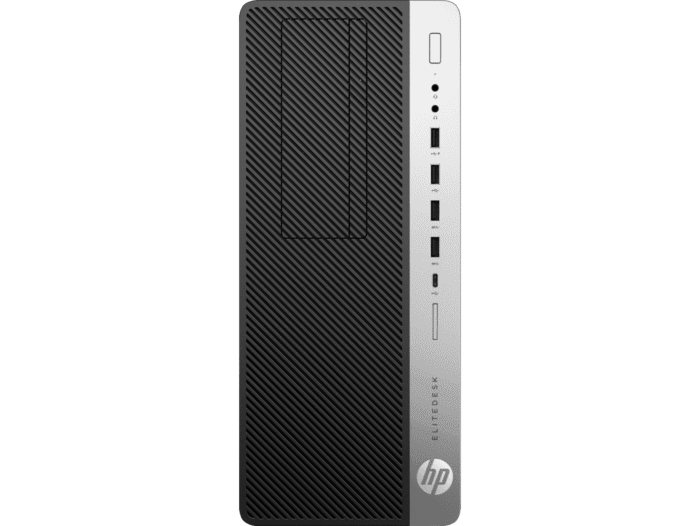
The HP EliteDesk 800 G4 DM is a compact business desktop designed for users who need reliable performance in a space-saving form factor. Built for offices, remote workstations, front-desk environments, and educational labs, this mini PC delivers strong everyday computing power while taking up very little desk space. The hp EliteDesk 800 G4 DM is especially appealing to IT teams and small businesses that want a manageable, upgrade-friendly system with enterprise security and long lifecycle support.
Its biggest strengths are its small footprint, quiet operation, flexible connectivity, and support for Intel 8th Gen Core processors. Depending on configuration, it can handle productivity apps, web-based workflows, light creative work, and multi-monitor setups with ease. Common configurations include Intel Core i3, i5, and i7 processors, DDR4 memory, NVMe SSD storage, dual DisplayPort outputs, Wi-Fi, and Bluetooth. Refurbished models are widely available, with typical pricing often ranging from about $110 to $180 for used or refurbished units and higher for premium configurations. New-old-stock or business-channel units can cost significantly more when available.
For buyers searching for a dependable small business desktop, the hp EliteDesk 800 G4 DM remains a practical choice thanks to its balance of performance, expandability, and low running noise. It is a strong fit for users who want a compact desktop PC for office productivity, point-of-sale stations, digital signage, or home office use without sacrificing essential business features.
Specifications for HP EliteDesk 800 G4 DM
- Form factor: Desktop Mini / DM compact business PC
- Processor options: Intel 8th Gen Core i3, i5, i7; some entry models with Pentium or Celeron
- Graphics: Integrated Intel UHD Graphics 610 or 630 depending on CPU
- Memory: DDR4 RAM, commonly 8 GB or 16 GB, with upgrade support
- Storage: M.2 NVMe SSD and SATA storage support; common capacities include 256 GB, 512 GB, and 1 TB
- Connectivity: Wi-Fi 5, Bluetooth, Gigabit Ethernet
- Ports: USB-C, multiple USB-A ports, dual DisplayPort, audio in/out, RJ-45 LAN
- Operating system: Typically Windows 10 Pro or Windows 11 Pro on refurbished units
- Dimensions: Approximately 177 x 34 x 175 mm
- Weight: Around 1.0 to 1.1 kg depending on configuration
Performance is suitable for daily business workloads, browser-heavy use, office suites, and conferencing tools. In comparison with larger SFF desktops, the hp EliteDesk 800 G4 DM trades some internal expansion for a smaller footprint and lower energy use. Compared with newer HP EliteDesk generations, it remains competitive for general productivity but is less ideal for heavy multitasking or advanced graphics tasks.
Detailed Description of the HP EliteDesk 800 G4 DM
The hp EliteDesk 800 G4 DM is built around a compact chassis that prioritizes efficiency and manageability. Internally, it uses laptop-class components adapted for desktop use, which helps keep heat and noise levels low while maintaining stable performance. The system is designed to work with solid-state drives and modern wireless networking, making startup times fast and everyday use responsive.
In real-world use, this mini desktop works well as a receptionist PC, conference room endpoint, office workstation, or home productivity machine. Dual DisplayPort outputs support dual-monitor setups, which is useful for finance teams, administrators, and customer service desks. The machine’s sturdy metal-and-plastic construction feels business-grade, and its understated design blends easily into professional settings. Users generally appreciate the quiet fan behavior, small footprint, and easy placement behind a monitor or under a desk.
The hp EliteDesk 800 G4 DM is also a strong fit for refurbished buyers because it offers enterprise hardware at a lower entry price than many current-generation mini PCs. For users who need a reliable compact desktop rather than a gaming or content-creation machine, it delivers practical value.
Setup Guide for HP EliteDesk 800 G4 DM
Setting up the hp EliteDesk 800 G4 DM is straightforward. Start by placing the unit on a stable, ventilated surface or mounting it with a compatible bracket behind a monitor. Connect the power adapter, keyboard, mouse, network cable, and one or two displays using the available DisplayPort connections. If wireless use is preferred, enable Wi-Fi and pair Bluetooth accessories during initial Windows setup.
- 1. Connect the power supply and press the power button.
- 2. Attach displays using DisplayPort or an approved adapter.
- 3. Connect USB peripherals such as keyboard, mouse, and printer.
- 4. Choose your language, region, and keyboard layout in Windows.
- 5. Sign in with a work, school, or personal account.
- 6. Install Windows updates, drivers, and HP support utilities.
- 7. Check network, audio, and display settings before daily use.
During setup, confirm that ventilation openings are not blocked and avoid placing the unit near heat sources. If a display does not appear, test a different cable or port and verify the monitor input source. For Bluetooth pairing issues, remove the device from Windows and pair it again after restarting the system.
Troubleshooting the HP EliteDesk 800 G4 DM
Common issues with the hp EliteDesk 800 G4 DM usually involve power, storage, display output, or wireless connectivity. If the system will not boot, check the AC adapter, power button LED, and cable seating. If the machine powers on but shows no image, try the alternate DisplayPort, reseat the monitor cable, or test with another monitor. If Windows is slow, inspect storage health, free disk space, and available RAM.
- No power: Verify outlet, power adapter, and rear power connection.
- No display: Test another DisplayPort, monitor, or cable.
- Slow startup: Replace failing drives and run Windows updates.
- Wi-Fi drops: Reinstall wireless drivers and move closer to the router.
- Overheating: Clean dust from vents and ensure proper airflow.
- Audio not working: Check Windows sound settings and audio output selection.
Preventive care includes regular software updates, periodic dust removal, and avoiding cramped spaces that restrict airflow. Warranty coverage depends on the seller and configuration, especially for refurbished systems. For support, contact HP business support or the retailer that supplied the unit, and keep the serial number ready for faster service.
Pros and Cons of HP EliteDesk 800 G4 DM
Pros
- Compact mini desktop design saves desk space and fits behind monitors.
- Quiet, efficient operation makes it ideal for office and home office use.
- Business-grade connectivity includes dual DisplayPort, USB-C, and Gigabit Ethernet.
- Good value on the refurbished market compared with newer mini PCs.
- Strong everyday performance for productivity, web apps, and conferencing.
Cons
- Limited internal expansion compared with larger SFF desktops.
- Integrated graphics are not suited for gaming or heavy 3D workloads.
- Older hardware generation means it is less future-proof than newer business PCs.
- Some units may have variable battery-free power profiles and used-condition wear.
For value for money, the hp EliteDesk 800 G4 DM is excellent when purchased refurbished in good condition. Compared with newer alternatives, it is more affordable but offers fewer upgrade paths and lower peak performance. Compared with ultra-cheap mini PCs, it usually feels more durable and better suited to professional environments.
Customer Reviews for HP EliteDesk 800 G4 DM
Customer feedback for the hp EliteDesk 800 G4 DM is generally positive, especially from business users and refurbished buyers. Typical ratings cluster around 4 out of 5 stars when the unit is received in clean condition and configured with an SSD and at least 8 GB of RAM.
- Praise: “Compact, quiet, and fast enough for office work. Perfect for a dual-monitor setup.”
- Praise: “Great value compared with buying a new mini PC.”
- Complaint: “Some refurbished units arrived with cosmetic wear or older storage drives.”
- Complaint: “I wish it had more internal upgrade options.”
Most buyers recommend it for productivity tasks, remote work, and small business deployments. Common issues center on the condition of refurbished hardware rather than the design itself. For the best experience, choose a seller with a return policy and verify memory, SSD type, and included accessories before purchase.
Faqs
How do I set up hp EliteDesk 800 G4 DM for the first time?
What should I do if hp EliteDesk 800 G4 DM will not power on?
Which storage and memory upgrades are compatible with hp EliteDesk 800 G4 DM?
Can hp EliteDesk 800 G4 DM run Windows 11 smoothly?
Why is my hp EliteDesk 800 G4 DM running slow and how can I optimize it?
What display and port connections does hp EliteDesk 800 G4 DM support?
How do I fix overheating or loud fan noise on hp EliteDesk 800 G4 DM?
How often should I maintain hp EliteDesk 800 G4 DM for reliable performance?
Tags
More hp manuals
- Hp Wireless Elite Keyboard FQ480AA User Manual
- Hp Compaq LCD Monitor LA1905wl User Manual
- Hp EliteBook 840 G6 Healthcare Edition Notebook PC User Manual
- Hp Smart Tank Plus 650 series Color Printer User Manual
- Hp Pavilion Gaming 15 Laptop PC User Manual
- Hp Office Jet Pro All-in-One Printer 8720 User Manual
Leave a Comment