
Hp Wireless Elite Keyboard FQ480AA User Manual
Content
hp Wireless Elite Keyboard FQ480AA Overview
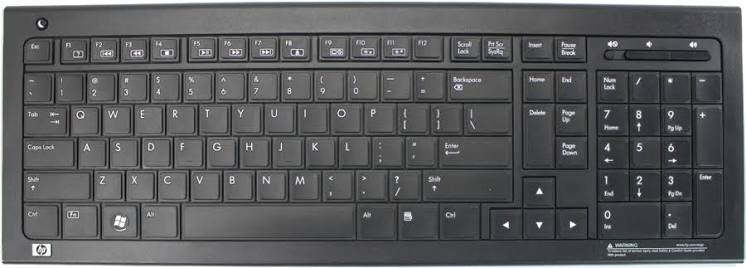
The hp Wireless Elite Keyboard FQ480AA is a slim, full-size wireless keyboard designed for everyday productivity, office work, and home computing. Built around 2.4 GHz wireless connectivity, it offers a clean desk setup with a compact USB receiver and a comfortable low-profile typing experience. Its scissor-style key design helps keep keystrokes quiet and responsive, making it a practical choice for users who type for long periods or want a keyboard that feels lighter and more precise than a traditional membrane model.
One of the biggest strengths of the hp Wireless Elite Keyboard FQ480AA is its balance of simplicity and convenience. It includes multimedia shortcuts, a sleep button, and a spill-resistant design that adds confidence in daily use. The adjustable tilt feet also make it easier to find a comfortable typing angle. This makes the keyboard especially useful for students, remote workers, office users, and anyone replacing a bulky wired keyboard with a cleaner wireless alternative.
In today’s market, the hp Wireless Elite Keyboard FQ480AA is typically found in the budget-to-midrange used and refurbished price category, often ranging from about $15 to $40 depending on condition, seller, and included accessories. Availability is usually strongest through resellers, refurbished tech stores, and marketplace listings rather than major retail shelves, since this is an older model. For users who want a reliable wireless keyboard with a familiar layout and no-frills operation, it remains a solid value option.
Specifications of hp Wireless Elite Keyboard FQ480AA
- Connection type: 2.4 GHz wireless via USB receiver
- Interface: USB Type-A receiver
- Keyboard layout: Full-size with numeric keypad
- Key structure: Low-profile scissor-style keys for quieter typing
- Hot keys: Multimedia and function shortcuts, including volume and sleep controls
- Wireless range: Up to about 10 meters, depending on environment
- Power: Battery-powered design for cable-free use
- Build: Slim black chassis with spill-resistant design
- Weight: Approximately 792 grams with batteries
- Warranty: Commonly sold with a 12-month limited warranty on retail listings
Compared with basic budget wireless keyboards, the hp Wireless Elite Keyboard FQ480AA stands out for its lower-profile keys, full numeric pad, and quieter typing feel. It is less feature-rich than modern ergonomic or Bluetooth keyboards, but it offers a straightforward plug-and-play experience that is often more dependable for users who want minimal setup.
How to Set Up hp Wireless Elite Keyboard FQ480AA
Setting up the hp Wireless Elite Keyboard FQ480AA is simple and usually takes only a few minutes. First, insert the batteries into the keyboard and make sure they are installed correctly. Next, plug the USB wireless receiver into an available USB-A port on your computer. In most cases, the keyboard will connect automatically without extra drivers or software.
If the keyboard does not respond right away, move it closer to the receiver and confirm that the batteries are fresh. Avoid placing the receiver behind a metal case or near devices that may cause wireless interference. For best results, keep the keyboard within the recommended 2.4 GHz operating range and use it on a flat surface for stable typing.
For safer use, do not expose the keyboard to liquids, excessive heat, or heavy impact. Although the design is spill-resistant, it is not fully waterproof. If you need to reconfigure shortcut keys or troubleshoot advanced behavior, check your operating system’s keyboard settings and USB device manager before assuming the device is defective.
Troubleshooting hp Wireless Elite Keyboard FQ480AA
If the keyboard stops working, the most common cause is weak batteries. Replace them first, then reconnect the USB receiver. If there is still no response, try a different USB port and restart the computer. Some systems may briefly take time to recognize the device after booting.
Common issues include delayed typing, missed keystrokes, or the keyboard disconnecting intermittently. These problems are usually linked to wireless interference, low battery power, or an obstructed receiver. Keep the receiver in a direct USB port rather than a hub if possible, and avoid using the keyboard too far from the computer.
There are no widely documented error codes for this model, so troubleshooting is generally based on symptoms rather than codes. If the issue persists, test the keyboard on another computer to confirm whether the problem is with the device or the system. For warranty or support, buyers should check the seller’s return policy, refurbished product guarantee, or any remaining HP accessory support channel available for older peripherals. When purchasing used units, prioritize listings that include a return window and verified functionality.
Pros and Cons of hp Wireless Elite Keyboard FQ480AA
Pros
- Wireless 2.4 GHz connection keeps the desk neat and cable-free
- Low-profile scissor keys feel quiet and comfortable for typing
- Full-size layout with numeric keypad improves productivity
- Multimedia shortcuts add convenience for everyday use
- Spill-resistant design increases practical durability
- Good value for users seeking a simple wireless office keyboard
Cons
- Older model, so new retail availability is limited
- Usually lacks modern extras like Bluetooth, backlighting, and rechargeable USB-C power
- Battery replacement is required instead of built-in charging
- Best suited for basic productivity rather than gaming or advanced customization
For the price, the hp Wireless Elite Keyboard FQ480AA offers solid everyday performance and dependable wireless convenience. Compared with newer premium alternatives, it is less advanced, but it remains attractive for buyers who want a straightforward wireless keyboard without paying for features they may not use.
Customer Reviews for hp Wireless Elite Keyboard FQ480AA
Customer feedback on the hp Wireless Elite Keyboard FQ480AA is generally positive, especially from users who value comfort, quiet keys, and simple setup. Many reviewers rate it around 4 out of 5 stars for its low-profile feel and practical wireless design. Typical praise includes easy installation, a tidy desk setup, and reliable everyday typing performance.
Common complaints focus on the age of the product, limited modern features, and battery dependence. Some users also note that availability can be inconsistent because the model is no longer widely sold new. Buyers who want a dependable office keyboard with a classic layout often recommend it, while users needing Bluetooth connectivity, rechargeable power, or premium ergonomics may prefer a newer alternative.
Frequently Asked Questions
Is the hp Wireless Elite Keyboard FQ480AA good for office work?
Yes. It is designed for comfortable everyday typing, especially in office, school, and home productivity setups.
Does hp Wireless Elite Keyboard FQ480AA need software?
Usually no. It is typically plug-and-play through the USB receiver and works without special software.
Is the hp Wireless Elite Keyboard FQ480AA still worth buying?
Yes, if you want a reliable wireless keyboard with a full-size layout and quiet keys at a budget-friendly price.
Faqs
How do I set up hp Wireless Elite Keyboard FQ480AA for the first time on a Windows PC?
What should I do if my hp Wireless Elite Keyboard FQ480AA is not working or not being detected?
Is the hp Wireless Elite Keyboard FQ480AA compatible with modern Windows versions or only older systems?
What are the main features of the hp Wireless Elite Keyboard FQ480AA?
How can I improve wireless range and typing stability on the hp Wireless Elite Keyboard FQ480AA?
How do I use the function and multimedia keys on the hp Wireless Elite Keyboard FQ480AA?
What batteries does the hp Wireless Elite Keyboard FQ480AA use, and how often should they be replaced?
How should I clean and maintain the hp Wireless Elite Keyboard FQ480AA for long-term use?
More hp manuals
Leave a Comment