
Setup & Pairing: Jabra Elite 3 Active Earbuds User Manual
Content
Jabra Elite 3 Active Earbuds
Introduction
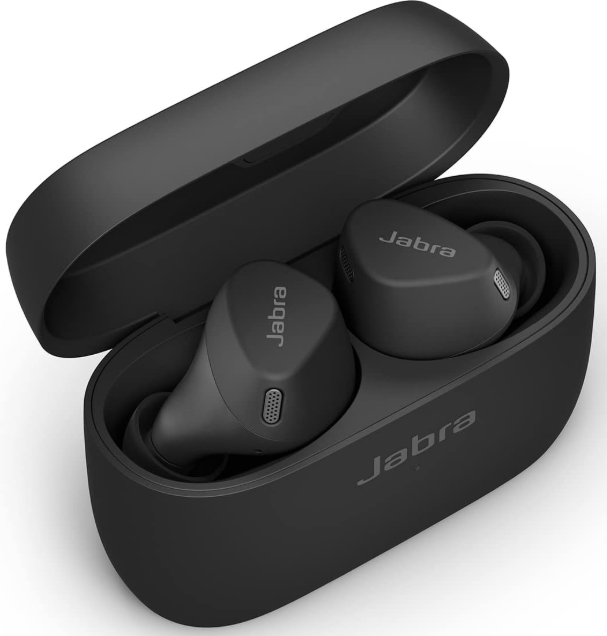
The Jabra Elite 3 Active Earbuds deliver a robust blend of advanced audio engineering and sport-ready design, making them an ideal choice for fitness enthusiasts and everyday users alike. Engineered for active lifestyles, these true wireless earbuds offer a secure active fit that stays firmly in place during workouts or daily commutes, ensuring comfort without compromise.
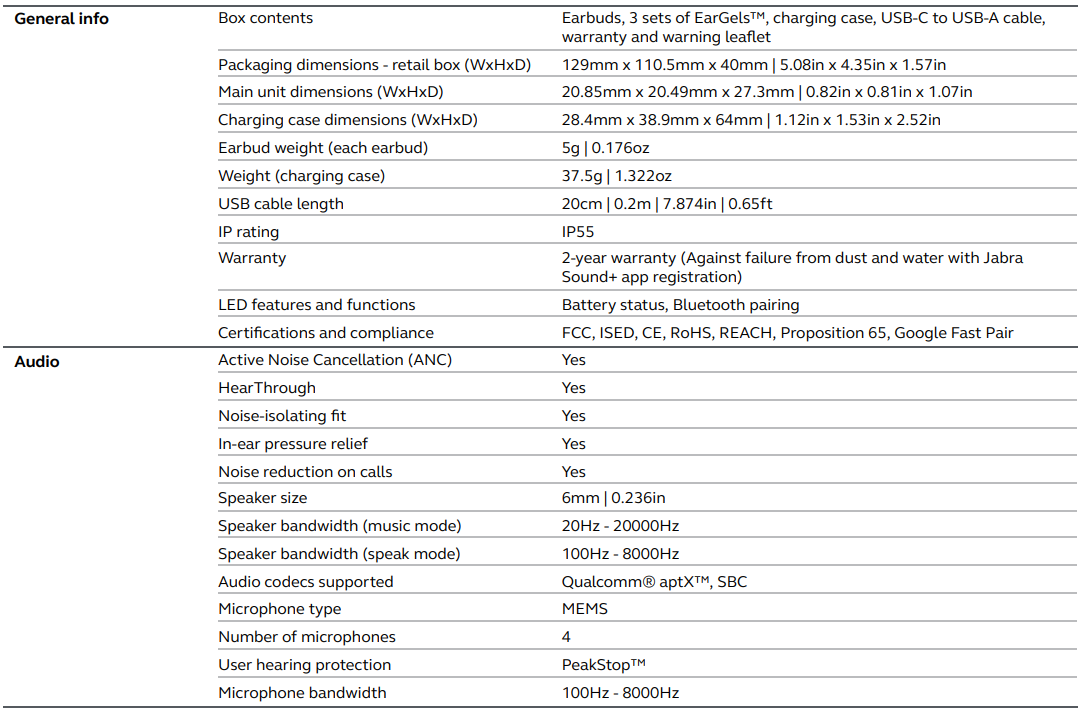
Key benefits include Active Noise Cancellation (ANC) to block out distractions, customizable equalizer settings through the Jabra Sound+ app, and the innovative HearThrough feature that allows ambient sound awareness for safety during outdoor activities. With four MEMS microphones, call quality is crystal clear, supporting noise reduction technology for seamless communication.
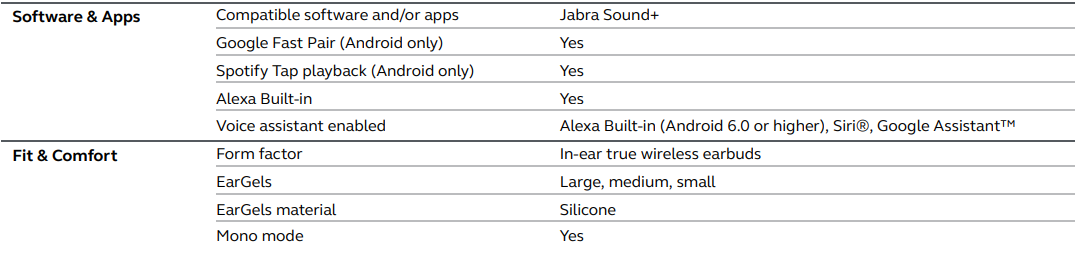
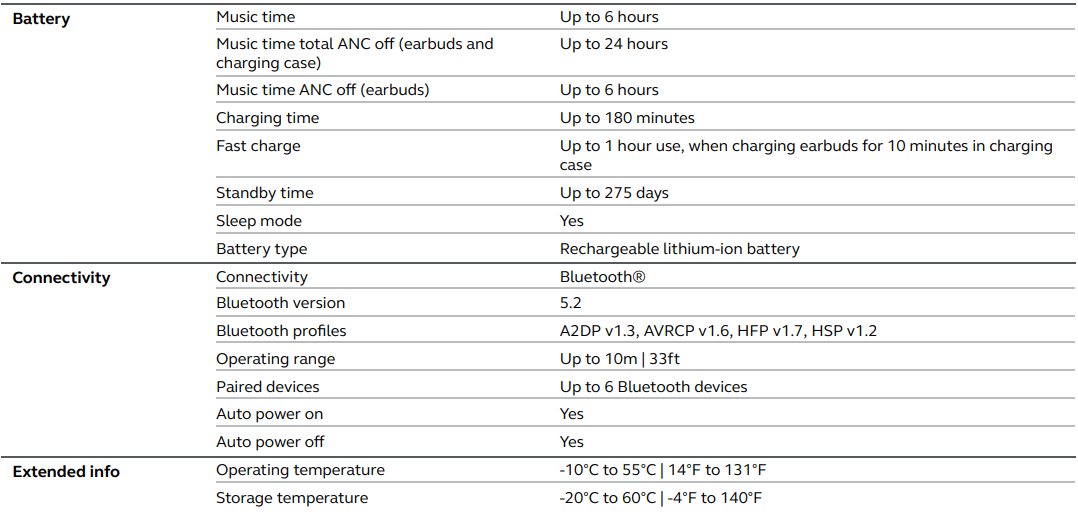
These earbuds are compatible with major voice assistants like Alexa, Siri, and Google Assistant, and include features such as Spotify Tap playback and Google Fast Pair for Android devices. The IP55 rating ensures water and sweat resistance, making them well-suited for sports and outdoor use. Battery life extends up to 7 hours per charge, with a total of 28 hours including the charging case, complemented by fast charging capabilities.
Targeted at active individuals who demand both performance and durability, the Jabra Elite 3 Active Earbuds retail in the estimated price range of $80 to $100, available through leading electronics retailers and online marketplaces globally. Their combination of affordability, advanced features, and rugged design positions them as a compelling option for users seeking value-packed, reliable wireless earbuds.
Specification
Troubleshooting Jabra Elite 3 Active Earbuds
While the Jabra Elite 3 Active Earbuds are designed for reliable performance, users may encounter typical problems such as connectivity drops, audio imbalances, or charging issues. Below are common problems and their solutions:
- Connectivity Issues: If earbuds fail to pair, ensure Bluetooth is enabled and the earbuds are in pairing mode. Use the Jabra Sound+ app for easier setup, especially on Android with Google Fast Pair. Restart both earbuds and your device if the connection is unstable.
- Audio Imbalance or One Earbud Not Working: Reset the earbuds by placing them back in the charging case and re-pairing with the device. Check the ear gel fit to ensure proper audio sealing.
- Charging Problems: Confirm charging contacts on both earbuds and the case are clean. Use the included USB-C cable and avoid wireless charging, as it is unsupported.
- Error Codes: No specific error codes are typical; however, app notifications may guide troubleshooting steps.
Preventive measures include regularly cleaning ear gels, updating firmware via the Jabra Sound+ app, and storing earbuds in their case when not in use to conserve battery. The earbuds come with a two-year warranty covering manufacturing defects.
For further assistance, Jabra provides customer support through their official website, phone support, and authorized retail channels, ensuring users receive prompt technical help.
Pros & Cons of Jabra Elite 3 Active Earbuds
Pros
- Secure Active Fit: Designed to stay put during intense workouts with three sizes of silicone EarGels for personalized comfort.
- Active Noise Cancellation & HearThrough: ANC reduces background noise effectively while HearThrough lets users stay aware of their surroundings.
- Clear Call Quality: Four microphones and noise-isolating technology provide excellent voice clarity.
- Long Battery Life: Up to 7 hours per charge and 28 hours overall with fast recharging capabilities.
- Voice Assistant Integration: Seamless access to Alexa, Siri, and Google Assistant.
- Water and Sweat Resistance: IP55 rating suitable for sports and outdoor conditions.
Cons
- No Wireless Charging: Charging case supports only wired USB-C charging.
- Limited Bluetooth Features: No multipoint pairing, which may affect users switching devices frequently.
- Android-Centric Features: Some features, such as Spotify Tap and Google Fast Pair,ir are exclusive to Android devices.
- Mid-Range Sound Nuances: Slightly underemphasized mid-treble can affect vocal and instrument clarity compared to higher-end models.
Compared with alternatives such as the Jabra Elite 4 Active or Elite 5, the Elite 3 Active provides strong value for money with core features tailored to active users, though with fewer advanced connectivity options.
Customer Reviews and Feedback on Jabra Elite 3 Active Earbuds
Users praise the Jabra Elite 3 Active Earbuds for their secure fit, impressive call quality, and effective noise cancellation for the price point. Many highlight the earbuds’ comfort during prolonged wear and the convenience of using either earbud independently. Star ratings commonly range from 4 to 4.5 out of 5.
Common compliments focus on the crisp audio performance and app-based sound customization. However, some users report issues with initial Bluetooth pairing and wish for wireless charging support. A few mention that the bass profile is slightly emphasized, which some appreciate for energetic music, sic while others prefer a more balanced sound.
Overall, the earbuds receive high recommendations for fitness enthusiasts and budget-conscious buyers seeking quality wireless earbuds with active noise cancellation and solid durability.
Faqs
How do I set up and pair my Jabra Elite 3 Active Earbuds with a smartphone for the first time?
What can I do if my Jabra Elite 3 Active Earbuds are not connecting or pairing correctly?
How do I customize the sound and controls on my Jabra Elite 3 Active Earbuds?
Are Jabra Elite 3 Active Earbuds compatible with Android and iOS devices?
What is the battery life of the Jabra Elite 3 Active Earbuds and how long does the charging case last?
How can I optimize the fit and comfort of my Jabra Elite 3 Active Earbuds for active use?
What should I do if the sound quality or microphone performance on my Jabra Elite 3 Active Earbuds is poor?
How do I maintain and clean my Jabra Elite 3 Active Earbuds to ensure longevity?
Tags
More jabra manuals
- Pairing & Setup: Jabra Elite 7 Pro Earbuds User Manual
- Pairing & Setup: Jabra ELITE 8 Active Earbuds User Manual
- Pairing & Setup: Jabra Elite Active 45e Earbuds User Manual
- How to wear: Jabra Elite 5 True Wireless Earbuds User Manual
- Pairing & Setup: Jabra Elite 3 Active Buds User Manual
- Jabra Elite Active 75t Earbuds Pairing Instructions
Leave a Comment