
Pairing & Setup: Jabra Elite Active 45e Earbuds User Manual
Content
Jabra Elite Active 45e Earbuds
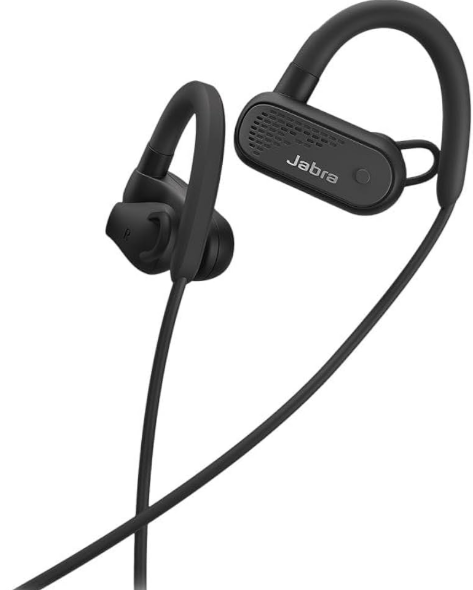
Introduction
The Jabra Elite Active 45e Earbuds are engineered to deliver a powerful combination of wireless freedom, durability, and superior audio quality tailored for active lifestyles. Designed with sports enthusiasts and fitness lovers in mind, these earbuds provide a secure fit with innovative Earwings and Earhooks that stay firmly in place during intense workouts, running, or daily commutes. They feature an IP67 waterproof rating, making them resistant to sweat, dust, and even immersion in water up to one meter for 30 minutes, ensuring reliability in tough environments.
Key benefits include up to 9 hours of battery life on a single charge, crystal-clear calls with dual-microphone noise reduction technology, and one-touch access to popular voice assistants like Amazon Alexa, Siri®, and Google Assistant™. The earbuds also allow users to maintain environmental awareness with an open design that keeps you alert to your surroundings while exercising.
Ideal for athletes, outdoor enthusiasts, and professionals seeking robust and versatile earbuds, the Jabra Elite Active 45e offers a balanced mix of performance and comfort. They are competitively priced, generally falling in the mid-range category (approximate price around $70–$90 USD or 5,000 INR), and are widely available via online retailers and authorized stores. This makes them an attractive option for anyone looking for dependable wireless earbuds optimized for active use without compromising everyday usability.
Specifications and Features of Jabra Elite Active 45e Earbuds
- Audio Drivers: 12mm dynamic speakers delivering consistent bass and clear treble
- Connectivity: Bluetooth 5.0 for stable, low-latency wireless connection
- Battery Life: Up to 9 hours of playback time per charge
- Waterproof Rating: IP67 certification, dust-tight and water-resistant up to 1m for 30 minutes
- Design: Comfortable, secure fit with Earwings and Earhooks, semi-open design for ambient awareness
- Call Quality: 2-microphone noise reduction technology for superior call clarity
- Voice Assistants: One-touch access to Amazon Alexa, Siri®, and Google Assistant™
- Charging: Micro-USB port with quick charge capability
- Warranty: 2-year sweat and dust warranty upon product registration
- Compatibility: Works seamlessly with iOS, Android, and popular sports watches with music support
Compared to similar models such as the Jabra Elite Active 65t, the 45e focuses more on sport-centric durability and fit, with slightly less premium sound fidelity but improved battery life and a water-resistant design that suits rough environments better.
Jabra Elite Active 45e
Engineered for wireless music, calls, and sport. Waterproof durability and superior fit.
- A fit that’s comfortable and secure.
Enjoy an active lifestyle with secure-fitting earbuds, thanks to Earwings and Earhooks that hold firm when you move. - Built for active lifestyles.
Jabra Elite Active 45e features IP67-rated waterproof durability, with a 2-year sweat and dust warranty. Whatever your day and your activity demands of you, your earbuds will enhance your sports, music, calls, and calls. - Rusafelyfe, in any environment.
Thanks to an open-ear design, you can stay aware of your surroundings. The oval shape of the earbuds helps to keep you safe when your workouts take you outdoors. - Boost your day.
With up to 9 hours of battery on a single charge, you can power a week’s worth of workouts, keeping the music playing and the calls answered. - Quality calls on the go.
2-microphone call technology gives you superior call quality wherever you are. So you can always switch seamlessly between listening to great music and making calls with crystal-clear sound. - Voice command made simple.
Jabra Elite Active 45e connects you instantly to Alexa, Siri®, or Google Assistant™. So you can get assistance with tasks, including setting appointments, finding nearby events, or having messages read to you. - Personalize your device.
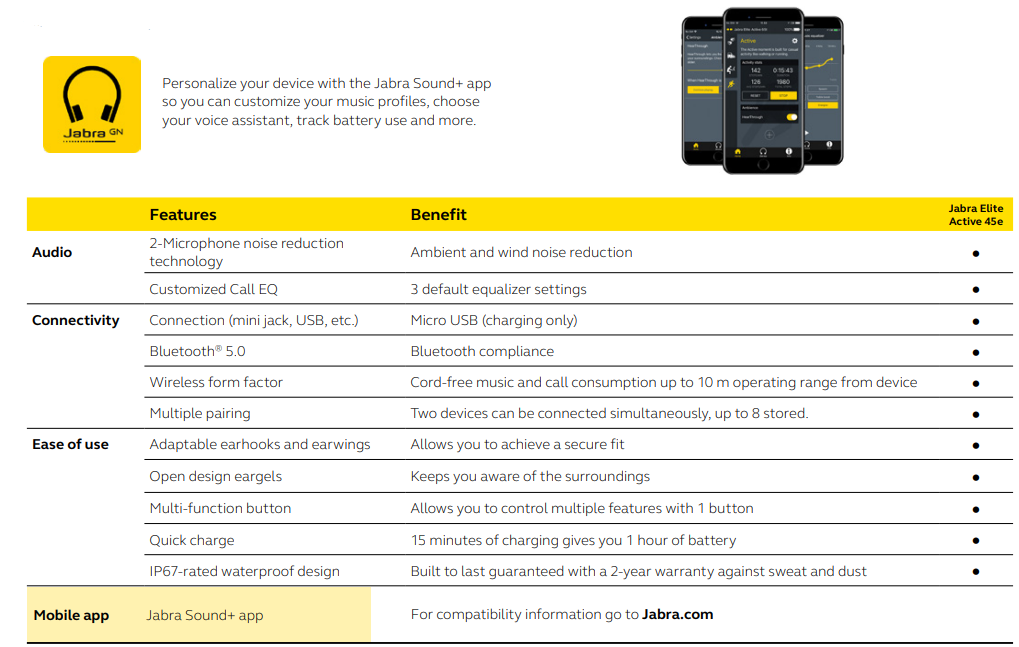
Pair with the Jabra Sound+ app to customize music profiles, choose your voice assistant, track battery us,e and more.
The Elite Active 45e earbuds are IP67-verified to withstand fresh water up to one meter for 30 minutes. Registration required with the Jabra Sound+ app. Operating system dependent
At a glance
Jabra Elite Active 45e
- Comfortable and secure earbuds. Earwings and Earhooks for a superior fit
- IP67-rated waterproof durability. 2-year sweat and dust warranty
- Run safely. Earbud design keeps you aware of your surroundings
- A week’s workouts on a single charge. Get up to 9 hours of battery life
- Quality call experience. 2-microphone call technology for superior calls
- Voice assistant enabled. One-touch access to Amazon Alexa, Siri®, and Google Assistant™
- Personalize your device. Pair with the Jabra Sound+ app for customized settings
How to pair
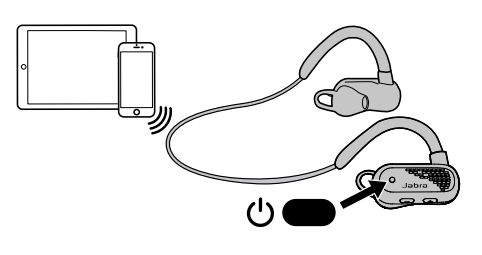
Power on the headset and follow the voice instructions to pair it to your smartphone.
How to charge
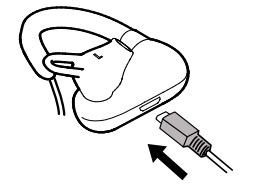
- It takes approx. 2 hours to fully charge the battery. If the headset is fully out of battery, 15 minutes of charging will give 1 hour of battery.
- To protect against water and sweat damage, ensure the charging port is kept clean and dry.
How to use
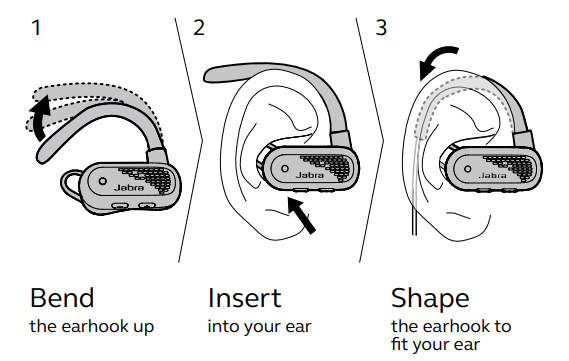
How to wear
Connect to the Jabra Sound+ app
© 2019 GN Audio A/S. All rights reserved. ® Jabra is a registered trademark of GN Audio A/S.
The Bluetooth® word mark and logos are registered trademarks owned by the Bluetooth SIG, Inc., and any use of such marks by GN Audio A/S is under license.
Troubleshooting and Support for Jabra Elite Active 45e
- Common Issue: Earbuds not pairing via Bluetooth
Solution: Reset the earbuds by pressing and holding the multi-function button for 10 seconds, then retry pairing. Ensure your device’s Bluetooth is on and within range. - Problem: Low volume or one earbud not producing sound
Fix: Clean the earbuds gently to remove debris. Check the Jabra Sound+ app for individual volume settings and firmware updates. - Call Quality Issues or Static
Resolution: Use the earbuds in an area with minimal wireless interference. Ensure firmware is updated via the Jabra Sound+ app. The dual-microphone system minimizes ambient noise but may require optimal positioning. - The battery drains quickly.
Preventive: Fully charge the earbuds before use. Disable any unnecessary features like voice assistants if not needed. Avoid exposing the earbuds to extreme temperatures.
The Jabra Elite Active 45e comes with a 2-year warranty against sweat and dust damage when registered, reflecting the brand's confidence in durability. For additional support, users can access detailed manuals, FAQs, and contact customer service via the official Jabra support page.
Pros & Cons of Jabra Elite Active 45e Earbuds
Pros
- Sport-Optimized Design: Secure Earwings and Earhooks keep earbuds stable during physical activity, suitable for running and gym workouts.
- Waterproof Durability: IP67 rating with a 2-year sweat and dust warranty ensures longevity under tough conditions.
- Long Battery Life: Up to 9 hours on a single charge supports extended workouts and daily use.
- Clear Call Quality: Dual microphones and noise reduction enable crisp voice calls even outdoors.
- Voice Assistant Integration: Easy access to Alexa, Siri, and Google Assistant enhances hands-free control.
- Good Value for Money: Affordable pricing with durable features compared to premium alternatives.
Cons
- Charging Port: Uses Micro-USB instead of modern USB-C, which may be less convenient.
- Sound Quality: While adequate for sports, audiophiles may find the sound less refined compared to higher-end models like Jabra Elite Active 65t.
- No Carrying Case: Lack of a pouch or case limits portability protection.
- Fit Comfort: Some users may find prolonged use (beyond 1-2 hours) uncomfortable due to the earhook design.
- Latency: Slight audio delay on PC devices may affect video sync, though less noticeable on smartphones.
Customer Reviews and Feedback for Jabra Elite Active 45e Earbuds
Users commonly praise the Jabra Elite Active 45e for its reliable fit during workouts, robust waterproofing, and solid call performance. Many highlight the earbuds' comfort during exercise and appreciate the long battery life that sustains multiple sessions without recharge. The built-in voice assistant support receives positive mentions for convenient hands-free operation.
Common complaints include the absence of a carrying case, the use of a Micro-USB charging port, and occasional discomfort during extended wear. Some users also note that sound quality, while good for sports, is not on par with premium true wireless earbuds.
Overall, the product averages around 4 out of 5 stars on major retail platforms, with recommendations focused on active users seeking durable, affordable wireless earbuds rather than audiophiles or casual listeners prioritizing supreme sound quality.
Faqs
How do I set up and pair my Jabra Elite Active 45e Earbuds with a smartphone for the first time?
What should I do if my Jabra Elite Active 45e Earbuds are not connecting or pairing with my device?
Can I use the Jabra Elite Active 45e Earbuds with multiple devices simultaneously?
How can I ensure the best fit and comfort with my Jabra Elite Active 45e Earbuds?
How do I maintain and clean my Jabra Elite Active 45e Earbuds to ensure durability and hygiene?
What are the key features of the Jabra Elite Active 45e Earbuds that optimize workout and everyday use?
How can I optimize the audio performance and battery life of my Jabra Elite Active 45e Earbuds?
What troubleshooting steps can I follow if the microphone on my Jabra Elite Active 45e Earbuds is not working properly during calls?
More jabra manuals
- Pairing & Setup: Jabra Elite 3 Active Buds User Manual
- Pairing & Setup: Jabra Elite 7 Pro Earbuds User Manual
- Pairing & Setup: Jabra Elite 7 Active Earbuds User Manual
- Setup & Pairing: Jabra Elite 3 Active Earbuds User Manual
- Setup: Jabra Scheduler VTD050 User Manual
- Pairing & Setup: Jabra ELITE 8 Active Earbuds User Manual
Leave a Comment