
Pairing & Setup: Jabra Elite 7 Pro Earbuds User Manual
Content
Jabra Elite 7 Pro Earbuds
Introduction
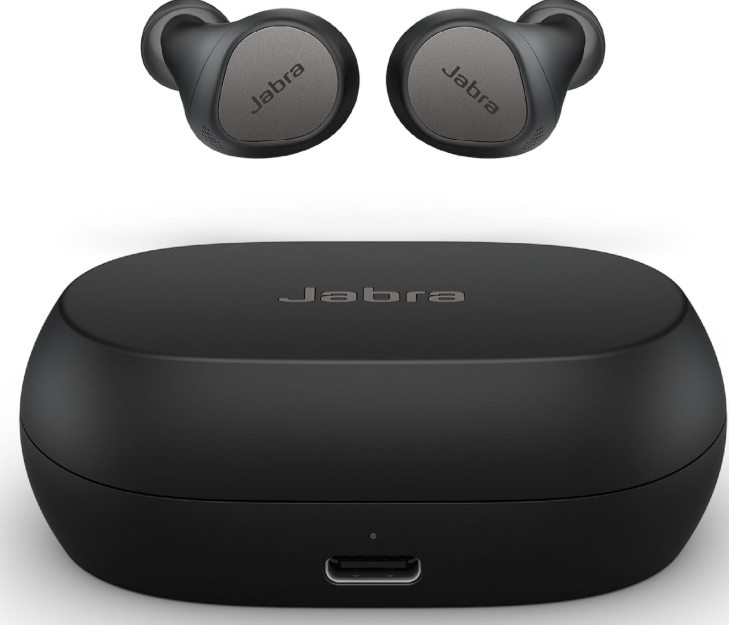
The Jabra Elite 7 Pro Earbuds are a premium choice for anyone seeking top-tier sound quality, advanced call performance, and versatile features in a compact true wireless design. Designed for professionals, commuters, and music lovers alike, these earbuds deliver a personalized audio experience with adjustable Active Noise Cancellation (ANC), HearThrough mode, and industry-leading microphone technology. Whether you're on a busy call, commuting, or enjoying your favorite playlist, the Jabra Elite 7 Pro Earbuds offer immersive sound, comfort, and reliability.
Key highlights include MultiSensor Voice™ technology for crystal-clear calls, up to 8 hours of battery life (30 hours with the charging case), and a neutral sound profile suitable for all genres. The earbuds are compatible with both Amazon Alexa and Siri, and the Jabra Sound+ app allows for extensive customization, including EQ settings, hearing tests, and firmware updates. With a sleek, lightweight build and IP57 water resistance, the Jabra Elite 7 Pro Earbuds are built for everyday use and active lifestyles.
Available at major retailers and online stores, the Jabra Elite 7 Pro Earbuds typically retail between $150 and $200, offering excellent value for their feature set and performance.
Specifications of Jabra Elite 7 Pro Earbuds
- Active Noise Cancellation (ANC): Adjustable, 5-stage ANC for immersive listening
- Microphones: 6 total (4 mics + 1 bone conduction VPU sensor per earbud)
- Audio Codecs: AAC, SBC
- Speaker Size: 6mm
- Frequency Response: 20Hz - 20,000Hz (music), 80Hz - 8,000Hz (calls)
- Battery Life: Up to 8 hours (earbuds), 30 hours with charging case
- Charging: USB-C, 5-minute quick charge = 1 hour playback
- Connectivity: Bluetooth 5.2, multipoint (2 devices simultaneously)
- Water Resistance: IP57 (dust and water resistant)
- Weight: 5.4g per earbud
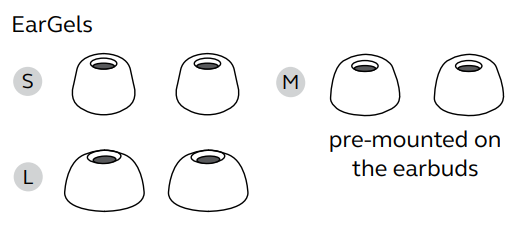
- EarGels: Silicone, Large/Medium/Small included
- App Support: Jabra Sound+ (MyControls, MyFit, MySound, hearing test)
- Voice Assistants: Amazon Alexa, Siri
- Additional Features: HearThrough, Mono mode, PeakStop™ hearing protection
Compared to competitors like the Sony WF-1000XM4 and Apple AirPods Pro, the Jabra Elite 7 Pro Earbuds stand out with superior call quality, longer battery life, and more customization options.
overview
Included accessories
How to wear
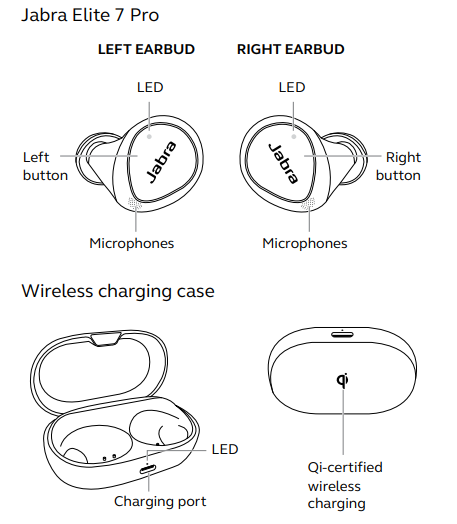
Insert each earbud into your ear and ensure the microphones are pointed towards your mouth.
Changing EarGels
For the optimal audio and ANC experience, it is recommended to take the MyFit test in the Sound+ app to ensure you have the best fit. If you don’t have a good fit, try a different eargel size. The fit should feel light and comfortable, and you may need a different size EarGel for each ear. The medium EarGels are pre-mounted on the earbuds.
How to charge
Get up to 8 hours on a single charge with ANC on, with a total charge of up to 30 hours with the charging case. If you use the earbuds without ANC and HearThrough, you’ll get even more battery, with up to 10 hours in the earbuds and a total of 35 hours with the charging case.
Charging the earbuds
Place the earbuds in the charging case and close the lid. It takes up to 2.5 hours to fully recharge the earbuds.
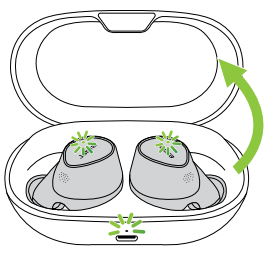
When the charging case is opened, the LEDs on the earbuds will light up red, yellow, or green to indicate the battery status of the earbuds. The LED on the front of the charging case indicates the battery status of the charging case.
Fast-charge the earbuds
When the earbuds are at low battery, placing them in the charging case for 5 minutes will fast charge the earbuds and give up to 1 hour of battery. Fast charging the earbuds requires that the charging case have a minimum of 30% battery.
You can see the current battery status of the earbuds and charging case using the Jabra Sound+ app.
Charging the charging case using USB
It takes up to 2 hours and 30 minutes to fully charge the earbuds and the charging case using a USB-C charging cable.
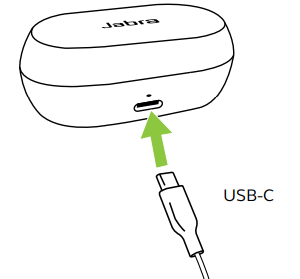
The charging case uses the standard USB voltage of 5V +- 0.25V. It is not recommended to charge the earbuds using a power supply with a higher voltage.
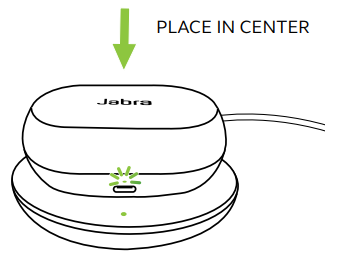
Charging the charging case using the Jabra wireless charging pad
The charging case is Qi-certified. Place the charging case in the center of the Jabra wireless charging pad. The LED on the charging case will flash to indicate that the charging case is placed correctly. It takes up to 2 hours and 30 minutes to fully charge the earbuds and the charging case.
How to pair
Pairing with a mobile device
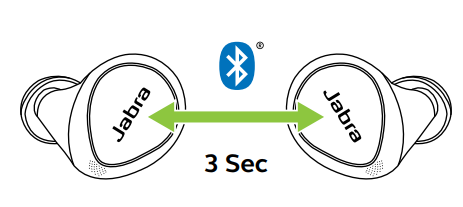
- Power on the earbuds by removing them from the charging case. Alternatively, press the Left and Right buttons simultaneously to power the earbuds on.
- Press and hold (3 sec) the Left and Right buttons simultaneously until the earbud LEDs flash blue. The earbuds will now be ready to pair with your phone.
- Wear the earbuds and follow the voice-guided pairing instructions to pair them to your mobile device.
Troubleshooting Jabra Elite 7 Pro Earbuds
Common issues with Jabra Elite 7 Pro Earbuds include connectivity problems, battery drain, and microphone issues. Most problems can be resolved with simple steps:
- Connection Drops: Reset Bluetooth, update firmware via Jabra Sound+ app.
- Low Battery: Ensure the case is charged; use the quick charge feature.
- Microphone Not Working: Clean earbuds, check app settings, update firmware.
- ANC/HearThrough Not Responding: Restart earbuds, check app settings.
- Error Codes: Refer to the Jabra support site for specific codes.
Preventive measures include regular cleaning, firmware updates, and proper storage. Jabra offers a 2-year warranty and support via their website, phone, and email. For urgent issues, contact Jabra support at Jabra Support.
Pros and Cons of Jabra Elite 7 Pro Earbuds
Pros
- Excellent call quality with MultiSensor Voice™
- Adjustable ANC and HearThrough modes
- Long battery life (8 hours, 30 with case)
- IP57 water and dust resistance
- Extensive app customization (Jabra Sound+)
- Comfortable, lightweight fit
- Value for money compared to premium rivals
Cons
- No LDAC/aptX codec support
- An app is required for full feature access
- Some users report that ANC could be stronger
- EarGels may not fit all ear shapes
The Jabra Elite 7 Pro Earbuds offer a balanced mix of performance, comfort, and features, making them a strong contender in the true wireless earbud market.
Customer Reviews of Jabra Elite 7 Pro Earbuds
Users consistently praise the Jabra Elite 7 Pro Earbuds for their clear call quality, comfortable fit, and long battery life. Many highlight the effectiveness of the ANC and HearThrough modes, as well as the convenience of multipoint connectivity. The Jabra Sound+ app receives positive feedback for its customization options and ease of use.
Common complaints include occasional connectivity issues and the need for frequent app updates. The earbuds average a 4.5-star rating across major retailers, with customers recommending them for professionals, travelers, and music enthusiasts. Frequent issues mentioned are minor ANC performance and ear tip fit, but most users find these manageable with adjustments.
Faqs
How do I set up Jabra Elite 7 Pro Earbuds for the first time?
What should I do if my Jabra Elite 7 Pro Earbuds won’t connect to my phone?
Can I use Jabra Elite 7 Pro Earbuds with only one earbud at a time?
How do I activate noise cancellation on Jabra Elite 7 Pro Earbuds?
Are Jabra Elite 7 Pro Earbuds compatible with Android and iOS devices?
How do I update the firmware on Jabra Elite 7 Pro Earbuds?
How can I improve battery life on Jabra Elite 7 Pro Earbuds?
How do I clean and maintain Jabra Elite 7 Pro Earbuds?
More jabra manuals
- Pairing & Setup: Jabra Elite Active 45e Earbuds User Manual
- Setup & Pairing: Jabra Elite 3 Active Earbuds User Manual
- Pairing & Setup: Jabra Elite 3 Active Buds User Manual
- Pairing & Setup: Jabra ELITE 8 Active Earbuds User Manual
- Pairing & Setup: Jabra Elite 7 Active Earbuds User Manual
- How to wear: Jabra Elite 5 True Wireless Earbuds User Manual
Leave a Comment