
Pairing & Setup: Jabra Elite 7 Active Earbuds User Manual
Content
Jabra Elite 7 Active Earbuds
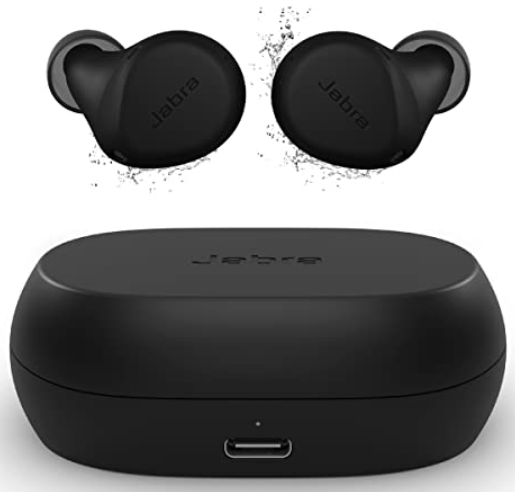
Introduction to Jabra Elite 7 Active Earbuds
The Jabra Elite 7 Active Earbuds represent a breakthrough in sports and fitness audio technology, combining advanced noise cancellation with exceptional durability for active users. These true wireless earbuds are specifically engineered for athletes, fitness enthusiasts, and anyone who demands reliable performance during intense physical activity. With their proprietary ShakeGrip technology and IP57 rating for dust and water resistance, the Jabra Elite 7 Active Earbuds deliver a secure fit that won't slip during your most demanding workouts.
The Jabra Elite 7 Active Earbuds feature adjustable Active Noise Cancellation (ANC) and HearThrough listening mode, giving you complete control over your audio environment. Whether you're commuting, traveling, or exercising, these earbuds adapt to your needs. The compact design weighs just 5.5 grams per earbud and is 16% smaller than previous models, making them incredibly lightweight and comfortable for extended wear.
The target audience for the Jabra Elite 7 Active Earbuds includes fitness enthusiasts, runners, gym-goers, commuters, and travelers who prioritize audio quality and durability. These earbuds typically retail between $179-$229 USD, positioning them as a premium option in the true wireless market. The Jabra Elite 7 Active Earbuds are available through major retailers,, including Best Buy, Amazon, and the official Jabra website, with various color options to match your personal style.
Key Benefits and Unique Selling Points
The Jabra Elite 7 Active Earbuds stand out in the competitive true wireless market with several distinctive advantages. The ShakeGrip technology uses liquid silicone rubber to provide an ultimate active fit that stays secure even during intense workouts. Combined with three EarGel sizes, the Jabra Elite 7 Active Earbuds ensure a customized fit for virtually any ear shape. The six-microphone array with wind noise reduction technology delivers crystal-clear call quality, even in challenging outdoor environments.
Battery performance is another major strength of the Jabra Elite 7 Active Earbuds, offering up to 8 hours of continuous listening time on a single charge, with an additional 22 hours provided by the charging case for a total of 30 hours. The inclusion of Alexa Built-in and voice assistant compatibility means you can control your audio and access information hands-free, perfect for active users who can't stop to interact with their phone.
Technical Specifications of Jabra Elite 7 Active Earbuds
Connectivity and Compatibility
- Bluetooth 5.2 for stable, interference-free connections
- Device pairing: up to 8 devices
- Bluetooth Multipoint technology for seamless switching between two devices
- Compatible with iOS and Android devices
Audio Performance Specifications
- Speaker size: 6mm drivers for powerful, dynamic sound
- Speaker bandwidth (music mode): 20Hz - 20,000Hz
- Speaker bandwidth (speak mode): 80Hz - 8,000Hz
- Audio codecs supported: AAC, SBC
- Microphone type: MEMS with 6 microphones total
- Microphone bandwidth: 80Hz - 8,000Hz
Noise Management Technology
- Adjustable Active Noise Cancellation (ANC) with customizable levels
- HearThrough mode for environmental awareness
- Noise isolating fit with passive isolation
- Wind noise reduction for outdoor use
- Noise reduction on calls with a 6-microphone array
- User hearing protection with PeakStop technology
- In-ear pressure relief for extended comfort
Design and Comfort Features
- Form factor: In-ear true wireless earbuds
- Weight: 5.5 grams per earbud (0.2 oz)
- ShakeGrip technology with liquid silicone rubber construction
- EarGels are available in three sizes (small, medium, large)
- EarGel material: Premium silicone for comfort and durability
- Mono mode capability for single-earbud operation
- IP57 rating for sweatproof and waterproof protection
Battery and Charging
- Battery life: Up to 8 hours continuous listening per charge
- Case battery: Provides 22 additional hours (30 hours total)
- Qi wireless charging support
- Fast charging capability for quick top-ups
Software and Customization
- Compatible with the Jabra Sound+ app for iOS and Android
- MyControls: Customize button functions and controls
- MyFit: Earbud seal testing for optimal ANC performance
- MySound: Personalized audio profile based on hearing test
- Five-band graphic equalizer for sound customization
- Alexa Built-in for voice control
- Voice assistant support: Amazon Alexa and Siri
Certifications and Compliance
- MFi (Made for iPhone) certification
- Qi wireless charging certification
- FCC, ISED, CE compliance
- RoHS and REACH compliance
- Proposition 65 compliance
Performance Comparison: Jabra Elite 7 Active vs. Competitors
The Jabra Elite 7 Active Earbuds compete directly with other premium sports earbuds. When compared to the Beats Fit Pro, the Jabra Elite 7 Active Earbuds offer superior noise isolation and wind reduction technology, making them better suited for outdoor activities. The six-microphone array on the Jabra Elite 7 Active Earbuds provides better call quality than most competitors in this price range.
Compared to the Jabra Elite 7 Pro (the non-sport variant), the Elite 7 Active Earbuds feature enhanced durability with an IP57 rating and ShakeGrip technology, though the Elite 7 Pro offers bone conduction technology for voice calls. The Jabra Elite 7 Active Earbuds provide nearly identical audio quality to the Pro model but with superior physical durability for active users.
Sound Quality and Audio Performance
The Jabra Elite 7 Active Earbuds deliver a well-balanced sound signature that appeals to most listeners across various music genres. The 6mm drivers produce rich, powerful audio with emphasis on sub-bass frequencies (60-100Hz), adding warmth and punch to hip-hop, electronic, and bass-heavy music. The neutral default sound profile makes these earbuds versatile for podcasts, audiobooks, and spoken content.
With the Jabra Sound+ app's MySound feature, you can generate a personalized audio profile based on an in-app hearing test, tailoring the Jabra Elite 7 Active Earbuds to your individual hearing characteristics. The five-band equalizer provides granular control over the frequency response, allowing you to boost or reduce specific frequency ranges to match your preferences.
Noise cancellation performance on the Jabra Elite 7 Active Earbuds is impressive, with passive isolation from the tight fit attenuating most noise above 500Hz by at least 50% without ANC enabled. Setting ANC to maximum reduces low-frequency noise like airplane engines to approximately half their original volume. The HearThrough mode amplifies environmental sounds, making these earbuds ideal for outdoor running where situational awareness is crucial.
Getting Started with Your Jabra Elite 7 Active Earbuds
Initial Setup and Pairing
Remove the Jabra Elite 7 Active Earbuds from the charging case and ensure they're fully charged. The earbuds will automatically enter pairing mode, indicated by alternating red and blue LED lights. On your smartphone or tablet, navigate to Bluetooth settings and select "Jabra Elite 7 Active" from the available devices. Once paired, download the Jabra Sound+ app from the App Store or Google Play to access full customization features.
Finding Your Perfect Fit
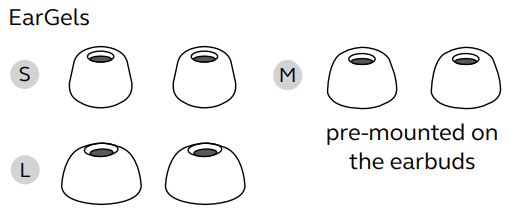
The Jabra Elite 7 Active Earbuds come with three EarGel sizes. Start with the medium size and adjust if needed. Proper fit is crucial for both comfort and ANC performance. Insert each earbud by twisting it slightly as you push it into your ear canal. Use the MyFit feature in the Jabra Sound+ app to test your seal quality and ensure optimal performance. A proper seal will feel snug but not uncomfortable.
Optimizing Your Audio Experience
After establishing a proper fit, use the MySound feature to create a personalized audio profile based on a hearing test. This customization significantly enhances the listening experience, tailored to your individual hearing characteristics. Explore the five-band equalizer to fine-tune the sound to your preferences, and enable or disable ANC based on your environment and activity.
overview
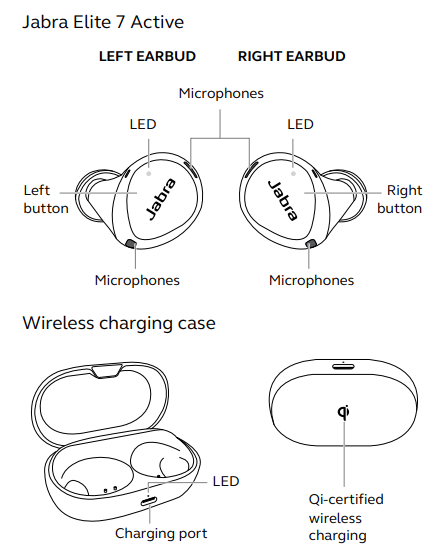
Included accessories
How to charge
Get up to 8 hours on a single charge with ANC on, with a total charge of up to 30 hours with the charging case. If you use the earbuds without ANC and HearThrough, you’ll get even more battery, with up to 10 hours in the earbuds and a total of 35 hours with the charging case.
Charging the earbuds
- Place the earbuds in the charging case and close the lid. It takes up to 2.5 hours to fully recharge the earbuds.
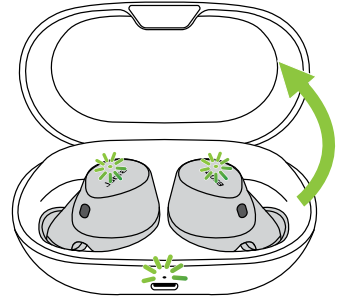
- When the charging case is opened, the LEDs on the earbuds will light up red, yellow, or green to indicate the battery status of the earbuds. The LED on the front of the charging case indicates the battery status of the charging case.
Fast-charge the earbuds
When the earbuds are at low battery, placing them in the charging case for 5 minutes will fast charge the earbuds and give up to 1 hour of battery. Fast charging the earbuds requires that the charging case have a minimum of 30% battery.
You can see the current battery status of the earbuds and charging case using the Jabra Sound+ app.
Charging the charging case using USB
It takes up to 2 hours and 30 minutes to fully charge the earbuds and the charging case using a USB-C charging cable.
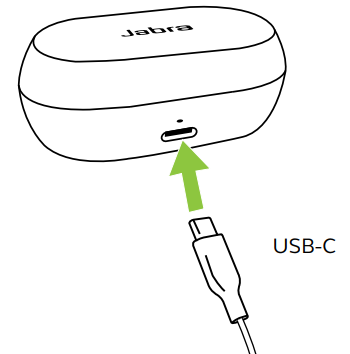
The charging case uses the standard USB voltage of 5V +- 0.25V. It is not recommended to charge the earbuds using a power supply with a higher voltage.
Charging the charging case using the Jabra wireless charging pad
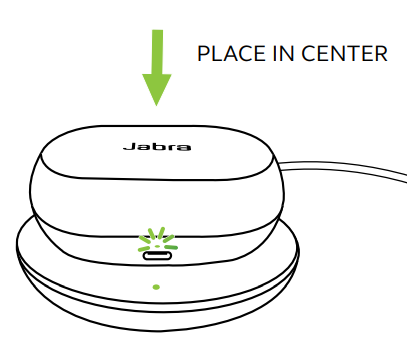
The charging case is Qi-certified. Place the charging case in the center of the Jabra wireless charging pad. The LED on the charging case will flash to indicate that the charging case is placed correctly. It takes up to 2 hours and 30 minutes to fully charge the earbuds and the charging case.
How to pair
Pairing with a mobile device
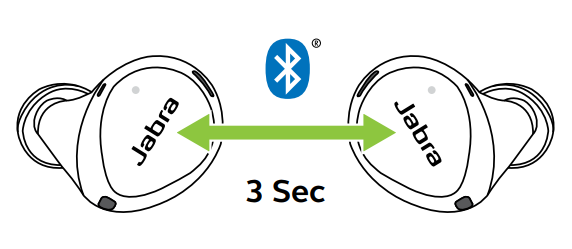
- Power on the earbuds by removing them from the charging case. Alternatively, press the Left and Right buttons simultaneously to power the earbuds on.
- Press and hold (3 sec) the Left and Right buttons simultaneously until the earbud LEDs flash blue. The earbuds will now be ready to pair with your phone.
- Wear the earbuds and follow the voice-guided pairing instructions to pair them with your mobile device.
How to use
Power the earbuds off/on
- To power off the earbuds, place them in the charging case.
- To power on the earbuds, remove them from the charging case.
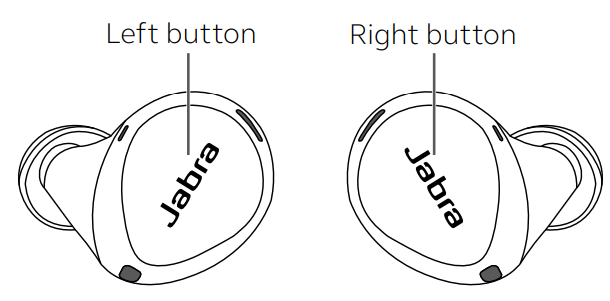
Alternatively, the earbuds can be manually powered off by pressing the Left and Right buttons on the earbuds simultaneously. To power on, press and hold (1 sec) the Left or Right buttons to power on each earbud individually.
Troubleshooting Guide for Jabra Elite 7 Active Earbuds
Connection Issues
Problem: Earbuds won't pair with the device
Solution: Reset the earbuds by holding the button for 10 seconds until the LED flashes red and blue. Clear the device from your phone's Bluetooth settings and attempt pairing again. Ensure your phone's Bluetooth is enabled and you're within 33 feet of the earbuds. If using Bluetooth Multipoint, disconnect from other devices first.
Problem: Frequent audio dropouts or interruptions
Solution: The Jabra Elite 7 Active Earbuds use Bluetooth 5.2, which should provide stable connections. If experiencing dropouts, move away from Wi-Fi routers, microwave ovens, and other 2.4GHz devices. Update your earbuds' firmware through the Jabra Sound+ app. If problems persist, reset the earbuds and re-pair them to your device.
Problem: Only one earbud connects
Solution: Ensure both earbuds are charged. Place both earbuds in the case for 30 seconds, then remove and attempt pairing again. If using mono mode intentionally, this is normal operation. Check the LED indicators on both earbuds—a solid light indicates a connected earbud.
Audio Quality Issues
Problem: Sound is muffled or unclear
Solution: Check that you're using the correct EarGel for foa r proper seal. Use the MyFit feature in the Jabra Sound+ app to test your earbud seal. Clean the speaker mesh and microphone ports with a dry cloth. Verify that ANC and HearThrough settings aren't conflicting. Reset the sound profile by removing any custom EQ settings.
Problem: The Microphone isn't picking up the voice clearly
Solution: The Jabra Elite 7 Active Earbuds feature six microphones with wind noise reduction. Ensure you're speaking directly into the microphones. Clean the microphone ports with a dry cloth. Test in a quieter environment to rule out background noise. Check that wind noise reduction isn't over-aggressive by adjusting settings in the Jabra Sound+ app.
Battery Problems
Problem: Earbuds drain battery quickly
Solution: Disable Bluetooth Multipoint if not in use. Lower the ANC level or disable it if not needed. Reduce screen brightness on your connected device. Ensure the earbuds' firmware is updated through the Jabra Sound+ app. If battery drain is extreme, reset the earbuds completely.
Problem: The Case won't charge earbuds
Solution: Clean the charging contacts on both the earbuds and case with a dry cloth. Ensure the earbuds are properly seated in the case. Try charging the case with a different USB-C cable. If using Qi wireless charging, ensure the case is properly centered on the charging pad. If problems persist, the battery may need replacement.
Physical and Durability Issues
Problem: Earbuds keep falling out during exercise
Solution: The ShakeGrip technology requires a proper fit. Try different EarGel sizes to find the perfect seal. Use the MyFit feature to verify your seal quality. Ensure you're inserting the earbuds correctly by twisting them slightly as you insert. The ShakeGrip material may need time to adapt to your ear shape—wear them for a few hours before intense exercise.
Problem: Water or sweat damage despite the IP57 rating
Solution: While the Jabra Elite 7 Active Earbuds are IP57-rated, they're not completely waterproof for submersion. Rinse with fresh water after saltwater exposure. Allow earbuds to air dry completely before charging. Avoid exposure to high-pressure water jets or submersion beyond the IP57 specification. The IP57 rating protects against dust and water splashes, not prolonged immersion.
Warranty and Support Options
The Jabra Elite 7 Active Earbuds typically include a two-year limited warranty covering manufacturing defects. For support, visit the official Jabra support page or download the Jabra Sound+ app for troubleshooting guides and firmware updates. Contact Jabra customer service through their website for warranty claims or replacement units. Authorized retailers like Best Buy also offer extended warranty options and customer support.
Pros and Cons of Jabra Elite 7 Active Earbuds
Advantages of Jabra Elite 7 Active Earbuds
Superior Durability and Active Fit
The ShakeGrip technology, combined with an IP57 rating, makes the Jabra Elite 7 Active Earbuds exceptionally durable for sports and fitness activities. The proprietary liquid silicone rubber construction provides a secure fit that won't slip during intense workouts, setting them apart from many competitors in the active earbuds category.
Exceptional Call Quality
With six microphones and advanced wind noise reduction, the Jabra Elite 7 Active Earbuds deliver crystal-clear call quality even in challenging outdoor environments. The dual microphone array for noise reduction on calls ensures your voice comes through clearly during windy conditions or in noisy locations.
Outstanding Battery Life
Up to 8 hours of continuous listening per charge, with an additional 22 hours from the case, provides exceptional value. This 30-hour total battery life means you can go weeks between charging sessions for casual users.
Excellent Noise Cancellation Performance
The passive isolation from the tight fit blocks most mid-range noise, and the adjustable ANC effectively reduces low-frequency rumble. The HearThrough mode is perfect for outdoor activities where environmental awareness matters.
Comprehensive Customization Options
The Jabra Sound+ app offers extensive customization, including MySound personalized profiles, five-band EQ, and MyFit seal testing. These features allow you to tailor the Jabra Elite 7 Active Earbuds to your specific needs and preferences.
Compact and Lightweight Design
At just 5.5 grams per earbud, the Jabra Elite 7 Active Earbuds are among the smallest and lightest in their class, making them comfortable for extended wear during workouts and daily use.
Disadvantages and Limitations
Limited Bass-Range Noise Cancellation
While the Jabra Elite 7 Active Earbuds excel at blocking mid-range noise, their ANC struggles with bass-range noise like airplane engines or bus rumble. For frequent travelers, this limitation may be noticeable compared to some premium alternatives.
Lack of Bone Conduction Technology
Unlike the Jabra Elite 7 Pro, the Active model doesn't include bone conduction technology for enhanced call quality. If voice call quality is your primary concern, the Pro model might be a better choice.
Limited Official Computer Support
While some users report success pairing with computers, Jabra doesn't officially support computer connectivity. If you need earbuds for video conferencing on a PC or Mac, this may be a consideration.
Smaller Soundstage
The in-ear design naturally produces a smaller soundstage compared to over-ear headphones. While the sound quality is excellent, those seeking expansive spatial audio may find this limiting.
App Dependency
Full customization and feature access require the Jabra Sound+ app. Without the app, you're limited to basic controls and can't access MySound, MyFit, or the equalizer features.
Value for Money Assessment
At the $179-$229 price point, the Jabra Elite 7 Active Earbuds offer exceptional value for active users and fitness enthusiasts. The combination of durability, call quality, battery life, and sound customization justifies the premium pricing. Compared to competitors like Beats Fit Pro at similar price points, the Jabra Elite 7 Active Earbuds provide superior wind noise reduction and more comprehensive app-based customization.
Customer Reviews and User Feedback
Overall Customer Satisfaction
Users consistently praise the Jabra Elite 7 Active Earbuds for their secure fit during intense workouts and excellent durability. The ShakeGrip technology receives widespread acclaim for staying in place during running, HIIT training, and gym sessions. Many users highlight the impressive battery life as a major selling point, with 8 hours of continuous listening eliminating concerns about mid-day charging.
Commonly Praised Features
The call quality receives outstanding reviews, with users noting that the six microphones deliver clear voice transmission even in windy conditions. The Jabra Sound+ app's customization options, particularly the MySound hearing profile and five-band EQ, are frequently mentioned as standout features that enhance the listening experience. The HearThrough mode is particularly appreciated by runners who value environmental awareness during outdoor activities.
Frequently Mentioned Concerns
Some users report that finding the perfect fit takes time, though most eventually discover the right EarGel size. The ANC's reduced effectiveness against low-frequency noise like airplane engines has been noted by frequent travelers. A few users mention that the touch controls can be unintuitive initially, though remapping through the app resolves this issue for most.
Purchase Recommendations
The Jabra Elite 7 Active Earbuds are highly recommended for fitness enthusiasts, runners, and gym-goers who prioritize a secure fit and durability. They're also excellent for commuters and travelers seeking reliable call quality and good noise isolation. Users working in noisy environments appreciate the wind noise reduction technology. However, those primarily seeking aggressive bass-range noise cancellation for air travel might want to consider alternatives.
Star Rating Summary
The Jabra Elite 7 Active Earbuds typically receive ratings between 4.2 and 4.5 out of 5 stars across major retailers, reflecting strong overall satisfaction with solid performance across most use cases.
Faqs
How do I set up jabra Elite 7 Active Earbuds for the first time?
What should I do if my jabra Elite 7 Active Earbuds won’t connect to my phone?
Can I use jabra Elite 7 Active Earbuds with Android and iOS devices?
How do I use only one jabra Elite 7 Active Earbud at a time?
How do I update the firmware on my jabra Elite 7 Active Earbuds?
Why is the battery draining quickly on my jabra Elite 7 Active Earbuds?
How do I clean and maintain my jabra Elite 7 Active Earbuds?
What are the key features that make jabra Elite 7 Active Earbuds different from other wireless earbuds?
Tags
More jabra manuals
- Setup: Jabra Scheduler VTD050 User Manual
- Pairing & Setup: Jabra Elite 3 Active Buds User Manual
- Usage & Connection: Jabra Evolve 65 Headset User Manual
- Pairing & Setup: Jabra Elite Active 45e Earbuds User Manual
- Usage: Jabra Evolve 65 TE On-Ear Headset User Manual
- Pairing & Setup: Jabra Elite 7 Pro Earbuds User Manual
Leave a Comment