
Pairing & Setup: Jabra Elite 3 Active Buds User Manual
Content
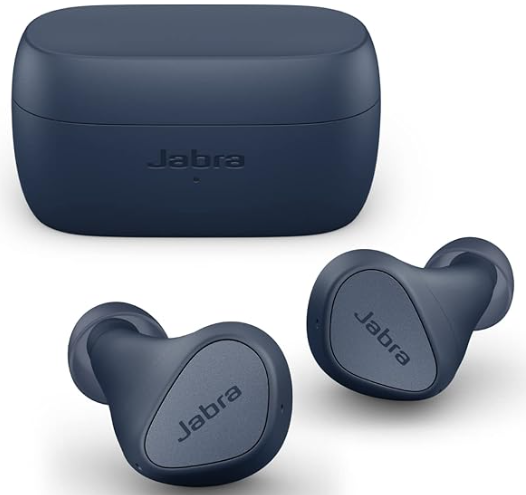
Jabra Elite 3 Active Buds
Introduction
Meet the Jabra Elite 3 Active Buds—true wireless earbuds crafted for those who demand both performance and durability. Engineered in Copenhagen, these sports earbuds are designed to stay secure during intense workouts, thanks to their active-fit ear gels and sweat-resistant IP55 rating. With advanced audio engineering, active noise cancellation (ANC), and customizable sound profiles via the Jabra Sound+ app, these earbuds deliver immersive, high-quality sound wherever you go.
The Jabra Elite 3 Active Buds stand out with four built-in MEMS microphones for crisp, clear calls, even in noisy environments. HearThrough technology allows you to stay aware of your surroundings, making it ideal for outdoor runs, commutes, and gym sessions. With Bluetooth 5.2, Google Fast Pair, and Spotify Tap playback (Android only), these earbuds offer seamless connectivity and smart features for modern users. Alexa is built for voice assistance, and mono mode lets you use a single earbud for calls or music.
Targeting fitness enthusiasts, commuters, and anyone seeking reliable wireless audio, the Jabra Elite 3 Active Buds are priced competitively in the mid-range segment, typically available for under $100. They are widely available through major electronics retailers and online platforms, ensuring easy access for buyers worldwide.
In summary, the Jabra Elite 3 Active Buds combine secure fit, active noise cancellation, sweat resistance, and smart features into a compact, user-friendly package, making them a top choice for active lifestyles and everyday listening.
Jabra Elite 3 Active Buds: Detailed Specifications
- Form Factor: In-ear true wireless earbuds with secure active-fit silicone ear gels (three sizes included)
- Drivers: 6mm dynamic speakers (20Hz–20kHz music bandwidth)
- Active Noise Cancellation (ANC): Yes, with adjustable settings via the Jabra Sound+ app
- HearThrough: Yes, for situational awareness
- Microphones: 4 MEMS mics with noise reduction for calls
- Bluetooth: 5.2 with Qualcomm aptX and SBC codecs (no AAC for iOS)
- Water & Dust Resistance: IP55 rating—resistant to sweat and light rain
- Battery Life: Up to 7 hours per charge, 28 hours with charging case (fast charging: 10 mins = 1 hour playback)
- Voice Assistants: Alexa built-in (Android), Siri, Google Assistant
- App Support: Jabra Sound+ for EQ customization, firmware updates, and more
- Google Fast Pair & Spotify Tap: Supported on Android devices
- Mono Mode: Use either earbud independently
- Dimensions & Weight: Compact, lightweight design for all-day comfort
- Warranty: 2 years
Comparison: Unlike the standard Jabra Elite 3, the Elite 3 Active Buds add active noise cancellation and a sportier fit. They lack multi-device pairing and wireless charging, features found in higher-end models like the Elite 4 Active, but offer better value for budget-conscious buyers seeking ANC and durability.
Jabra Elite 3 Active Features
- Secure fit for active lifestyles. With an ergonomic, wing-free design.
- Everyday durability. IP55-rated water with a 2-year warranty.
- Active Noise Cancellation (ANC). Block intrusive sounds and stay in the zone.
- Your music,, your way. Boost the bass or turn up the treble with the customizable equalizer.
- Stay alert with HearThrough. Hear what’s going on around you.
- Clear calls in noisy places. 4 microphones for great call clarity on the go.
- Smalinon size. Big on power. Up to 6 hours in he buds, and up to 24 hours with the case + fast charge.
- Use either earbud with mono mode.
- Seamless connectivity. Alexa Built-in or Spotify Tap playback, and Google Fast Pair.
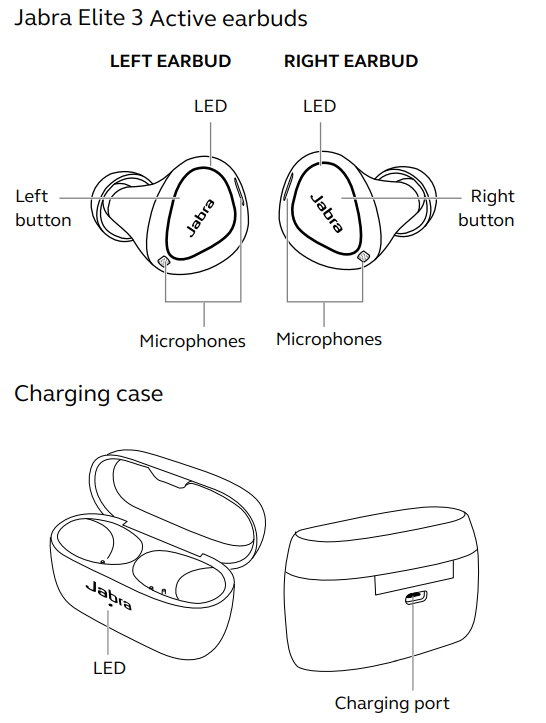
Jabra Elite 3 Active overview
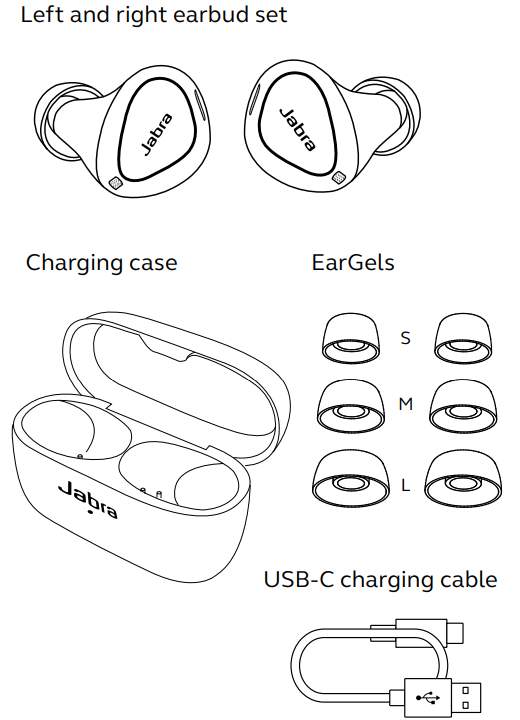
Included accessories
How to wear
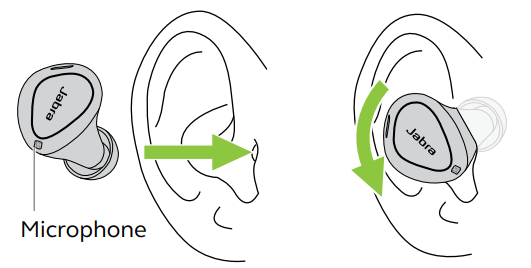
Carefully insert each earbud into your ear. Position the microphones on the earbuds towards your mouth.
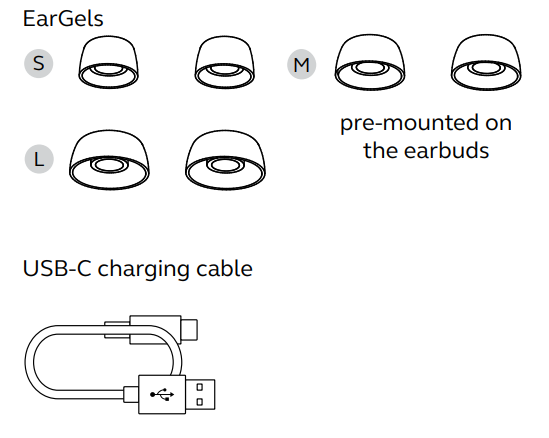
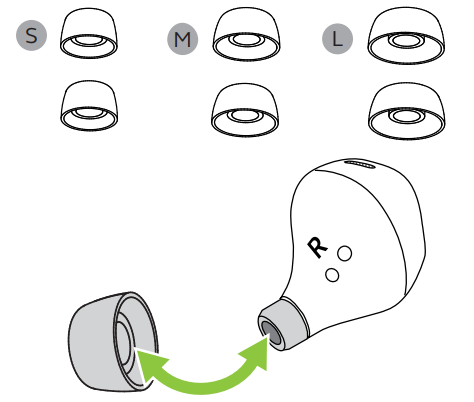
Changing EarGels
For the optimal audio experience, it is recommended to try each of the different EarGel sizes. The fit should feel light and comfortable in your ear. The medium EarGels are pre-mounted on the earbuds.
How to charge
The Jabra Elite 3 Active offers up to 6 hours of battery and up to 24 hours with the charging case and fast charge.
Charging the earbuds
Place the earbuds in the charging case and close the lid. It takes up to 2 hours to fully recharge the earbuds.
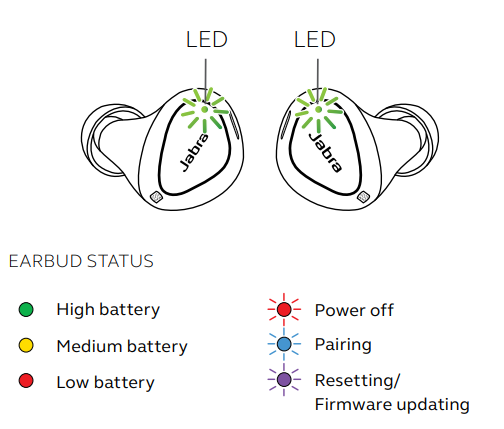
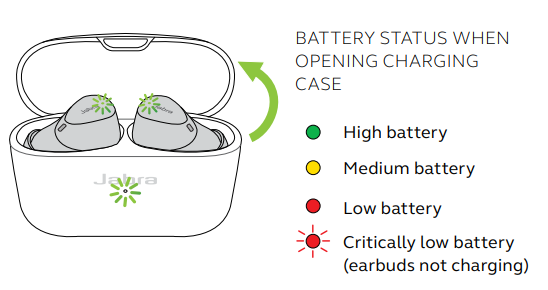
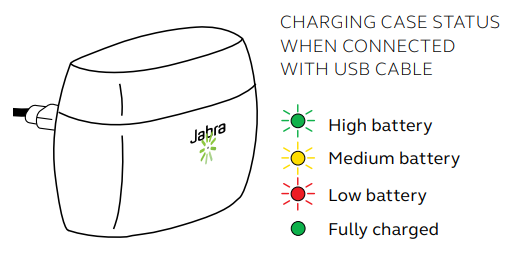
When the charging case lid is opened with the earbuds inside, the LEDs on the earbuds will light up red, yellow,, or green to indicate the battery status of the earbuds. The LED on the front of the charging case indicates the battery status of the charging case. Fast-charge the earbuds
Placing the earbuds in the charging case for 10 minutes when they are at low battery will fast charge the earbuds, offering up to 60 minutes of battery. Fast charging the earbuds requires that the charging case have a minimum of 30% battery.
You can see the current battery status of the earbuds using the Jabra Sound+ app.
What the LEDs mean
BATTERY STATUS WHEN OPENING CHARGING CASE
CHARGING CASE STATUS WHEN CONNECTED WITH USB CABLE
How to pair
Pairing with a mobile device
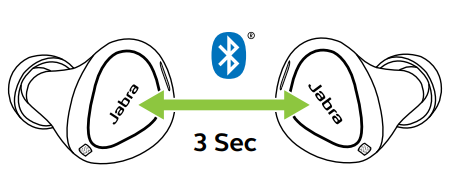
- Power on the earbuds by removing them from the charging case. Alternatively, press the Left and Right buttons to power the earbuds on.
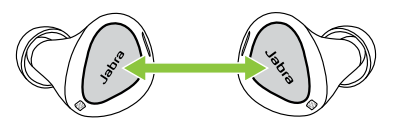
- Press and hold (3 sec) the Left and Right buttons simultaneously until the earbud LED flashes blue. The earbuds will now be ready to pair with your phone.
- Go to the Bluetooth settings on your smartphone and select the Jabra Elite 3 Active from the list of available devices to complete the pairing.
How to use
Power the earbuds on/off
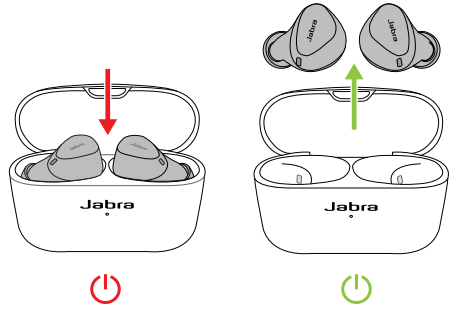
- Place the earbuds in the charging case to power off. Remove the earbuds from the charging case to power on.
- To power off the earbuds manually, press both the Left and Right buttons simultaneously. To power off an earbud in mono mode, press and hold the button on the earbud for 5 seconds.
- To power on the left or right earbud manually, press the Left or Right button.
Replacement accessories
Troubleshooting Common Issues with Jabra Elite 3 Active Buds
Common Problems & Solutions
- Connection Issues: Ensure Bluetooth is enabled on your device. If pairing fails, reset the earbuds by placing them in the case, closing the lid, and waiting 10 seconds before trying again. Installing the Jabra Sound+ app can resolve persistent Android pairing issues[4].
- One Earbud Not Working: Place both earbuds in the case, close the lid, then reopen to reset. Ensure both are charged.
- Poor Call Quality: Check for obstructions near the microphones. Clean the earbuds gently with a dry cloth.
- Battery Drains Quickly: Reset the earbuds and update firmware via the Jabra Sound+ app. Avoid exposing the case to extreme temperatures.
- No Sound: Check volume settings on your device and the earbuds. Ensure the earbuds are properly seated in your ears.
Error Codes & Fixes
While specific error codes are rare, most issues can be resolved by resetting the earbuds or updating the firmware. Consult the Jabra support site for detailed error code guidance.
Preventive Measures
Keep your Jabra Elite 3 Active Buds clean and dry. Store them in the charging case when not in use. Regularly check for firmware updates via the Jabra Sound+ app to ensure optimal performance.
Warranty & Support
Jabra Elite 3 Active Buds come with a 2-year warranty[5]. For further assistance, visit the official Jabra website or contact customer support via their help center. Always keep your proof of purchase for warranty claims.
Pros & Cons of Jabra Elite 3 Active Buds
Advantages
- Secure, Comfortable Fit: Designed to stay in place during workouts, with multiple ear gel sizes for a personalized fit.
- Active Noise Cancellation: Effective ANC for a budget-friendly model, great for blocking out gym noise and commutes.
- Durable & Sweat-Resistant: IP55 rating makes them ideal for sports and outdoor use.
- Long Battery Life: Up to 7 hours of playback, with 28 hours total using the case.
- Clear Call Quality: Four-microphone setup ensures your voice is heard clearly, even in noisy environments.
- Customizable Sound: Adjustable EQ via the Jabra Sound+ app lets you tailor your listening experience.
- Value for Money: Packs premium features at an affordable price point.
Disadvantages
- No Multi-Device Pairing: Cannot connect to two devices simultaneously.
- No Wireless Charging: Case must be charged via USB-C.
- Limited Codec Support: Lacks AAC, so iPhone users miss out on optimal audio quality.
- ANC Performance: While good for the price, it’s not as advanced as higher-end models.
- Noise Isolation: Passive isolation is decent, but not class-leading.
Comparison: Compared to pricier alternatives, Jabra Elite 3 Active Buds offer excellent value, especially for users prioritizing fit, durability, and ANC. However, audiophiles and multi-device users may prefer more premium options.
Customer Reviews & Testimonials
Jabra Elite 3 Active Buds consistently receive positive feedback for their secure fit, battery life, and effective active noise cancellation. Many users praise the earbuds for staying in place during intense workouts and delivering clear, balanced sound. The customizable EQ and HearThrough features are also highlighted as standout benefits.
Common complaints include the lack of multi-device pairing and wireless charging, as well as occasional connectivity hiccups during initial setup. Some users note that while ANC is present, it’s not as powerful as in higher-end models.
On average, Jabra Elite 3 Active Buds earn 4 to 4.5-star ratings across major retailers, with users recommending them for sports, commuting, and everyday use. Most agree that these earbuds offer exceptional value for the price, making them a smart choice for budget-conscious buyers seeking reliable performance and durability.
Faqs
How do I pair my jabra Elite 3 Active Buds with a new device for the first time?
Why won’t my jabra Elite 3 Active Buds connect to my phone, and how can I fix this?
Can I use only one jabra Elite 3 Active Bud for calls or music, and how do I switch between mono and stereo modes?
How do I check and extend the battery life of my jabra Elite 3 Active Buds?
What should I do if the sound quality on my jabra Elite 3 Active Buds is poor or distorted?
How do I update the firmware on my jabra Elite 3 Active Buds, and why is it important?
Are jabra Elite 3 Active Buds compatible with voice assistants like Siri or Google Assistant?
How do I clean and maintain my jabra Elite 3 Active Buds to ensure longevity and hygiene?
Tags
More jabra manuals
- Pairing & Setup: Jabra Elite 7 Active Earbuds User Manual
- Pairing & Setup: Jabra Elite Active 45e Earbuds User Manual
- Setup: Jabra Scheduler VTD050 User Manual
- Pairing & Setup: Jabra Elite 7 Pro Earbuds User Manual
- Usage & Connection: Jabra Evolve 65 Headset User Manual
- Setup & Pairing: Jabra Elite 3 Active Earbuds User Manual
Leave a Comment