
How to Connect: Jbl Speaker JRX215 Usage Guide
Content
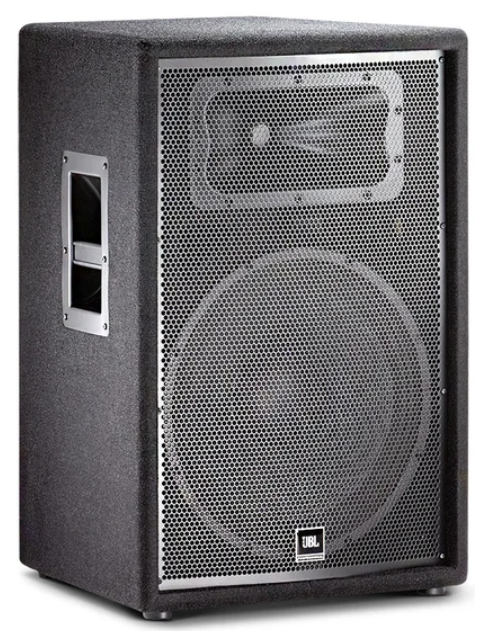
JBL Speaker JRX215
Introduction
The JBL Speaker JRX215 is a powerful and versatile speaker that delivers high-quality sound for various applications. Whether you're a musician, DJ, or audio enthusiast, this speaker is designed to enhance your audio experience.
Instructions
- Connect the JBL Speaker JRX215 to a power source using the provided power cable.
- Ensure that the power switch is in the "Off" position before connecting any audio sources.
- Connect your audio source, such as a mixer or amplifier, to the speaker using an appropriate audio cable.
- Adjust the volume and other settings on your audio source to the desired levels.
- Turn on the power switch of the JBL Speaker JRX215.
- Enjoy the high-quality sound produced by the speaker.
SPECIFICATIONS
ACOUSTIC & ELECTRICAL SPECIFICATIONS
- Nominal Impedance: 8 Ohms
- Power Capacity: 250W, 1000W Peak Power Capacity
- Frequency Response (±3 dB): 59 Hz – 13 kHz
- Frequency Range (–10 dB): 41 Hz – 18 kHz
- Maximum SPL: 129 dB
- Crossover Frequency: 2.2 kHz
SYSTEM COMPONENTS
- Cabinet: Enclosure (Not For Sale)
- Grille: 5033398
- Low Frequency Driver: M115-8A, 380 mm (15 in.) Cone Transducer
- D.C. Resistance: 5.3 ohms
- High Frequency Driver: 2414H-C, 25 mm (1 in) exit compression driver mounted on Progressive, Transition™ Waveguide
- D.C. Resistance: 4.80 ohm +/- 0.2 ohm
AURAL SWEEP TEST SPECIFICATIONS
- System Aural Sweep Test: 7.0V Input, 40 Hz to 20 kHz
- L.F. Aural Sweep Test: 6.0V Input, 20 Hz to 200 Hz
- H.F. Aural Sweep Test: 0.75V Input, 500 Hz to 1.5 kHz
PHYSICAL SPECIFICATIONS
- Enclosure Dimensions: 699 mm x 460 mm x 432 mm (27.5 in x 18.1 in x 17 in)
- Net Weight: 27.4 kg (60.5 lb)
WARRANTY INFORMATION:
- Refer to the Warranty Statement posted online
PACKAGE
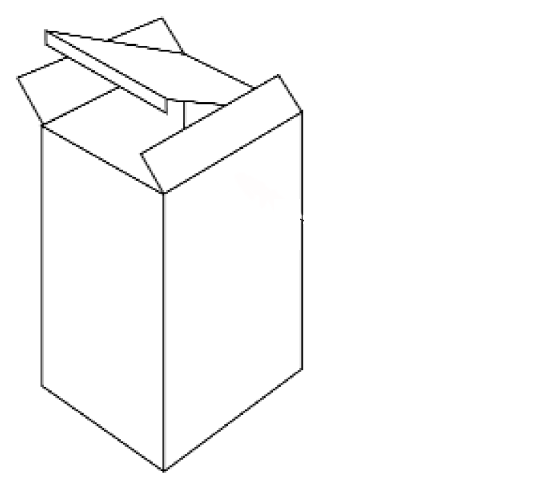
- Quick set-up Guide: 5034639
- Carton: 5034637
- Filler (2): 339021-001
- Micro-foam (4): 49790P
- Insert (1): 445549-001
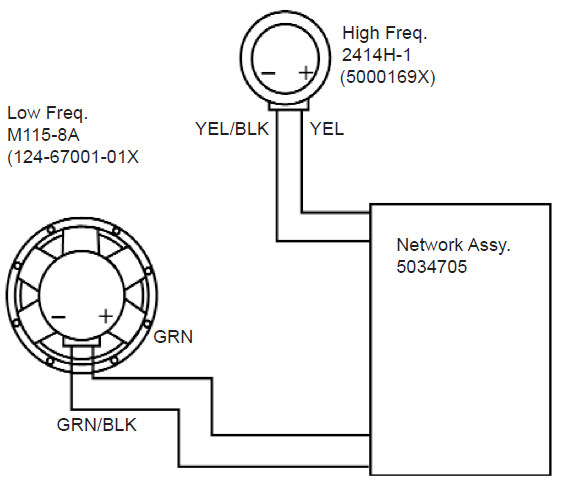
WIRING DIAGRAM
COMPONENT EXPLODED VIEW
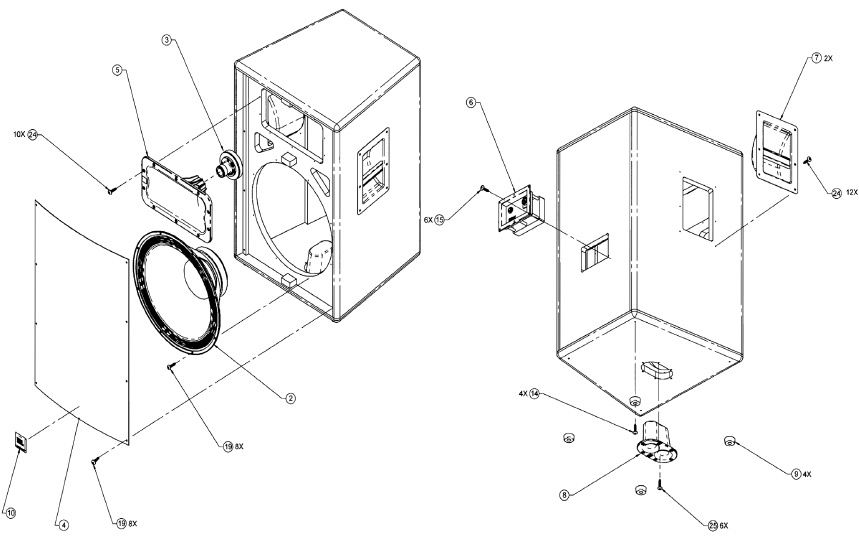
COMPONENT PARTS LIST
Item | Part No. | Qty | Description | Item | Part No. | Qty | Description | |
2 | 124-67001-01X | 1 | M115-8A WOOFER | 10 | 5007401 | 1 | LOGO BADGE | |
3 | 5000169X | 1 | M/I, 2414H-C | 14 | 729-90001-16 | 4 | SCR, #12X1,THR FORMING, FLTHD, PH, TY | |
4 | 5033398 | 1 | GRILLE | 15 | 882-51110-12 | 6 | SCR, 6 X 3/4,OV,PH,PTCL,BLK ZC,LCS | |
5 | 338800-001 | 1 | HORN | 19 | 883-41110-16 | 16 | SCR,8 X 1,PAN,PH,PB,BLK ZINC,LCS | |
6 | 5034705 | 1 | NETWORK ASSY, | 24 | 883-41110-12 | 22 | SCR,8 X 3/4,PAN,PH,PB,BLK ZINC,LCS | |
7 | 339018-003 | 2 | HANDLE ASSY, WITHOUT LABEL | 25 | 884-41110-16 | 6 | SCR,10 X 1,PAN,PH,PB,BLK ZINC,LCS | |
8 | 351256-001 | 1 | CUP, DUAL POLE | |||||
9 | 924-00002-01 | 4 | FOOT |
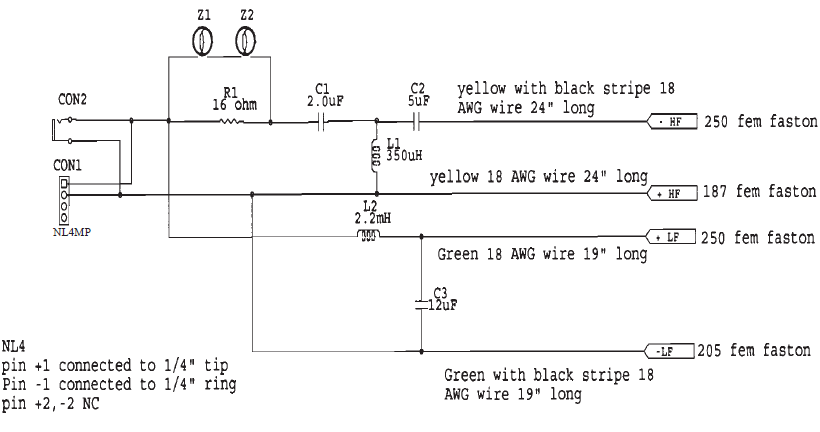
NETWORK SCHEMATIC 5034705
Troubleshooting guide
Basic Checks
Before diving into deeper issues, confirm the basics:
Power and Signal Path
- The JRX215 is a passive speaker, meaning it has no built-in amplifier.
- Ensure it’s powered by a proper external power amplifier.
- Verify the amplifier is turned on and not in protection mode.
- Check that signal cables (XLR, ¼", Speakon) are properly connected and undamaged.
- Test your source (mixer, phone, etc.) by connecting it to a known working system.
Check Speaker Connections
- Use a multimeter to check the speaker cable continuity.
- Ensure you’re using speaker cables, not instrument cables — they look similar but behave differently.
- Make sure the Speakon connectors are firmly locked in place.
Amplifier Output Matching
- The JRX215 is rated:
- 250W continuous / 1000W peak @ 8Ω
- Match your amplifier to deliver roughly 250–500W per channel at 8Ω.
- Too little power can cause clipping and distortion; too much can blow the driver.
Sound Issues
No Sound
- Check that your amp channel is active (not muted or bridged incorrectly).
- Try connecting a different speaker to confirm whether the problem is with the amp or the JRX215.
- Inspect the input jack plate on the speaker for loose connections.
Low Volume
- Check for polarity reversal (wires swapped +/−) — it can cause phase cancellation.
- Verify amp gain and mixer output levels.
- Ensure EQ or crossover settings are not cutting frequencies.
Distortion
- Check for amp clipping (watch the clip indicators).
- Replace or test with a different cable.
- Try lowering the gain; overdriven signal can damage components.
Physical Inspection
Unplug everything and carefully check:
- Woofer cone for tears, rubbing, or burns.
- Horn driver for continuity (you can use a multimeter; typical diaphragm = 6–8Ω).
- Crossover network inside the cabinet for burnt components.
Component Testing
If you’re comfortable with electronics:
- Remove the woofer and test DC resistance with a multimeter:
- Should read around 6–8Ω (for an 8Ω driver).
- If it reads open circuit (∞), the voice coil is likely blown.
- If resistance is too low (<2Ω), it may be shorted.
- Repeat for the HF compression driver.
Common Failures
| Symptom | Possible Cause | Fix |
|---|---|---|
| No sound | Blown woofer or HF driver | Replace driver |
| Crackling or intermittent | Loose terminal / bad cable | Tighten or replace |
| Weak highs | HF diaphragm blown | Replace diaphragm |
| Weak lows | Woofer damage or polarity issue | Rewire or replace |
| Amp protection trips | Shorted cable or driver | Check wiring & impedance |
Replacement Parts
Typical JBL JRX215 components:
- Woofer: JBL 15" 2032H or equivalent.
- Horn Driver: JBL 2414H-C.
- Crossover: Passive 2-way network (available from JBL parts or authorized dealers).
When to Seek Service
If:
- Both drivers test okay, but no sound.
- You notice a burnt smell or discoloration inside.
- Crossover appears damaged.
→ Take it to an authorized JBL service center. They can test the components and replace only what’s needed.
Faqs
What is the power handling of the JBL Speaker JRX215?
What is the frequency range of JBL Speaker JRX215?
Can I use JBL Speaker JRX215 outdoors?
Does JBL Speaker JRX215 come with a built-in pole mount socket?
What type of audio cables can I use to connect JBL Speaker JRX215?
Is JBL Speaker JRX215 a powered or passive speaker?
Can I use JBL Speaker JRX215 for live performances?
Does this speaker come with a warranty?
What is the weight of JBL Speaker JRX215?
Can I use JBL Speaker JRX215 as a monitor?
More jbl manuals
- Jbl Tune 500 BT User Manual | Connection and Specifications
- Jbl Speaker S36II, S36-AWII User Guide | Connection & Specifications
- Jbl Sound Bar 2.1 User Manual | Connection & Settings
- Jbl on Stage III portable loudspeaker Guide | Complete Set-up
- Jbl L100 Iconic Bookshelf Loudspeaker Owner Manual | Specifications
- Jbl OnBeat Rumble Audio Deck Speaker Setup Guide | Specs & Connections
Leave a Comment