
Setup: Jlab Go Work 2 Headset User Manual
Content
Jlab Go Work 2 Headset
Introduction
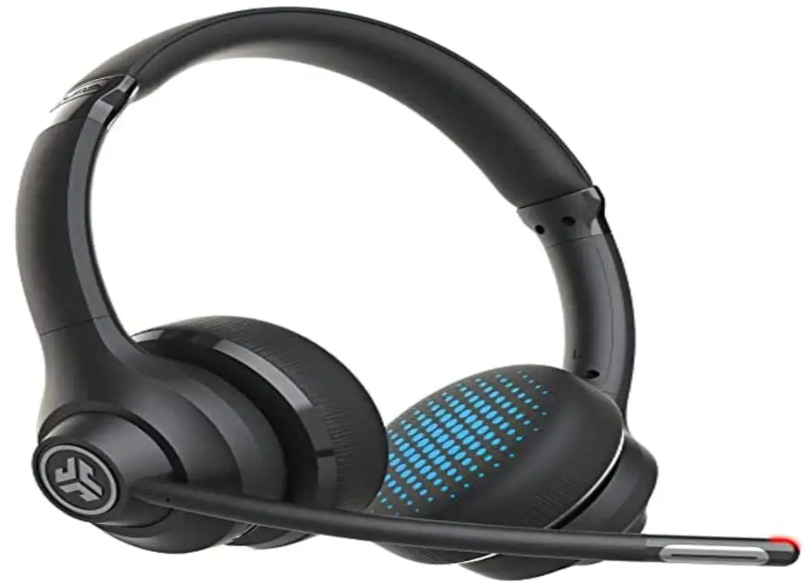
The JLab Go Work 2 Headset is a versatile wireless on-ear headset designed to deliver professional-grade audio and crystal-clear communication for office calls, video conferences, and everyday music enjoyment. Engineered with advanced dual microphones featuring noise-canceling technology, it ensures that your voice is heard loud and clear while minimizing ambient noise distractions. Whether you're working remotely, participating in virtual meetings, or simply enjoying media, this headset offers reliable performance and long-lasting comfort.
Key benefits of the JLab Go Work 2 include its impressive battery life of up to 55 hours, fast USB-C charging, and multiple connectivity options such as Bluetooth 5.3 and a USB-C dongle for seamless wireless connection to computers and mobile devices. Its ergonomic, lightweight design enhances comfort during extended wear, making it ideal for professionals, students, and remote workers who demand both quality and convenience.
Targeted mainly at office users and remote workers who require dependable, hands-free communication tools, the headset also appeals to casual users seeking a budget-friendly yet feature-rich audio device. The product is widely available online and at electronics retailers, with an estimated price range of around $45 to $50, offering excellent value considering its capabilities and two-year warranty coverage.
Technical Specifications and Features of the JLab Go Work 2 Headset
- Model: Go Work Gen 2
- Connectivity: Bluetooth 5.3, USB-C wireless dongle, wired USB-C connection, multipoint pairing
- Battery Life: Up to 55 hours of wireless talk and playtime, 2 to 2.5 hours charging time via USB-C, quick charge (10 minutes for 7 hours usage)
- Microphones: Dual MEMS microphones with environmental noise cancellation (ENC), quick mute function, microphone frequency response 100–10,000 Hz
- Audio Drivers: 40mm dynamic drivers, frequency response 20 Hz – 20 kHz, impedance 32 ohms, output 117 ± 3 dB
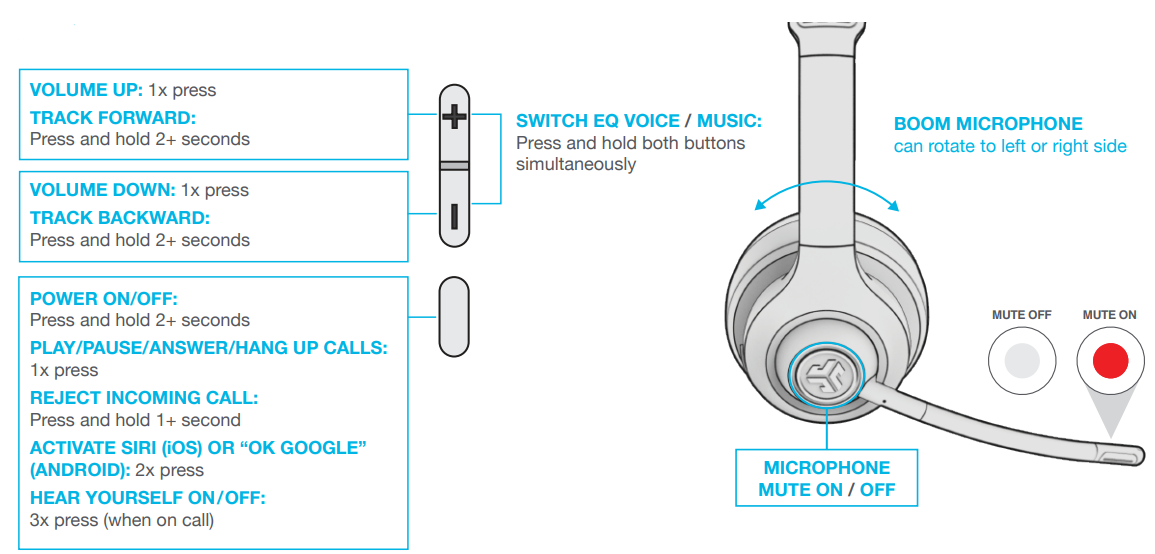
- Controls: Multi-function buttons for volume, call handling, music control, and mute
- Comfort: On-ear placement, lightweight at 147 grams (approx. 5.2 ounces), cushioned ear pads
- Additional Features: JLab App support for custom EQ, sound modes (Music/Movie), voice assistance integration, microphone monitoring ("Hear Yourself"), and OTA updates
In comparison to similar office headsets, the JLab Go Work 2 stands out with its extended battery life exceeding 50 hours, latest Bluetooth 5.3 support for improved connectivity, and a competitive price point under $50, making it a cost-effective choice without sacrificing quality or features.
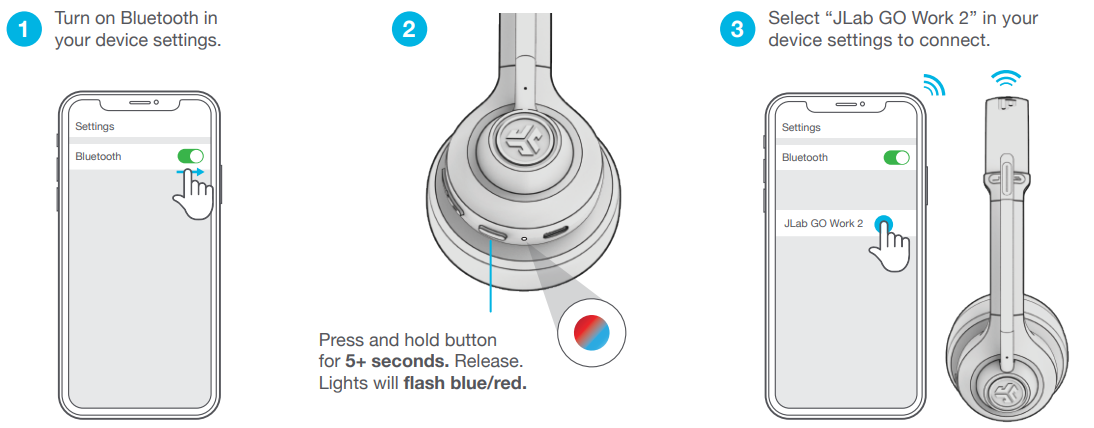
BLUETOOTH CONNECTION
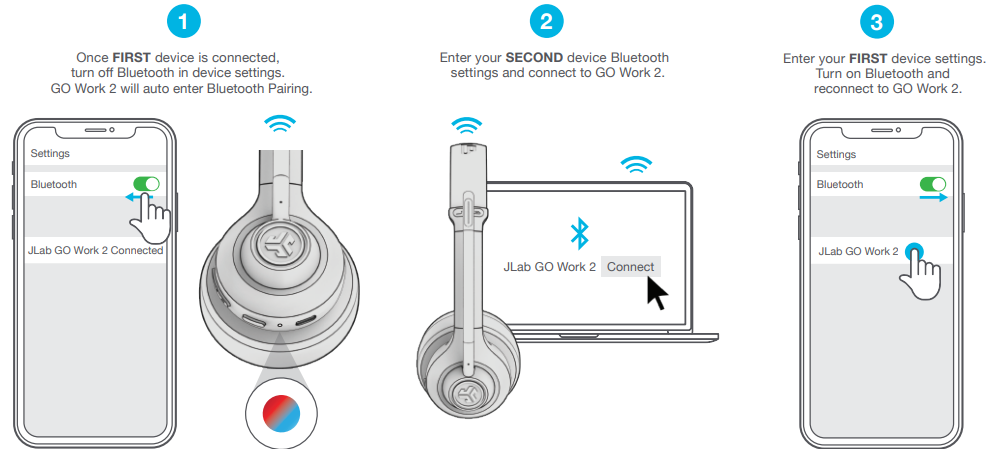
MULTIPOINT (CONNECT 2 DEVICES SIMULTANEOUSLY)
Multipoint is supported when connecting to two devices via Bluetooth. The USB-C Dongle and Wired connection methods create dedicated connection channels and do not support Multipoint.
BUTTON FUNCTIONS
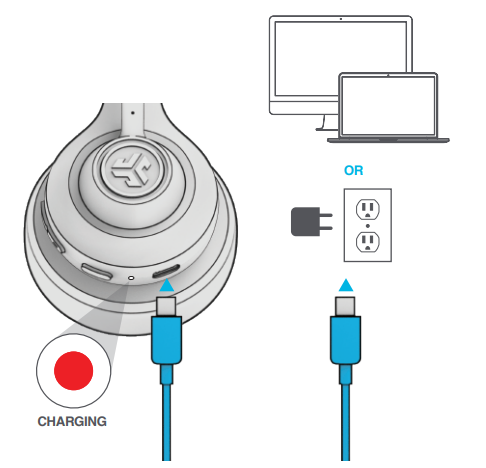
CHARGING
Connect to a computer or a USB 5V 1A (or less) output device.
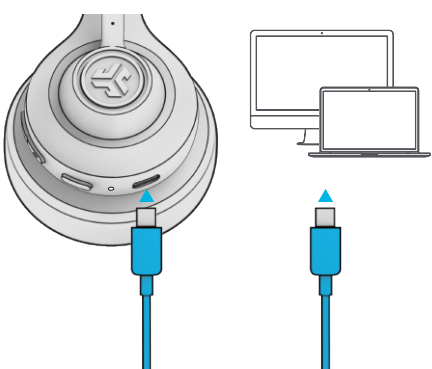
WIRED CONNECTION
Connect the GO Work 2 cable to the computer. Check your PC/Mac Input and Output settings.
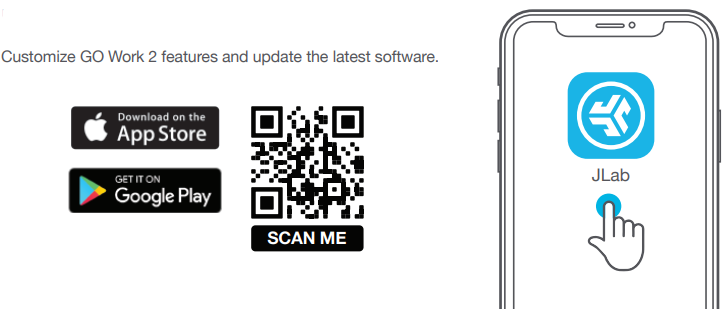
DOWNLOAD THE APP
Customize GO Work 2 features and update the latest software.
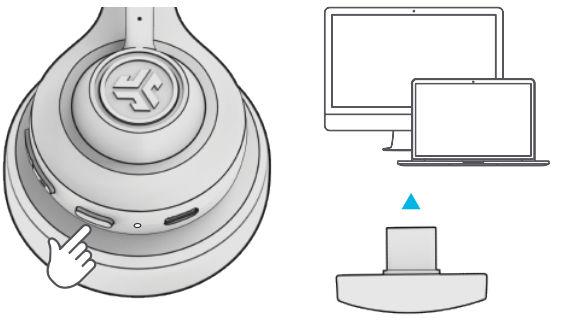
USB-C DONGLE CONNECTION
Power on GO Work 2 and plug in the USB-C dongle into PC/Mac/Android. (avoid hubs/adapters) This connection will override any current Bluetooth connections.
Check your device settings.
SETUP DONGLE WITH PC (WINDOWS 7/8/10/11)
- From the Start menu, select the Control Panel.
- From the Control Panel, select the Sound icon.
- Select the Recording tab and select “JLab GO Work 2”.
- Select the Playback tab and select “JLab GO Work 2”.
SETUP DONGLE WITH MAC (macOS 10.10 or HIGHER)
- Open System Preferences and select the Sound icon.
- Select the Input tab and select “JLab GO Work 2”.
- Selthe ect Output tab and select “JLab GO Work 2”.
- From this screen, set the Output volume to the desired level.
TROUBLESHOOTING
WINDOWS 7/8/10/11: NO MICROPHONE AUDIO
Depending on your PC, the Bluetooth might not detect the proper Bluetooth protocol. This is a known issue with certain Windows OS.
- Open the Bluetooth & Device settings and enter the View more devices tab.
- Remove all Bluetooth devices that are already connected.
- Reconnect your GO Work 2 FIRST to your PC, followed by other Bluetooth devices. The GO Work 2 should display “Connected voice, music”.
YOUR WARRANTY
All warranty claims are subject to JLab authorization,, and at our sole discretion. Retain your proof of purchase to ensure warranty coverage.
CONTACT US
Reach out to us at support@jlab.com or visit jlab.com/contact
Pros & Cons of the JLab Go Work 2 Headset
Pros
- Exceptional Battery Life: Up to 55 hours of continuous use, reducing the need for frequent charging.
- Versatile Connectivity: Supports Bluetooth 5.3, USB-C dongle, and wired USB-C connections, with multipoint pairing for easy switching between devices.
- Clear Voice Quality: Dual noise-canceling microphones ensure crisp call audio free from background noise.
- Comfortable Design: Lightweight and ergonomic on-ear fit suitable for prolonged wear.
- Customization via App: The JLab App offers EQ customization and sound mode adjustments to tailor the audio experience.
- Affordable Price: Provides professional-grade features at a budget-friendly price of around $50, representing excellent value.
Cons
- On-Ear Fit May Not Suit Everyone: Some users might prefer over-ear headphones for better noise isolation.
- Latency in Music Mode: Bluetooth latency can be slightly noticeable during media playback, though movie mode reduces this delay.
- Limited Noise Isolation: While microphones cancel noise, passive sound isolation is moderate due to the on-ear design.
- App Dependency: Full feature customization requires downloading the JLab App, which may be less convenient for some users.
Customer Reviews and User Feedback on the jlab Go Work 2 Headset..
The JLab Go Work 2 Headset enjoys predominantly positive reviews from users praising its outstanding battery life, reliable wireless connectivity, and clear microphone performance. Users frequently highlight its comfort during long calls and ease of setup with Bluetooth and USB-C dongle options. The quick mute feature and mic monitoring are also well-received for professional office use.
Common complaints include occasional Bluetooth latency during music playback and the on-ear design not fully blocking external sounds, which some users found less ideal in noisy environments. However, the majority appreciate the headset’s excellent value for money, especially given the extensive feature set and two-year warranty.
With an average rating above 4.5 stars out of 5 from over 50 reviewers, the JLab Go Work 2 is recommended for professionals seeking an affordable, efficient wireless office headset with a strong focus on call clarity and battery endurance.
More jlab manuals
Leave a Comment