
Setup: Jlab Jbuddies Studio Wireless Headphones User Manual
Content
JLab JBuddies Studio Wireless Headphones
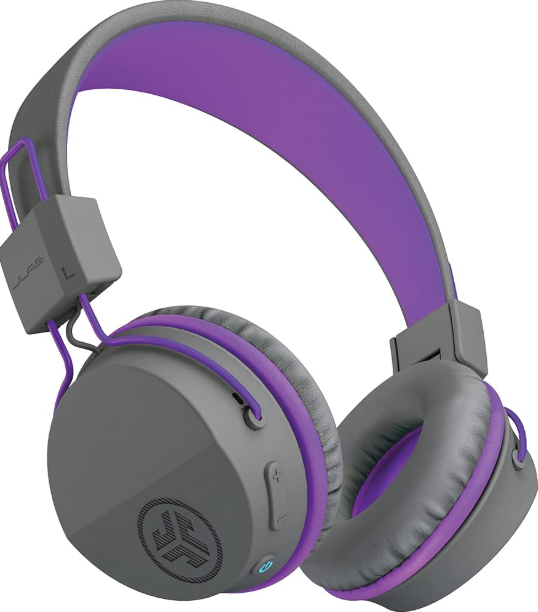
Introduction
The JLab JBuddies Studio Wireless Headphones are designed with young listeners in mind, offering a safe, comfortable, and versatile audio experience for children ages 6 and up. These on-ear headphones deliver the best of both worlds: seamless Bluetooth wireless connectivity for freedom of movement and a reliable wired option for compatibility with any device. With a built-in 85dB volume limiter, parents can rest assured that their child's hearing is protected during extended listening sessions, whether for school, travel, or entertainment at home.
Key benefits include an impressive 24+ hour Bluetooth battery life, three noise control modes, and a Shareport feature that allows two kids to listen together using a single audio source. The headphones feature plush Cloud Foam cushions and a stainless steel headband for all-day comfort, while the compact, foldable design makes them easy to pack and store. The JLab JBuddies Studio Wireless Headphones also include a built-in universal microphone and intuitive controls, making it simple for kids to adjust volume, play/pause music, and answer calls—no fuss necessary.
These headphones are ideal for families seeking a durable, user-friendly, and hearing-safe audio accessory. They are perfect for schoolwork, online learning, gaming, watching movies, and long car rides. The JLab JBuddies Studio Wireless Headphones typically retail in the $30–$40 range, making them an affordable yet feature-rich choice compared to other kids' Bluetooth headphones. They are widely available online and through major electronics retailers.
FIRST TIME SETUP: BLUETOOTH PAIRING
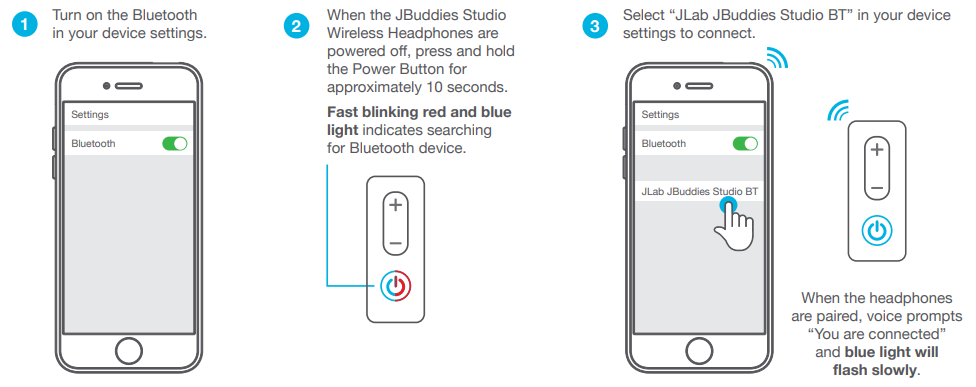
Notes:
- Bluetooth is a wireless radio technology, which means it is sensitive to objects between the headphone and the connected device. The headphone is designed to be used within 33 feet (10 meters) of a connected device, with no major objects in between (walls, etc.).
- Once successfully connected, the headphone will memorize your device and automatically pair when turned on in the future.
- Only one device may be connected at a time. To pair a different device, first unpair the current one through its Bluetooth settings.
- If, for any reason Bluetooth connection is lost, manually reconnect your Bluetooth device.
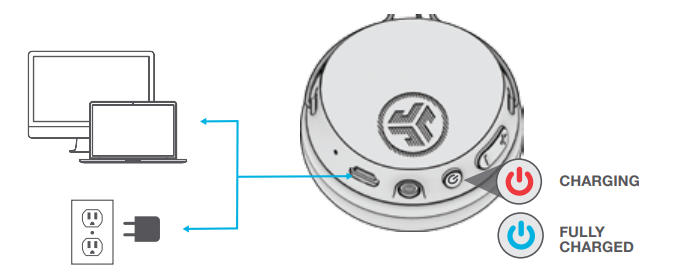
CHARGING
Connect the Micro USB cable to a computer or a USB 5V 1A (or less) output device.
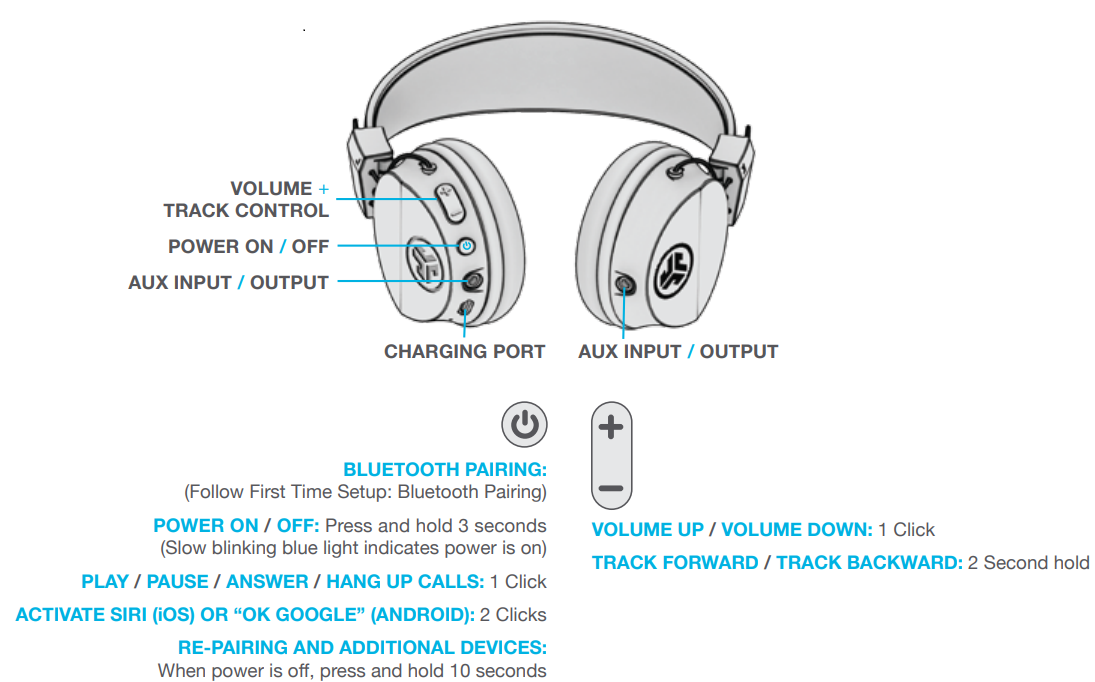
CONTROLS
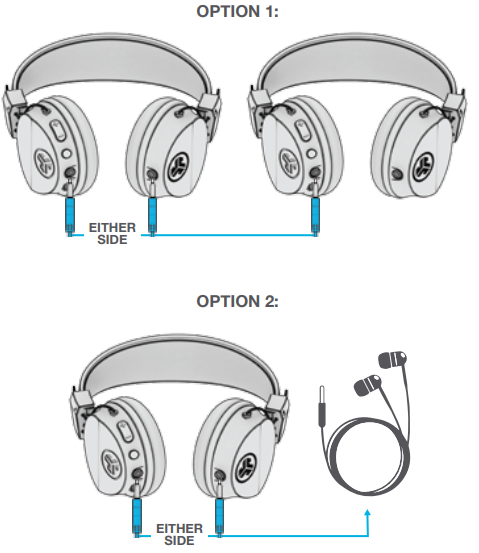
SHARE MODE
Connect the included AUX CABLE to either side to another JBuddies Studio or any other wired headphone/earbud for Share Mode.
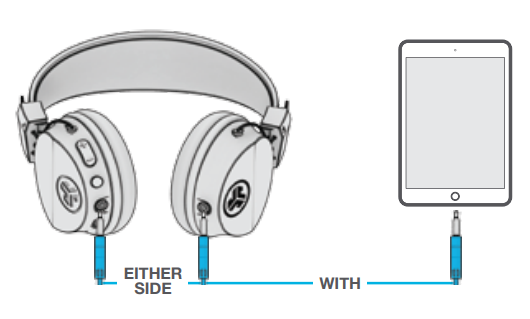
GO WIRED
Connect the AUX CABLE to a device for a wired connection.
Specifications
- Connectivity: Bluetooth 5.0 wireless (SBC, AAC codecs) and 3.5mm wired (Shareport AUX cord included)
- Battery Life: 24+ hours of continuous Bluetooth playback; Micro-USB charging (3-hour charge time)
- Volume Limiter: Safe listening below 85dB—protects young ears from excessive volume
- Drivers: 40mm dynamic drivers; Frequency response: 20Hz–20kHz
- Microphone: Built-in universal mic with track control for calls and voice commands
- Comfort: On-ear Cloud Foam cushions, plush memory foam, stainless steel adjustable headband
- Controls: Easy-access buttons for volume, play/pause, and answering calls
- Design: Compact, foldable for portability; 3 noise control modes
- Weight: 114g (lightweight for children)
- Warranty: 2-year limited warranty from JLab
Compared to similar products, the JLab JBuddies Studio Wireless Headphones stand out for their combination of long battery life, dual wireless/wired connectivity, hearing protection, and comfort features—making them a top choice for parents prioritizing safety and ease of use for their children.
Troubleshooting
Common Problems and Solutions
- Headphones won’t turn on: Ensure the battery is charged using the included Micro-USB cable. If the device still doesn’t power on, try a different cable or power source.
- Bluetooth connection issues: Make sure the headphones are in pairing mode (LED indicator blinking). Restart both the headphones and the audio device. Remove old pairings and reconnect.
- No sound in wired mode: Check that the AUX cable is fully inserted. Test with another audio device to rule out source issues.
- Microphone not working: Confirm the mic is enabled in your device settings. Try the headphones with a different device to isolate the issue.
- Battery drains quickly: Reduce volume and disable unnecessary features like noise control modes. Fully charge the headphones before first use.
Preventive Measures
- Regularly clean the ear cushions and headband with a dry cloth.
- Store in a cool, dry place away from direct sunlight.
- Avoid exposing the headphones to water or extreme temperatures.
Warranty and Support
The JLab JBuddies Studio Wireless Headphones come with a 2-year limited warranty. For technical support or warranty claims, visit the JLab website’s support section or contact customer service directly. Always keep your proof of purchase for warranty purposes.
Pros & Cons
Pros
- Hearing Protection: Built-in 85dB volume limiter safeguards children’s ears.
- Versatile Connectivity: Works wirelessly via Bluetooth or with a wired connection, ensuring compatibility with any device.
- Long Battery Life: 24+ hours of playtime reduces the need for frequent charging.
- Comfortable Design: Plush Cloud Foam cushions and an adjustable headband provide all-day comfort for kids.
- Shareport Feature: Two kids can listen simultaneously using the included AUX cord.
- Affordable Price: Competitive pricing compared to similar kids’ wireless headphones.
Cons
- Micro-USB Charging: Older charging port standard; not USB-C.
- Basic Audio Codecs: Supports SBC and AAC, but not higher-end codecs like aptX.
- Limited Noise Isolation: On-ear design offers less noise isolation compared to over-ear models.
For the price, the JLab JBuddies Studio Wireless Headphones deliver excellent value, especially for parents seeking safe, durable, and easy-to-use headphones for children. They outperform many competitors in battery life and comfort, though audiophiles may prefer more advanced codecs or noise cancellation.
Customer Reviews
Parents and guardians consistently praise the JLab JBuddies Studio Wireless Headphones for their comfortable fit, long battery life, and effective volume limiting—essential features for protecting children’s hearing during school, travel, and entertainment. Many users highlight the convenience of switching between wireless and wired modes, as well as the Shareport feature for shared listening.
Common complaints are rare but include occasional Bluetooth pairing issues and a desire for USB-C charging. The majority of reviews award these headphones 4 to 5 stars, noting their durability and child-friendly design. Testimonials frequently mention that these headphones are a favorite among kids for both learning and leisure, making them a recommended purchase for families seeking reliable, hearing-safe audio gear.
If you’re looking for affordable, feature-packed wireless headphones for kids that prioritize safety and comfort, the JLab JBuddies Studio Wireless Headphones are a top choice—ideal for school, travel, and everyday use.
Faqs
How do I set up my jlab Jbuddies Studio Wireless Headphones for the first time?
What should I do if my jlab Jbuddies Studio Wireless Headphones won't connect via Bluetooth?
Can I use the jlab Jbuddies Studio Wireless Headphones with a non-Bluetooth device?
How does the volume limiting feature work on jlab Jbuddies Studio Wireless Headphones?
What are the key features that make jlab Jbuddies Studio Wireless Headphones ideal for kids?
How can I maintain and clean my jlab Jbuddies Studio Wireless Headphones to ensure longevity?
What should I do if the microphone on my jlab Jbuddies Studio Wireless Headphones is not working?
Are jlab Jbuddies Studio Wireless Headphones compatible with all Bluetooth devices?
More jlab manuals
Leave a Comment