
Setup: Jlab Epic Air Sport ANC Earbuds User Manual
Content
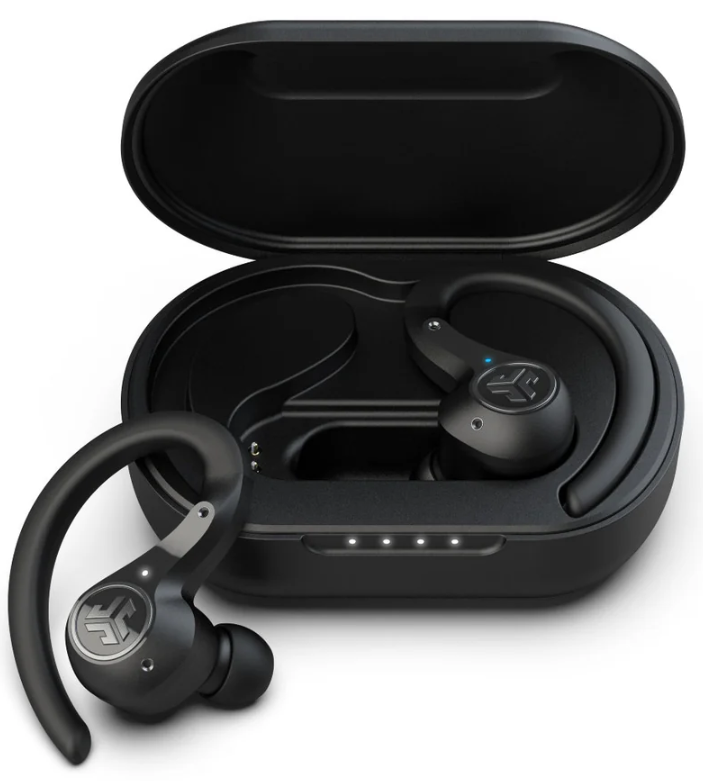
JLab Epic Air Sport ANC Earbuds
Introduction
The jlab Epic Air Sport ANC Earbuds deliver a premium true wireless audio experience designed specifically for active users who demand durability, long battery life, and superior sound quality. Featuring advanced Hybrid Active Noise Cancellation (ANC), these earbuds block out distractions, empowering you to focus whether you're hitting the gym, running outdoors, or commuting. With an industry-leading battery life of over 70 hours—combining 15+ hours per earbud and 55+ additional hours via the charging case—these earbuds are built to keep up with your longest days.
Sporting an IP66 splash-proof rating, the Epic Air Sport ANC are resistant to sweat, dust, and rain, making them ideal for fitness enthusiasts and outdoor adventurers. The earbuds integrate smart features such as wear detection sensors that pause playback when removed and a customizable sound profile through the JLab app, allowing users to tailor audio to their preferences. Additional conveniences like wireless charging compatibility and Find with Tile technology enhance usability and security.
Available at an affordable price point around $99.99, these earbuds offer excellent value compared to higher-end competitors. They target fitness lovers, commuters, and casual listeners seeking reliable, feature-packed earbuds without breaking the bank. JLab's two-year warranty and 30-day return policy provide added peace of mind for buyers.
FIRST TIME SETUP
AUTO-CONNECTING EARBUDS
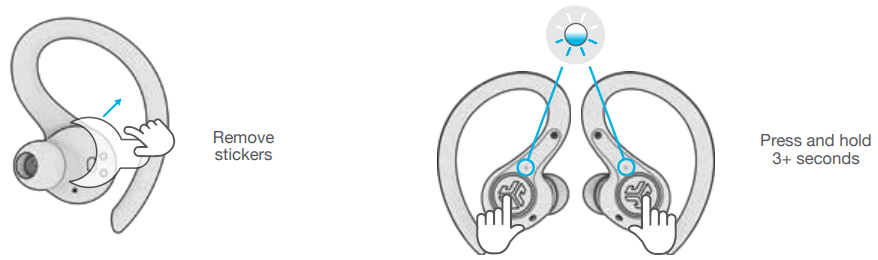
- A. Take earbuds out of the charging case and remove stickers.
- B. Press and hold 3+ seconds on each earbud. Blinking blue and white light on one earbud will indicate ready to pair to your device.
CONNECTING BLUETOOTH
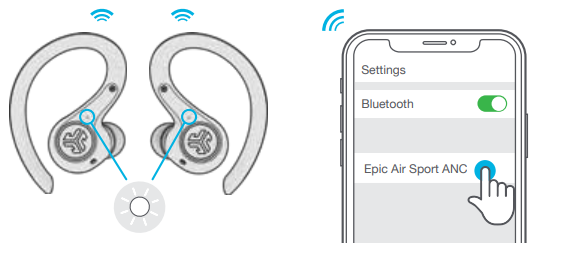
- Select “Epic Air Sport ANC” in your device settings. Voice prompt “Bluetooth connected” followed by solid white lights will indicate you are connected.
ADDING NEW / ADDITIONAL BLUETOOTH DEVICES:
- Turn OFF Bluetooth from any previously connected device. Turn ON Bluetooth from new device. Take earbuds out of the case.
- Earbuds will automatically enter Bluetooth Pairing. Select “Epic Air Sport ANC” in new device settings to connect.
CONTROLS
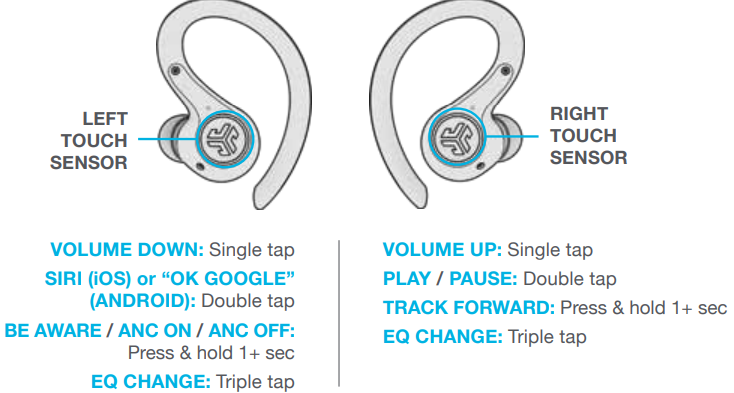
- ANSWER: Single Tap Left or Right
- HANG UP: Double Tap Left or Right
- REJECT INCOMING CALL: Press and hold 1+ seconds Left or Right
- MUSIC / MOVIE MODE: Press and hold both touch sensors simultaneously 3+ seconds.
- POWER OFF WITHOUT CHARGING CASE: Turn off your Bluetooth from your device settings. The earbuds will then power off after 3 minutes.
VOICE PROMPTS
- “JLab ON”: Power ON
- “Ready to Pair”:
- Epic Air Sport ANC is ready to pair to your Bluetooth device
- “Be Aware”: Hear your surroundings
- “Noise Canceling ON”:
- Noise canceling ON
- “Noise Canceling OFF”:
- Noise canceling OFF
- “Bluetooth Connected”:
- Earbud is connected to device
- “Battery Full”: 100-80%
- “Battery Medium”: 80-20%
- “Low Battery”: Less than 20%
- (When power decreases to 10%,
- “Low Battery” will play one time)
- “Goodbye”: Power OFF
AUTO-POWER ON/OFF
- Placing the earbuds in the charging case will power OFF earbuds and start charging.
- When taken out of the charging case, they will auto power ON and connect.
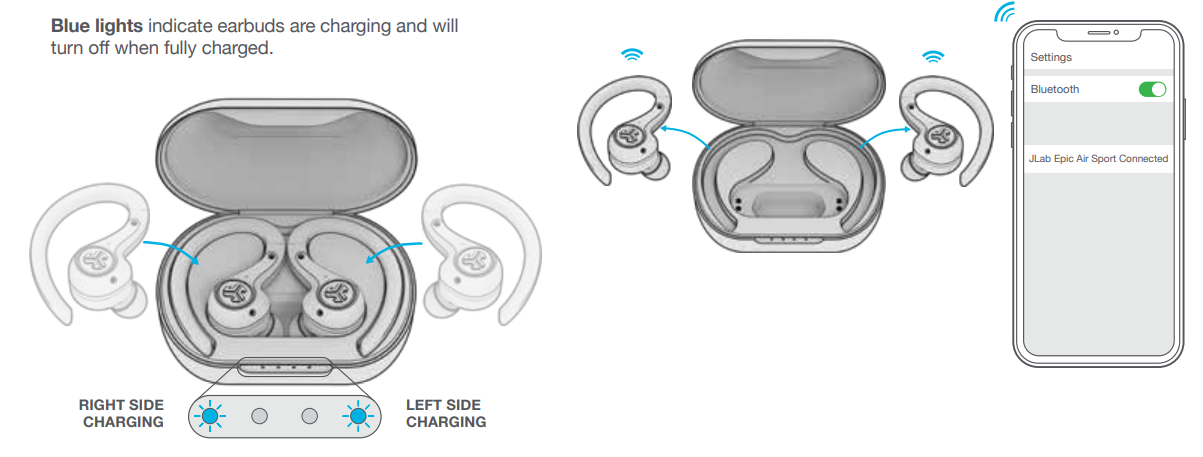
WIRED CHARGING
Connect the Epic Air Sport ANC to computer or USB 5V 1A (or less) output device.
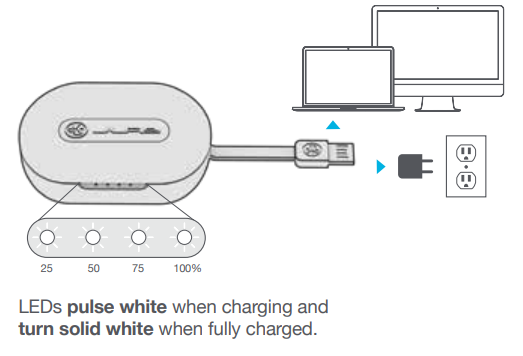
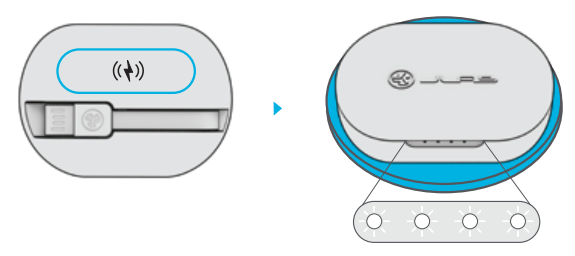
WIRELESS CHARGING
Place the charging case on a wireless charging platform.
- LEDs pulse white when charging and turn solid white when fully charged.
TROUBLESHOOTING
NO AUDIO IN ONE EARBUD OR EARBUDS ARE DISCONNECTED (MANUAL RESET)
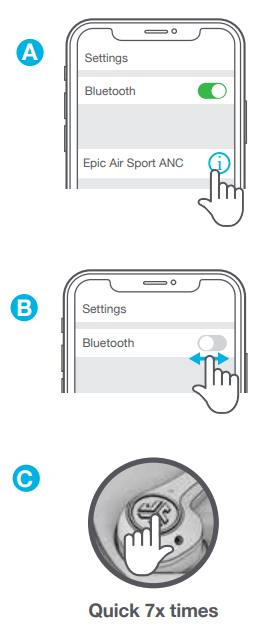
- Enter your Bluetooth device settings and forget the Epic Air Sport ANC. FigA
- Keep the earbuds in the charging case and on ONE earbud quickly tap the touch sensor 7x times. Light blinks blue 4 times. FigC
- Repeat with other earbud. Quickly tap the touch sensor 7x times. 3 Light blinks blue 4 times. FigC
- Take both earbuds out of the charging case. Wait for one earbud to turn solid white 4 and one to blink blue/white. You are now ready to pair to your Bluetooth device.
BLUETOOTH DEVICE DOES NOT CONNECT/RECONNECT
- Enter your Bluetooth device settings and forget the Epic Air Sport ANC. FigA
- Turn OFF then ON Bluetooth. FigB
- Take the earbuds out of the case. Wait for one to turn solid white and one to blinking blue/white.
- Select “Epic Air Sport ANC” in device settings to reconnect.
Specifications of jlab Epic Air Sport ANC Earbuds
- Audio Drivers: 8mm dynamic drivers with neodymium magnets, frequency response 20Hz–20kHz, impedance 32Ω ± 15%
- Output Level: 110 ± 3dB
- Microphones: Six MEMS microphones (3 per earbud) with -40dB ± 3dB sensitivity, enabling environmental noise cancellation
- Battery Life: 15+ hours per earbud (ANC off), 11+ hours with ANC on; 55+ additional hours via 1000mAh wireless charging case, totaling 70+ hours playback
- Charging: Integrated USB-A charging cable in case plus Qi wireless charging support; 3 hours earbud charge time, 3.5 hours case charge time; quick charge offers 1+ hour playback from a 15-minute charge
- Connectivity: Bluetooth 5.0 Class 1 with up to 30+ ft range; supports SBC and AAC codecs; latency optimized with Movie Mode (sub 200ms)
- Durability: IP66 splashproof rating for sweat, dust, and rain resistance
- Features: Smart Active Noise Cancellation modes (ANC On, Off, and Be Aware pass-through), wear detection auto-pause/play, customizable EQ via JLab app, Find with Tile integration
- Weight: 10g per earbud; charging case 75.4g
- Warranty: Two-year limited warranty
Compared to similar models like JLab's Epic Air ANC, the Epic Air Sport ANC offers longer battery life and enhanced fitness-focused durability features such as IP66 rating and sport-fit design. Unlike standard earbuds, the hybrid ANC and customizable sound profiles provide a premium listening experience at a competitive price.
Pros and Cons of jlab Epic Air Sport ANC Earbuds
- Pros:
- Exceptional battery life with 70+ hours total playback, supporting long sessions without frequent recharging
- Effective Hybrid Active Noise Cancellation with multiple control modes for tailored noise control
- Robust IP66 rating ideal for sports, outdoor activities, and sweat exposure
- Convenient wireless charging and integrated USB-A charging cable in the case
- Smart wear detection automatically pauses and resumes playback, enhancing user experience
- Custom EQ and sound personalization via free JLab app
- Competitive price point around $100 offers excellent value
- Cons:
- Fit may not provide perfect seal for all ear types, which can reduce ANC effectiveness especially in very noisy environments
- ANC performance is good but may not match premium over-ear noise-canceling headphones on flights or loud commutes
- Charging case is somewhat bulky compared to ultra-compact competitors
- Touch controls can be sensitive, occasionally resulting in unintended commands
- Limited codec support (no aptX) might be a drawback for audiophiles seeking highest Bluetooth quality
Overall, the jlab Epic Air Sport ANC earbuds provide outstanding value for fitness-minded users and casual listeners who prioritize battery life, durability, and active noise cancellation in a budget-friendly package.
Customer Reviews and User Feedback on jlab Epic Air Sport ANC Earbuds
Customers rate the jlab Epic Air Sport ANC Earbuds highly, often awarding 4 to 4.5 stars out of 5 for their combination of price and performance. Users praise the impressive battery life and reliable Bluetooth connection, noting the convenience of wireless charging and the effectiveness of the ANC in moderate noise environments. The sport fit and IP66 rating receive consistent accolades from fitness enthusiasts.
Common complaints include occasional fit discomfort for users with smaller ears, which sometimes affects the noise cancellation seal and overall sound experience. Several reviews mention that touch controls require a learning curve and can trigger unintended responses in active use. Despite these minor drawbacks, many recommend the earbuds for everyday use, workouts, and travel thanks to their durable design and robust feature set.
Testimonials often highlight the value for money, with one user stating, “The jlab Epic Air Sport ANC offers features found in much more expensive earbuds, making them a great buy for anyone needing solid ANC and long battery life.” Recommendations emphasize these earbuds as an excellent choice under $100 for anyone needing sport-focused earbuds with noise cancellation.
Faqs
How do I set up my JLab Epic Air Sport ANC Earbuds for the first time?
What should I do if my JLab Epic Air Sport ANC Earbuds are not connecting or reconnecting?
Can I use JLab Epic Air Sport ANC Earbuds with my smartphone and tablet simultaneously?
How do I customize the touch controls on my JLab Epic Air Sport ANC Earbuds?
What are the key features that make JLab Epic Air Sport ANC Earbuds different?
How often should I maintain my JLab Epic Air Sport ANC Earbuds?
Are JLab Epic Air Sport ANC Earbuds compatible with voice assistants like Siri or Google Assistant?
How do I optimize the sound quality of my JLab Epic Air Sport ANC Earbuds?
More jlab manuals
Leave a Comment