
Setup: Jlab Jbuds Air Sport Earbuds User Manual
Content
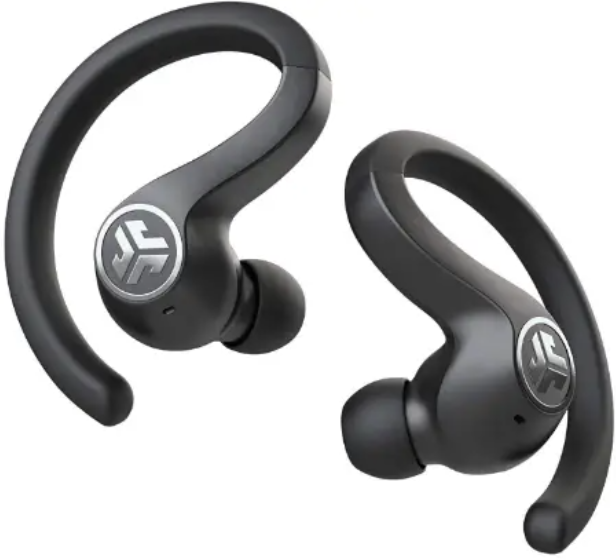
Jlab Jbuds Air Sport Earbuds
Introduction
The JLab Jbuds Air Sport Earbuds are designed for active users seeking durable, high-quality true wireless earbuds that keep pace with intense workouts and everyday life. These earbuds combine robust audio performance with advanced features like Be Aware Audio,, which lets you toggle ambient sound for enhanced safety outdoors. Their ergonomic design with secure earhooks and Cloud Foam™ tips provides a comfortable, stable fit during running, gym sessions, and other sports activities.
With an impressive battery life of up to 44+ hours,, including the charging case and rapid charge capabilities, they offer uninterrupted listening for long workout days or commutes. The IP66 sweat and water resistance rating ensures durability even in tough weather or heavy sweat conditions. Integrated touch controls, customizable EQ3 sound profiles, and clear call microphones make these earbuds versatile for fitness enthusiasts, commuters, and casual listeners alike.
Available widely through online and retail outlets, the JLab Jbuds Air Sport Earbuds typically range from $70 to $90, providing excellent value for their feature-rich package. Whether you want reliable wireless audio for running, cycling, or office calls, these earbuds balance performance and convenience effectively.
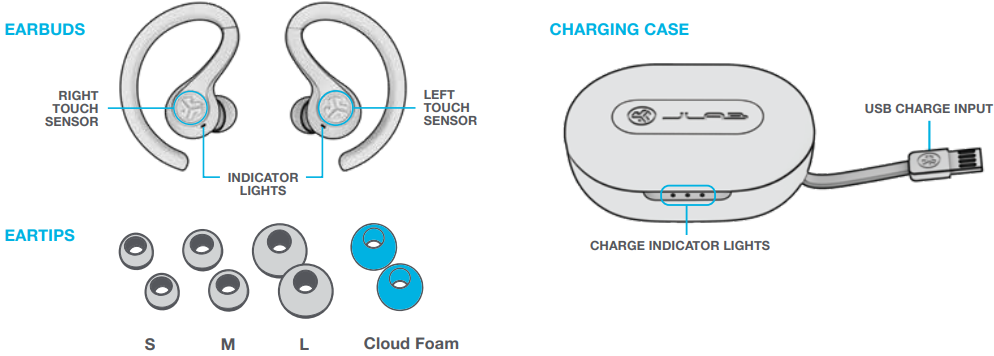
IN THE BOX
Specifications of JLab Jbuds Air Sport True Wireless Earbuds
- Audio Driver: 8mm dynamic driver with neodymium magnet delivering 20Hz–20kHz frequency response and 103 ± 3 dB output
- Microphones: Dual Knowles microphones with environmental noise cancellation for clear voice calls
- Connectivity: Bluetooth 5.0 with 30+ feet wireless range; supports SBC and AAC codecs
- Battery Life: Approximately 9+ hours per earbud; 44+ hours total with charging case
- Charging: 1.5-hour earbud charge time; rapid charge provides 1 hour of playback in 10-15 minutes; case charges in ~3 hours via integrated USB-A cable
- Design & Durability: IP66 sweat and water resistance; lightweight earbuds (~8.7g each) with ergonomic over-ear hooks and Cloud Foam™ eartips for a secure fit
- Additional Features: Customizable EQ3 sound presets (JLab Signature, Balanced, Bass Boost), Be Aware Audio pass-through, touch controls, Google Fast Pair, multipoint connectivity, and voice assistant support
Compared to similar sport-oriented earbuds in the $70 price range, such as the Anker Soundcore Spirit X2 or JBL Endurance Peak II, the Jbuds Air Sport stand out with longer battery life, dual noise-cancelling mics, and advanced sound customization options.
FIRST TIME SETUP
AUTO-CONNECTING EARBUDS
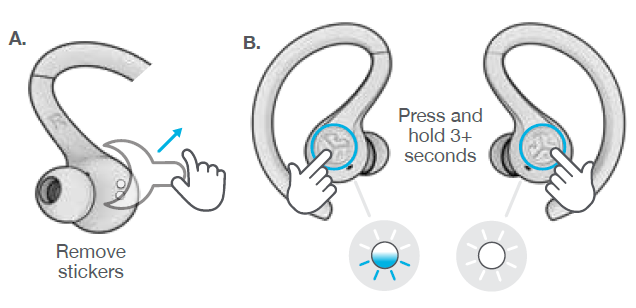
- Take the earbuds out of the charging case and remove stickers.
- Press and hold both touch sensors for 3+ seconds to turn ON.
One earbud turns solid white, and the other earbud blinks blue/white,, indicating ready to pair to your device.
CONNECTING TO BLUETOOTH
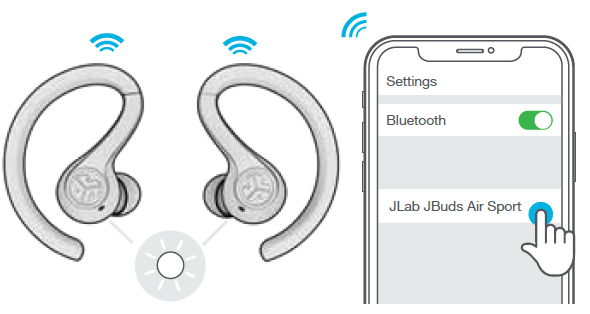
Select “JLab JBuds Air Sport” in your device settings. Voice prompt “Bluetooth connected” followed by solid white lights will indicate you are connected.
ADDING NEW / ADDITIONAL BLUETOOTH DEVICES:
Turn OFF Bluetooth on any previously connected device. Turn ON Bluetooth on the new device. Take the earbuds out of the case. Earbuds will automatically enter Bluetooth Pairing. Select “JLab JBuds Air Sport” in device settings to connect.
BUTTON FUNCTIONS
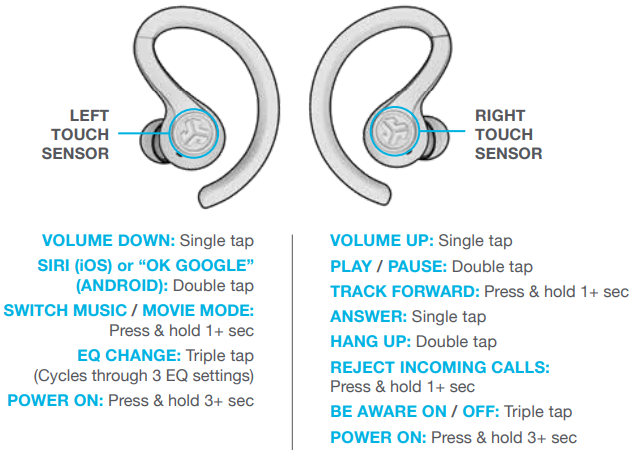
VOICE PROMPTS
- “JLab ON”: Power ON
- “Ready to Pair”: JBuds Air Sport are ready to pair to a Bluetooth device
- “Bluetooth Connected”: The Earbud is connected to the device
- “Battery Full”: 100-80%
- “Battery Medium”: 80-20%
- “Low Battery”: Less than 20%When power decreases to 10%,
- “Low Battery”: will play
- “Goodbye”: Power OFF
TURN OFF EARBUDS WITHOUT CHARGING CASE:
Enter your Bluetooth device settings and disconnect the JBuds Air Sport. Earbuds will power OFF after 3 minutes.
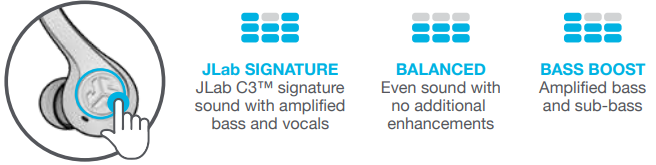
EQUALIZER MODES
Triple-tap Triple-tap tap left earbud for different EQ settings. Voice prompts will indicate EQ settings (JBuds Air Sport will cycle through 3 EQ settings)
CHARGING EARBUDS
Placing the earbuds in the charging case will power off the earbuds and start charging. Blue lights indicate earbuds are charging and will turn off when fully charged.
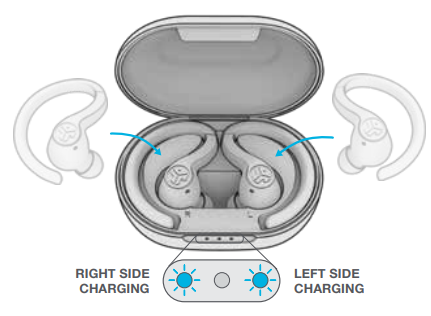
- When earbuds are taken out of the case, they will auto-power on and reconnect to your device.
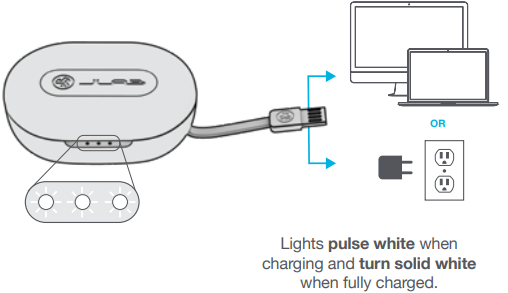
CHARGING CASE
Connect the JBuds Air Sport to a computer or a USB 5V 1A (or less) output device.
FITTING
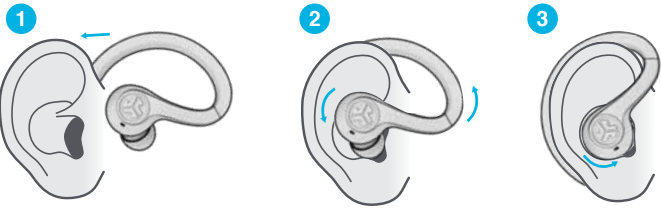
FIND YOUR EARBUDS
Download the Tile app and activate it to find your earbuds. Learn more at jlab.com/tileapp
Activating Tile will reduce earbud playtime.

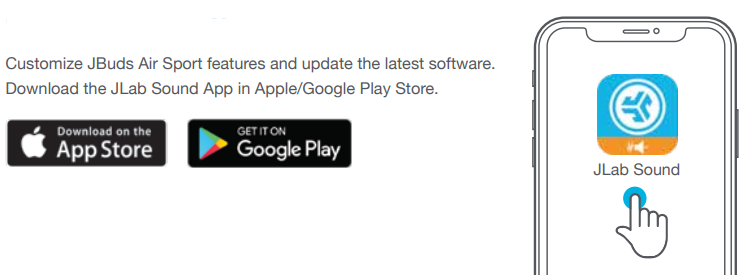
DOWNLOAD THE APP
Customize JBuds Air Sport features and update to the latest software. Download the JLab Sound App from the Apple/Google Play Store.
TROUBLESHOOTING
NO AUDIO IN LEFT EARBUD OR EARBUDS DISCONNECT FROM EACH OTHER (MANUAL RESET)
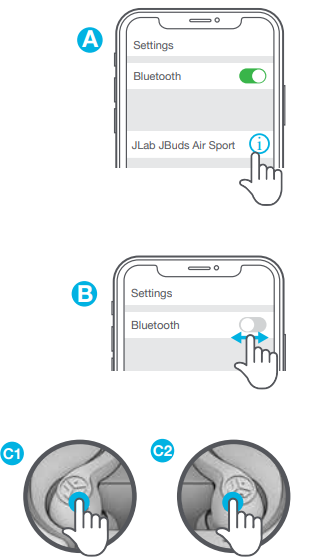
- Enter your Bluetooth device settings and forget the JBuds Air Sport. FigA
- Open the charging case door and leave both earbuds inside. Starting with ONE earbud, quickly tap the touch sensor 7x times. Light will blink blue 4x times. Leave the earbuds in the charging case. Fig C1
- Repeat with the other earbud. Quickly tap the touch sensor 7x times. Light will blink blue 4x times. Fig C2
- Take both earbuds out of the charging case and keep them within 2 inches of each other. Wait for one earbud to turn solid white and the other to blink blue/white. You are now ready to pair with your Bluetooth device.
BLUETOOTH DEVICE DOES NOT CONNECT/RECONNECT
- Enter your Bluetooth device settings and forget the JBuds Air Sport. Fig A
- Take the earbuds out of the case. Wait for one to turn solid white and the other to blink blue/white.
- Select “JLab JBuds Air Sport” in device settings to reconnect.
Instructional videos at: JLAB.COM/MANUALS
QUICK TIPS
- The left or right earbud can be used independently for music and phone calls. Simply choose one and take it out of the case to connect.
- Choosing the correct ear tip makes a significant improvement in audio quality due to the proper seal for the driver. Test all ear tips for best results.
- Only ONE Bluetooth device can be connected at a time. Turn off Bluetooth on unwanted devices and turn on Bluetooth on the chosen device to connect.
CAUTIONS
- Avoid extreme heat, cold, and humidity.
- Avoid dropping or crushing the earbuds.
- Wax may build up in the earbud tips, lowering the sound quality.
Carefully remove the wax with a cotton swab or other small tool to improve the sound quality.
- If you experience discomfort or pain, try lowering the volume or discontinuing use temporarily.
- If you experience regular discomfort while using this product, discontinue use and consult your physician.
- We recommend you treat your earbuds as you would a nice pair of sunglasses and keep them in a safe location when not in use.
YOUR WARRANTY
All warranty claims are subject to JLab authorization and at our sole discretion. Retain your proof of purchase to ensure warranty coverage.
CONTACT US
Reach out to us at support@jlab.com or visit jlab.com/contact
Pros & Cons of JLab Jbuds Air Sport Earbuds
- Pros:
- Exceptional battery life with 44+ hours total playback, suitable for extended use without frequent charging
- IP66 rating ensures reliable sweat and water resistance for all weather workouts
- Be Aware Audio feature provides safety by allowing ambient sound to pass through when needed
- Comfortable fit with secure earhooks and Cloud Foam™ tips,, ideal for vigorous physical activity
- Custom EQ3 settings and touch controls enhance user experience and audio personalization
- Fast charge capability reduces downtime with quick 10-15 minute charging for 1 hour of play
- Cons:
- Some users report occasional touch control sensitivity issues during workouts..
- The charging case is relatively bulky compared to ultra-compact models
- Latency is slightly noticeable in music mode, though movie mode mitigates this for video use
- Sound quality, while strong for the price, may not satisfy audiophiles seeking premium clarity
- Value for Money: These earbuds deliver robust features and durability at an affordable price point around $70–90, offering excellent value for fitness enthusiasts and casual users.
Customer Reviews and Feedback on jlab Jbuds Air Sport Earbuds
Users generally praise the JLab Jbuds Air Sport Earbuds for their long battery life, secure fit, and useful Be Aware Audio functionality. Many highlight how the IP66 rating gives confidence during sweat-heavy gym sessions or outdoor activities. The customizable EQ3 presets and clear call quality are also frequent compliments.
Common complaints include occasional touch control misfires and the somewhat large charging case. Some customers mention slight latency in regular music playback but appreciate the dedicated low-latency movie mode. Overall, the earbuds maintain an average rating close to 4.3–4.5 stars out of 5 across major retailers.
Reviewers recommend the JLab Jbuds Air Sport Earbuds for anyone looking for durable, budget-friendly true wireless earbuds optimized for sports and active lifestyles, especially for those who value customizable sound and extended playtime.
Tags
More jlab manuals
Leave a Comment