
Setup: Jlab Go Air Sport Earbuds User Manual
Content
Jlab Go Air Sport Earbuds
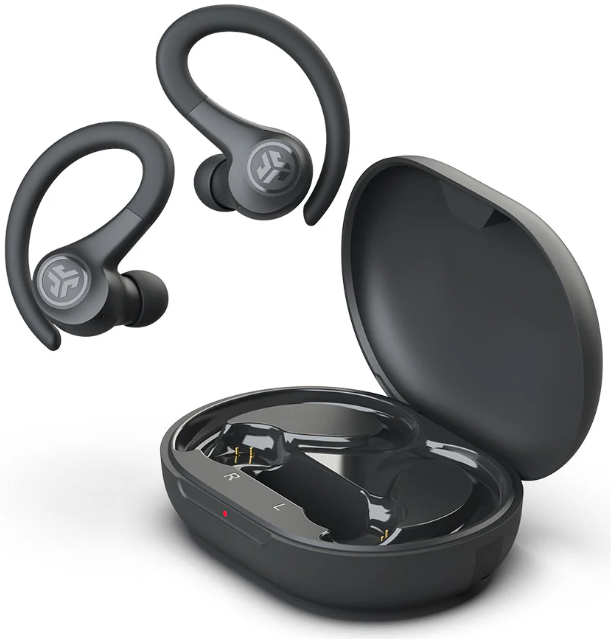
Introduction
The JLab Go Air Sport Earbuds are designed to elevate your workout and active lifestyle with true wireless freedom, superior comfort, and lasting performance. These earbuds combine a secure sport-fit earhook design with sweat and splash resistance (IP55 rating), making them ideal for gym sessions, running, cycling, and other high-intensity activities. Their lightweight and ergonomic build ensures they stay comfortably in place, while touch controls provide easy access to music, calls, and JLab’s signature EQ3 sound settings—allowing you to customize audio profiles from balanced to bass-boosted sound.
Targeted at fitness enthusiasts, outdoor adventurers, and everyday users seeking affordable yet high-quality wireless earbuds, the Go Air Sport offers an exceptional balance of performance and value. With over 32 hours of total playback time, including the charging case, these earbuds easily last through multiple workouts or a full day of on-the-go listening. Available in several vibrant colors, they retail in the affordable price range of approximately $30 to $45, making them an accessible option compared to premium alternatives.
Whether you’re hitting the trails, powering through HIIT workouts, or simply enjoying music during daily commutes, the JLab Go Air Sport Earbuds deliver reliability, comfort, and rich sound tailored to active lifestyles.
Specifications of JLab Go Air Sport Earbuds
- Audio Driver: 8mm Dynamic Driver delivering 103 ± 3 dB output
- Frequency Response: 20 Hz - 20 kHz for clear and balanced sound
- Microphones: Dual MEMS microphones with Environmental Noise Cancelling (ENC) and DNS algorithm for crystal-clear calls
- Connectivity: Bluetooth 5.1 with 30+ feet range; supports SBC and AAC codecs
- Battery Life: 8+ hours per earbud, 32+ hours total with charging case; quick charge feature offers 1 hour of use from a 10-15-minute charge
- Charging Case: 350mAh lithium polymer rechargeable with integrated USB-A cable, fully charges in under 2 hours
- Weight: 6.2g per earbud; 45.1g charging case for portability
- Water Resistance: IP55 rating protects against sweat and splashes
- Additional Features: Touch controls, EQ3 sound presets, My JLab app compatibility, voice assistant support
Compared to other wireless sport earbuds like the Beats Fit Pro and Bose QuietComfort, the JLab Go Air Sport offers comparable battery life and water resistance but at a significantly lower price point, making them stand out for budget-conscious users looking for durable and feature-rich workout earbuds.
BLUETOOTH PAIRING
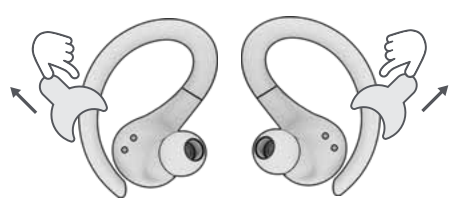
Take the earbuds out of the case and remove stickers. Plit ace back in the case and close the door.
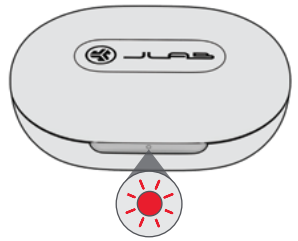
The red light on the case indicates a charge. Remove earbuds from case.
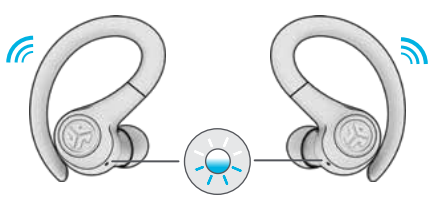
One earbud will blink blue/white,, indicating ready to pair to your device.
Select “JLab GO Air Sport” in your device's Bluetooth settings to connect.
Voice prompt “Bluetooth connected” followed by blinking white lights will indicate you are connected.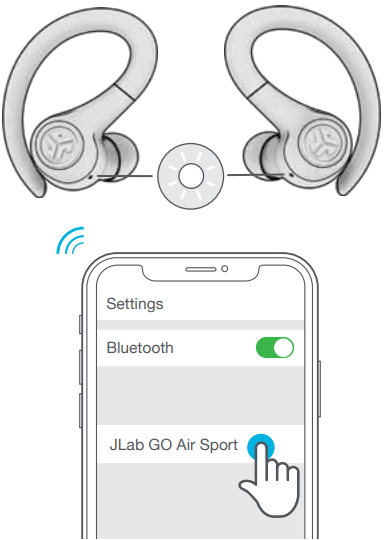
ADDING NEW / ADDITIONAL BLUETOOTH DEVICES:
- Turn OFF Bluetooth from any previously connected device. Turn ON Bluetooth on the new device.
- Take the earbuds out of the case.
- Earbuds will automatically enter Bluetooth Pairing.
- Select “JLab GO Air Sport” in device settings to connect.
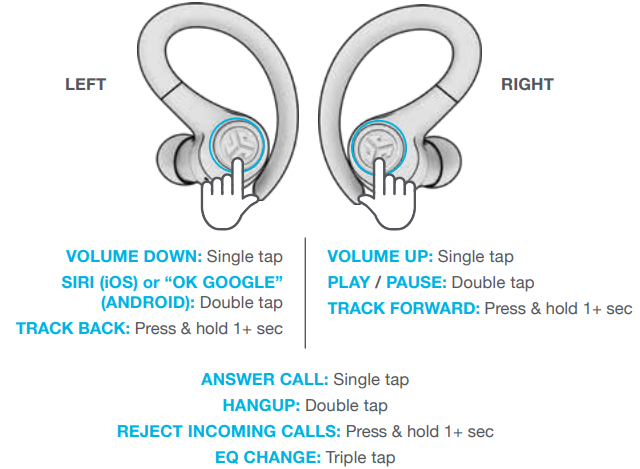
BUTTON FUNCTIONS
VOICE PROMPTS
- “JLab ON”: Power ON
- “Ready to Pair”: GO Air Sport is ready to pair with a Bluetooth device
- “Bluetooth Connected”: Earbud is connected to device “Battery Full”: 100-75%
- “Battery Medium”: 75-25%
- “Low Battery”: Less than 25%(When power decreases to 10%, “Low Battery” will play one time)
- “Goodbye”: Power OFF
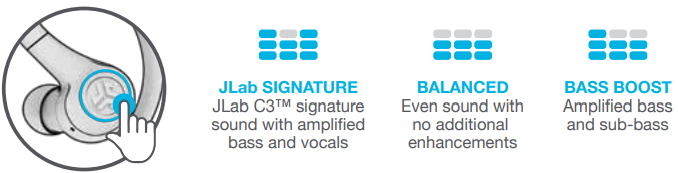
CUSTOM EQ3 SOUND MODES
Tap either the right or left earbud 3 times for different EQ settings (GO Air Sport will cycle through 3 EQ settings).
CHARGING EARBUDS
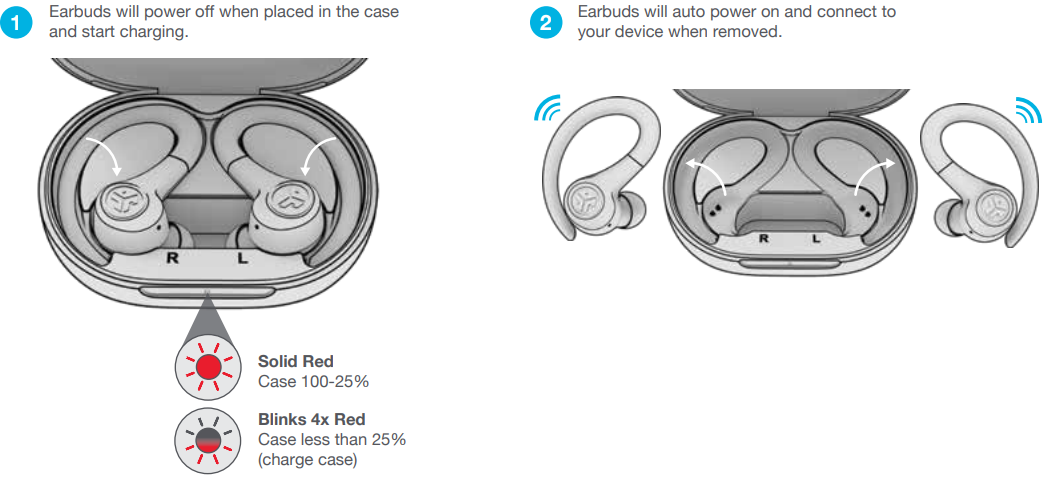
CHARGING CASE
Connect the GO Air Sport to a computer or a USB 5V 1A (or less) output device.

QUICK TIPS
- The left or right earbud can be used independently for music and phone calls. Simply choose one and take it out of the case to connect.
- Only ONE Bluetooth device can be connected at a time. Turn off Bluetooth on unwanted devices and turn on Bluetooth on the chosen device to connect.
WARNING
Fully dry off the earbuds before putting them in the charging case to avoid any damage to the case.
The earbuds are sweat/water resistant,, but the case is not.
Troubleshooting JLab Go Air Sport Earbuds
- Issue: Earbuds not pairing or connecting
Solution: Ensure earbuds are fully charged. Reset by placing both earbuds in the case, then hold the touch controls for 10 seconds until the LEDs flash. Re-pair via Bluetooth settings. - Issue: One earbud nis ot producing sound
Solution: Check battery level and recharge both earbuds. Clean the earbud contacts and re-sync the earbuds by resetting them. - Issue: Poor audio quality or dropouts
Solution: Confirm the device Bluetooth version is 5.0 or higher. Keep the device within 30 feet. Avoid obstacles or interference from other wireless devices. - Preventive Measures: Regularly clean earbuds, avoid exposure to extreme moisture despite the IP55 rating, and store the earbuds in the charging case when not in use.
- Warranty & Support: JLab offers a 2-year limited warranty covering manufacturing defects. For help, contact JLab Support via their official website or customer service hotline.
Connection failure or earbuds disconnected from each other (Manual Reset)
- Keep the earbuds in the charging case and forget “JLab GO Air Sport” from your Bluetooth device settings.
- Quick tap 7x on one earbud in the charging case. The earbud blinks blue 4 times.
- Quick tap 7x on the other earbud in the charging case. The earbud blinks blue 4 times.
- Take both earbuds out of the charging case.
One earbud will be solid white and the other will blink blue/white,, indicating ready to pair to your device.
Instructional videos at: JLAB.COM/MANUALS
CAUTIONS
- Avoid extreme heat, cold, and humidity.
- Avoid dropping or crushing the earbuds.
- Wax may build up in the earbud tips, lowering the sound quality.
Carefully remove the wax with a cotton swab or other small tool to improve the sound quality.
- If you experience discomfort or pain, try lowering the volume or discontinuing use temporarily.
- If you experience regular discomfort while using this product, discontinue use and consult your physician.
- We recommend you treat your earbuds as you would a nice pair of sunglasses and keep them in a safe location when not in use.
YOUR WARRANTY
All warranty claims are subject to JLab authorization, and at our sole discretion. Retain your proof of purchase to ensure warranty coverage.
CONTACT US
Reach out to us at support@jlab.com or visit jlab.com/contact
Pros & Cons of JLab Go Air Sport Earbuds
- Pros:
- Long battery life with 32+ hours total playtime and quick charge capabilities
- Secure and comfortable sport-fit design with multiple gel tips and earhooks
- Strong IP55 water and sweat resistance,, ideal for active use
- Customizable EQ3 sound settings for r personalized audio experience
- Affordable price point under $45, delivering excellent value
- Cons:
- Bluetooth range may be limited compared to high-end models
- Supports basic SBC and AAC codecs, lacking advanced codecs like aptX
- Touch controls can be sensitive and may require practice to avoid accidental commands
- Audio latency is higher than premium earbuds, which may affect video sync
Customer Reviews on JLab Go Air Sport Earbuds
Users consistently praise the JLab Go Air Sport Earbuds for their impressive battery longevity, secure fit during workouts, and excellent value for money. Many highlight the earbuds’ clear call quality and customizable EQ3 sound modes as standout features for this price range. The lightweight design and splashproof durability are also frequently mentioned as plus points for fitness use.
Common complaints involve occasional Bluetooth connectivity drops and sensitivity of touch controls, which some users found triggered unintentionally. However, most users recommend these earbuds as an affordable and reliable option for sports and everyday listening, particularly for those seeking a budget-friendly alternative to more expensive models.
Average Rating: 4 out of 5 stars.
Recommended For: Fitness enthusiasts, casual listeners, budget-conscious buyers seeking sport-focused true wireless earbuds.
Faqs
How do I set up jlab Go Air Sport Earbuds for the first time?
What should I do if my jlab Go Air Sport Earbuds are not pairing properly?
Can I use jlab Go Air Sport Earbuds with multiple devices simultaneously?
How do I optimize the sound quality of my jlab Go Air Sport Earbuds?
Are jlab Go Air Sport Earbuds compatible with all smartphones?
How often should I maintain my jlab Go Air Sport Earbuds?
What are the key features that make jlab Go Air Sport Earbuds different?
How do I reset my jlab Go Air Sport Earbuds if they are not functioning correctly?
Tags
More jlab manuals
Leave a Comment