
Setup: Jlab Epic Air ANC Earbuds User Manual
Content
JLab Epic Air ANC Earbuds
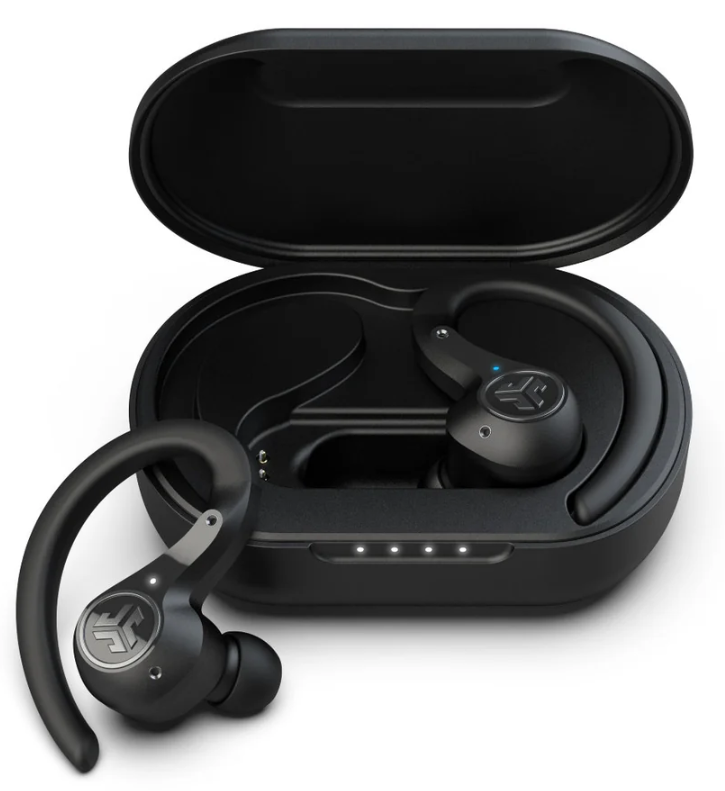
Introduction
The JLab Epic Air ANC Earbuds deliver a premium true wireless listening experience designed for professionals, audiophiles, and everyday users seeking superior sound quality and advanced noise control. Featuring hybrid active noise canceling (ANC) technology with three noise control modes—ANC On, ANC Off, and Be Aware pass-through—these earbuds enable you to tailor your listening environment precisely, whether at work, commuting, or relaxing.
With an industry-leading battery life of over 48 hours, combining earbuds and charging case, plus quick charge capabilities, the Epic Air ANC earbuds support extended use for music, calls, and video streaming without interruption. Additional features such as customizable sound via the JLab App, wear-detect auto play/pause, movie mode for low-latency audio, and wireless plus USB charging enhance convenience and user control.
These sweatproof (IP55-rated) earbuds offer a comfortable fit with multiple eartip options, making them ideal for fitness enthusiasts, remote workers, and daily commuters alike. Priced competitively around $120 to $150, the JLabb Epic Air ANC earbuds provide excellent value considering their robust feature set and 2-year warranty. They are widely available through major retailers and online platforms.
FIRST TIME SETUP
AUTO-CONNECTING EARBUDS
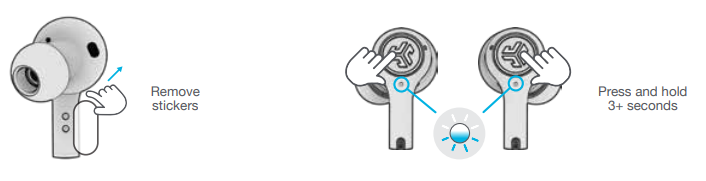
- A. Take the earbuds out of the charging case and remove stickers.
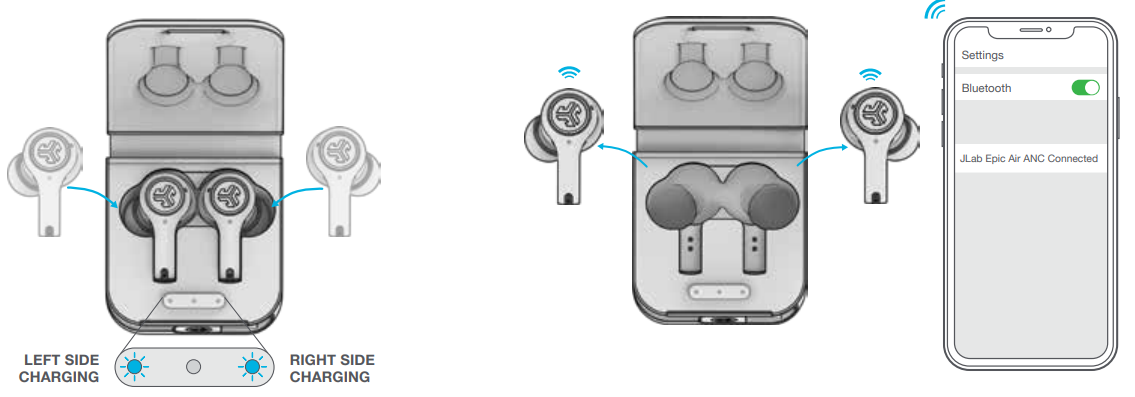
- B. Press and hold 3+ seconds on each earbud. Blinking blue and white light on one earbud will indicate ready to pair to your device.
CONNECTING BLUETOOTH
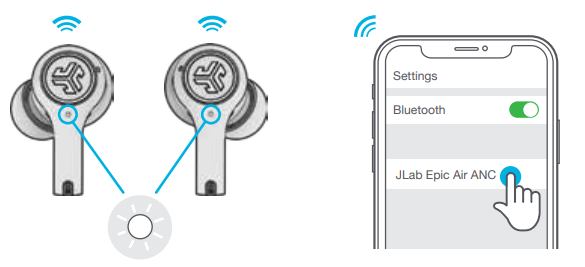
- Select “JLab Epic Air ANC” in your device settings.
- Voice prompt “Bluetooth connected” followed by solid white lights will indicate you are connected.
ADDING NEW / ADDITIONAL BLUETOOTH DEVICES:
Turn OFF Bluetooth from any previously connected device. Turn ON Bluetooth on the new device. Take the earbuds out of the case. Earbuds will automatically enter Bluetooth Pairing. Select “JLab Epic Air ANC” in the new device settings to connect.
CONTROLS
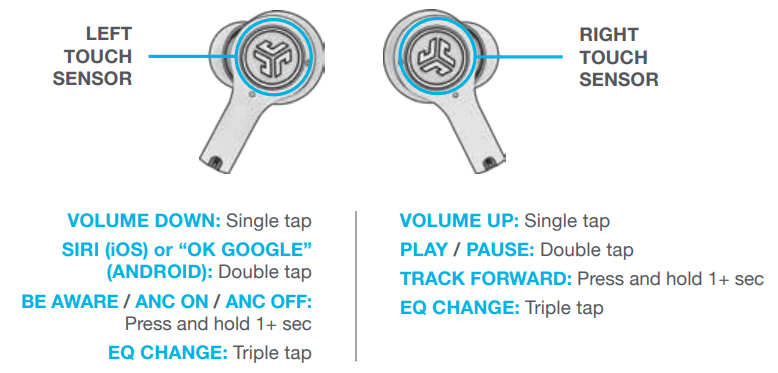
- ANSWER: Single Tap Left or Right
- HANG UP: Double Tap Left or Right
- REJECT INCOMING CALL: Press and hold 1+ seconds Left or Right
- MUSIC / MOVIE MODE: Press and hold both touch sensors simultaneously for 3+ seconds.
- POWER OFF WITHOUT CHARGING CASE: Turn off your Bluetooth from your device settings. The earbuds will then power off after 3 minutes.
VOICE PROMPTS
- “Hello”: Power ON
- “Ready to Pair”:
- Epic Air ANC is ready to pair with your Bluetooth device
- “Be Aware”: Hear your surroundings. “ANC ON”: Noise canceling ON
- “ANC OFF”: Noise canceling OFF
- “Bluetooth Connected”: The earbuds are connected to device
- “Battery Full”: 100-75%
- “Battery Medium”: 75-25%
- “Low Battery”: Less than 25%
- (When power decreases to 10%,
- “Low Battery” will play one time.
- “Goodbye”: Power OFF
AUTO-POWER ON/OFF
- Placing the earbuds in the charging case will power OFF the earbuds and start charging. Blue lights indicate earbuds are charging and will turn off when fully charged.
- When taken out of the charging case, they will auto power ON and connect.
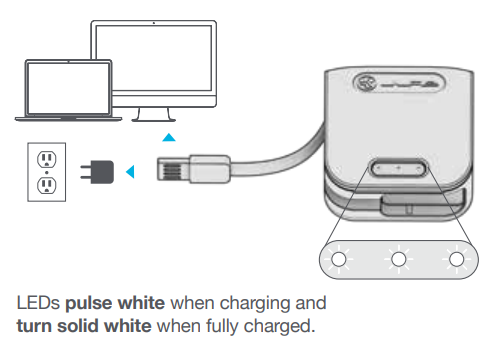
WIRED CHARGING
Connect the Epic Air ANC to a computer or a USB 5V 1A (or less) output device.
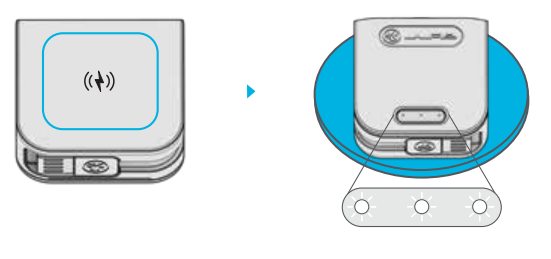
WIRELESS CHARGING
- Place the charging case on a wireless charging platform.
- LEDs pulse white when charging and turn solid white when fully charged.
TROUBLESHOOTING
NO AUDIO IN ONE EARBUD OR EARBUDS ARE DISCONNECTED (MANUAL RESET)
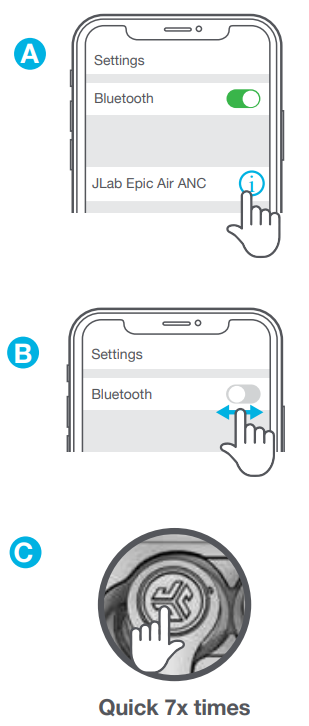
- Enter your Bluetooth device settings and forget the JLab Epic Air ANC. FigA
- Keep the earbuds in the charging case and on ONE earbud. Quickly tap the touch sensor 7x times. Light blinks blue 4 times. Fig C
- Repeat with the other earbud. Quickly tap the touch sensor 7x times. 3 Light blinks blue 4 times. FigC
- Take both earbuds out of the charging case. Wait for one earbud to turn solid white 4 and one to blink blue/white. You are now ready to pair with your Bluetooth device.
BLUETOOTH DEVICE DOES NOT CONNECT/RECONNECT
- Enter your Bluetooth device settings and forget the JLab Epic Air ANC. FigA
- 2 Turn OFF then ON Bluetooth. FigB
- Take the earbuds out of the case. Wait for one to turn solid white and one to blink blue/white.
- Select “JLab Epic Air ANC” in device settings to reconnect.
Technical Specifications of JLab Epic Air ANC Earbuds
- Speaker: 8mm dynamic neodymium drivers, frequency response 20Hz-20kHz
- Output Level: 110 ± 3 dB for clear, powerful audio
- Bluetooth: Class 1 Bluetooth 5.0 with 30+ ft wireless range
- Battery Life: 12+ hours per earbud (music playback at medium volume, ANC off); 36+ additional hours via charging case; up to 48+ hours total
- ANC Battery Impact: 8+ hours with ANC enabled
- Charging: 3-hour charge time for earbuds and case; quick charge 15 minutes = 1 hour playback; wireless charging and USB-A wired charging supported
- Microphones: Six MEMS microphones (three per earbud) for clear calls and effective noise cancellation
- Noise Control Modes: Hybrid Active Noise Canceling with ANC On, ANC Off, and Be Aware (pass-through)
- Special Features: Wear detect auto play/pause, movie mode for low latency audio, Find with Tile integration, customizable EQ via JLab App
- Fit & Protection: IP55 sweat and dust resistance; multiple eartip sizes, including gel, extra-long, and Cloud Foam
- Weight: 7g per earbud; 57g charging case
- Warranty: 2-year limited manufacturer warranty
Compared to similar models like the JLab Epic Lab Edition, which offers hybrid dual drivers and higher price points, the Epic Air ANC balances excellent sound quality and advanced ANC features at a more accessible price.
Pros & Cons of the JLab Epic Air ANC Earbuds
Pros
- Exceptional Battery Life: Over 48 hours total playback surpasses many competitors in this price range.
- Advanced Noise Cancelation: Hybrid ANC with three modes provides adaptable noise control for various environments.
- Customizable Sound: The JLab App allows users to tailor EQ settings for a personalized audio experience.
- Comfort & Fit: Multiple eartip options, including Cloud Foam,m ensure secure and comfortable wear for extended periods.
- Convenience Features: Wear detect auto play/pause, wireless charging, movie mode for low latency, and Find with Tile integration add practical value.
- Durability: IP55 sweat and dust resistance suitable for workouts and outdoor use.
Cons
- Midrange Bass Response: Some users report bass performance is solid but not as deep or punchy as higher-end rivals.
- ANC Battery Tradeoff: Noise canceling reduces battery life from 12+ to around 8 hours per charge.
- Charging Time: Three hours to full charge may be long compared to fast-charge competitors.
- Fit Variability: While multiple tips are included, some users with smaller ear canals find the fit less secure.
Overall, the JLab Epic Air ANC earbuds offer compelling value for users wanting comprehensive ANC features and long battery life without a premium price tag.
Customer Reviews of JLab Epic Air ANC Earbuds
Many users praise the JLab Epic Air ANC earbuds for their impressive battery longevity and effective noise canceling, often highlighting the convenience of wireless charging and the customizable sound profile via the app. Customers report clear call quality supported by the dual microphones and appreciate the IP55 rating for sweat resistance during workouts.
Common complaints include occasional connectivity hiccups typical of Bluetooth devices, and some users mention that the fit may require trying different eartips for optimal comfort. A few reviews note that the ANC is good but not on par with flagship models such as Sony or Bose.
The earbuds generally earn high ratings around 4 to 4.5 stars out of 5 across major retail sites, with recommendations focusing on their excellent price-to-performance ratio and suitability for daily use, calls, and casual listening.
Faqs
How do I set up my jlab Epic Air ANC Earbuds for the first time?
What should I do if one jlab Epic Air ANC Earbud has no audio or earbuds disconnect from each other?
Can I customize the touch controls and sound settings on jlab Epic Air ANC Earbuds?
Are jlab Epic Air ANC Earbuds compatible with all Bluetooth devices?
How can I optimize the battery life of my jlab Epic Air ANC Earbuds?
What are the recommended steps to clean and maintain jlab Epic Air ANC Earbuds?
How do I perform a factory reset on the jlab Epic Air ANC Earbuds if they are not functioning correctly?
Why is my jlab Epic Air ANC Earbuds Bluetooth not connecting or keeps disconnecting?
More jlab manuals
Leave a Comment