
Setup: Jlab Hear OTC Hearing Aid User Manual
Content
jlab Hear OTC Hearing Aid
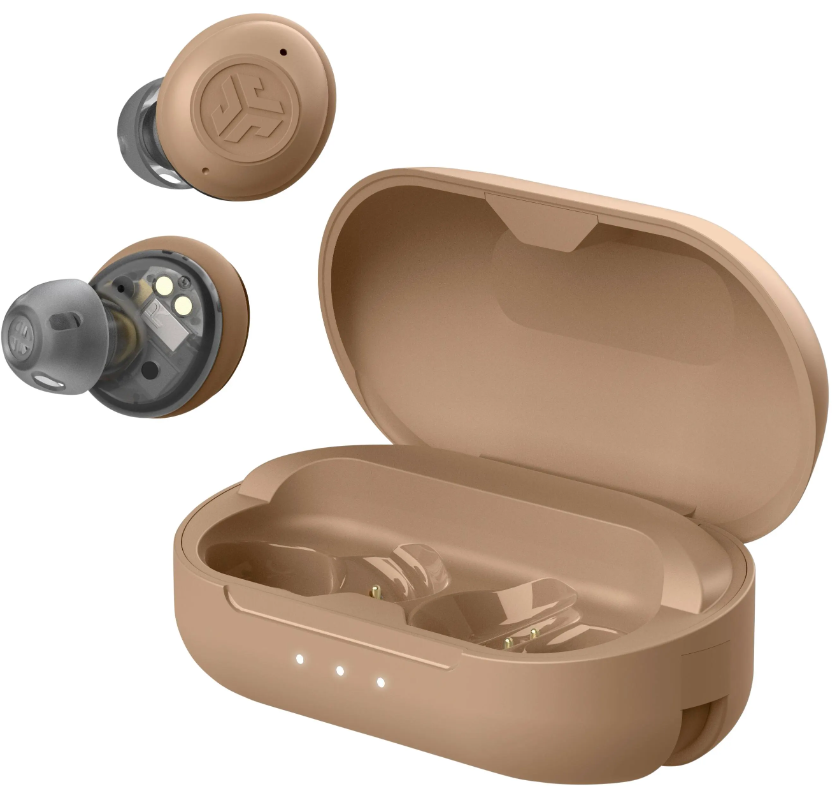
Introduction
The JJLabHear OTC Hearing Aid is a revolutionary 2-in-1 device that combines advanced hearing aid technology with wireless Bluetooth earbuds, designed to enhance your hearing experience while providing seamless audio streaming. This sleek, compact hearing aid is suitable for individuals experiencing mild to moderate hearing loss who want discreet, easy-to-use assistance in various daily environments.
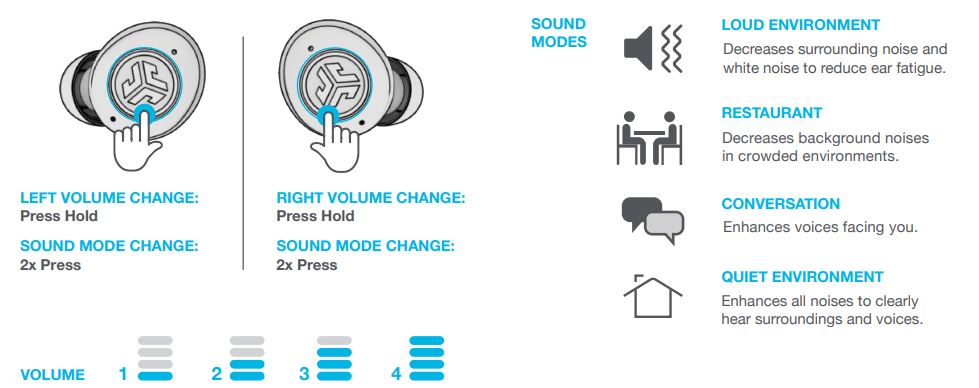
Key benefits include four preset hearing modes—Loud, Restaurant, Conversation, and Quiet—that optimize sound amplification based on your surroundings. In addition to improving speech clarity, the Hear OTC offers natural voice amplification and built-in feedback suppression for a comfortable listening experience. Its Bluetooth 5.3 connectivity enables users to stream music and take phone calls effortlessly from iOS or Android devices, making it a versatile earbud and hearing aid hybrid.
The JJLabHear OTC Hearing Aid targets active adults seeking budget-friendly, user-friendly hearing assistance without the stigma of traditional hearing aids. It fits comfortably in the ear and features independent volume controls for the left and right earbuds, ensuring personalized settings. The device is rechargeable, making it convenient and eco-friendly. Retailing for approximately $99.99, it is widely available online through authorized dealers and major electronics retailers.
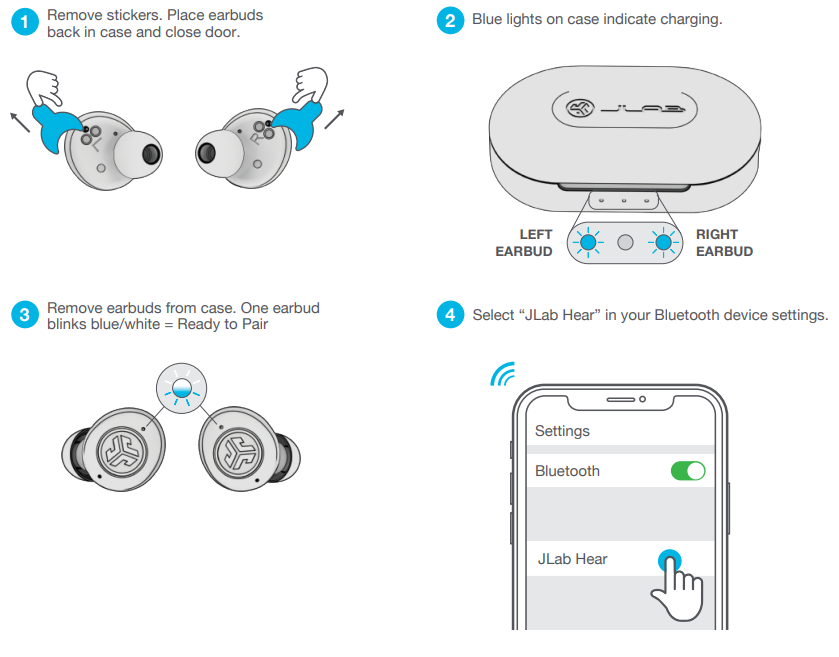
CONNECT YOUR DEVICE
(Don’t need Bluetooth? Follow steps 1-2 and turn to page 3 for Hearing Aid Only Mode.)
CONTROLS: HEARING AID
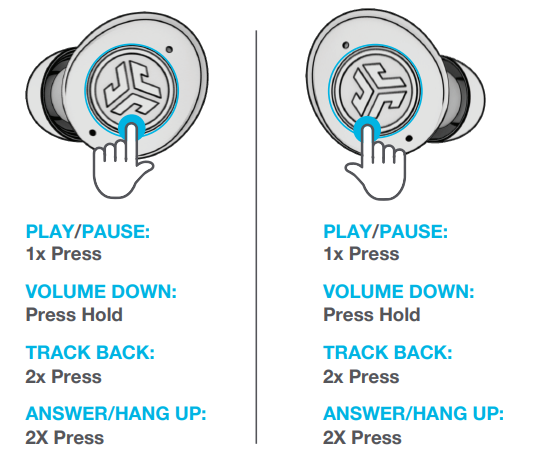
CONTROLS: BLUETOOTH MEDIA
FITTING
CHARGING EARBUDS
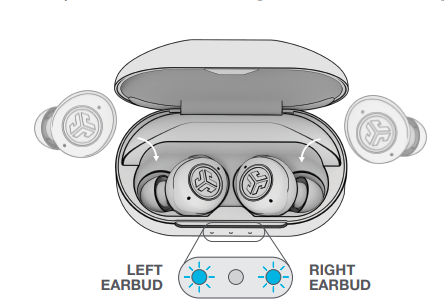
- Earbuds will power OFF and start charging when placed in the case. Blue lights = Earbuds charging
CHARGING CASE
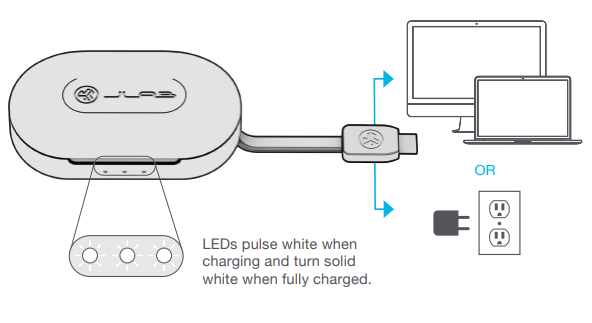
Connect the charging cable to the computer or USB-C charging device.
TROUBLESHOOTING CONNECTION (FACTORY RESET)
Specifications and Technical Features of jlab Hear OTC Hearing Aid
- Device Type: Over-the-Counter (OTC) Hearing Aid and Bluetooth Earbuds
- Connectivity: Bluetooth 5.3 compatible with iOS and Android devices
- Hearing Modes: Four preset modes – Loud, Restaurant, Conversation, Quiet for environment-specific sound amplification
- Audio Technology: Advanced directional microphones for improved speech-in-noise performance; natural voice enhancement and feedback suppression
- Controls: Touch controls for media, calls, and mode switching; independent volume for each earbud
- Battery: Rechargeable with USB-C charging case; no wall charger included, requires 2a .5 to 55-wattpower supply
- Additional Features: In-ear detection to toggle hearing or streaming mode automatically, EQ3 sound equalizer with presets (Music, Voice Call, Home, Street)
- App Support: Optional JLab Hearing Health App for custom sound adjustments, volume limit settings, and mode selection
- Dimensions: Compact, ergonomic earbud design
- Performance Benchmark: Rated SoundGrade B by HearAdvisor, placing it in the top 50% of OTC hearing aids and best performing under $250
Compared to similar OTC hearing aids, the jlab Hear OTC offers a unique blend of hearing enhancement and wireless earbud functionality at a competitive price point, excelling in music streaming quality and user-friendly controls.
Troubleshooting JLJLabear OTC Hearing Aid: Common Problems and Solutions.
- Problem: Device not turning on
Solution: Ensure the earbuds are charged using the USB-C charging case. Check power source and cable integrity. - Problem: Bluetooth connection issues
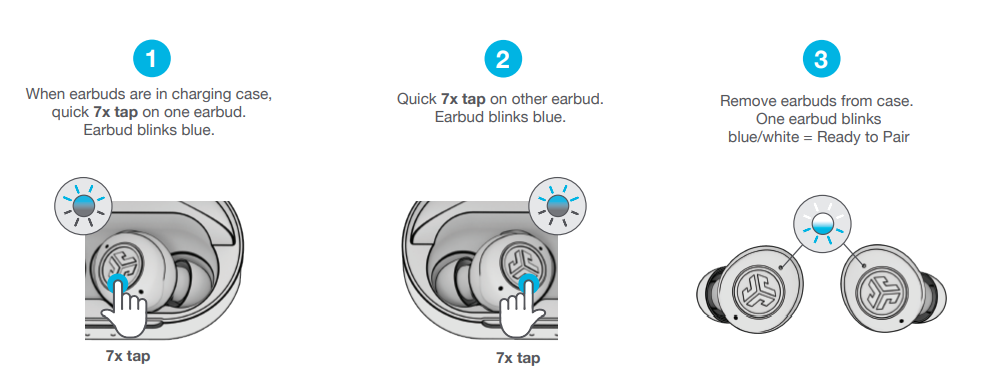
Solution: Restart the earbuds and your device. Re-pair the earbuds via Bluetooth settings. Ensure your device supports Bluetooth 5.3. - Problem: Audio feedback or whistling
Solution: Adjust the volume to a lower level or switch to a different preset hearing mode. Use the JLab Hearing Health App for further fine-tuning. - Problem: One earbud's volume is lower than the other
Solution: Use independent volume controls to balance the levels. Reset settings via the app if needed. - Problem: In-ear detection nis ot functioning properly
Solution: Clean the earbud sensor areas gently. Ensure earbuds fit correctly in the ear canal.
The product comes with a 2-year limited warranty covering manufacturing defects. For personalized assistance, users can contact JLab Support via their official website or the Hearing Health App support page.
Pros and Cons of the JLab Hear OTC Hearing Aid
- Pros:
- Affordable price (~$99.99), excellent value for a hearing aid with Bluetooth functionality
- Four versatile preset hearing modes tailored for different environments
- Dual-use design: serves as both hearing aids and wireless earbuds for calls and music
- Rechargeable with a convenient USB-C charging case; eco-friendly and portable
- Independent volume control for personalized binaural hearing
- Optional app customization enhances user control and hearing safety
- Cons:
- Limited fine-tuning options compared to premium hearing aids
- May perform below average on speech intelligibility in noisy environments according to expert tests
- Does not include a dedicated wall charger in the box
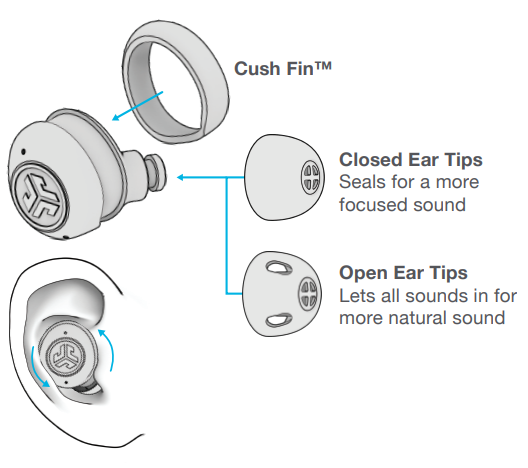
- Fit and comfort may vary depending on ear anatomy, requiring different eartip sizes
When compared with alternatives like Bose or Sony OTC hearing solutions, JJLabHear OTC is more budget-friendly but with fewer advanced customization features.
Customer Reviews and Feedback on JJLabHear OTC Hearing Aid
Users rate the JJLabHear OTC Hearing Aid with an average of around 3.7 out of 5 stars across major retail platforms, praising its dual functionality and ease of use. Many customers appreciate the natural sound quality and discreet design, highlighting the convenience of switching between hearing aid and earbud modes effortlessly.
Common praises include the effectiveness of the preset modes in various listening environments and the value for money at the $99 price point. However, some users mention occasional Bluetooth connectivity hiccups and wish for more advanced sound tuning options. Frequent feedback emphasizes the importance of fitting the earbuds properly for optimal performance.
Overall, theJJLabthe JJLabHearrrrecommended for first-time hearing aid users or those seeking a cost-effective hearing enhancement paired with everyday wireless earbud functionality.
Faqs
How do I set up my jlab Hear OTC Hearing Aid for the first time?
What should I do if my jlab Hear OTC Hearing Aid is not connecting to my phone via Bluetooth?
How do I switch between hearing aid mode and Bluetooth mode on the jlab Hear OTC Hearing Aid?
What are the different sound modes available on the jlab Hear OTC Hearing Aid and how do I change them?
Can I use the jlab Hear OTC Hearing Aid with both iOS and Android devices?
How can I optimize the battery life of my jlab Hear OTC Hearing Aid?
What maintenance steps are recommended for the jlab Hear OTC Hearing Aid to ensure long-term performance?
What do I do if my jlab Hear OTC Hearing Aid earbuds experience audio dropouts or lose connection intermittently?
Tags
More jlab manuals
- Usage: Jlab Nightfall Gaming Wired Headset User Manual
- Setup: Jlab Epic Air Sport ANC Earbuds User Manual
- Setup: Jlab Jbuddies Studio Wireless Headphones User Manual
- Setup: Jlab Jbuds Air Sport Earbuds User Manual
- Setup & Pairing: Jlab Go Work Pop Headset User Manual
- Setup: Jlab Epic Air ANC Earbuds User Manual
Leave a Comment