
Setup & Pairing: Jlab Go Work Pop Headset User Manual
Content
Jlab Go Work Pop Headset
Introduction
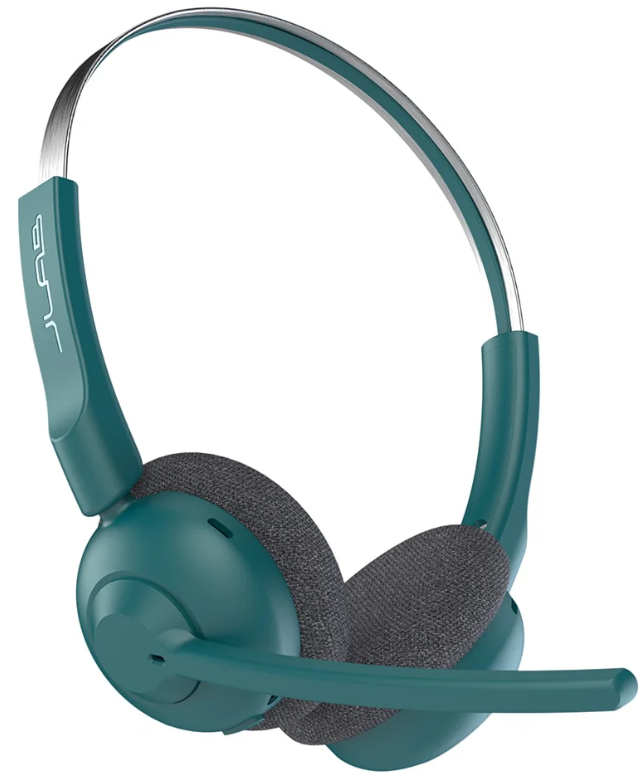
The JLabbb Go Work Pop Headset is a lightweight, wireless on-ear headset designed to elevate your work-from-home, remote meetings, and everyday communication experience. Featuring a powerful rotating boom microphone with environmental noise canceling (ENC) technology, it ensures crystal-clear voice calls by filtering out background noise, making it ideal for professionals, students, and remote workers who demand clear communication. The headset also incorporates cloud foam cushions for extended comfort during long hours of use, combining ergonomics with performance.
With Bluetooth 5.3 connectivity and multipoint support, the Go Work Pop can seamlessly switch between your phone and computer, enhancing productivity without the hassle of reconnecting devices. Its robust 50+ hour battery life and quick 2.5-hour charge time provide all-day usage, with a quick charge option delivering 5.5 hours of playback in just 10 minutes. The headset supports SBC and AAC codecs, delivering clear, rich audio for voice and music alike.
Priced in the affordable range of approximately $50–$70, the JLab Go Work Pop Headset is widely available through online retailers such as JLab’s official website, Best Buy, and Office Depot. Its combination of long battery life, noise-canceling microphone, and comfortable fit targets users who need reliable wireless headsets for video conferencing, call centers, online learning, and general productivity without breaking the bank.
Troubleshooting the JLab Go Work Pop Headset: Common Issues and Solutions.
Users of the JLabbb Go Work Pop Headset may encounter a few typical issues that can be resolved with straightforward troubleshooting:
- No sound or audio drops: Ensure the headset is fully charged and within 30 feet of the connected device. Re-pair the Bluetooth connection by turning the headset off and on. Clearing Bluetooth cache on your device can also help.
- Microphone not working or muffled voice: Verify the boom mic is correctly rotated down and not muted. Clean the mic area gently to remove any debris. Reset device permissions to allow microphone access.
- Battery charging problems: Use the included USB-C charging cable and power source rated at 5V, 1A. Avoid using incompatible chargers. If charging fails, try a different USB port or cable.
- Bluetooth connection issues or interference: Turn off other Bluetooth devices nearby to reduce interference. Restart the headset and your device. Update your device’s Bluetooth drivers if possible.
Preventive measures include keeping the headset clean, storing it properly, and charging it regularly. The JLabbb Go Work Pop Headset comes with a 2-year limited warranty covering manufacturer defects. For support, visit JLab’s official help site or contact their customer service via their support page or authorized retailers.
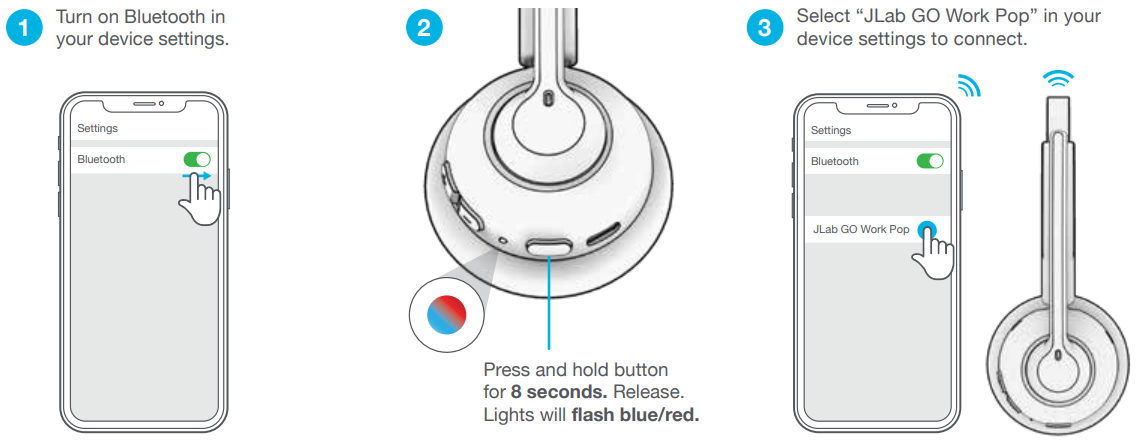
BLUETOOTH PAIRING
MULTIPOINT (CONNECT 2 DEVICES SIMULTANEOUSLY)
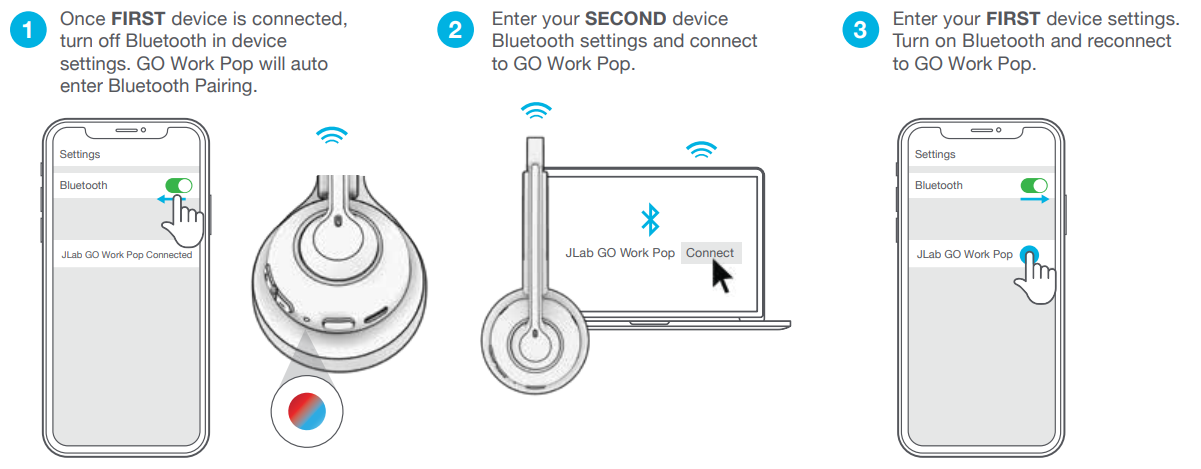
For more info and troubleshooting on MULTIPOINT,, visit: JLAB.COM/MULTIPOINT
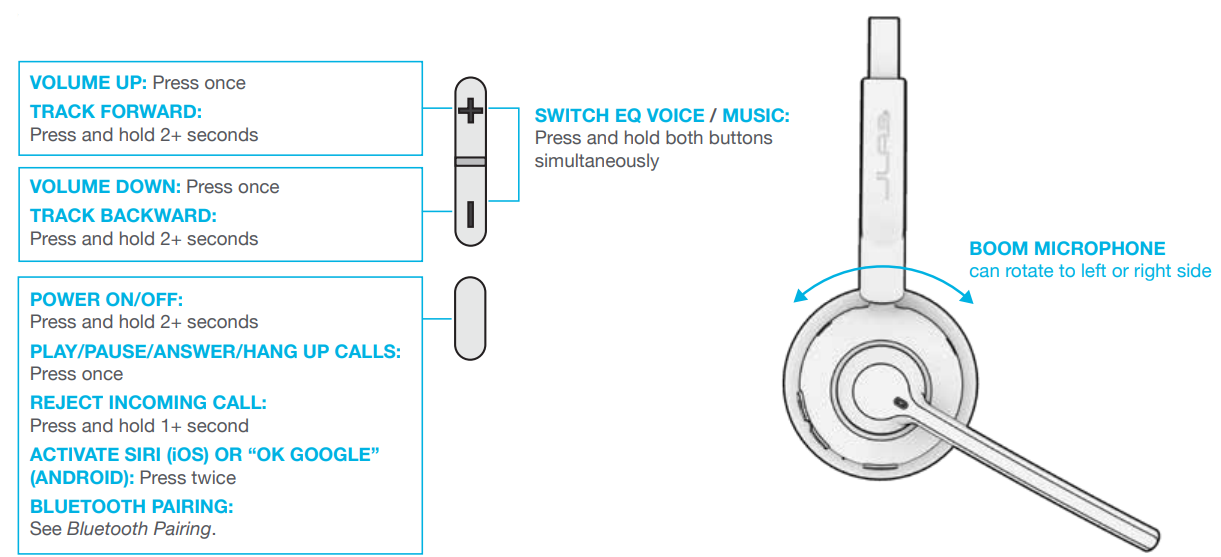
BUTTON FUNCTIONS
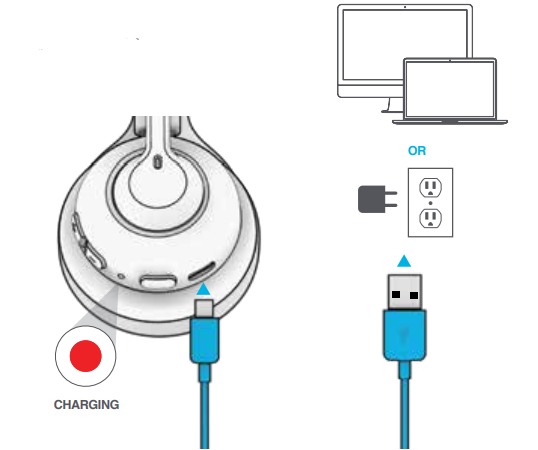
CHARGING
Connect to a computer or a USB 5V 1A (or less) output device.
CAUTIONS
- Avoid getting moisture or liquids on the headphone cups.
- Avoid extreme heat, cold, and humidity.
- Avoid dropping or crushing headphones, stressing the cable by rapid pulling or extreme force, or bending the cable at a sharp angle.
- Wax may build up in headphone cups, lowering the sound quality. Carefully remove the wax with a cotton swab or other small tool to improve the sound quality.
- If you experience discomfort or pain, try lowering the volume or discontinuing use temporarily.
- If you experience regular discomfort while using this product, discontinue use and consult your physician.
- We recommend you treat your headphones as you would a nice pair of sunglasses and keep them in a safe location when not in use.
Pros & Cons of the JLab Go Work Pop Headset
Pros
- Exceptional Battery Life: Over 50 hours of wireless playtime on a single charge supports intensive daily use without frequent recharging.
- Clear Communication: Dual MEMS microphones with noise canceling enhance voice clarity by reducing background noise during calls.
- Comfortable Design: Cloud foam ear cushions and a lightweight build (about 101 grams) ensure all-day comfort for on-ear wear.
- Multipoint Bluetooth Connectivity: Easily switch between devices, such as smartphones and laptops, for flexible multitasking.
- Quick Charge Feature: 10 minutes of charging provides 5.5 hours of talk time, ideal for users on the go.
Cons
- Limited Codec Support: Supports SBC and AAC codecs but lacks higher-end codecs like aptX for audiophile-grade wireless audio quality.
- On-Ear Design: May not fully isolate external noise compared to over-ear models, potentially less suitable for very noisy environments.
- No Carrying Case Included: Users must purchase a case separately for better protection during transport.
- Lower Output Volume Compared to Higher-End Models: Output at about 105 dB may be quieter than some competitors.
Compared to alternatives like the JLab GO Work Gen 2 headset, the Go Work Pop is lighter and more affordable but offers slightly less battery life and fewer advanced features. It delivers solid value for users prioritizing comfort, battery endurance, and clear voice communication at a budget-friendly price.
Customer Reviews of the JLab Go Work PoHeadset
Customers consistently praise the jlab Go Work Pop Headset for its excellent battery life and comfort, highlighting the cloud foam ear cushions as a key feature for long workdays. Many users report clear call quality thanks to the noise-canceling boom mic, making it a favorite for remote work and video conferencing. Typical star ratings average between 4 and 4.5 out of 5.
Common complaints include occasional Bluetooth connectivity hiccups and that the on-ear design does not fully block ambient noise in loud settings. Some users desire a carrying case and feel the mic could be slightly more sensitive. However, most reviewers recommend the headset for its value, comfort, and durable battery life, especially at its price point around $60.
Overall, buyers find the JLabb Go Work Pop Headset a reliable, affordable tool for improving their remote communication experience and multitasking with multiple devices.
Faqs
How do I set up my jlab Go Work Pop Headset for the first time?
What should I do if my jlab Go Work Pop Headset is not connecting to my device?
Can I use my jlab Go Work Pop Headset with multiple devices at once?
How do I optimize the audio quality of my jlab Go Work Pop Headset?
What are the key features that make jlab Go Work Pop Headset different?
How often should I clean and maintain my jlab Go Work Pop Headset?
Can I use my jlab Go Work Pop Headset during workouts or outdoor activities?
What should I do if my jlab Go Work Pop Headset's microphone is not working clearly?
Tags
More jlab manuals
Leave a Comment