
Setup: Jlab Go Pods Earbuds User Manual
Content
Jlab Go Pods Earbuds
Introduction
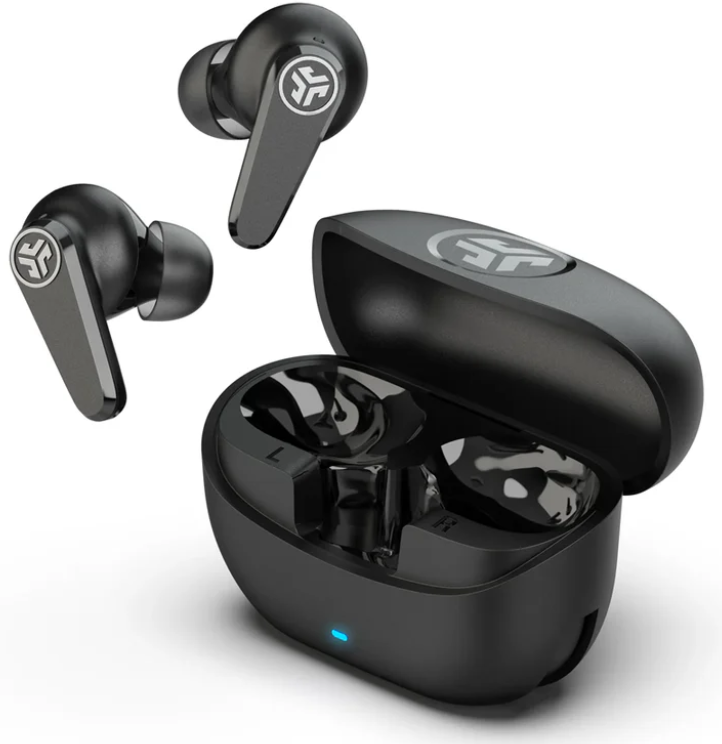
The JLab Go Pods Earbuds are a versatile, affordable solution for those seeking quality audio, active noise cancellation, and modern features without the premium price tag. Designed for users who value both comfort and performance, these true wireless earbuds feature a sleek stem design, hybrid active noise cancellation (ANC), and customizable sound via the JLab App. The Go Pods ANC are ideal for commuters, students, fitness enthusiasts, and remote workers, offering up to 26 hours of playtime, clear call quality, and seamless device switching thanks to Bluetooth Multipoint technology. Their IP55 rating ensures sweat and splash resistance, making them suitable for workouts and outdoor use.
What sets the JLab Go Pods Earbuds apart is their combination of robust ANC, customizable EQ, and practical features like fast charging and multipoint connectivity—all at a competitive price point typically ranging from $30 to $60, depending on retailer and promotions. The earbuds are widely available through major electronics retailers and online marketplaces, making them accessible to a broad audience. Whether you're looking to immerse yourself in music, take calls on the go, or block out distractions, the JLab Go Pods Earbuds deliver a compelling mix of functionality, comfort, and value.
Specifications
- Drivers: 10mm dynamic drivers for rich, balanced sound
- Active Noise Cancellation: Hybrid ANC with adjustable levels via app
- Battery Life: Up to 7.5 hours per earbud (ANC off), 5+ hours (ANC on); total playtime 26+ hours (ANC off), 18+ hours (ANC on) with charging case
- Fast Charging: 10 minutes = 1 hour of playback
- Bluetooth: Bluetooth 5.3, Multipoint connectivity for two devices, Google Fast Pair support
- Water Resistance: IP55 sweat and splashproof protection
- Microphones: Dual environmental noise-canceling mics per earbud for clear calls
- App Features: Customizable 10-band EQ, touch controls, max volume limit, workout interval timer, music/movie modes
- Weight: Lightweight for all-day comfort
Compared to similar earbuds in their price range, the JLab Go Pods Earbuds stand out for their hybrid ANC and multipoint connectivity—features often reserved for more expensive models. The 10-band customizable EQ and IP55 rating further differentiate them from basic entry-level options.
PAIR UP
Remove the tab and close the door.
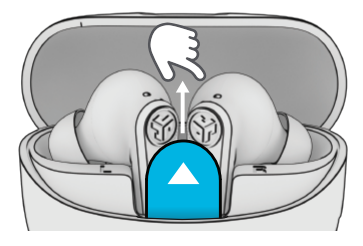
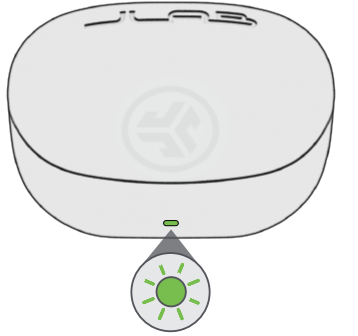
Light on the case indicates a charge. Remove earbuds from case.
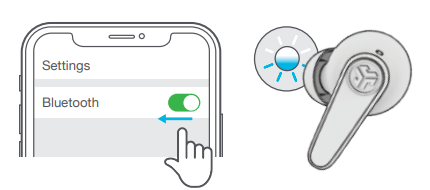
One earbud blinks blue/white = Ready to Pair
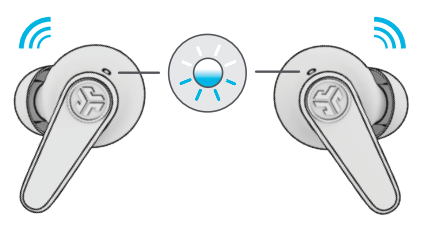
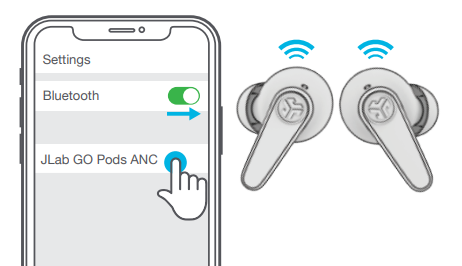
Select JLab GO Pods ANC in your Bluetooth settings to connect.
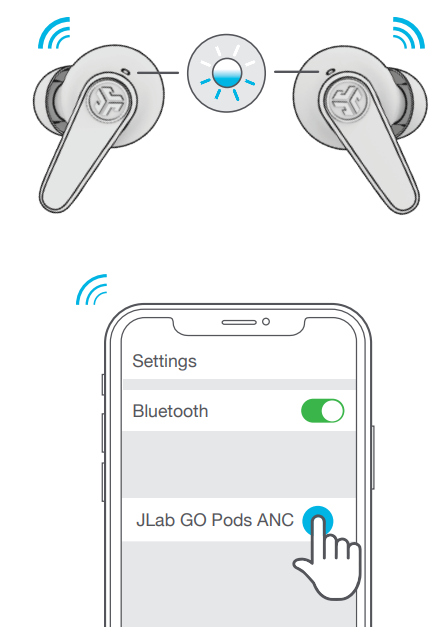
Voice prompt “Bluetooth connected” followed by lights off will indicate connection.
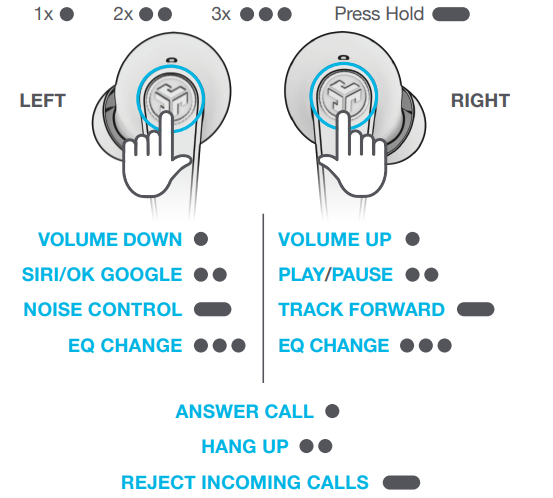
GO AHEAD, PRESS THE BUTTON
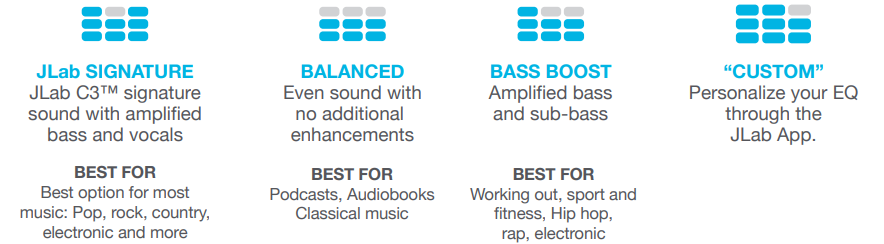
THE RIGHT SOUND FOR EVERY MOMENT
We get it, sound is personal. Choose your sound preferences from our EQ4 settings and customize your sound style to match exactly what you’re doing.
GET CHARGED (EARBUDS)
.png)
GET CHARGED (CASE)
Connect the GO Pods ANC to a computer or USB-C output device.
.png)
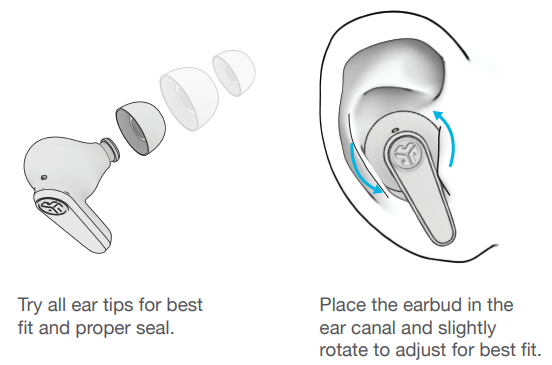
FIND YOUR FIT
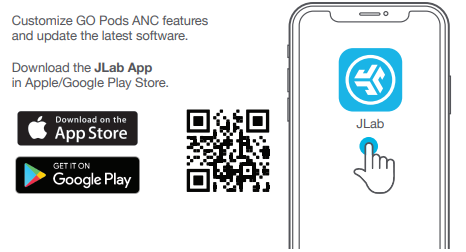
DOWNLOAD THE APP
MULTIPOINT
Once the FIRST device is connected, turn off Bluetooth in device settings. Earbuds will auto-enter Bluetooth Pairing.
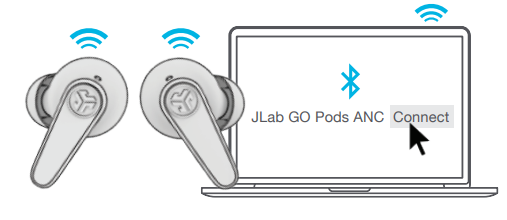
Enter your SECOND device Bluetooth settings and connect to GO Pods ANC.
Enter your FIRST device Bluetooth settings. Turn on Bluetooth and connect the GO Pods ANC.
Troubleshooting
- No Power/Charging Issues: Ensure the charging case is fully charged. Use the included USB-C cable and a compatible power adapter (2.5–5W recommended). Clean charging contacts if the earbuds aren't charging.
- Pairing Problems: Reset earbuds by holding the touch controls for 15 seconds. Remove previous pairings from your device. Ensure Bluetooth is enabled and within 30 feet.
- Low Volume/Distorted Sound: Check for debris in the earbud mesh. Adjust the volume on both the earbuds and your device. Try a different EQ preset in the JLab App.
- ANC Not Working: Update firmware via the JLab App. Ensure ANC is enabled in the app settings.
- Preventive Measures: Regularly clean earbuds and case. Store in a dry place. Avoid exposure to extreme temperatures.
- Warranty & Support: JLab offers a 2-year limited warranty. Contact JLab support via their website for technical assistance or warranty claims.
YOUR WARRANTY
All warranty claims are subject to JLab authorization,, and at our sole discretion. Retain your proof of purchase to ensure warranty coverage.
CONTACT US
Reach out to us at support@jlab.com or visit jlab.com/contact
Pros & Cons
Pros
- Value for Money: Hybrid ANC and multipoint at a budget price
- Customizable Sound: 10-band EQ and multiple sound modes via app
- Comfort & Fit: Stem design and multiple ear tips for secure, comfortable wear
- Battery Life: Up to 26+ hours with case, fast charging support
- Durability: IP55 rating for sweat and splash resistance
Cons
- ANC Performance: Effective for the price, but can't match premium ANC earbuds; some background noise may remain
- Single Earbud Use: Limited features when using only one earbud
- App Navigation: Some users may find the app interface less intuitive
- Build Quality: Plastic construction feels less premium than higher-end models
For buyers seeking affordable noise-canceling earbuds with strong features, the JLab Go Pods Earbuds offer excellent value, though audiophiles may prefer more expensive alternatives for superior ANC and audio fidelity.
Customer Reviews
User feedback for the JLab Go Pods Earbuds highlights their impressive ANC performance for the price, comfortable fit, and long battery life. Many customers praise the customizable EQ and multipoint connectivity as standout features. Common complaints include occasional connectivity dropouts and a desire for even stronger noise cancellation. Star ratings typically range from 4 to 4.5 out of 5, with most users recommending them for budget-conscious buyers seeking reliable, feature-rich wireless earbuds. Testimonials often mention the earbuds' suitability for daily commutes, workouts, and remote work. If you prioritize affordability and practical features over luxury build quality, the JLab Go Pods Earbuds are a smart choice.
Faqs
How do I set up jlab Go Pods Earbuds for the first time?
What should I do if my jlab Go Pods Earbuds are not connecting properly?
Can I use jlab Go Pods Earbuds with my Android device?
How often should I clean my jlab Go Pods Earbuds?
What are the key features that make jlab Go Pods Earbuds different?
Can I use jlab Go Pods Earbuds in the rain?
How do I optimize the battery life of my jlab Go Pods Earbuds?
What should I do if one earbud is louder than the other?
More jlab manuals
Leave a Comment