
Setup: Jlab Jbuds Lux ANC Headphones User Manual
Content
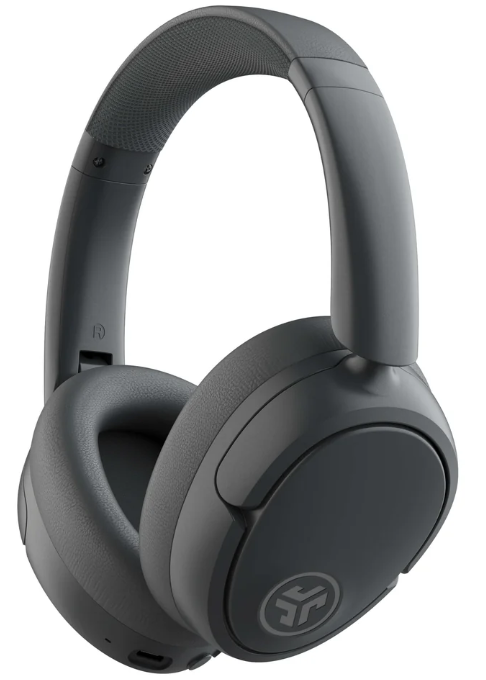
JLab Jbuds Lux ANC Headphones
IntroJLabion
The jlab Jbuds Lux ANC Headphones redefine wireless over-ear audio with a blend of premium sound quality, advanced noise cancellation, and superior comfort. Featuring powerful 40mm drivers and hybrid Smart Active Noise Canceling (ANC) technology, these headphones deliver immersive, lab-quality sound that elevates every listening experience. Designed for music enthusiasts, frequent travelers, remote workers, and casual listeners alike, the Jbuds Lux ANC seamlessly blocks out distractions whether commuting, working from home, or relaxing.
Unique selling points include their hybrid ANC that reduces up to 35 dB of ambient noise, an ultra-long battery life of up to 70 hours (40 hours with ANC on), and Cloud Foam earcups for all-day comfort. Multipoint Bluetooth 5.4 connectivity allows simultaneous pairing with multiple devices, and the JLab App offers extensive sound customization via EQ3 presets and personal equalizer controls. Additional features such as Environmental Noise Canceling microphones, foldable design, and Google Fast Pair compatibility make these headphones versatile and user-friendly.
The jlab Jbuds Lux ANC Headphones are competitively priced in the $80 to $100 range and widely available through major retailers and online stores. They come with a 2-year limited warranty, reflecting JLab’s commitment to quality and customer support.
Specifications of JLab Jbuds Lux ANC Headphones
- Drivers: 40mm dynamic drivers delivering rich and clear sound
- Active Noise Canceling reduces ANC, reducing noise up to 35 dB
- Microphones: 3 Environmental Noise Canceling (ENC) mics plus 5 ECM microphones for clear calls
- Connectivity: Bluetooth 5.4 with multipoint pairing; supports SBC and AAC codecs; USB-C wired playback option
- Battery Life: Up to 70 hours total playback; 40 hours with ANC enabled; Quick charge: 10 minutes provides 7.5 hours
- Controls & Features: Physical buttons, voice assistant support, foldable design, Google Fast Pair, Wireless Share Mode
- App Support: JLab App for custom EQ3 sound presets, noise control, music/movie modes, and Safe Hearing
- Dimensions & Weight: 7.47” height, 6.13” length, 3.23” width; 235 grams total weight
- Comfort: Cloud Foam ear cushions and faux leather headband for extended use comfort
Compared to similar ANC headphones in its price bracket, the Jbuds Lux ANC stand out with superior battery life, multipoint connectivity, and a robust app ecosystem. While some alternatives may offer stronger bass or more premium materials, JLab balances sound, comfort, and features effectively for everyday use.
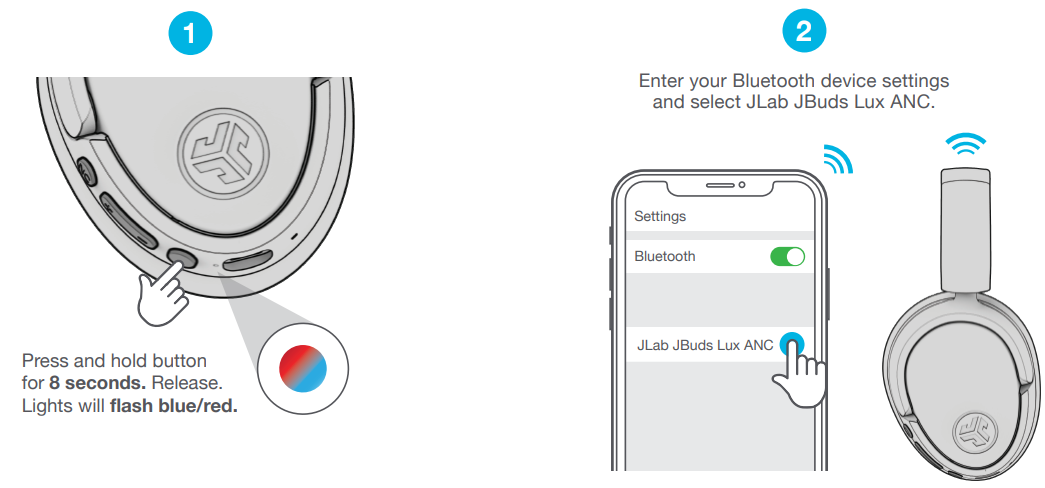
BLUETOOTH
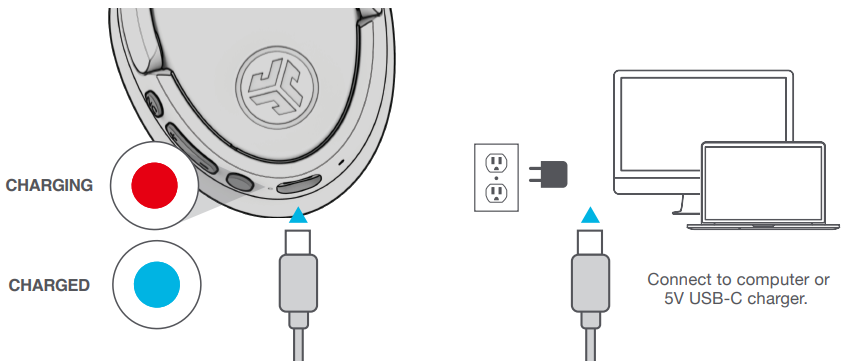
CHARGING
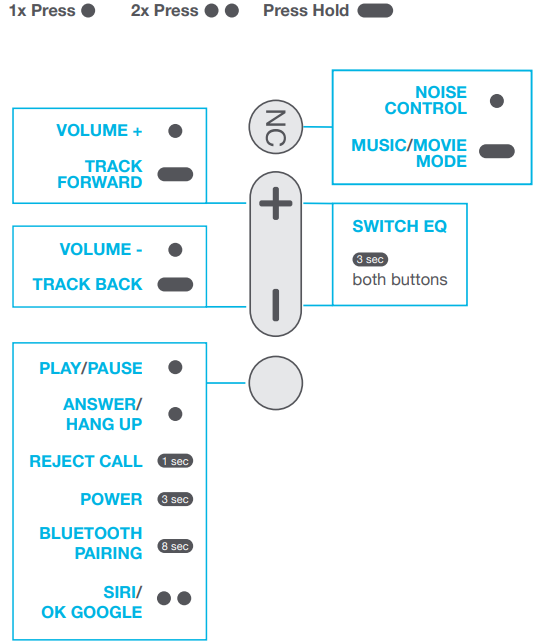
CONTROLS
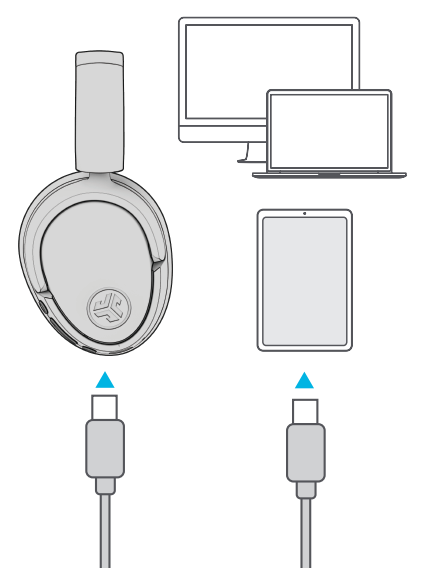
GO WIRED
Connect the USB-C cable to the computer/tablet/phone for wired mode.
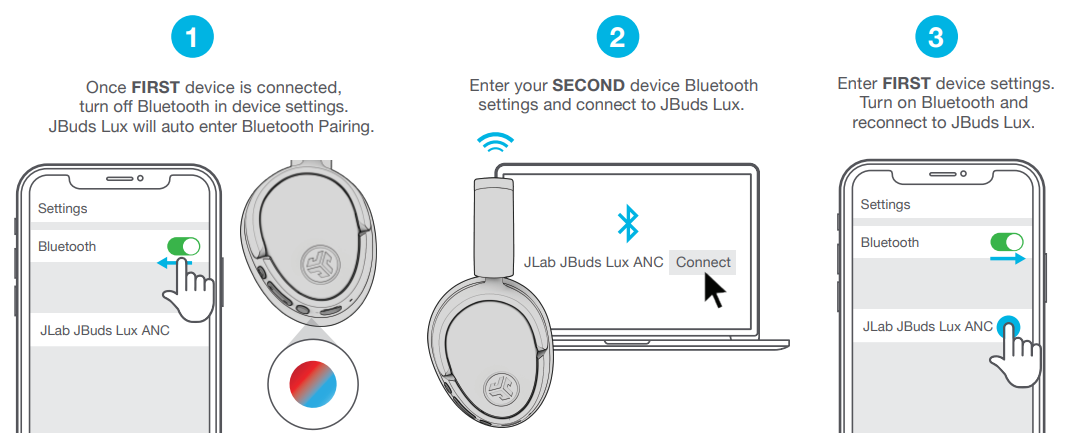
BLUETOOTH MULTIPOINT (CONNECT 2 DEVICES SIMULTANEOUSLY)
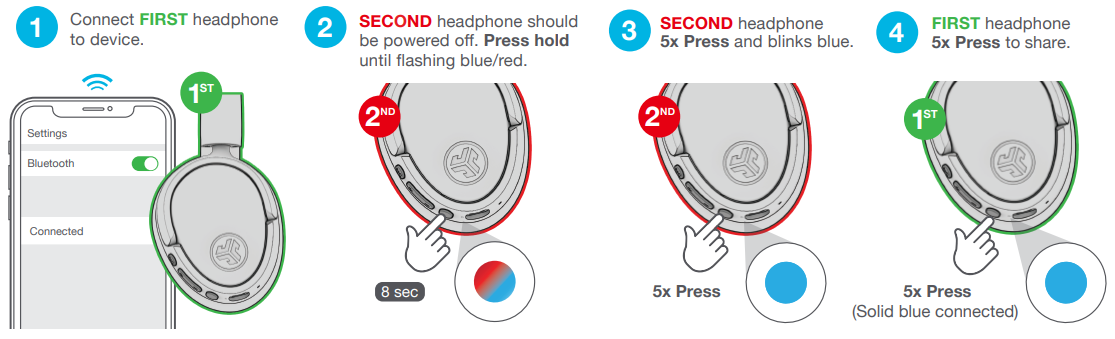
SHARE MODE (SHARE BETWEEN TWO JBUDS LUX HEADPHONES)
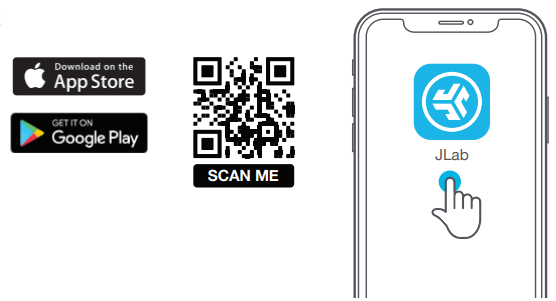
DOWNLOAD THE MOBILE APP
Customize JBuds Lux features and update the latest software.
Troubleshooting JLab Jbuds Lux ANC Headphones
- No Power or Not Charging: Ensure the USB-C charging cable and port are clean and properly connected. Use the original charger or one with DC 5V, 1A output. Charge for at least 2a .5 hours for full battery.
- Bluetooth Connection Issues: Reset the headphones by holding the power button for 10 seconds, then re-pair with devices. Clear Bluetooth cache on your device if needed. Keep devices within 30 feet.
- Active Noise Canceling Not Working: Confirm ANC is enabled via the headphones or JLab App. Update firmware through the app's OTA section. If ANC remains ineffective, try resetting the device.
- Microphone or Call Quality Problems: Use in quiet environments to reduce wind noise. Ensure ENC microphones are unobstructed. Update firmware and verify app settings for clear voice pickup.
- Error Codes: The headphones do not display any error codes but blinking LED patterns indicate battery or connectivity status—refer to the manual for specifics.
- Preventive Measures: Regularly update firmware, avoid exposing headphones to extreme temperatures, and store folded headphones to preserve ear cushion shape.
For further assistance, JLab offers a 2-year limited warranty and customer support via their official website or support line.
YOUR WARRANTY
All warranty claims are subject to JLab authorization and at our sole discretion. Retain your proof of purchase to ensure warranty coverage.
CONTACT US
Reach out to us at support@jlab.com or visit jlab.com/contact
Pros and Cons of JLab JBuds Lux ANC Headphones
Pros
- Exceptional Battery Life: Up to 70 hours playback time, surpassing many competitors.
- Effective ANC: Hybrid noise cancellation reduces up to 35 dB for immersive listening.
- Comfortable Design: Cloud Foam cushions and lightweight (235g) make them suitable for long sessions.
- Multipoint Connectivity: Simultaneous connection to two devices boosts productivity and ease of use.
- Customizable Sound: JLab App with EQ3 presets and personalized equalizer settings.
- Foldable and Portable: Convenient for travel and storage.
Cons
- Be-Aware Mode Weakness: Ambient sound amplification is less pronounced compared to competitors.
- Fit Limitations: Teardrop-shaped earcups may feel tight for users with larger ears.
- Heat Build-Up: Some users report slight warmth during extended wear in hot climates.
- No USB Power Adapter Included: Charging cable,e is included but not the wall adapter.
Overall, the value for money is strong, especially considering the 2-year warranty and premium features. Alternatives like Sony or Bose ANC headphones may offer stronger ANC or , build quality but at a significantly higher price.
Customer Reviews and Feedback on jlab Jbuds Lux ANC Headphones
Usersconsistently praisee the JLab Jbuds Lux ANC Headphones for their long battery life, comfortable fit, and excellent noise cancellation that performs well in various environments. The sound profile, emphasizing bass with clear highs, suits commuters and casual listeners who appreciate immersive audio. Many highlight the convenience of multipoint Bluetooth and the customizable sound options via the JLab App.
Common complaints include a less effective “Be-Aware” ambient sound mode and occasional heat buildup during prolonged use. Some users with larger ears find the earcups a bit snug. Despite these, the headphones maintain an average rating above 4 stars out of 5, with recommendations for anyone seeking affordable ANC headphones with premium features.
Star Ratings: ★★★★☆ (4.2/5 average)
Faqs
How do I set up jlab Jbuds Lux ANC Headphones for the first time?
What should I do if jlab Jbuds Lux ANC Headphones is not connecting via Bluetooth?
Can I use jlab Jbuds Lux ANC Headphones with multiple devices simultaneously?
How do I customize the sound on jlab Jbuds Lux ANC Headphones?
What are the key features that make jlab Jbuds Lux ANC Headphones different?
How often should I maintain jlab Jbuds Lux ANC Headphones?
Can I use jlab Jbuds Lux ANC Headphones in wired mode?
Are jlab Jbuds Lux ANC Headphones compatible with Google Fast Pair?
Tags
More jlab manuals
Leave a Comment