
Setup & Pairing: Jlab Epic Pods ANC Erabuds User Manual
Content
JLab Epic Pods ANC Earbuds
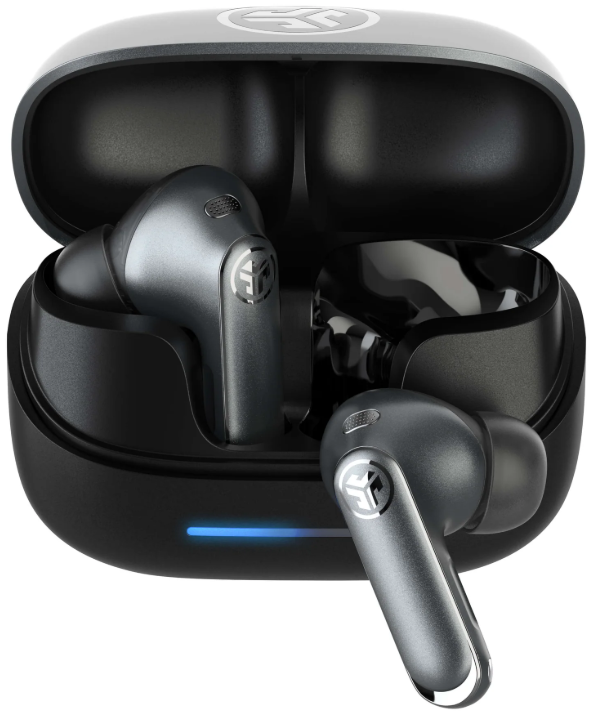
Introduction
The JLab Epic Pods ANC Earbuds represent a premium leap in true wireless earbud technology, designed for users who demand superior sound quality combined with cutting-edge noise cancellation. These earbuds feature a revolutionary hybrid dual-driver system, including Knowles Balanced Armature drivers paired with dynamic 10mm drivers, delivering crisp highs, rich mids, and powerful bass for an immersive audio experience. Featuring adaptive active noise canceling (ANC) technology that reduces ambient noise up to 42dB, the Epic Pods ANC are perfect for commuters, remote workers, and audiophiles alike.
With over 40 hours of total playtime, including a robust wireless charging case, these earbuds are engineered for all-day use,, whether you’re traveling, working, or relaxing. The built-in Lab Spatial Audio enhances soundstage performance, providing an engaging 3D audio experience. Seamless multi-device connectivity via Bluetooth Multipoint allows users to switch effortlessly between smartphones and laptops. Splashproof with an IP55 rating, the Epic Pods ANC are resilient enough for everyday activities.
Pricing typically ranges from $150 to $170, making them a competitive choice in the mid-to-high-end wireless earbud market. Available through JLab's official website and major retailers, the Epic Pods ANC combine affordability with professional-grade audio technology for users seeking premium earbuds with advanced features.
Specifications of JLab Epic Pods ANC True Wireless Earbuds
- Driver Configuration: Hybrid dual drivers – Knowles Balanced Armature + 10mm dynamic drivers for full-range audio fidelity
- Audio Quality: Hi-Res Audio support via LDAC (Android) and AAC (iOS) codecs
- Adaptive Active Noise Canceling: Up to 42dB noise reduction, automatically adjusting to the environment
- Battery Life: 8+ hours per charge with ANC on (10+ hours ANC off); wireless charging case adds 30+ hours (ANC off) or 20+ hours (ANC on) for total 40+ hours
- Microphones: Six microphones for crystal-clear calls and enhanced ANC performance
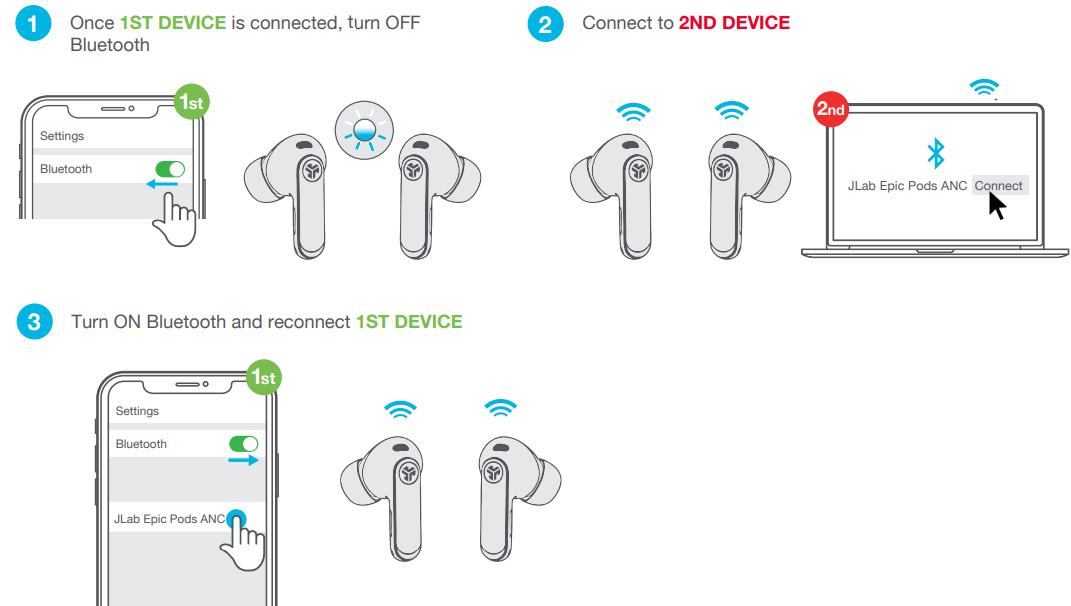
- Connectivity: Bluetooth 5.3 with Multipoint for connecting two devices simultaneously
- Durability: IP55-rated splashproof for sweat and rain resistance
- Controls: Intuitive touch and force press controls for playback, calls, and ANC mode toggle
- Special Features: Built-in Lab Spatial Audio, customizable sound via JLab app, fast charging (5 hours of playback in 10 minutes)
Compared to similar products like the JLab Epic Lab Edition, the Epic Pods ANC offer slightly less total playtime but focus more on adaptive ANC technology and a stem-style design, making them ideal for users prioritizing noise cancellation and ergonomics in a mid-priced package.
PAIR UP
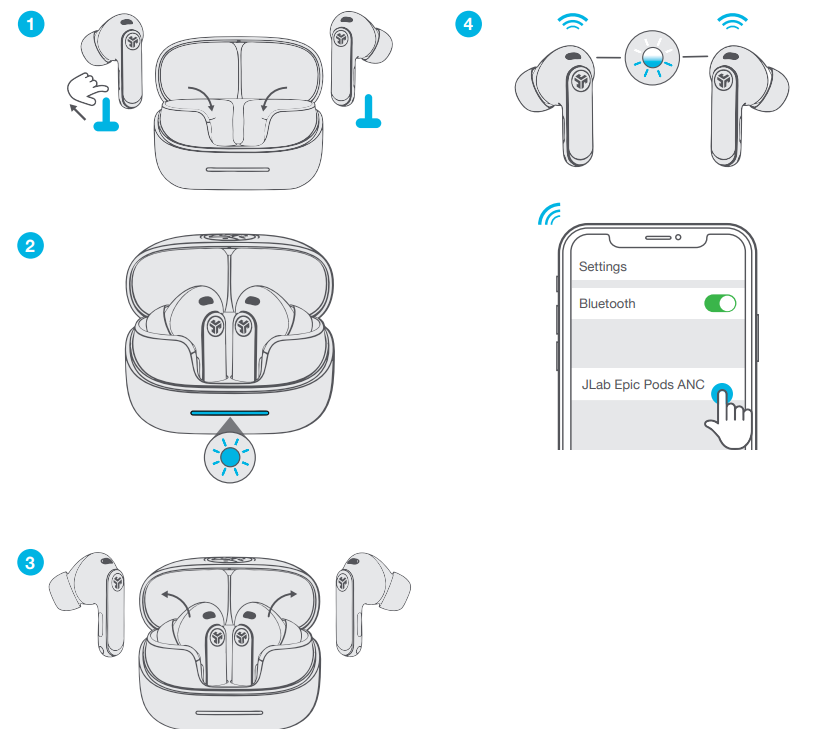
GO AHEAD, PRESS THE BUTTON
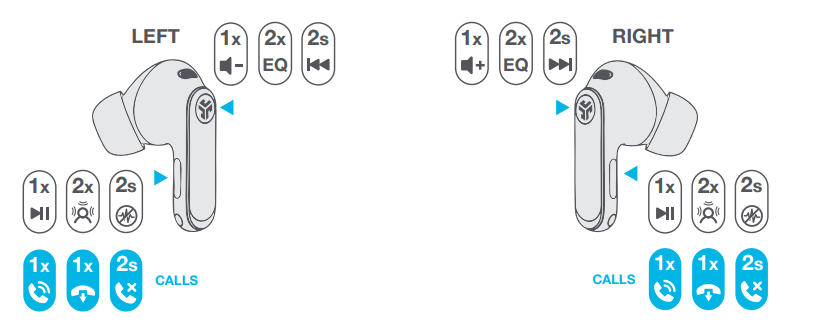
GET CHARGED (EARBUDS)
.png)
GET CHARGED (CASE)
.png)
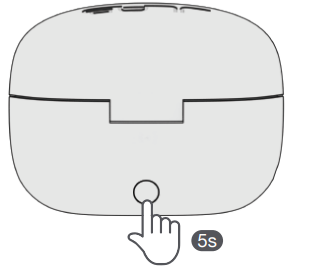
RESET BUTTON
MULTIPOINT
DOWNLOAD THE APP
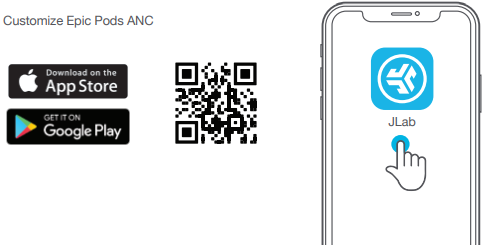
Customize Epic Pods ANC
Troubleshooting for JLab Epic Pods ANC Earbuds
- No Audio or One Earbud Not Working: Ensure earbuds are charged; reset by placing them back in the case and re-pair with the device via Bluetooth settings.
- Bluetooth Connection Issues: Clear Bluetooth cache on your device, turn Bluetooth off and on, and try reconnecting. Ensure no other devices interfere by disabling multipoint temporarily.
- ANC Not Activating or Weak Noise Cancelation: Confirm ANC mode is enabled via touch controls or JLab app; update firmware if available.
- Charging Problems: Use a USB-C cable with a 2.5 to 5 Watts power supply; clean charging contacts if charging is inconsistent.
- Error Codes: No specific error codes, but frequent disconnection may indicate a firmware update is needed or a hardware defect.
Preventive tips include regular firmware updates via the JLab app, avoiding extreme temperatures, and keeping earbuds clean. Warranty coverage is typically two years with a 30-day return policy. For additional support, contact JLab customer service through their official website or support email available in product documentation.
YOUR WARRANTY
All warranty claims are subject to JLab authorization and at our sole discretion. Retain your proof of purchase to ensure warranty coverage.
CONTACT US
Reach out to us at support@jlab.com or visit jlab.com/contact
Pros and Cons of JLab Epic Pods ANC Earbuds
- Pros:
- Exceptional sound quality with hybrid dual drivers delivering balanced highs and powerful bass
- Adaptive ANC effectively reduces ambient noise up to 42dB, enhancing focus in noisy environments
- Long battery life with fast wireless charging supports extended use
- Bluetooth Multipoint allows seamless device switching
- IP55 splashproof rating provides durability for active lifestyles
- Cons:
- Does not include a wall charger, requiring a separate purchase or use of an existing USB power source
- Battery life is slightly less than some competitors, like the Epic Lab Edition (40+ hours vs. 56+ hours)
- Touch controls may require initial learning for intuitive use
- Some users may prefer earbuds with more compact designs or additional color options
Overall, the JLab Epic Pods ANC provide excellent value for money by combining advanced audio technology and noise-canceling features at a mid-range price, competing well with similarly priced earbuds like Sony WF-C500 or Samsung Galaxy Buds 2.
Customer Reviews of JLab Epic Pods ANC Earbuds
Users consistently praise the JLab Epic Pods ANC Earbuds for their rich, balanced sound and effective noise cancellation. Many reviewers highlight the clarity of calls and the convenience of multipoint Bluetooth connectivity. The battery life and fast charging capabilities receive positive feedback for supporting long listening sessions without frequent interruptions.
Common critiques include the absence of a bundled charger and occasional quirks with touch controls, which some users find oversensitive or requiring adaptation. Some mention the earbuds’ bulkier stem design as less comfortable for extended wear compared to smaller models. Overall, the product holds an average rating of 4 to 4.5 stars out of 5 on major retail platforms, with strong recommendations for commuters and professionals seeking quality audio with ANC features.
Faqs
How do I set up jlab Epic Pods ANC Erabuds for the first time?
What should I do if my jlab Epic Pods ANC Erabuds are not connecting to my device?
Can I use jlab Epic Pods ANC Erabuds with my iPhone and Android devices simultaneously?
How often should I clean and maintain my jlab Epic Pods ANC Erabuds?
What are the key features that make jlab Epic Pods ANC Erabuds different?
Can I use jlab Epic Pods ANC Erabuds for gaming and watching videos?
How do I reset my jlab Epic Pods ANC Erabuds if they are not functioning properly?
Are jlab Epic Pods ANC Erabuds compatible with all Bluetooth devices?
Tags
More jlab manuals
Leave a Comment