
How to Setup: Linksys Cable/DSL Router BEFSR41, BEFSR81, BEFSX41, BEFVP41 (EU/LA) User Manual
Content
Linksys Cable/DSL Router BEFSR41, BEFSR81, BEFSX41, BEFVP41 (EU/LA) Product Manual
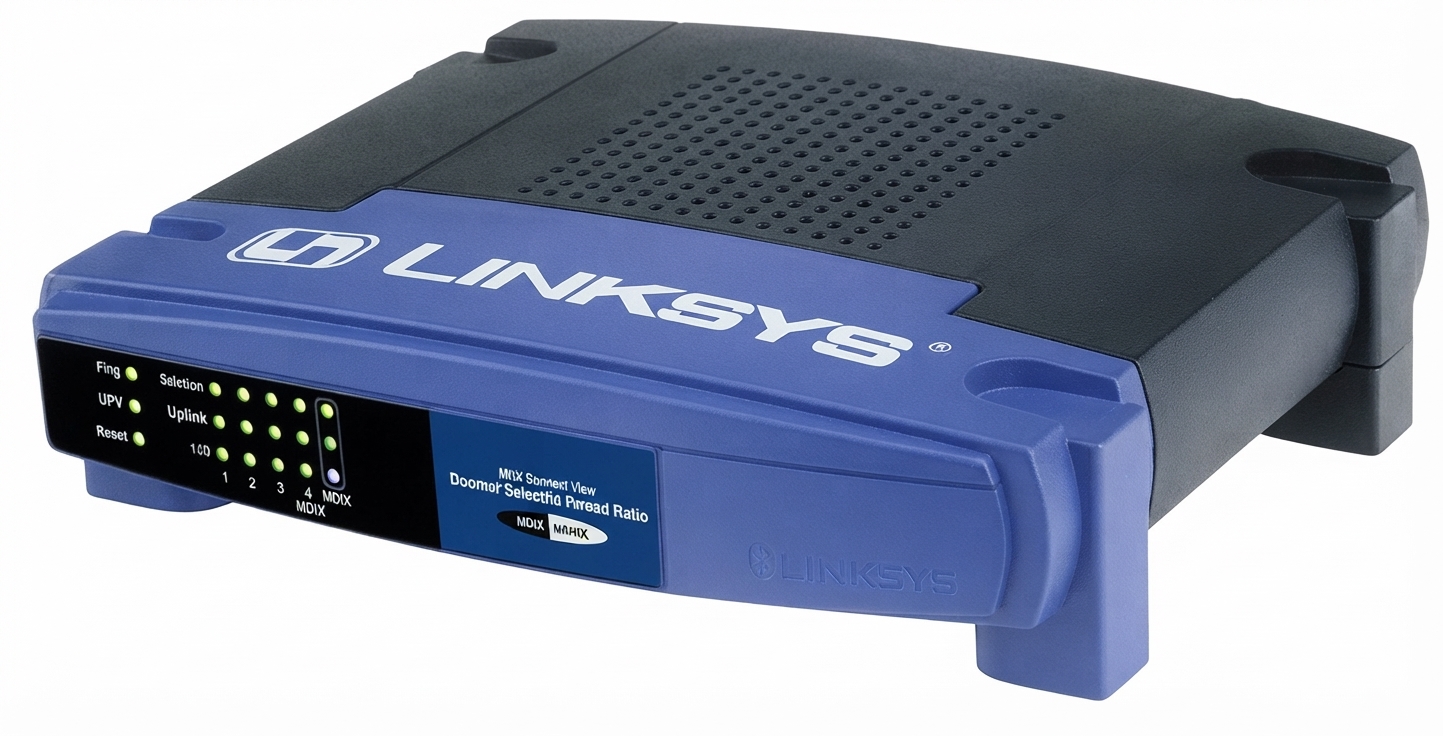
Introduction: Linksys Cable/DSL Router BEFSR41, BEFSR81, BEFSX41, BEFVP41 (EU/LA)
The Linksys Cable/DSL Router BEFSR41, BEFSR81, BEFSX41, BEFVP41 (EU/LA) family is a classic wired broadband routing lineup designed for small offices, home networks, and power users who need reliable internet sharing with simple management. These routers combine a built-in 4-port switch, 10/100 Ethernet connectivity, and support for broadband modem connections, making them practical for shared internet access, basic firewall protection, and stable wired networking.
Depending on the model, the series adds different capabilities such as VPN endpoint support, firewall protection, and DMZ functionality. The BEFSR41 is a straightforward cable/DSL router for everyday internet sharing, while the BEFSX41 expands security with firewall and VPN endpoint features. The BEFVP41 is tailored for VPN use in business and branch-office scenarios. Together, these models appeal to users who want a dependable wired router with easy browser-based setup and long-term value.
Typical availability is now in the used, refurbished, or legacy-equipment market rather than new retail channels. Estimated pricing often ranges from very low-cost surplus units to moderate prices for tested refurbished devices, depending on condition and included accessories. For organizations maintaining older networks, and for users needing a simple wired router with legacy compatibility, this series remains a practical option.
Specifications: Key Technical Details and Router Capabilities
- Standards: IEEE 802.3 10BaseT and IEEE 802.3u 100BaseTX for Fast Ethernet connectivity.
- Ports: 1 WAN port for the broadband modem and 4 switched 10/100 LAN ports for wired devices.
- Cabling: Category 5 Ethernet or better.
- Protocols: TCP/IP support for standard internet networking.
- Power: External 12V DC power supply, with model-dependent current ratings.
- Size: Compact desktop form factor designed for easy placement near a modem or switch.
- Security features: Basic firewall functionality on BEFSX41, VPN endpoint support on BEFVP41, and DMZ capabilities on selected models.
- LED indicators: Power, Internet, and per-port Ethernet status lights for quick diagnostics.
- Operating environment: Designed for typical indoor office and home temperatures and humidity ranges.
- Performance profile: Wired Fast Ethernet throughput suits legacy broadband and small-network file sharing, but it is not intended for modern gigabit or wireless-heavy environments.
Compared with modern Wi-Fi routers, these models trade wireless convenience for simplicity, stable wired performance, and easier legacy compatibility. Compared with basic consumer routers, the BEFSX41 and BEFVP41 offer stronger business-oriented features such as VPN and firewall controls.
Setup Guide: How to Configure the Linksys Cable/DSL Router BEFSR41, BEFSR81, BEFSX41, BEFVP41 (EU/LA)
1. Unplug the modem before starting setup, then connect the modem to the WAN or Internet port on the router.
2. Connect a desktop or laptop to any LAN port using a Category 5 Ethernet cable.
3. Power on the modem first, wait for it to fully sync, and then power on the router.
4. Open a web browser and enter the router’s local IP address to access the administration page.
5. Configure the internet connection type, such as DHCP, PPPoE, or static addressing, based on your ISP requirements.
6. Set a secure administrator password, review LAN settings, and save the configuration.
7. For VPN or firewall models, enable only the features required by your network policy and confirm remote-access rules before deployment.
Safety precautions: use only the correct power adapter, keep the unit dry, and ensure ventilation around the router. Troubleshooting tip: if the Internet light stays off, reboot the modem and router in sequence and verify the WAN cable is firmly seated.
Troubleshooting: Common Problems and Fixes
- No Internet connection: confirm the modem is online, verify WAN cabling, and reboot the modem before the router.
- Slow wired speeds: test with known-good Ethernet cables, check for 10 Mbps or half-duplex fallback, and replace damaged wiring.
- Cannot access the admin page: verify the PC is on the same subnet, renew the IP address, and try a direct LAN connection.
- VPN tunnel failure on BEFVP41: confirm encryption settings, authentication parameters, and matching remote endpoint profiles.
- Port LED not lit: reseat the cable, test another LAN port, or check whether the connected device is powered on.
Preventive maintenance includes keeping firmware and configuration backups, labeling cables, and using surge protection. Warranty support for these legacy routers is typically limited due to product age, so help is usually available through reseller documentation, refurbished-product sellers, and archived Linksys manuals. For assistance, use the official Linksys support channels and model-specific documentation provided with the device.
Pros & Cons: Honest Review of the Linksys Cable/DSL Router BEFSR41, BEFSR81, BEFSX41, BEFVP41 (EU/LA)
Pros
- Simple wired setup with four LAN ports for small networks.
- Reliable Fast Ethernet performance for legacy broadband and office devices.
- BEFSX41 adds firewall features for better network control.
- BEFVP41 supports VPN use cases for remote access and site-to-site links.
- Compact design and straightforward browser-based administration.
- Good value on the used market for users who need older compatibility.
Cons
- No built-in Wi-Fi, so wireless coverage requires a separate access point.
- 100 Mbps Ethernet is slower than modern gigabit routers.
- Legacy hardware may have limited firmware support and documentation availability.
- Advanced security expectations are better met by newer routers.
- Refurbished units may vary in condition, power adapter quality, and accessories.
For users with older internet plans, wired PCs, or legacy VPN requirements, the value can still be strong. For modern homes or high-speed fiber connections, newer alternatives with gigabit Ethernet and Wi-Fi 6 will usually be a better fit.
Customer Reviews: What Users Say About This Linksys Router Series
Average user sentiment is typically around 4 out of 5 stars for reliability in older networking setups. Buyers often praise the easy configuration, solid wired stability, and dependable long-term operation. One common testimonial is that the router “just works” for basic cable and DSL sharing, especially in offices that do not need wireless networking.
Frequent complaints focus on the dated 10/100 speeds, lack of Wi-Fi, and limited appeal for modern broadband plans. Users also mention that setup can be confusing if the ISP uses special authentication settings or if the unit is being deployed with legacy VPN configurations. Most reviewers recommend this series for retro networking, small wired offices, and replacement use where compatibility matters more than cutting-edge speed.
Frequently Asked Questions
What is the Linksys Cable/DSL Router BEFSR41, BEFSR81, BEFSX41, BEFVP41 (EU/LA) best for?
It is best for wired internet sharing, small office networking, and legacy VPN or firewall use, depending on the model.
Does it support wireless networking?
No, these are wired routers and require a separate wireless access point for Wi-Fi.
Is it still worth buying?
Yes, if you need a legacy wired router, a simple 4-port switch, or model-specific VPN features. For modern households, newer gigabit routers are usually the better choice.
Faqs
How do I set up linksys Cable/DSL Router BEFSR41, BEFSR81, BEFSX41, BEFVP41 (EU/LA) for the first time?
What should I do if linksys Cable/DSL Router BEFSR41, BEFSR81, BEFSX41, BEFVP41 (EU/LA) has no internet after installation?
How do I access the web-based configuration page on linksys Cable/DSL Router BEFSR41, BEFSR81, BEFSX41, BEFVP41 (EU/LA)?
Which internet service types are compatible with linksys Cable/DSL Router BEFSR41, BEFSR81, BEFSX41, BEFVP41 (EU/LA)?
How can I improve speed and stability on linksys Cable/DSL Router BEFSR41, BEFSR81, BEFSX41, BEFVP41 (EU/LA)?
Why is the status light blinking or showing a fault on linksys Cable/DSL Router BEFSR41, BEFSR81, BEFSX41, BEFVP41 (EU/LA)?
Can I use the built-in switch on linksys Cable/DSL Router BEFSR41, BEFSR81, BEFSX41, BEFVP41 (EU/LA) to connect multiple wired devices?
How do I maintain and secure linksys Cable/DSL Router BEFSR41, BEFSR81, BEFSX41, BEFVP41 (EU/LA) over time?
More linksys manuals
- Linksys RE9000 Wi-Fi Range Extender User Manual
- Setup & Features: Linksys Atlas Max WiFi 6E System AXE8400 MX8500 Series User Manual
- Linksys Max-Stream WiFi Range Extender RE7310 User Manual
- Setup: Linksys WRT 1900 AC Dual Band Gigabit Wi-Fi Router User Manual
- Specifications: Linksys AC1200 Max Wi-Fi Range Extender RE6500 User Guide
Leave a Comment